
TABWEE T80
TABWEE T80 10-inch Android Tablet User Manual
Eredua: T80
1. Sarrera
Thank you for choosing the TABWEE T80 10-inch Android Tablet. This manual provides essential information for setting up, operating, and maintaining your device. Please read it thoroughly before use to ensure optimal performance and safety.
The TABWEE T80 is a versatile Wi-Fi tablet featuring the latest Android 15 operating system with integrated AI capabilities. It boasts a vibrant 10.5-inch Incell IPS display, ample storage with 12GB RAM and 64GB ROM (expandable up to 2TB), and a long-lasting 6000mAh battery. With GMS certification, dual-band Wi-Fi, Bluetooth 5.0, and GPS, it is designed for both productivity and entertainment.
2. Segurtasun informazioa
- Ez jarri gailua tenperatura altuen, eguzki-argiaren eraginpean edo hezetasun handiaren eraginpean.
- Saihestu tableta erortzea edo kolpe gogorren eraginpean jartzea.
- Erabili emandako kargagailua eta osagarriak soilik.
- Ez saiatu gailua zuk zeuk desmuntatzen edo konpontzen. Jarri harremanetan bezeroarentzako laguntza eskatzeko.
- Keep the tablet away from children and pets to prevent damage or injury.
3. Paketearen edukia
Mesedez, egiaztatu paketea elementu hauek dituen:
- TABWEE T80 Tablet
- AC egokigailua
- USB motako kablea
- Erabiltzailearen eskuliburua
4. Produktua amaitu daview
Familiarize yourself with the components of your TABWEE T80 tablet.

4.1. irudia: Aurrealdea eta atzealdea view of the TABWEE T80 tablet, highlighting its sleek design and rear camera module.
Osagai fisikoak:
- 10.5-inch Incell IPS Display: High-definition screen for vivid visuals.
- Aurreko kamera (2MP): Goiko markoan kokatuta dago bideo-deiak eta selfieak egiteko.
- Atzeko kamera (5MP): Located on the back for capturing photos and videos.
- Pizteko botoia: On the side, used to turn the tablet on/off or wake/sleep the screen.
- Bolumen-botoiak: On the side, to adjust audio volume.
- USB C motako ataka: Kargatzeko eta datuak transferitzeko.
- 3.5 mm aurikularretarako konektua: For connecting wired headphones or external speakers.
- MicroSD txartelaren zirrikitua: For storage expansion up to 2TB.
- Bozgorailu bikoitza: Located on the bottom edge for enhanced audio experience.
5. Konfigurazioa
5.1 Hasierako karga
Before first use, fully charge your tablet. Connect the USB Type-C cable to the tablet's charging port and the AC adapter to a power outlet. The battery indicator on the screen will show charging status.
5.2 Piztu/Itzali
- Pizteko: Press and hold the Power button until the TABWEE logo appears.
- Itzaltzeko: Sakatu eta eutsi pizteko botoia energia aukeren menua agertu arte, eta ondoren hautatu "Itzali".
- Lo egiteko/esnatzeko: Sakatu labur pizteko botoia.
5.3 Wi-Fi konexioa
Internetera konektatzeko:
- Joan zaitez Ezarpenak > Sarea eta Internet > Wi-Fi.
- Aktibatu Wi-Fia. Tabletak eskuragarri dauden sareak bilatuko ditu.
- Hautatu nahi duzun sarea zerrendatik.
- Eskatzen bazaizu, idatzi pasahitza eta, ondoren, sakatu Konektatu.
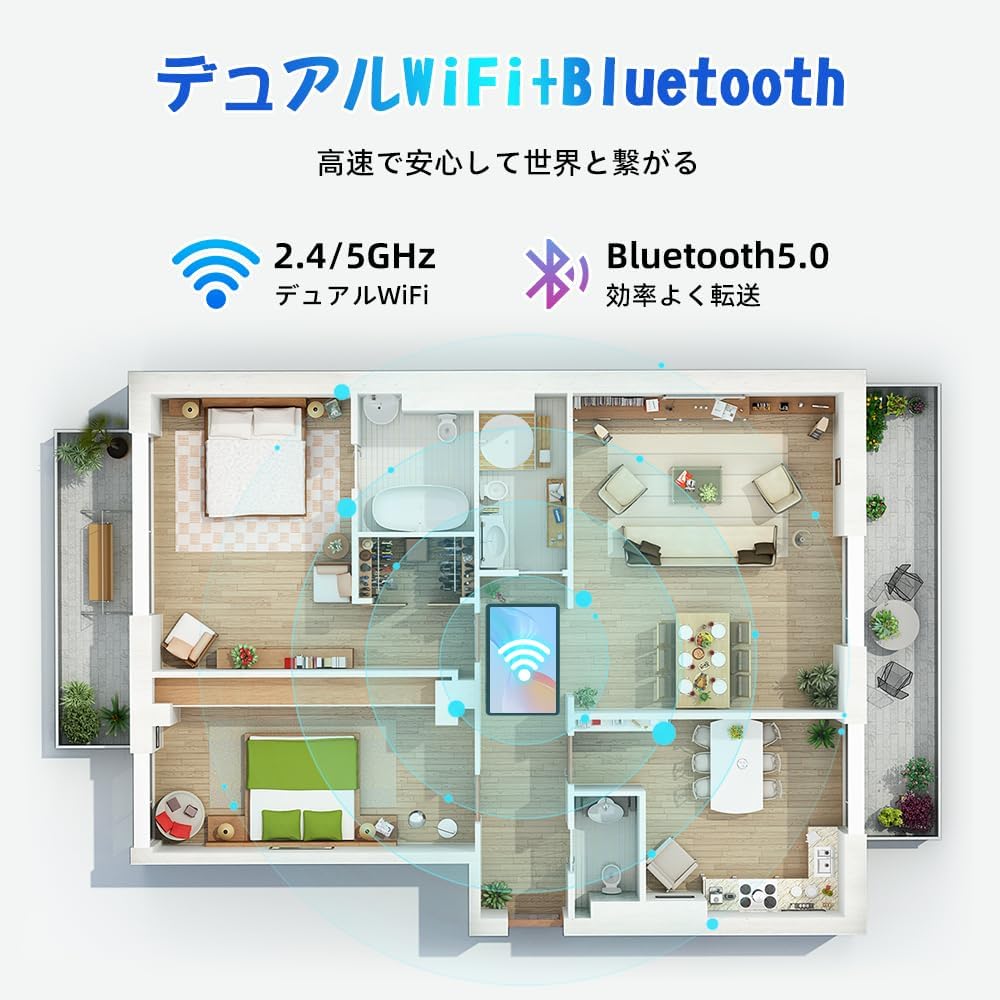
Figure 5.1: Diagram illustrating the tablet's dual-band 2.4G/5G Wi-Fi and Bluetooth 5.0 connectivity, ensuring fast and reliable connections throughout your home or office.
5.4 Google kontuaren konfigurazioa
As a GMS certified device, you can access Google Play Store and other Google services. During initial setup, you will be prompted to sign in with your Google account or create a new one. This is essential for downloading apps and syncing data.
5.5 MicroSD txartelaren instalazioa
To expand storage up to 2TB:
- Bilatu MicroSD txartelaren zirrikitua tabletaren alboan.
- Insert the MicroSD card into the slot with the gold contacts facing down until it clicks into place.
- You may be prompted to format the card for use with the tablet.

Figure 5.2: Visual representation of the tablet's 12GB RAM and 64GB ROM, with support for up to 2TB MicroSD card expansion, allowing for vast storage of photos, videos, and music.
6. Funtzionamendu-argibideak
6.1 Android 15 Ezaugarriak
Your tablet runs on Android 15, offering an intuitive and enhanced user experience with improved security, customization, and AI capabilities.

6.1 Irudia: Gainetikview of Android 15 features, including enhanced security and privacy, expanded customization options, improved AI functions, and new gesture controls for a smoother operation.
6.2 Pantaila eta Viewmoduak
The 10.5-inch Incell IPS display provides vibrant colors and wide viewing angles. Optimize your viewing experience and reduce eye strain with various display modes:

Figure 6.2: The 10.5-inch Incell IPS display offers a 1280x800 resolution and a 16:10 aspect ratio for a wide and efficient viewesperientzia.

Figure 6.3: The tablet supports 1080P Full HD content, providing an immersive visual experience for movies and dramas from platforms like YouTube, Prime Video, Hulu, and HBO.

6.4. irudia: Adibide bisualaamples of different screen modes: Night mode for reduced blue light, Dark mode for eye comfort in low light, and Reader mode for a black-and-white paper-like display.
- Gaueko modua: Reduces blue light emissions for comfortable viewing in low light conditions. Access via Quick Settings or Display settings.
- Modu iluna: Changes the system UI and supported apps to a dark theme, reducing eye strain and saving battery on OLED screens. Access via Display settings.
- Irakurle modua: Optimizes the display for reading, often by converting to grayscale and adjusting contrast. Access via Display settings or specific reading apps.
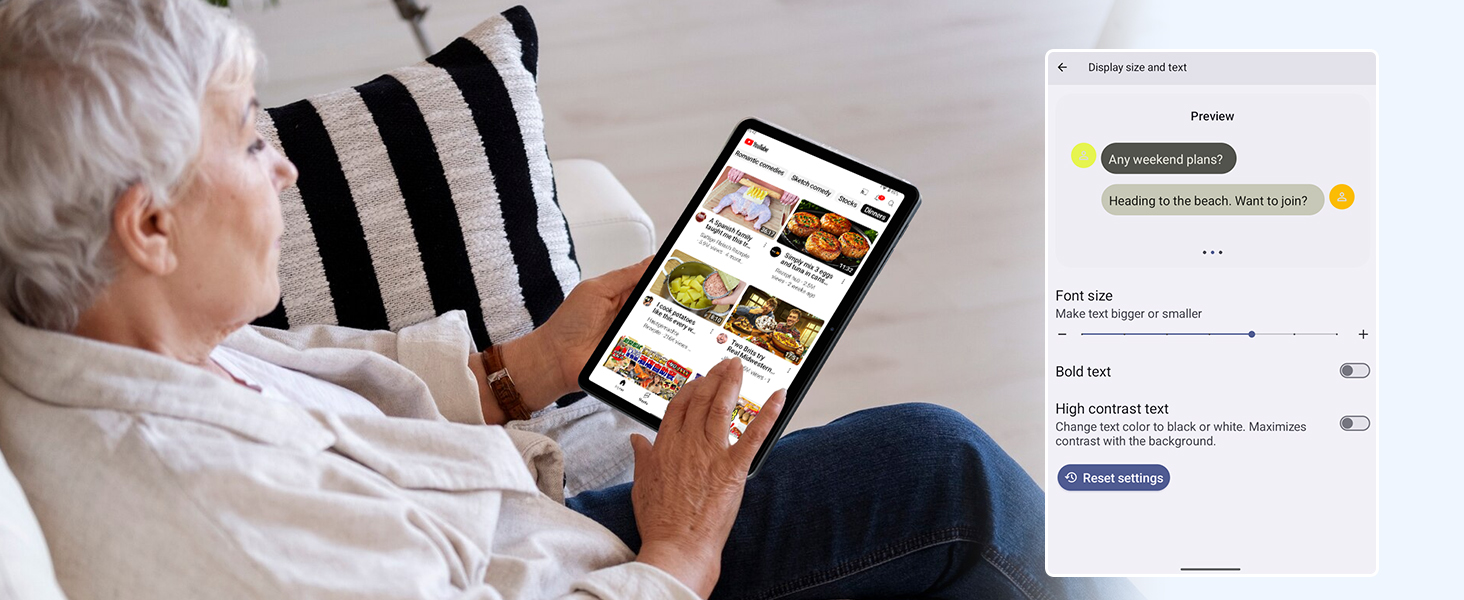
Figure 6.5: Screenshot showing display settings for adjusting text size and bold text, allowing users to customize readability.
6.3 Errendimendua
The TABWEE T80 is powered by a Unisoc T310 processor, ensuring smooth operation for daily tasks and multimedia consumption.
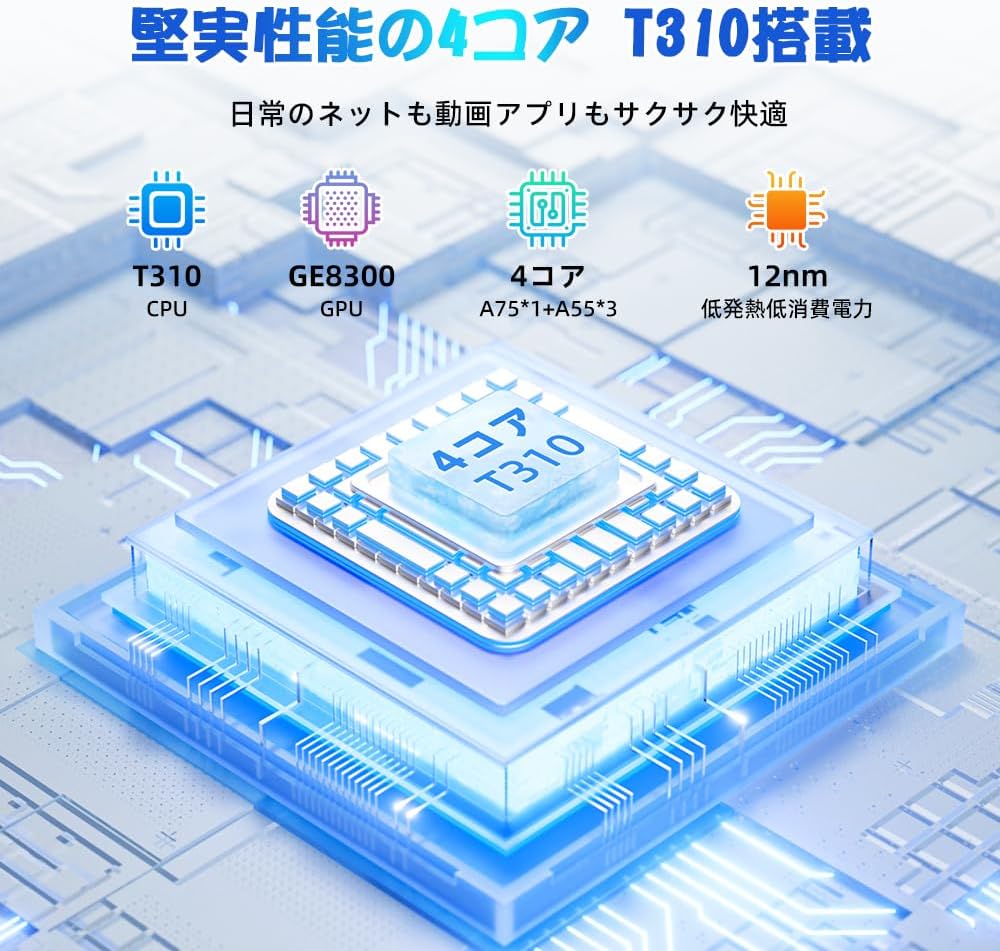
Figure 6.6: Diagram illustrating the T310 quad-core CPU architecture, featuring A75 and A55 cores, designed for efficient performance and low power consumption.

Figure 6.7: Comparison showing the Unisoc T310 processor's improved speed (up to 2.0 GHz) and lower power consumption compared to previous generation products.
6.4 Multiataza eta pantaila zatitua
For enhanced productivity, the tablet supports split-screen mode, allowing you to run two applications side-by-side.

Figure 6.8: Demonstration of the split-screen feature, allowing users to comfortably multitask by viewing two applications simultaneously, such as reading an e-book while checking messages.
- To activate split screen: Open an app, then swipe up slightly from the bottom and hold to reveal recent apps. Drag one app to the top or bottom of the screen, then select another app for the remaining space.
6.5 IA Ezaugarriak (Gemini IA)
Leverage the power of Gemini AI for enhanced productivity and convenience.

Figure 6.9: Visuals demonstrating Gemini AI 2.0 capabilities, including AI text-to-image generation, AI voice response, AI smart control, AI real-time conversation, and AI full-screen smart assistance.
Gemini AI can assist with real-time translation, smart text suggestions, and optimizing performance based on your usage habits. Explore AI-enhanced multi-tasking for learning, office work, and entertainment.
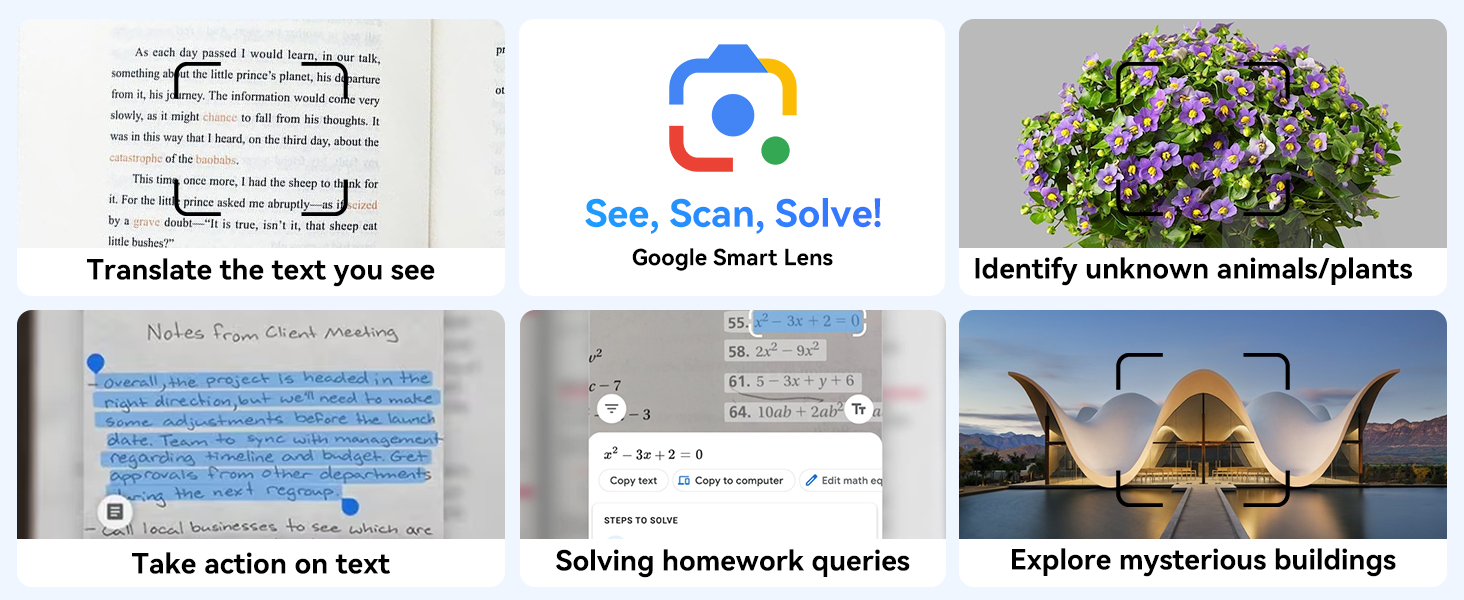
6.10. irudia: Adibamples of Google Smart Lens functions: translating text, identifying unknown objects/plants, taking action on text, solving homework queries, and exploring mysterious buildings.
6.6 Parental Controls (Kids Mode)
The tablet includes parental control features to ensure a safe environment for children.

Figure 6.11: Icons representing parental control features: usage time limits, break time settings, app usage restrictions, and content restrictions, all designed to protect children.
You can set time limits, restrict app access, and filter content. Navigate to Ezarpenak > Ongizate digitala eta gurasoen kontrola to configure these features.
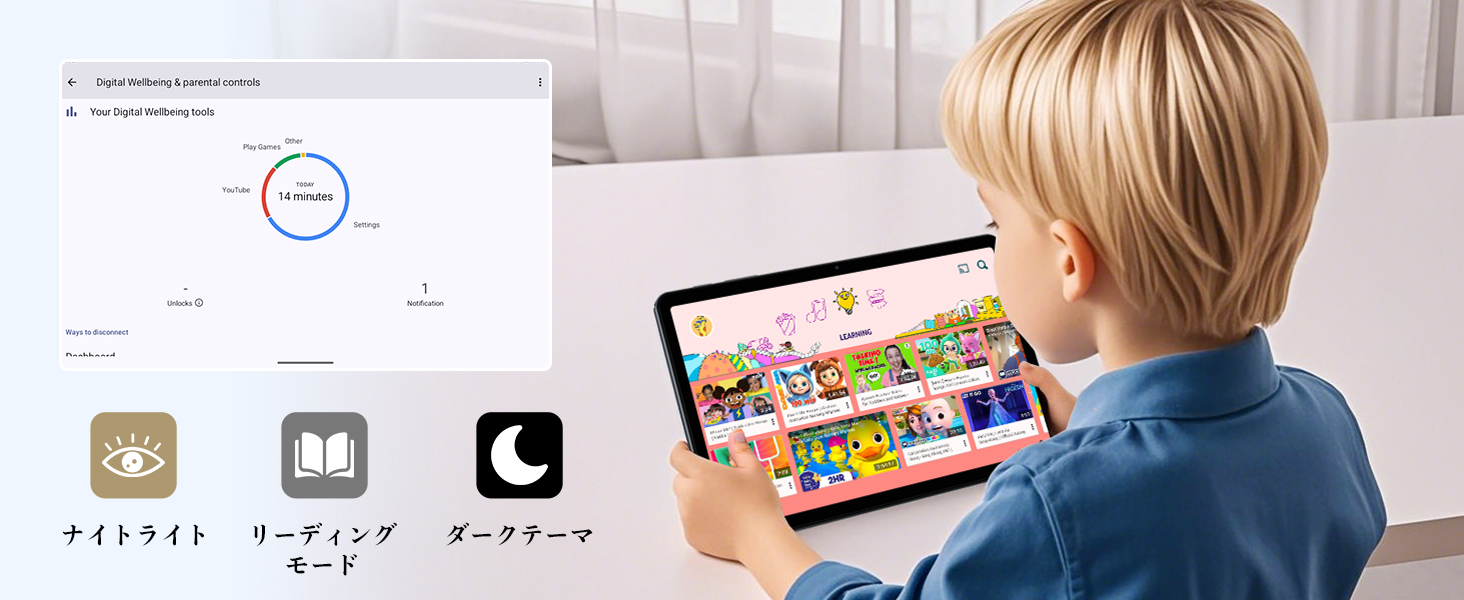
Figure 6.12: Screenshot of the Digital Wellbeing and parental controls interface, showing usage statistics and options for managing screen time and app access for children.
6.7 Haririk gabeko proiekzioa
Mirror your tablet's screen to a compatible TV or monitor wirelessly.
- Ensure your TV/monitor supports wireless display (e.g., Miracast, Chromecast built-in).
- Zure tabletan, joan honera: Ezarpenak > Konektatutako gailuak > Konexio-hobespenak > Antzezleak.
- Select your display device from the list to begin mirroring.
6.8 Kameraren erabilera
Tabletak 2MP-ko aurrealdeko kamera eta 5MP-ko atzeko kamera ditu.

Figure 6.13: Illustration of the tablet's 2-megapixel front camera and 5-megapixel rear camera, capable of autofocus for clear photos and video calls.
Open the Camera app to take photos or record videos. Tap the shutter button to capture an image or the record button to start/stop video recording. You can switch between front and rear cameras using the camera switch icon.
6.9 Audioa
The tablet features dual speakers for an immersive audio experience and a 3.5mm headphone jack for private listening.

Figure 6.14: Diagram showing the location of the two powerful speakers on the TABWEE T80, providing a deep and immersive audio experience.
Adjust volume using the physical volume buttons on the side of the tablet or through the on-screen volume slider.
6.10 GPS nabigazioa
The integrated GPS system allows for accurate location tracking and navigation. Use pre-installed map applications or download your preferred navigation app from the Google Play Store.
7. Mantentzea
7.1 Garbiketa
Use a soft, lint-free cloth to clean the screen and body of the tablet. Do not use abrasive cleaners or solvents, as they may damage the surface.
7.2 Software eguneraketak
Regularly check for system updates to ensure your tablet has the latest features and security patches. Go to Ezarpenak > Sistema > Sistema eguneratzea.
7.3 Bateria zaintzea
Bateriaren iraupena luzatzeko:
- Saihestu bateria maiz erabat deskargatzea.
- Do not leave the tablet charging for extended periods after it's full.
- Store the tablet in a cool, dry place when not in use for long periods.

Figure 7.1: Battery life estimates for the 6000mAh battery: 5 hours of web browsing, 4 hours of video playback, 4 hours of gaming, 21 hours of music, and 648 hours of standby time, supported by AI power-saving algorithms.
8. Arazoak
| Arazoa | Kausa posiblea | Irtenbidea |
|---|---|---|
| Tableta ez da pizten. | Bateria baxua; sistemaren kraskadura. | Kargatu tableta gutxienez 30 minutuz. Berrabiaraztea behartzeko, sakatu eta eutsi pizteko botoia 10-15 segundoz. |
| Ezin da wifira konektatu. | Incorrect password; router issue; out of range. | Verify Wi-Fi password. Restart your router. Move closer to the Wi-Fi router. |
| Aplikazioak motel doaz edo huts egiten dute. | Aplikazio gehiegi martxan; biltegiratze gutxi. | Close background apps. Clear app cache. Free up storage space. |
| Pantailak ez du erantzuten. | Softwarearen aldi baterako akatsa. | Force restart the tablet by holding the Power button. |
9. Zehaztapenak
| Ezaugarri | Xehetasuna |
|---|---|
| Marka | TABWEE |
| Ereduaren izena | T80 Tablet Tabwee |
| Sistema eragilea | Android 15 (GMS ziurtagiria) |
| Bistaratzeko tamaina | 10.5 inches Incell IPS |
| Bistaratzeko ebazpena | 1280x800 pixel |
| PUZaren marka | Unisoc |
| CPU Abiadura | 2 GHz |
| GPU marka | ARM Mali-G57 |
| RAM | 12GB (4GB+8GB expansion) |
| Barne Biltegiratzea | 64 GB |
| Biltegiratze zabalgarria | Gehienez 2 TB MicroSD txartelaren bidez |
| Bateria Edukiera | 6000mAh litio-ioi polimeroa |
| Aurrealdeko kamera | 2 MP |
| Atzeko kamera | 5 MP |
| Konektibitatea | 2.4G/5G Wi-Fi (802.11ac), Bluetooth 5.0, GPS |
| Portuak | USB Type-C, 3.5mm Headphone Jack |
| Neurriak | 32.79 x 19.9 x 4.1 cm |
| Pisua | 910 g |
10. Bermea eta Laguntza
Your TABWEE T80 tablet comes with a 2 urteko fabrikatzailearen bermea.
If you encounter any issues with your product, please contact us via email. We strive to respond promptly to ensure your satisfaction.
Nola jarri laguntzarekin harremanetan:
- Through your Amazon account: Go to Eskaeraren Historia > Select the relevant order > Click Jarri harremanetan saltzailearekin.
- Through the product page: On the product page, click on the seller's name (TABWEE Official Store) below the "Add to Cart" button, then click "Ask a question" on the top right.
Support hours: 9:00 AM - 6:00 PM (excluding holidays). We will reply as soon as possible.

Figure 10.1: Image representing customer support availability for assistance.
Lotutako dokumentuakT80


Ask a question about this manual
Ask about setup, troubleshooting, compatibility, parts, safety, or missing instructions. Manuals+ will review the question and use this page’s manual context to help answer it.