
1. Sarrera
This manual provides comprehensive instructions for the Denash X99D3M M ATX Motherboard. It is designed to assist users with the proper installation, configuration, and maintenance of the motherboard to ensure stable and efficient operation of your computer system. Please read this manual thoroughly before proceeding with installation.

1.1. irudia: Amaituview of the Denash X99D3M M ATX Motherboard. This image displays the general layout of the motherboard, highlighting key components such as the CPU socket, RAM slots, and various expansion ports.
2. Produktuaren ezaugarriak
- CPU euskarria: Designed for LGA 2011-3 sockets, supporting E5 V3/V4 and i7 58xx/68xx series CPUs.
- Memoria: Features 4 x DDR4 DIMM slots, supporting up to 128GB of DDR4 2666, 2400, or 2133MHz memory.
- Biltegiratzea: Equipped with 4 x SATA 2.0 ports and 1 x NVME M.2 interface (supporting NGFF and NVME protocols).
- Hedapena: Includes 1 x PCIE x16 graphics card slot and 1 x PCIE X1 slot.
- Konektibitatea: Offers 4 x USB 2.0 and 4 x USB 3.0 ports, 1 x RJ45 network port, and PS/2 keyboard/mouse universal port.
- Iraunkortasuna: Constructed with metal and PCB materials, featuring all solid-state capacitors for stable performance and extended lifespan.
3. Paketearen edukia
Egiaztatu elementu guztiak paketean daudela:
- 1 x Denash X99D3M M ATX Motherboard
- 1 x Metal I/O Plate
- 1 x SATA datu-kablea
4. Konfigurazioa eta instalazioa
Before beginning installation, ensure your workspace is clean, well-lit, and static-free. It is recommended to wear an anti-static wrist strap to prevent damage to components.
4.1. CPUaren instalazioa
- Locate the LGA 2011-3 CPU socket on the motherboard.
- Gently push down the load lever and pull it away from the socket to open the CPU retention frame.
- Kontu handiz lerrokatu CPUa socket-arekin, ziurtatu CPUko urrezko triangelua socket-eko triangeluarekin bat datorrela. Ez indarrez sartu CPUa bere lekuan.
- Lower the CPU into the socket. Close the retention frame and secure it with the load lever.
- Aplikatu pasta termikoa CPUan eta instalatu CPU hozkailua fabrikatzailearen argibideen arabera.

Image 4.1: Close-up of the LGA 2011-3 CPU socket. This image shows the socket where the processor is installed, emphasizing the retention mechanism.
4.2. Memoriaren (RAM) instalazioa
- Ireki DDR4 DIMM zirrikituen bi muturretan dauden klipak.
- Lerrokatu RAM moduluko koska DIMM zirrikituan dagoen giltzarekin.
- Sakatu ondo RAM moduluaren bi muturrak klipak bere lekuan sartu arte.

4.2. irudia: View of the four DDR4 DIMM slots. This image illustrates the memory slots where RAM modules are to be installed.
4.3. Storage Device Installation (SATA & M.2)
- SATA unitateak: Connect SATA data cables from your storage drives (HDDs/SSDs) to the SATA 2.0 ports on the motherboard. Connect SATA power cables from your power supply to the drives.
- M.2 NVME SSD: Locate the M.2 slot. Insert the M.2 SSD at a 30-degree angle, then gently push it down and secure it with the provided screw. Ensure the jumper switch for the M.2 interface is set correctly for Serial ATA or PCIE mode as required by your M.2 device.

Image 4.3: Close-up of the SATA 2.0 ports and M.2 NVME interface. This image details the connectivity options for storage devices.
4.4. Konexio elektrikoak
- Konektatu elikatze-iturriaren 24 pineko ATX elikatze-konektorea plaka baseko elikatze-hartune nagusira.
- Connect the 8-pin CPU power connector (EPS12V) from your power supply to the CPU power socket near the CPU.
4.5. Front Panel and I/O Connections
- Connect the front panel headers (power switch, reset switch, HDD LED, power LED) to their respective pins on the motherboard. Refer to the motherboard's silkscreen labels for correct orientation.
- Connect USB 2.0 and USB 3.0 front panel cables to the corresponding USB headers.
- Connect the audio front panel cable to the audio header.
- Install your graphics card into the PCIE x16 slot and secure it.
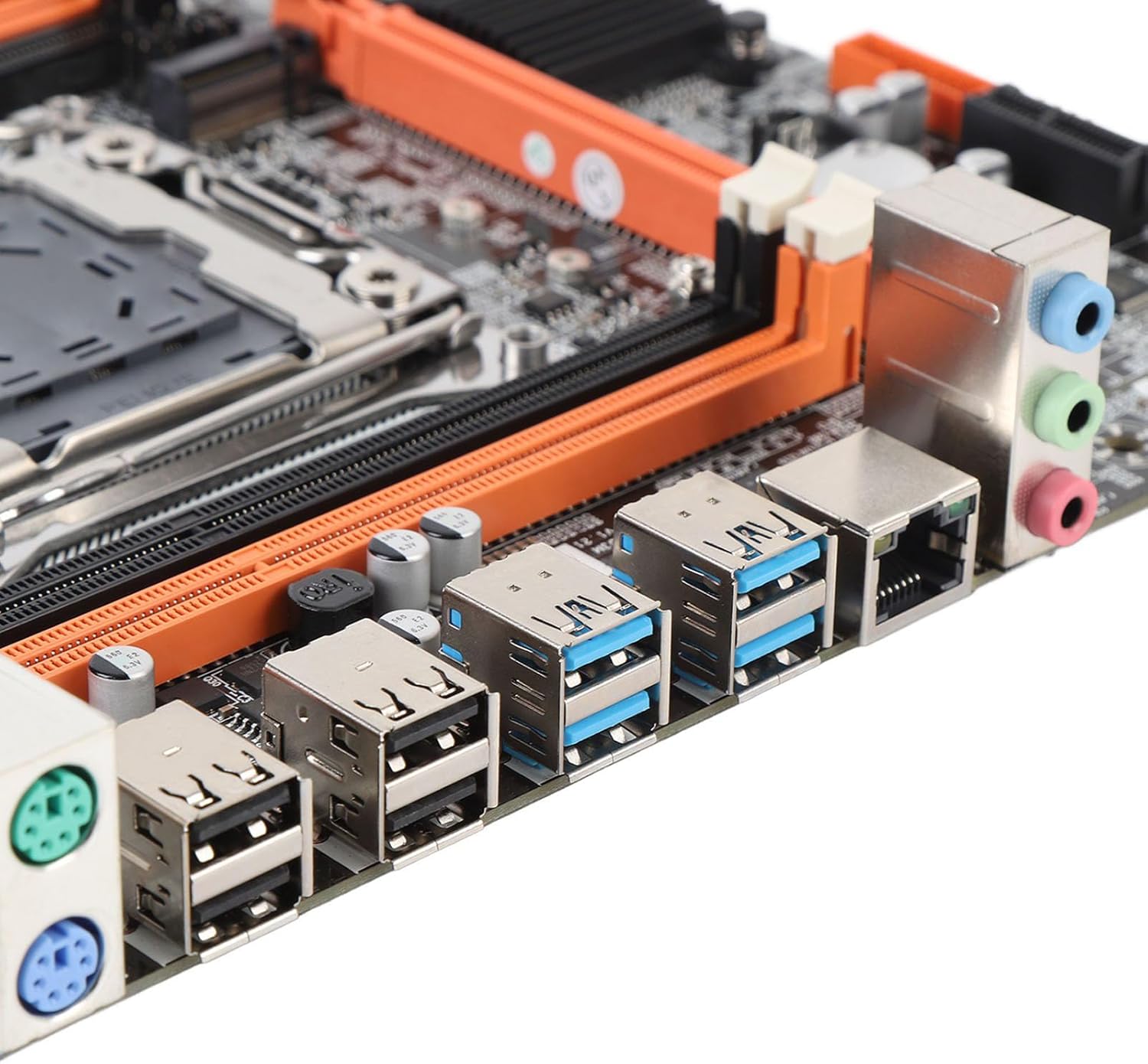
Image 4.4: Rear I/O ports including USB, LAN, and audio jacks. This image shows the external connectivity options available on the motherboard.
5. Funtzionamendu-argibideak
5.1. Hasierako abiaraztea
- After completing all hardware installations, connect your monitor, keyboard, and mouse.
- Power on your system. The system should display the BIOS/UEFI splash screen.
- Sakatu dagokion tekla (normalean DEL or F2) during boot to enter the BIOS/UEFI setup.
5.2. BIOS/UEFI konfigurazioa
In the BIOS/UEFI, you can configure various system settings, including boot order, date/time, and hardware parameters. Ensure your boot device (e.g., SSD with OS) is prioritized in the boot sequence.
5.3. Gidariaren instalazioa
After installing your operating system, install the necessary drivers for the motherboard chipset, network, audio, and any other integrated components. These drivers are typically provided on a CD/DVD or can be downloaded from the manufacturer's webgunea.
6. Zehaztapenak
| Elementu mota | Plaka nagusia |
| Motherboard Architecture | M ATX |
| Chipset | X99H |
| Supported CPU Types | for LGA 2011-3 (E5 V3/V4, i7 58xx/68xx) |
| Memoria Mota | DDR4 2666, 2400, 2133MHz |
| Memoria zirrikituak | 4 × DDR4 DIMM (Max 128GB) |
| Onboard Network Card | Bai |
| Graphics Card Standard | PCI Express 16X |
| USB atakak | 4x USB 2.0, 4x USB 3.0 |
| Serial ATA Ports | 4 x Serial ATA 2.0 |
| Bateria integratua | CR2032 x 1 (240mAh) |
| Zabaltzeko Slots | 1 x PCIE x16, 1 x PCIE X1, 1 x NVME M.2 Interface |
| I/O Portuak | PS/2, 1 x RJ45, USB 2.0, USB 3.0, Audio |
| Produktuaren neurriak | 10.24 x 7.87 x 1.97 hazbete |
| Elementuaren pisua | 1.46 kilo |
| Modelo zenbakia | Denashckge97d20i |
7. Arazoak
- Potentziarik gabe: Ensure all power cables (24-pin ATX, 8-pin CPU) are securely connected to the motherboard and power supply. Verify the power supply switch is on.
- Ez dago pantailarik: Check that the monitor is connected to the graphics card (not the motherboard's I/O if a dedicated GPU is installed). Reseat the graphics card and RAM modules.
- Sistemaren ezegonkortasuna/matxurak: This can be caused by incompatible RAM, insufficient power, or overheating. Verify RAM compatibility and seating. Check CPU cooler installation and fan operation.
- Periferikoa ez da detektatu: Ensure USB devices are properly connected. Try different USB ports. Check for necessary drivers.
- BIOSa berrezartzea: If system settings become unstable, you can clear the CMOS by removing the CR2032 battery for a few minutes or using the CMOS clear jumper (refer to motherboard diagram for location).
8. Mantentzea
- Garbiketa: Garbitu aldizka hautsa plaka nagusitik eta osagaietatik aire konprimatua erabiliz. Ziurtatu sistema itzalita eta deskonektatuta dagoela garbitu aurretik.
- BIOS/UEFI eguneraketak: Aldian-aldian egiaztatu fabrikatzailearen website for BIOS/UEFI updates. Updates can improve stability, compatibility, and performance. Follow the update instructions carefully to avoid damaging the motherboard.
- Kableen kudeaketa: Ziurtatu kableak ondo bideratuta daudela aire-fluxua hobetzeko eta interferentziak saihesteko.
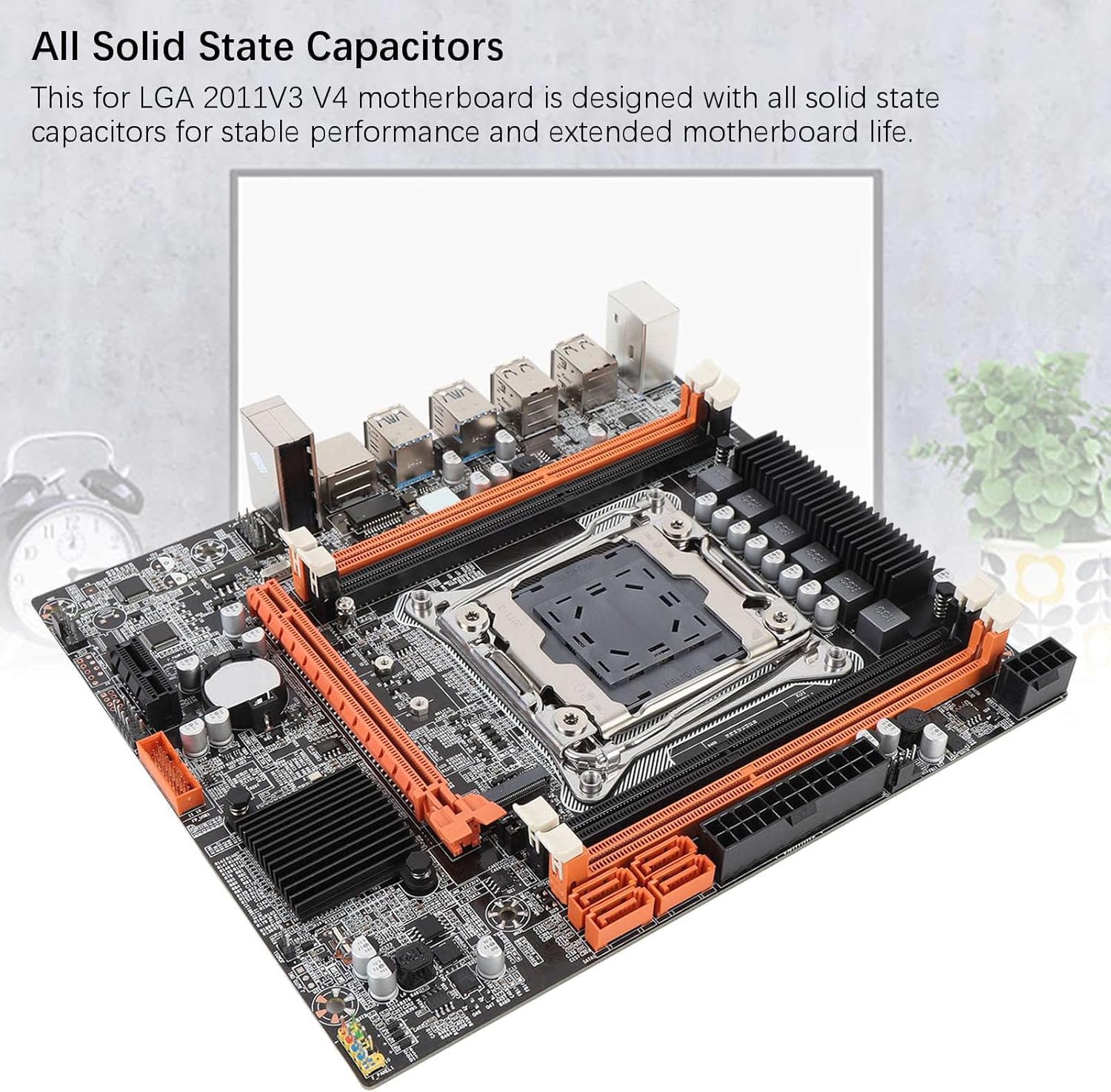
Image 8.1: Close-up of solid-state capacitors. These components contribute to the motherboard's stable performance and longevity.
9. Bermea eta Laguntza
For warranty information and technical support, please refer to the documentation provided with your purchase or visit the official Denash webgunea. Gorde erosketaren egiaztagiria bermearen erreklamazioetarako.