
1. Sarrera
This manual provides detailed instructions for the installation, setup, and operation of your DEWENWILS Matter Pool Pump Timer (Model PTW06). This heavy-duty timer box is designed for controlling 240VAC single-phase equipment up to 3 HP and 40A, such as pool pumps, water heaters, and other high-load devices. It integrates with Matter-certified smart home platforms including Apple HomeKit, Alexa, Google Home, and SmartThings, requiring a compatible hub for smart functionality.
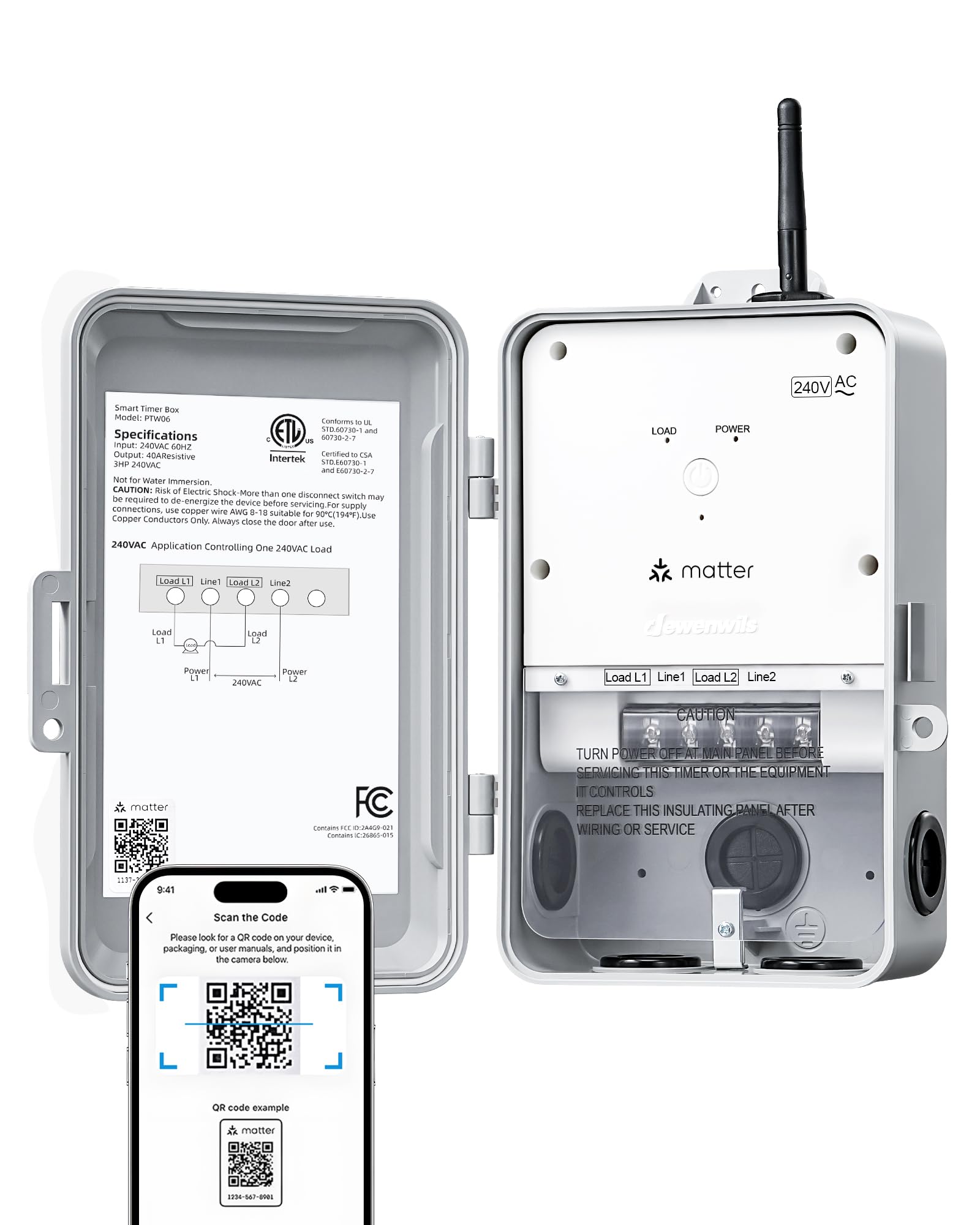
The DEWENWILS Matter Pool Pump Timer is an outdoor-rated device, built to withstand various environmental conditions. Please read this manual thoroughly before installation and use to ensure safe and proper operation.
2. Segurtasun informazioa
OHARRA: Deskarga elektrikoaren arriskua. This device operates on 240VAC and involves high current. Improper installation or use can result in serious injury or death. Always follow local electrical codes and consult a qualified electrician if you are unsure about any part of the installation process.
- Disconnect power at the circuit breaker before installing or servicing the timer.
- Ziurtatu kable-konexio guztiak seguru daudela eta behar bezala isolatuta daudela.
- Do not exceed the maximum load ratings of 240VAC, 3 HP, and 40A.
- This device is designed for permanent installation and should not be used with extension cords.
- Keep the enclosure door securely closed to maintain its weatherproof rating.
3. Paketearen edukia
- DEWENWILS Matter Pool Pump Timer (Model PTW06)
- Muntatzeko Hardwarea
- Argibide eskuliburua
4. Zehaztapenak
| Modelo zenbakia | PTW06 |
| liburukiatage | 240 VAC |
| Egungo balorazioa | 40A |
| Zaldi-potentziaren balorazioa | 3 HP arte |
| Haririk gabeko konexioa | Matter (requires compatible hub), 2.4GHz Wi-Fi only |
| Funtzionamendu-tenperatura | -40°F eta 140°F (-40°C eta 60°C) |
| Eguraldi Erresistentearen Balorazioa | IP44 |
| Neurriak (L x W x H) | 9.75" x 4.21" x 7.63" |
| Ziurtagiriak | ETL zerrendatua |
5. Konfigurazioa eta instalazioa
5.1 Mounting the Timer Box
Select a suitable outdoor location for mounting the timer box, ensuring it is protected from direct impact and accessible for wiring. Use the provided mounting hardware to securely attach the box to a wall or sturdy surface.

5.2 Kableatzeko jarraibideak
IMPORTANT: Ensure power is OFF at the circuit breaker before proceeding with wiring.
- Open the timer box cover.
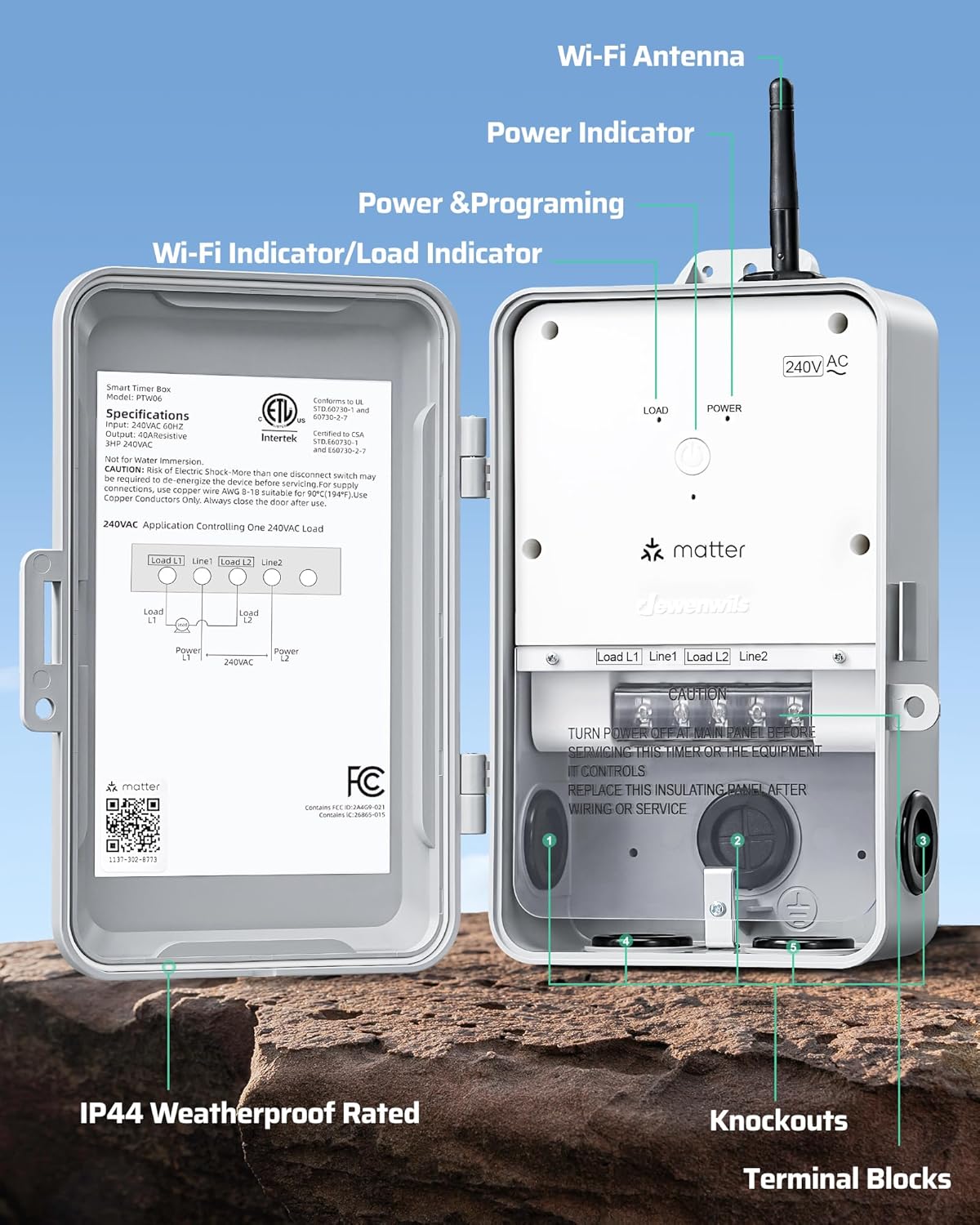
- Identify the terminal blocks for Line 1 (L1), Line 2 (L2), Load 1, and Load 2.
- Connect the incoming 240VAC power lines to the 'Line 1' and 'Line 2' terminals.
- Connect the wires leading to your appliance (e.g., pool pump, water heater) to the 'Load 1' and 'Load 2' terminals.
- Ensure all connections are tight and secure. Use appropriate wire gauges (AWG 8-18 suitable for 90°C conductors).
- Close the timer box cover securely.


5.3 Hasierako piztea
After completing the wiring, restore power at the circuit breaker. The power indicator on the timer box should illuminate, indicating it is receiving power.
6. Smart Home Integrazioa
6.1 Matter Compatibility
This is a Matter-certified timer. It requires a Matter-compatible hub to function with smart home platforms like Apple Home, Alexa, Google Home, and SmartThings. Ensure your hub is Matter-certified and updated to the latest firmware. The timer supports 2.4GHz Wi-Fi networks only.

6.2 App Pairing and Linking
To connect the timer to your smart home system:
- Ziurtatu zure telefonoa 2.4 GHz-ko Wi-Fi sare batera konektatuta dagoela.
- Open your preferred Matter-compatible smart home app (e.g., Apple Home, Alexa app, Google Home app, SmartThings app).
- Follow the app's instructions to add a new device. You will typically be prompted to scan the Matter QR code located inside the timer box cover.
- Once scanned, the app will guide you through the remaining steps to connect the timer to your home network and integrate it into your smart home ecosystem.

7. Funtzionamendua
7.1 Eskuzko Kontrola
The timer box features a manual ON/OFF button on the front panel. Press this button to manually toggle the connected appliance's power state. The LED indicator will show the current status.
7.2 Programazioa
Utilize your smart home app (Apple Home, Alexa, Google Home, SmartThings) to create custom schedules for your connected appliance. You can set specific ON/OFF times, daily routines, or countdown timers to automate operation.

7.3 Ahots kontrola
Once integrated with your smart home system, you can control the timer using voice commands through compatible devices (e.g., HomePod, Echo Dot, Nest Hub). Examples include: "Hey Siri, turn on the pool pump," or "Alexa, turn off the water heater."

7.4 Aplikazioak
The DEWENWILS Matter Pool Pump Timer is suitable for various high-power outdoor and indoor applications:
- Igerileku-ponpak
- Ur-berogailuak
- Iturriak
- Kanpoko Argiztapena
- Other 240VAC high-load appliances

8. Mantentzea
The DEWENWILS Matter Pool Pump Timer is designed for minimal maintenance. Periodically inspect the unit for any signs of damage, loose connections, or wear. Ensure the enclosure door is clean and the seal is intact to maintain its weatherproof integrity. Clean the exterior with a damp cloth; do not use abrasive cleaners or immerse the unit in water.

9. Arazoak
| Arazoa | Kausa posiblea | Irtenbidea |
|---|---|---|
| Timer does not power on. | No power from circuit breaker; incorrect wiring. | Check circuit breaker; verify wiring connections (refer to Section 5.2). |
| Ezin da etxe adimenduneko aplikaziora konektatu. | No Matter-compatible hub; phone not on 2.4GHz Wi-Fi; incorrect QR code scan; hub/app outdated. | Ensure you have a Matter-compatible hub; connect phone to 2.4GHz Wi-Fi; rescan QR code; update hub firmware and app version. |
| Appliance does not turn ON/OFF as scheduled. | Incorrect schedule settings; loss of Wi-Fi connection; power outage. | Verify schedule settings in the app; check Wi-Fi router and internet connection; confirm power to the timer. |
| Ahots-kontrola ez dabil. | Not linked to voice assistant; incorrect commands; smart speaker offline. | Ensure timer is linked in your smart home app; use correct voice commands; check smart speaker's status. |
10. Bermea eta Laguntza
DEWENWILS products are designed for reliability and performance. For warranty information, technical support, or assistance with your DEWENWILS Matter Pool Pump Timer, please refer to the contact information provided on the product packaging or visit the official DEWENWILS webgunea.