
NIMO NIMO N154G
NIMO 15.6 FHD-Laptop User Manual
Model: NIMO N154G
Sarrera
Thank you for choosing the NIMO 15.6 FHD-Laptop. This powerful and versatile laptop is designed to enhance your productivity and entertainment experience. Featuring an Intel Core i3-1215U processor, 16GB RAM, and a 1TB SSD, it delivers fast and efficient performance for all your tasks. This manual provides essential information on setting up, operating, maintaining, and troubleshooting your new laptop.

Image: The NIMO 15.6 FHD-Laptop, showcasing its sleek design and key features like Full HD display, 16GB RAM, 1TB SSD, Type-C PD Charger, Fingerprint reader, and Backlit keyboard.
Kutxan dagoena
Mesedez, egiaztatu paketearen edukia elementu guztiak daudela ziurtatzeko:
- 1 x Nimo N154 Laptop
- 1 x Type-C 65W PD Fast Charger
- 1 x Erabiltzailearen eskuliburua
- Windows 11 Home (pre-installed)
Konfigurazioa
Hasierako piztea eta kargatzea
- Unpack your NIMO laptop and the Type-C 65W PD Fast Charger.
- Connect the Type-C charger to the laptop's Type-C charging port and plug the adapter into a power outlet.
- Utzi ordenagailu eramangarria gutxienez 30 minutuz kargatzen lehen aldiz erabili aurretik, edo bateriaren adierazleak karga nahikoa erakutsi arte.
- Press the power button located on the top right side of the keyboard to turn on the laptop.
Windows 11 konfigurazioa
Follow the on-screen instructions to complete the initial Windows 11 setup. This typically includes:
- Zure eskualdea eta teklatuaren diseinua hautatzea.
- Wi-Fi sare batera konektatzen.
- Accepting the license agreement.
- Microsoft kontu bat sortzea edo saioa hastea.
- Setting up a PIN or password for login.
- Configuring privacy settings.
Zure ordenagailu eramangarria erabiltzea
Pantaila eta ikus-entzunezko elementuak
The NIMO laptop features a stunning 15.6-inch Full HD (1920x1080) display with an 85% screen-to-body ratio and razor-thin bezels, providing vibrant colors and sharp details for an immersive viewesperientzia.

Image: The NIMO laptop screen displaying a vibrant image, highlighting its Full HD (1920x1080) resolution, IPS technology, bright view, and eye protection features.
Errendimendua
Equipped with an Intel Core i3-1215U processor, 16GB DDR4 RAM, and a 1TB SSD, your NIMO laptop delivers powerful performance for multitasking, productivity, and entertainment. The 12th Gen Intel Core i3-1215U processor offers 6 cores and 8 threads, with a turbo boost up to 3.7 GHz, ensuring smooth and responsive operation.

Irudia: Xehetasun zehatza view of the 12th Gen Intel Core i3-1215U Processor, illustrating its 6 cores, 8 threads, 15W power consumption, and 3.7 GHz Turbo Boost frequency, with a performance improvement indicator.
Teklatua eta sarrera
The laptop features a backlit keyboard for comfortable typing in various lighting conditions, a responsive touchpad, and a numeric keypad for efficient data entry. The integrated fingerprint reader provides seamless and secure login.
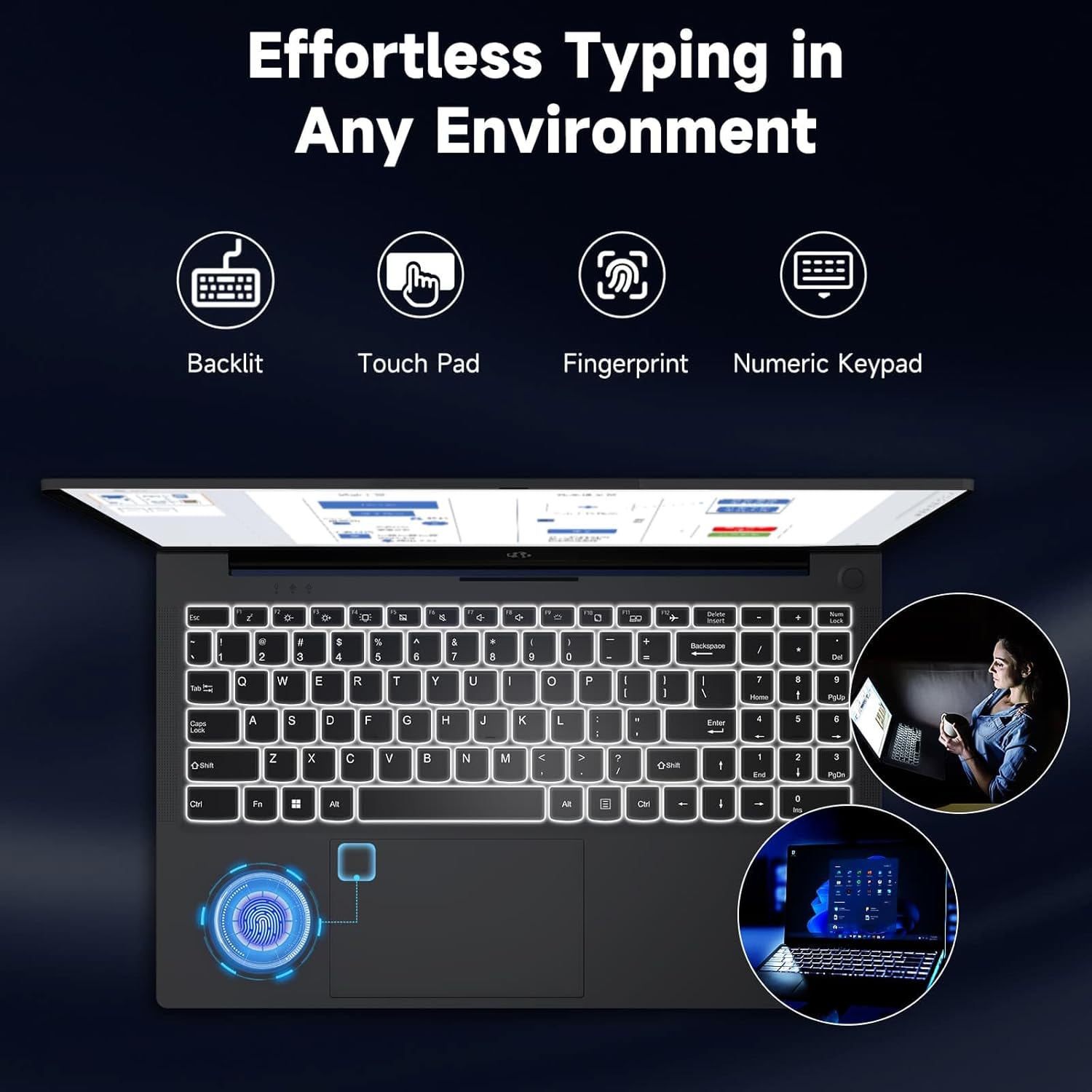
Image: The NIMO laptop keyboard, highlighting its backlit keys, touchpad, fingerprint sensor, and numeric keypad for effortless typing in any environment.
Segurtasuna eta Pribatutasuna
Unlock your laptop with ease and speed using the integrated fingerprint scanner. For privacy, the 2.0MP webcam includes a physical privacy switch, allowing you to control when your camera is active.
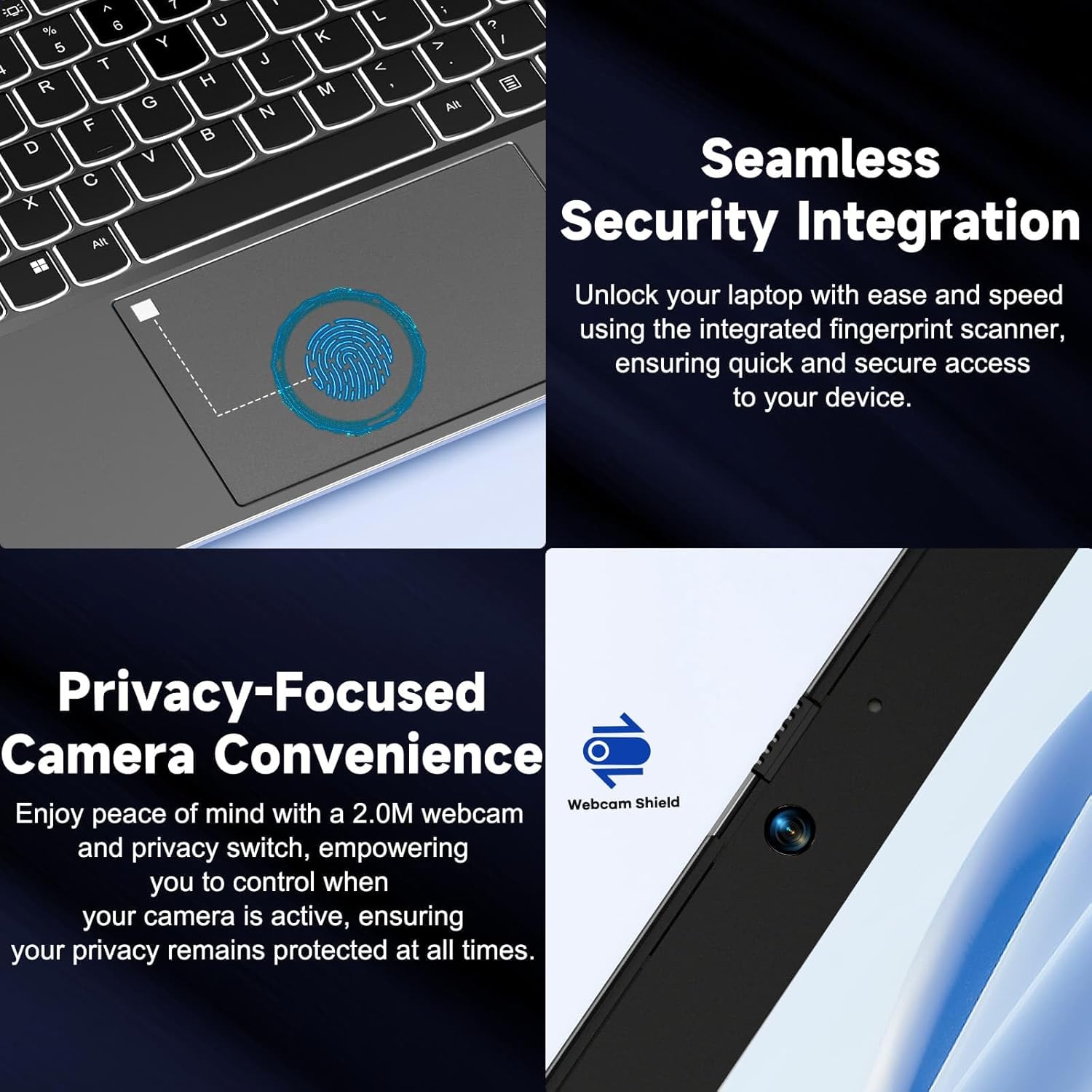
Irudia: Gertuko planoa views of the laptop's fingerprint sensor for seamless security integration and the webcam with its privacy shield for enhanced privacy.
Konektibitatea
The NIMO laptop offers multiple ports for versatile connectivity, including USB 2.0, USB 3.0, HDMI, and Type-C ports (one for charging, one for multifunction). It also features a Micro SD card reader, a headphone combo jack, and a Kensington lock slot.

Irudia: Leherketa bat view of the NIMO laptop, highlighting the location and type of its multiple ports, including USB, HDMI, Type-C, Micro SD, headphone combo, and Kensington lock.
180° Lay-Flat Hinge
The laptop is equipped with a 180° lay-flat hinge, allowing the screen to lie completely flat. This feature expands usage scenarios, making it easier to share content or collaborate with others.

Image: The NIMO laptop demonstrating its 180° lay-flat hinge, showing the screen fully opened and flat, ideal for sharing content.
Mantentzea
Garbiketa
- Erabili lipurrik gabeko zapi leun bat dampPantaila garbitzeko, urarekin edo pantaila-garbitzaile batekin garbitu.
- Teklatuarentzat eta xasisarentzat, erabili oihal leun eta lehor bat. Saihestu produktu kimiko gogorrak edo material urratzaileak.
- Erabili aire konprimatua teklatuko tekletako eta aireztapen-saretetako hautsa kentzeko.
Bateria zaintzea
- Saihestu bateria maiz erabat deskargatzea.
- Denbora luzez erabiltzen ez baduzu, gorde ordenagailu eramangarria leku fresko eta lehor batean.
- Use only the provided NIMO 65W PD fast charger.
Software eguneraketak
- Regularly check for Windows updates to ensure your system has the latest security patches and performance improvements.
- Keep your drivers updated for optimal hardware performance.
Arazoak konpontzea
| Arazoa | Kausa posiblea | Irtenbidea |
|---|---|---|
| Ordenagailu eramangarria ez da pizten | Low battery; Power adapter issue | Ensure charger is properly connected and plugged in. Allow to charge for a few minutes before attempting to power on again. |
| Wi-Fi konexio arazoak | Driver issue; Router problem; Wi-Fi disabled | Check if Wi-Fi is enabled (Fn+F5). Restart your router. Update Wi-Fi drivers via Device Manager. |
| Errendimendu motela | Too many background apps; Low disk space; Malware | Itxi beharrezkoak ez diren aplikazioak. Askatu diskoan lekua. Egin sistemaren eskaneatu osoa birusen aurkako softwarearekin. |
| Teklatuaren atzeko planoa ez dabil | Atzeko argia desgaituta dago | Press Fn + F10 (or the key with the backlight icon) to toggle the backlight on/off or adjust brightness. |
| Fingerprint reader not responding | Sensor dirty; Driver issue; Incorrect setup | Clean the sensor with a soft cloth. Re-register your fingerprint in Windows Settings. Update fingerprint reader drivers. |
Zehaztapenak
| Ezaugarri | Xehetasuna |
|---|---|
| Ereduaren izena | NIMO N154G |
| Pantailaren tamaina | 15.6 hazbete |
| Pantailaren bereizmena | 1920 x 1080 pixel (Full HD) |
| Prozesadorea | Intel Core i3-1215U (up to 4.4 GHz) |
| RAM | 16 GB DDR4 (3200 MHz) |
| Biltegiratzea | 1 TB-ko SSDa |
| Koprozesadore grafikoa | Grafiko Integratua |
| Sistema eragilea | Windows 11 Home |
| Haririk gabeko mota | 802.11a/b/g/n/ac |
| USB atakak | 1x USB 2.0, 2x USB 3.0 |
| Beste Portu batzuk | HDMI, 2 x Type-C (1 Charge Only, 1 Multifunction), Micro SD Reader, Headphone Combo, Kensington Lock |
| Webkamara | 2 MP Atzekoa Webkamaren ebazpena |
| Bateriaren iraupena (batez bestekoa) | 5 ordu |
| Energia iturria | Battery Powered (65W PD Type-C Charger) |
| Elementuaren pisua | 5 kilo |
| Produktuaren neurriak | 14.07 x 8.98 x 0.76 hazbete |
| Kolorea | Grisa |
| Ezaugarri bereziak | Fingerprint Reader, HD Audio, Backlit Keyboard, Memory Card Slot, Numeric Keypad, 180° Lay-Flat Hinge |
Bermea eta Laguntza
NIMO is committed to providing reliable products and excellent customer service. Your NIMO laptop comes with comprehensive warranty and support:
- 2-Year Laptop Protection: Enjoy peace of mind with a 2-year warranty covering manufacturing defects.
- 90 eguneko doako itzulketak: If you are not satisfied with your purchase, you can return it within 90 days.
- 24/7 Customer Service Support: Our dedicated team of laptop experts is available around the clock to provide instant assistance and resolve any issues you may encounter.
For support, please refer to the contact information provided on the NIMO official website or the packaging. Please have your model number (NIMO N154G) and purchase details ready when contacting support.

Image: An illustration of NIMO's after-sales excellence, showing domestically partial assembly, 90-day free returns, 2-year after-sales support, and 24/7 customer service support.
Ask a question about this manual
Ask about setup, troubleshooting, compatibility, parts, safety, or missing instructions. Manuals+ will review the question and use this page’s manual context to help answer it.