
Sarrera
This manual provides essential information for the setup, operation, maintenance, and troubleshooting of your Protectli Vault Pro VP2430-4 Port Micro Appliance/Mini PC. Please read these instructions carefully before using the device to ensure proper functionality and longevity.
Konfigurazioa
Follow these steps to set up your Protectli Vault Pro VP2430-4.
1. Kutxatik ateratzea eta osagaien egiaztapena
Kontu handiz atera osagai guztiak kaxatik. Egiaztatu elementu guztiak bertan daudela:
- Protectli Vault Pro VP2430-4 unit
- Korronte egokitzailea eta kablea
- Mounting bracket and screws (if included)
- USB Type-C console cable
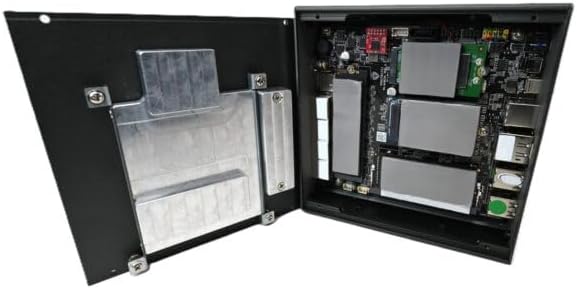
Image: Included accessories, including the power adapter, mounting bracket, screws, and USB console cable.
2. Konexio fisikoak
Connect the necessary cables to the device ports. Refer to the image below for port identification.

Image: Rear panel of the Protectli Vault Pro VP2430-4, displaying various ports including USB, HDMI, DisplayPort, and USB-C console port.
- Potentzia: Connect the power adapter to the DC 12V input port and then to a power outlet.
- Sarea: Connect Ethernet cables to the 2.5G NIC ports (labeled 1-4) as required for your network configuration.
- Pantaila: If a display is needed for initial setup or monitoring, connect a monitor to the HDMI or DisplayPort output.
- USB gailuak: Connect any necessary USB peripherals (keyboard, mouse) to the USB 2.0 or USB 3.2 Type C ports.
- Kontsola: For serial console access, connect the provided USB Type-C console cable to the console port and your computer.
3. Lehenengo abioa
After all connections are made, press the power button located on the front panel. The device will power on. Since no operating system is pre-installed, you will need to install your preferred firewall or operating system software.
Funtzionamendu-argibideak
The Protectli Vault Pro VP2430-4 is designed as a micro appliance for network security and mini PC applications. It does not come with a pre-installed operating system, allowing for maximum flexibility.
Softwarearen bateragarritasuna
This hardware is tested for compatibility with various open-source firewall software solutions, including OPNsense, pfSense, and VyOS. It also supports other popular open-source software solutions. The device ships with AMI BIOS.
Erabilera-eszenatoki tipikoak
- Suebakia/Bideratzailea: Utilize the multiple 2.5G NICs to create a robust and secure network gateway.
- Mini PC: Install a lightweight operating system for various computing tasks.
- Birtualizazioa: Deploy hypervisors for running virtual machines.
Mantentzea
Mantentze-lan erregularrak zure gailuaren errendimendu optimoa eta iraupena bermatzen ditu.
Garbiketa
To clean the exterior of the device, use a soft, dry cloth. Avoid using liquid cleaners or solvents, as these can damage the finish or internal components. Ensure the device is powered off and unplugged before cleaning.
Firmware eguneraketak
Periodically check the Protectli website for BIOS/firmware updates. Updating the firmware can improve stability, performance, and security. Follow the instructions provided with the firmware update package carefully.
Hardware Upgrades (RAM/Storage)
The Protectli Vault Pro VP2430-4 supports upgrades for RAM and M.2 SATA SSD storage. To perform an upgrade:
- Itzali gailua eta deskonektatu kable guztiak.
- Carefully remove the screws securing the bottom cover.
- Gently lift the cover to expose the internal components.

Irudia: Barnekoa view of the Protectli Vault Pro VP2430-4, showing the motherboard, RAM slots, and M.2 SSD slots.
Locate the SODIMM DDR5 RAM slots and M.2 SATA SSD slot. Install or replace components according to their respective instructions. Ensure components are seated correctly before reattaching the cover and screws.
Arazoak konpontzea
Atal honek aurki ditzakezun arazo ohikoenei heltzen die.
Botererik ez
- Ziurtatu korronte-egokitzailea ondo konektatuta dagoela gailura eta funtzionatzen duen entxufe batera.
- Egiaztatu entxufea funtzionatzen duela beste gailu bat konektatuz.
- Egiaztatu korronte-egokitzailea kalterik dagoen ikusteko.
Ez dago pantaila-irteerarik
- Confirm the monitor is powered on and correctly connected to the device's HDMI or DisplayPort.
- Try a different display cable or monitor.
- Ziurtatu sarrera-iturri zuzena hautatuta dagoela monitorearen bidez.
Sarearen konexio arazoak
- Check that Ethernet cables are securely connected to both the device and your network equipment.
- Verify the status indicator lights on the Ethernet ports.
- Ensure your installed operating system or firewall software is correctly configured for network interfaces.
Zehaztapenak
| Eredua | VP2430 |
| CPU | Intel N150 Quad Core (up to 3.6GHz, 6MB Cache) |
| RAM | 32 GB SO-DIMM DDR5 RAM |
| Biltegiratzea | 1000GB NVMe SSD, 32GB eMMC on-board |
| Sare Interfazeak | 4x Intel I226-V 2.5G NICs |
| USB atakak | 2x USB 3.2 Type C with DisplayPort, 4x USB 2.0 Type A, 1x USB Type C Console |
| Bideo Irteera | 1x HDMI, 1x DisplayPort (via USB-C) |
| Koprozesadore grafikoa | Intel UHD Graphics 630 |
| Hardware Plataforma | PC |
| Neurriak (LxWxH) | 5.67 x 5.63 x 2.17 hazbete |
| Pisua | 4.1 kilo |
| Energia iturria | DC |
| Pilak | 1 CR2 bateria behar da (barne) |
Bermea eta Laguntza
Bermearen informazioa
Your Protectli Vault Pro VP2430-4 comes with a 30-day money-back guarantee. For specific warranty terms and conditions, please refer to the official Protectli webwebgunean edo jarri harremanetan bezeroarentzako laguntzarekin.
Bezeroarentzako Arreta
Protectli offers US-based customer support to assist you with any questions or issues. Our dedicated team is available to provide technical assistance and guidance.
Laguntza behar baduzu, bisitatu Protectli Store or refer to the contact information provided with your product documentation.