
1. Sarrera
This manual provides essential instructions for the safe and efficient use of your Aiffro P10 Plus Magnetic Portable Solid State Drive. Please read this manual thoroughly before using the device and retain it for future reference.
2. Produktua amaitu daview
The Aiffro P10 Plus is a high-speed, portable solid state drive designed for efficient data transfer and storage expansion across various devices. Its magnetic design offers convenient attachment, particularly for MagSafe-compatible iPhones.
- High-Speed Transfers: Achieves speeds up to 2000MB/s, supporting USB 3.2 Gen 2x2 (20Gbps) for rapid data movement.
- MagSafe bateragarritasuna: Features magnetic attachment for iPhones, supporting both Type-C (iPhone 15/16 and later) and Lightning (iPhone 14/13/12 and earlier) connections.
- Bateragarritasun polifazetikoa: Works with Windows, macOS, Linux, Android, and iOS devices, including laptops, smartphones, and gaming consoles like PS5.
- Diseinu eramangarria: Ultra-thin at 6.5mm and lightweight at approximately 41g, crafted from aluminum alloy for durability and ease of transport.
- Errendimendu eraginkorra: Utilizes a single-chip SM2320 design for enhanced performance and reduced power consumption.
3. Paketearen edukia
Egiaztatu elementu guztiak zure paketean daudela:
- Aiffro P10 Plus Magnetic Portable Solid State Drive
- 2 x USB Cables (Type-C to Type-C, Type-C to Lightning)

4. Konfiguratzeko argibideak
- Konektatu SSDa:
- For iPhone 15/16 and later models: Use the Type-C to Type-C cable.
- For iPhone 14/13/12 and earlier models: Use the Type-C to Lightning cable.
- For other devices (laptops, Android phones, PS5): Use the appropriate USB cable (Type-C to Type-C or Type-C to USB-A if an adapter is used).
- Magnetic Attachment (for iPhones): Align the Aiffro P10 Plus with the back of your iPhone. The magnetic mechanism will securely attach the SSD. For non-MagSafe compatible iPhones or cases, a magnetic ring may be required for optimal adhesion.

Image 2: The Aiffro P10 Plus SSD magnetically connected to an iPhone. 
Image 3: Illustration of the stable magnetic adhesion feature for iPhones. - Gailuaren ezagutza: Once connected, your device should automatically recognize the Aiffro P10 Plus as an external storage drive. You may need to access it through your device's file management application (e.g., Files app on iOS, File Explorer on Windows, Finder on macOS).
5. Funtzionamendu-argibideak
- Transferitzea Files:
- Open your device's file kudeatzailea.
- Kokatu filetransferitu nahi duzun.
- Kopiatu edo mugitu files to the Aiffro P10 Plus drive.
- Transferitzeko files from the SSD to your device, reverse the process.
- Using with iPhone ProRes 4K 60fps: For iPhone 15/16 and later models, the P10 Plus supports direct recording of ProRes 4K 60fps video. Ensure the SSD is connected and recognized before starting video recording in the Camera app.
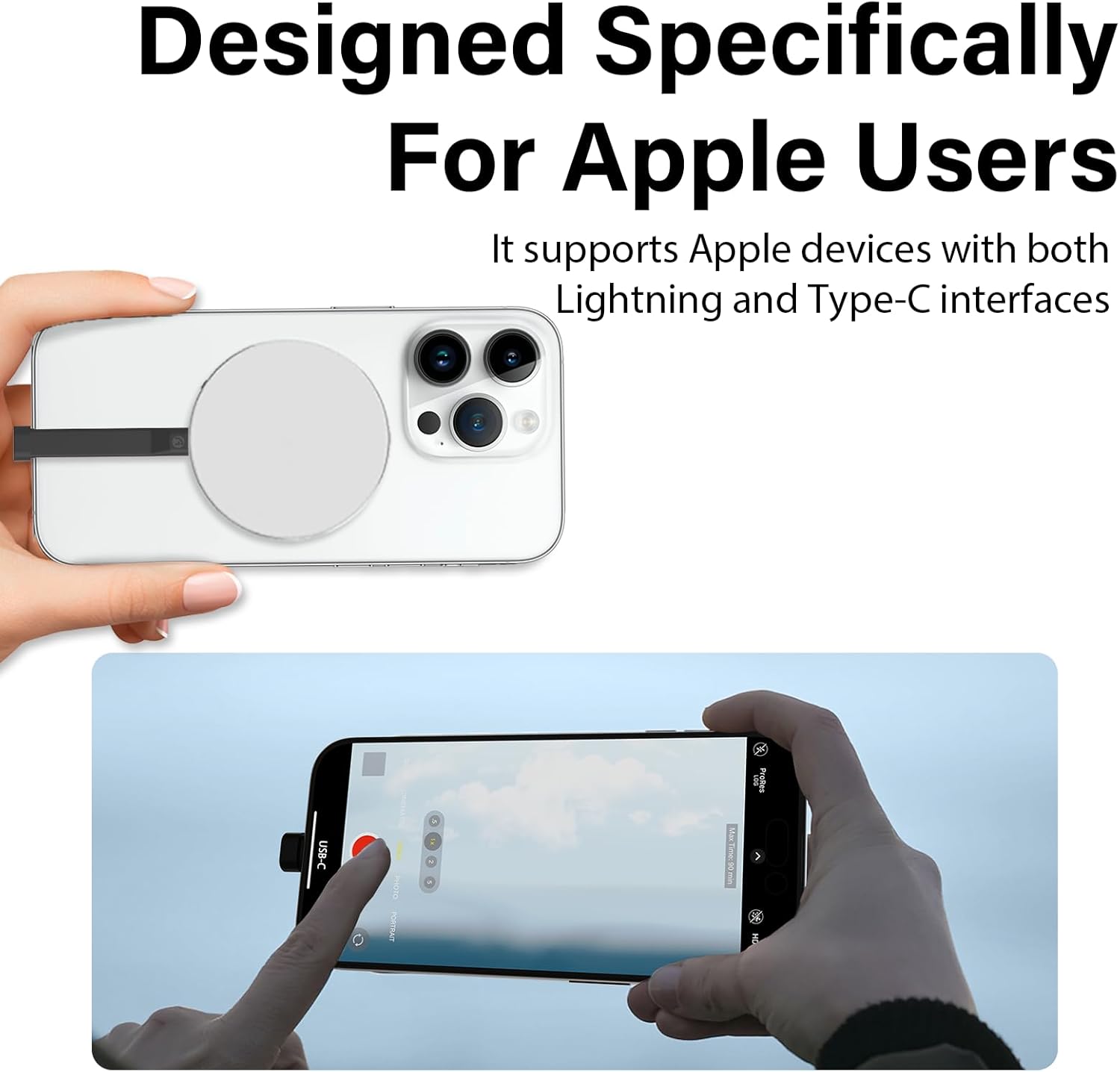
Image 4: An iPhone recording ProRes video directly to the Aiffro P10 Plus SSD. - Kanporaketa segurua: Always safely eject the Aiffro P10 Plus from your computer or device before disconnecting it to prevent data corruption.
- Windows: Right-click the drive icon in "This PC" or the taskbar, then select "Eject".
- macOS: Drag the drive icon to the Trash or click the Eject button next to the drive in Finder.
- iOS/Android: Disconnect after confirming no active transfers are occurring.
6. Bateragarritasuna
The Aiffro P10 Plus is designed for broad compatibility:
- Sistema eragileak: Windows, macOS, Linux, Android, iOS (version 13 and later).
- Gailuak:
- iPhones: X, 11, 12, 13, 14 (Lightning connection); 15, 16 and later (Type-C connection).
- iPads: iPad mini, iPad Air, iPad Pro, and other Lightning or Type-C enabled iPads.
- Android Smartphones and Tablets.
- Laptops and Desktop Computers.
- Gaming Consoles: PS5.


7. Mantentzea
To ensure the longevity and optimal performance of your Aiffro P10 Plus SSD, follow these maintenance guidelines:
- Zaintza fisikoa: Avoid dropping the device or subjecting it to strong impacts. While durable, extreme physical shock can damage internal components.
- Ingurumen-baldintzak: Keep the SSD away from extreme temperatures, direct sunlight, and high humidity. Store it in a cool, dry place.
- Garbiketa: Use a soft, dry cloth to clean the exterior of the SSD. Do not use liquid cleaners or solvents.
- Software eguneraketak: Keep your device's operating system updated to ensure proper compatibility and performance with external storage devices.
- Kanporaketa segurua: Always follow the safe ejection procedures mentioned in Section 5 before disconnecting the drive.
8. Arazoak
If you encounter issues with your Aiffro P10 Plus, refer to the following common problems and solutions:
| Arazoa | Kausa posiblea | Irtenbidea |
|---|---|---|
| SSD not recognized by device. |
|
|
| Datuen transferentzia abiadura motela. |
|
|
| Lotura magnetikoa ahula da. |
|
|
9. Zehaztapenak
| Ezaugarri | Xehetasuna |
|---|---|
| Eredua | P10 Plus |
| Biltegiratze mota | Egoera Solidoko Unitatea (SSD) |
| Biltegiratze Digitalaren Ahalmena | 512 GB |
| Max Read/Write Speed | Up to 2000MB/s (Read/Write) |
| Interfazea | USB 3.2 Gen 2x2 (20Gbps) |
| Konektibitatea | USB (C mota) |
| Dimentsioak (Lodiera) | 6.5 mm |
| Pisua | 41 g inguru |
| Materiala | Aluminiozko aleazioa |
| OS bateragarria | Windows, macOS, Linux, Android, iOS (13+) |


10. Bermea eta Laguntza
Aiffro products are designed for reliability and performance. For warranty information, technical support, or service inquiries, please refer to the official Aiffro webwebgunera edo jarri harremanetan bezeroarentzako arreta-zerbitzura zuzenean. Gorde erosketa-agiria erosketaren frogagiri gisa berme-erreklamazioetarako.
Laguntza gehiago lortzeko, mesedez bisitatu: Aiffro Official Store on Amazon