
Sarrera
The SONRU B110 is a versatile 2-in-1 Bluetooth 5.3 audio adapter designed to transform your audio experience. It functions as both a Bluetooth transmitter (TX mode) and a Bluetooth receiver (RX mode), allowing you to wirelessly stream audio to and from various devices. Enjoy high-fidelity sound, low latency, and extended battery life for home entertainment, travel, and on-the-go use.
Paketearen edukia
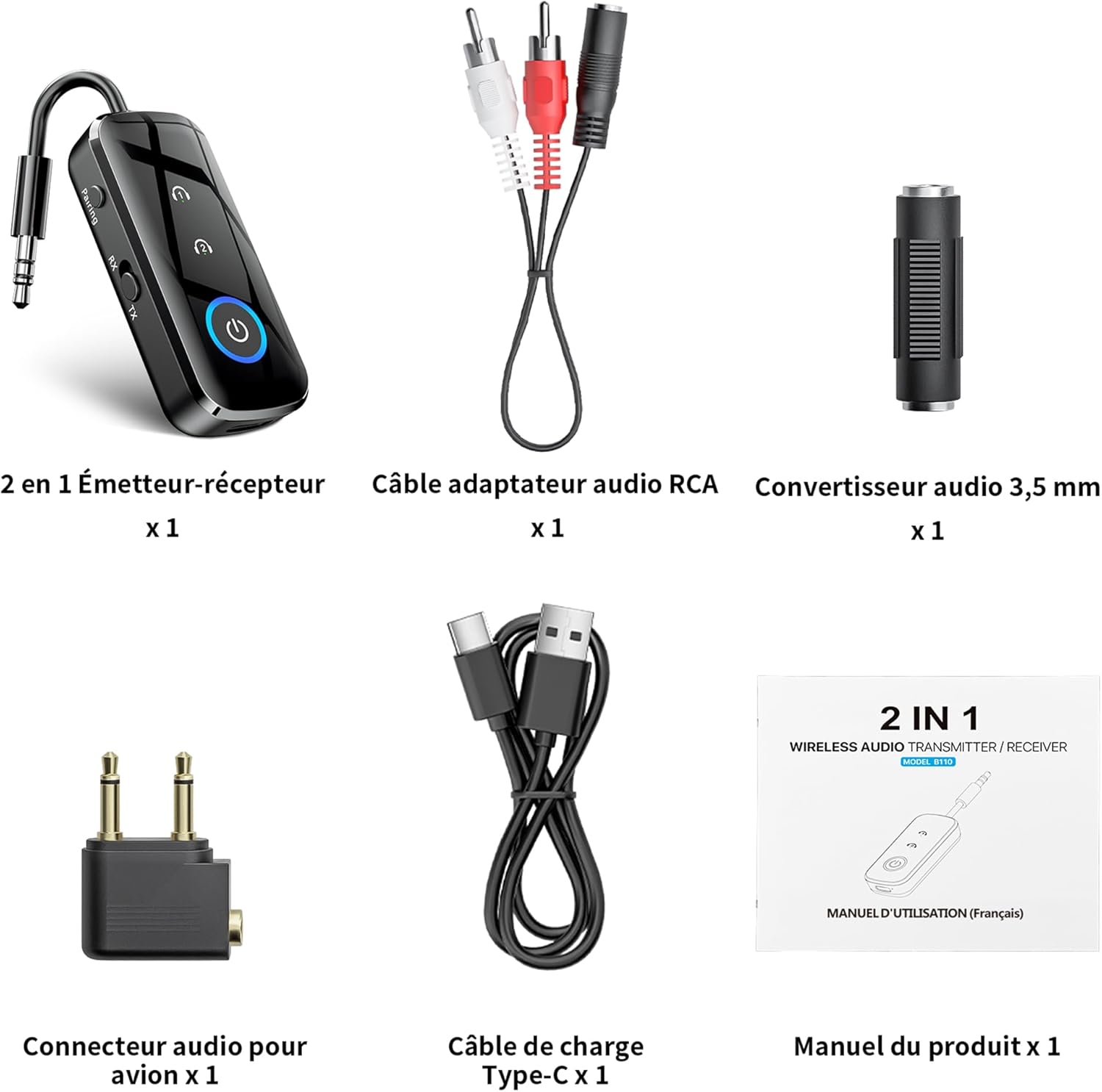
1. irudia: paketearen edukia
- 1 x SONRU B110 2-in-1 Bluetooth Transmitter/Receiver
- 1 x RCA Audio Adapter Cable
- 1 x 3.5mm Audio Converter
- 1 x Airplane Audio Connector
- 1 x USB motako C kargatzeko kablea
- 1 x Erabiltzailearen eskuliburua
Produktua amaituview

Figure 2: Device Features and Controls
The SONRU B110 features a compact design with essential controls for easy operation. It includes a 3.5mm audio jack, a mode switch (RX/TX), power button, and volume/track control buttons. The device also has a USB-C charging port.
Zehaztapenak
| Ezaugarri | Xehetasuna |
|---|---|
| Eredua | B110 |
| Bluetooth bertsioa | 5.3 |
| Bluetooth protokoloak | A2DP/AVRCP (Reception), A2DP (Emission) |
| Eragiketa-eremua | >10 meters (open space) |
| Audio Interfazea | Universal 3.5 mm audio input/output |
| Bateria Edukiera | 250 mAh |
| Kargatzeko Denbora | Gutxi gorabehera 1.5 ordu (USB-C) |
| Bateriaren iraupena (TX modua) | Gehienez 15 ordu |
| Bateriaren iraupena (RX modua) | Gehienez 12 ordu |
| Neurriak | 13.9 x 11.6 x 2 cm |
| Pisua | 110 gramo |
| Ezaugarri bereziak | Automatic connection memory, Dual connection, Fast Charging, Hands-Free Calls, Low Latency |
Konfigurazioa
1. Gailua kargatzea
Before first use, fully charge your SONRU B110.
- Connect the provided USB Type-C charging cable to the charging port on the device.
- Konektatu kablearen beste muturra USB elikatze-egokitzaile batera (ez dago barne) edo ordenagailuaren USB atakara.
- Kargatzeko adierazlearen argiak kargatzeko egoera erakutsiko du. Karga oso batek 1.5 ordu inguru behar ditu.
- Once fully charged, the device offers up to 15 hours of use in Transmitter (TX) mode and 12 hours in Receiver (RX) mode.

3. irudia: Kargatzea eta bateriaren iraupena
2. Pairing in Transmitter (TX) Mode
TX mode allows you to transmit audio from non-Bluetooth devices (e.g., TV, PC, airplane entertainment system) to Bluetooth headphones or speakers.
- Switch the device to TX mode.
- Connect the SONRU B110 to your audio source (e.g., TV, PC, MP3 player) using the 3.5mm audio cable. For airplane entertainment systems, use the provided airplane audio connector.
- Piztu Bluetooth entzungailuak edo bozgorailuak eta jarri parekatze moduan.
- The SONRU B110 will automatically search for and connect to nearby Bluetooth devices. The indicator light will confirm a successful connection.
- Konexio bikoitza: The device supports connecting to two Bluetooth headphones/speakers simultaneously. After connecting the first device, put the second device into pairing mode. The B110 will automatically connect to it.

Figure 4: TX Mode in an Airplane

Figure 5: Dual Connection in TX Mode
3. Pairing in Receiver (RX) Mode
RX mode allows you to receive audio from your Bluetooth-enabled smartphone, tablet, or computer and play it through non-Bluetooth devices like car stereos, wired headphones, or home speaker systems.
- Switch the device to RX mode.
- Connect the SONRU B110 to your non-Bluetooth audio device (e.g., car stereo, wired speaker) using the 3.5mm audio cable.
- Enable Bluetooth on your smartphone, tablet, or computer and search for "SONRU B110" in the list of available devices.
- Select "SONRU B110" to pair. The indicator light will confirm a successful connection.
- Birkonexio automatikoa: The device has an automatic connection memory function. After a successful connection, re-enabling Bluetooth on your phone will automatically connect to the B110.

Figure 6: RX Mode in a Car

Figure 7: TX and RX Mode Compatibility
Funtzionamendu-argibideak
Piztu/Itzali
- Piztu: Sakatu eta eutsi pizteko botoia adierazle-argia piztu arte.
- Itzali: Sakatu eta eutsi pizteko botoia adierazle-argia itzali arte.
Modu aldaketa
- Use the TX/RX switch on the side of the device to select the desired mode (Transmitter or Receiver).
Music Control (RX Mode)
- Erreproduzitu/Pausatu: Sakatu pizteko botoia behin.
- Hurrengo ibilbidea: Sakatu eta eutsi "+" botoiari.
- Aurreko pista: Sakatu eta eutsi "-" botoiari.
- Bolumena igo: Sakatu labur "+" botoia.
- Bolumena jaitsi: Sakatu labur "-" botoia.
Call Management (RX Mode)
The SONRU B110 features a built-in microphone for hands-free calls when in RX mode.
- Deia erantzun/amaitu: Sakatu pizteko botoia behin.
- Deia baztertu: Eduki sakatuta pizteko botoia.
- Berriz markatu azken zenbakia: Sakatu bi aldiz pizteko botoia.
Mantentzea
- Mantendu gailua lehor. Saihestu hezetasun edo likidoen eraginpean egotea.
- Ez saiatu gailua desmuntatzen edo aldatzen.
- Garbitu gailua zapi leun eta lehor batekin. Ez erabili produktu kimiko gogorrik edo garbitzaile urratzailerik.
- Gorde gailua leku fresko eta lehor batean erabiltzen ez duzunean.
- Saihestu muturreko tenperaturak.
Arazoak konpontzea
- Gailua ez da pizten:
- Ziurtatu gailua guztiz kargatuta dagoela. Konektatu energia-iturri batera USB-C kablea erabiliz eta saiatu berriro.
- Ezin da Bluetooth gailu batekin parekatu:
- Make sure the SONRU B110 is in the correct mode (TX for transmitting, RX for receiving).
- Ensure your target Bluetooth device (headphones, speaker, phone) is in pairing mode.
- Place the devices close to each other.
- Garbitu aurreko parekatze-erregistroak bi gailuetan eta saiatu berriro parekatzen.
- Soinurik ez edo audio kalitate eskasa:
- Check if the 3.5mm audio cable is securely connected to both the SONRU B110 and the audio source/receiver.
- Ensure the volume on both the SONRU B110 and the connected audio device is turned up.
- Verify that the correct input/output source is selected on your audio system (e.g., AUX input on car stereo).
- Reduce the distance between the B110 and the paired Bluetooth device, and remove any obstacles.
- Ensure there is no interference from other wireless devices.
- Dual connection not working:
- Ensure both target Bluetooth devices are in pairing mode when attempting to connect the second device.
- Device not compatible with musical instruments or hearing aids:
- As stated in the product features, this device is not designed for use with musical instruments or hearing aids.
Bermea eta Laguntza
SONRU products are designed for reliability and performance. For warranty information or technical support, please refer to the contact details provided on the product packaging or visit the official SONRU webgunea. Gorde erosketaren egiaztagiria bermearen erreklamazioetarako.