
1. Sarrera
Thank you for choosing the Ctronics CTIPC-930 4K 8MP WiFi Outdoor Security Camera. This camera is designed to provide high-definition surveillance with advanced features for enhanced security. It captures ultra-clear images day and night, offers intelligent detection, and supports various connectivity and storage options. Please read this manual carefully before installation and operation to ensure proper use and optimal performance.
2. Paketearen edukia
Please check the package contents upon receipt. If any items are missing or damaged, contact Ctronics customer support.
- Ctronics CTIPC-930 Camera Unit
- Elikatze-moldagailua
- Muntatzeko torlojuak eta hormako takoak
- Kit iragazgaitza
- Argibide eskuliburua
3. Konfigurazioa
3.1 Hasierako piztea
- Connect the camera to the power adapter.
- Plug the power adapter into a power outlet. The camera will initiate its self-test sequence.
3.2 Aplikazioaren deskarga eta kontuaren erregistroa
Download the "Ctronics Pro" app from your smartphone's app store (iOS or Android). Register for a new account or log in if you already have one.
3.3 Connecting the Camera to WiFi
The CTIPC-930 supports dual-band WiFi (2.4 GHz and 5 GHz) for flexible and stable connectivity. Bluetooth pairing is available for quick setup.

Image: Dual-band WiFi connectivity for stable signal.
- Open the Ctronics Pro app and tap "Add Device".
- Follow the on-screen instructions to select your camera model and connect it to your WiFi network. The app will guide you through the Bluetooth pairing process for initial connection.
- Ensure your camera is within range of your WiFi router for a strong signal.
4. Kameraren funtzionamendua
4.1 Bizi View eta Erreprodukzioa
Access the live feed and recorded footage through the Ctronics Pro app on your smartphone, tablet, or via client software on your PC/Mac.

Image: Broad compatibility across multiple devices and operating systems.
4.2 4K Ultra HD Resolution and Color Night Vision
The camera features 4K (3840x2160) resolution for clear, detailed images. Its starlight lens and F1.6 aperture provide full-color night vision up to 30 meters, even in low-light conditions without additional illumination.
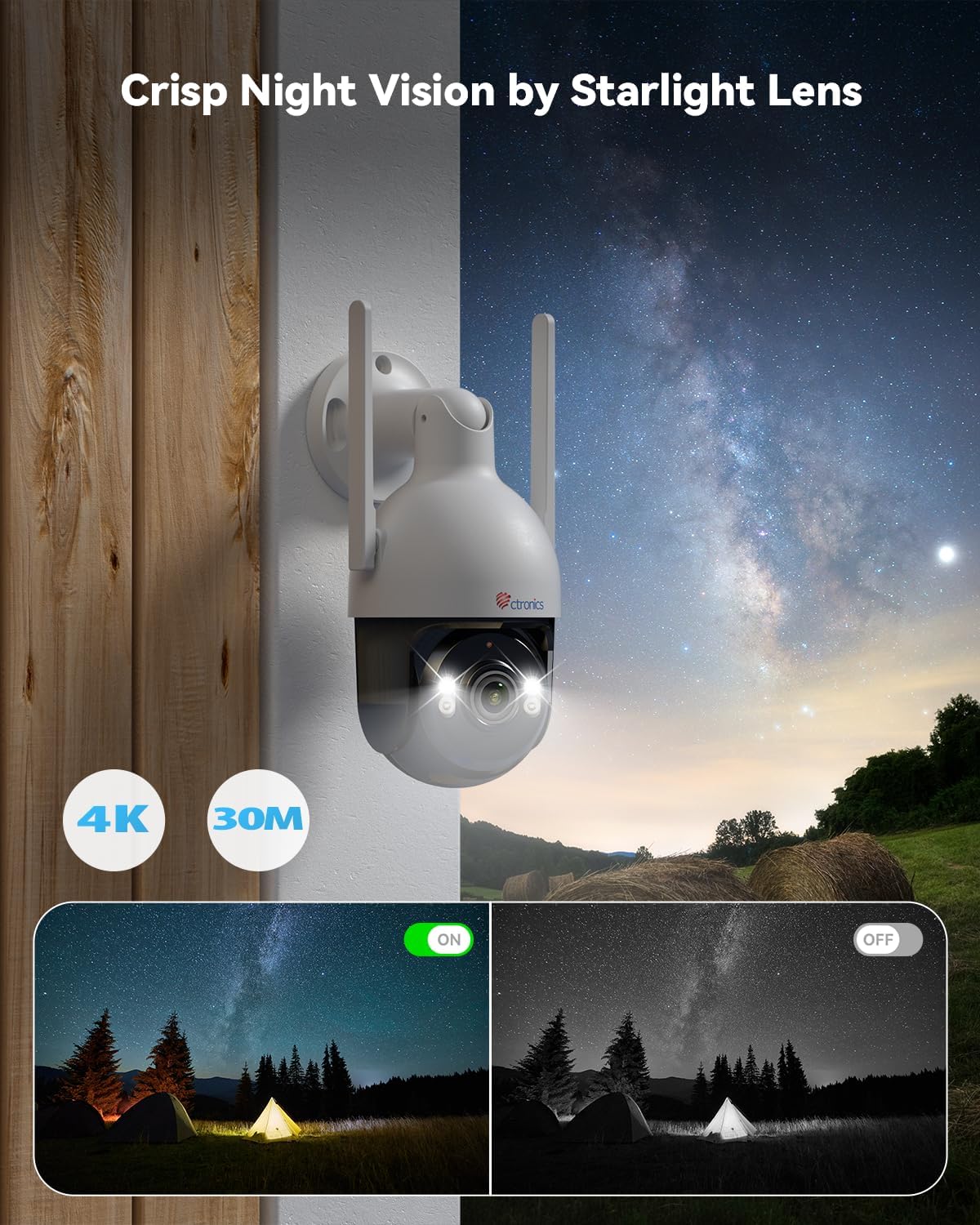
Image: Crisp night vision capabilities with color and infrared options.
4.3 AI Smart Detection and Auto Tracking
Utilize advanced AI technology to accurately detect humans, vehicles, and pets. Customize detection modes to minimize false alarms. When an event is detected, the camera captures snapshots and sends real-time alerts via email and the Ctronics Pro app. The camera also supports automatic tracking of detected subjects.

Image: Smart AI detection and auto-tracking of humans, cars, and pets with instant alerts.
4.4 Bi norabideko audioa
The built-in microphone and speaker enable clear two-way communication, allowing you to interact with visitors or deter intruders remotely.
4.5 Pan-Tilt-Zoom (PTZ) Functionality
Control the camera's movement remotely with 355° horizontal rotation and 90° vertical tilt, providing extensive coverage of your surveillance area.

Image: Wide area coverage with 355° pan and 90° tilt.
4.6 Biltegiratze aukerak
The camera offers multiple recording and storage solutions:
- Tokiko biltegiratzea: Supports TF (MicroSD) cards up to 256GB (not included).
- Hodeiko biltegiratzea: Encrypted cloud backup with a 30-day trial available.
- NVR/FTP: Compatible with Network Video Recorders (NVR) and File Transfer Protocol (FTP) for continuous recording and storage.
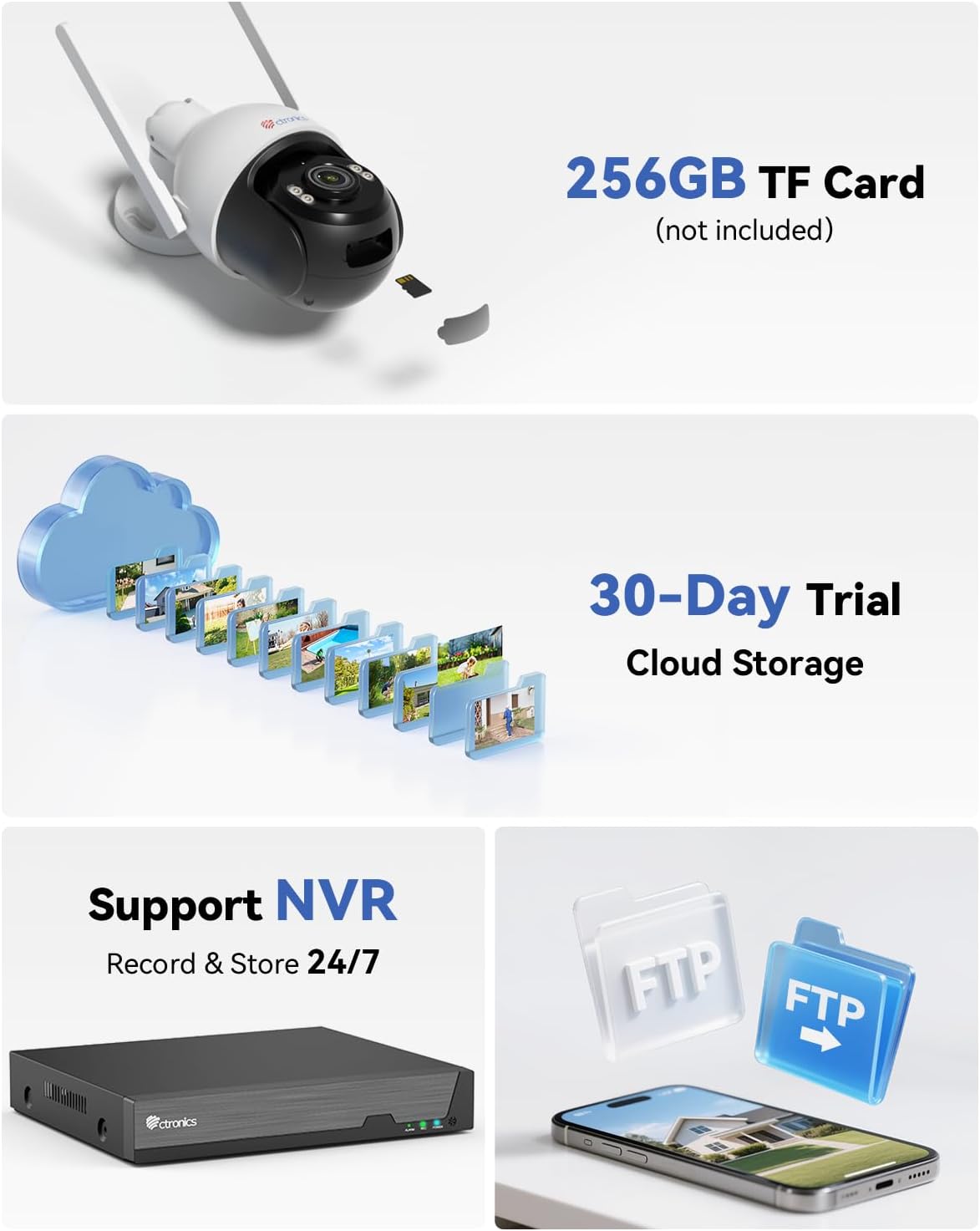
Image: Multiple storage options including TF card, cloud, NVR, and FTP.
5. Instalazioa
The Ctronics CTIPC-930 camera is designed for outdoor use with an IP66 weatherproof rating, ensuring resistance to rain, dust, and heat. It supports both wall and ceiling mounting.

Image: Durable metal construction and IP66 weatherproof rating for wall or ceiling mounting.
5.1 Muntatzeko kokapena
Aukeratu nahi duzuna eskaintzen duen kokapen bat viewing angle and is within range of your WiFi network. Ensure the mounting surface is sturdy enough to support the camera's weight.
5.2 Muntatzeko urratsak
- Use the provided mounting template (if available) or the camera base to mark the drill holes on the wall or ceiling.
- Zuloak egin eta hormako takoak sartu.
- Lotu kameraren oinarria gainazalera muntatzeko torlojuak erabiliz.
- Adjust the camera angle as needed after installation.
6. Mantentzea
Mantentze-lan erregularrak zure kameraren iraupena eta errendimendu optimoa bermatzen ditu.
- Garbiketa: Aldian-aldian garbitu kameraren lentea oihal leun eta lehor batekin irudiaren kalitate garbia bermatzeko. Ez erabili produktu kimiko gogorrik.
- Firmware eguneraketak: Check the Ctronics Pro app regularly for firmware updates. Keeping your camera's firmware up-to-date ensures access to the latest features and security enhancements.
- Elikatze-iturria: Ensure the power supply is stable and free from damage.
7. Arazoak
Arazoak badituzu, jarraitu arazoak konpontzeko ohiko urrats hauek:
- Kamera lineaz kanpo: Check WiFi connection, power supply, and router status. Try restarting the camera and your router.
- Irudiaren kalitate eskasa: Clean the lens. Ensure sufficient lighting for optimal night vision. Check network bandwidth.
- Alarma faltsuak: Adjust AI detection sensitivity and detection zones in the app.
- Grabaketarik ez: Verify TF card insertion and format. Check cloud storage subscription status or NVR/FTP configuration.
- Ezin da aplikaziora konektatu: Ensure Bluetooth is enabled on your phone for initial pairing. Re-attempt the connection process.
For further assistance, please contact Ctronics customer support.
8. Zehaztapenak
| Ezaugarri | Zehaztapena |
|---|---|
| Bideo Grabaketa Ebazpena | 4K (3840 x 2160) |
| Modelo zenbakia | CTIPC-930 |
| Haririk gabeko Komunikazio Teknologia | Bluetooth, Wi-Fi (2.4 GHz / 5 GHz) |
| Forma-faktorea | Kupula |
| Gaueko Ikusmenaren barrutia | 30 metro |
| Materiala | Metala |
| liburukiatage | 12 Volt |
| Boterea | 12 Watt |
| Elementuaren neurriak (L x W x H) | 16 x 14 cm (approx. 6.3 x 5.5 inches) |
| Uraren Erresistentzia Maila | IP66 (iragazgaitza) |
| Bonbilla mota | Infrared & LED |
| Ezaugarri bereziak | Two-way audio, Human/Vehicle/Animal Detection, HD Resolution, PTZ Technology, Color Night Vision |
| Gomendatutako Erabilerak | Kanpoko Segurtasuna |
| Gailu bateragarriak | Smartphone, Tablet, PC, Mac |
| Energia iturria | Kable elektrikoa |
| Muntatze Mota | Hormako Muntaia |
9. Bermea eta Laguntza
Ctronics products come with a standard manufacturer's warranty. Please refer to the warranty card included in your package or visit the official Ctronics webwebgunean bermearen baldintza zehatzak ikusteko.
For technical support, product inquiries, or warranty claims, please contact Ctronics customer service through their official website or the contact information provided in the app. Have your model number (CTIPC-930) and purchase details ready when contacting support.