
1. Sarrera
This manual provides essential information for setting up, operating, maintaining, and troubleshooting your GIGABYTE AORUS Elite 16 BWH gaming laptop. The AORUS Elite 16 BWH is designed for high-performance gaming and demanding applications, featuring an Intel Core Ultra 9 processor, NVIDIA GeForce RTX 5070 laptop GPU, a 16-inch WQXGA 165Hz display, and Windows 11 Pro.
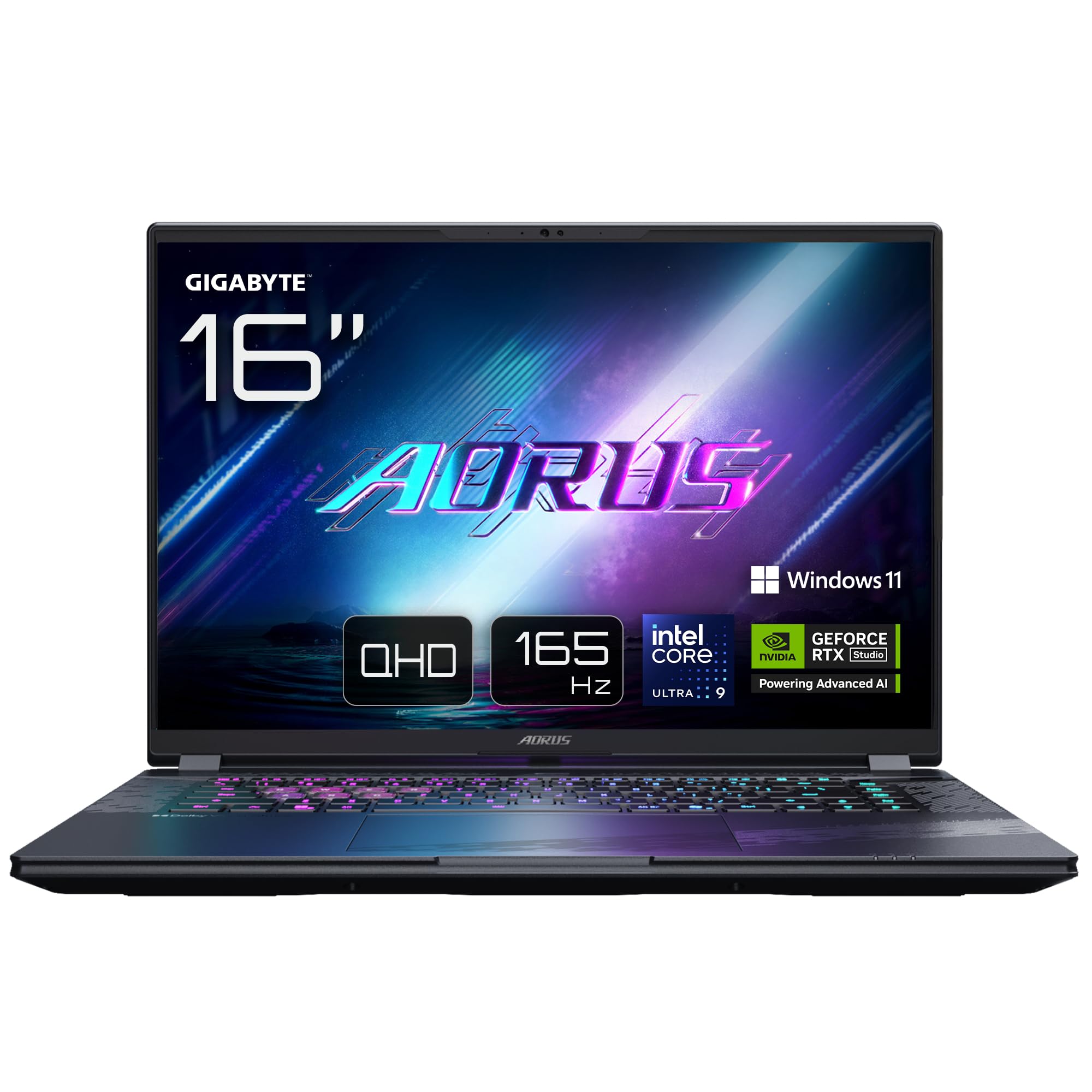
Image: The GIGABYTE AORUS Elite 16 BWH gaming laptop, showcasing its open display and keyboard.
2. Konfigurazioa
2.1 Kutxatik ateratzea eta hasierako ikuskapena
Carefully remove the laptop and all accessories from the packaging. Verify that all components listed in the "What's in the Box" section are present and undamaged.
- GIGABYTE AORUS ELITE 16 BWHC3FRC65SP Laptop
- Korronte egokitzailea eta kablea
- Dokumentazioa (eskuliburu hau, berme txartela)
2.2 Potentzia konektatzea
Connect the power adapter to the laptop's power input port and then plug the power cable into an electrical outlet. It is recommended to fully charge the battery before initial use.
2.3 Lehenengo piztea
Sakatu pizteko botoia ordenagailu eramangarria pizteko. Jarraitu pantailan agertzen diren argibideei Windows 11 Pro konfigurazio prozesua osatzeko, hizkuntza hautatzea, sareko konexioa eta erabiltzaile kontua sortzea barne.
2.4 Connecting Peripherals and Network
The laptop features various ports for connecting external devices and networks.
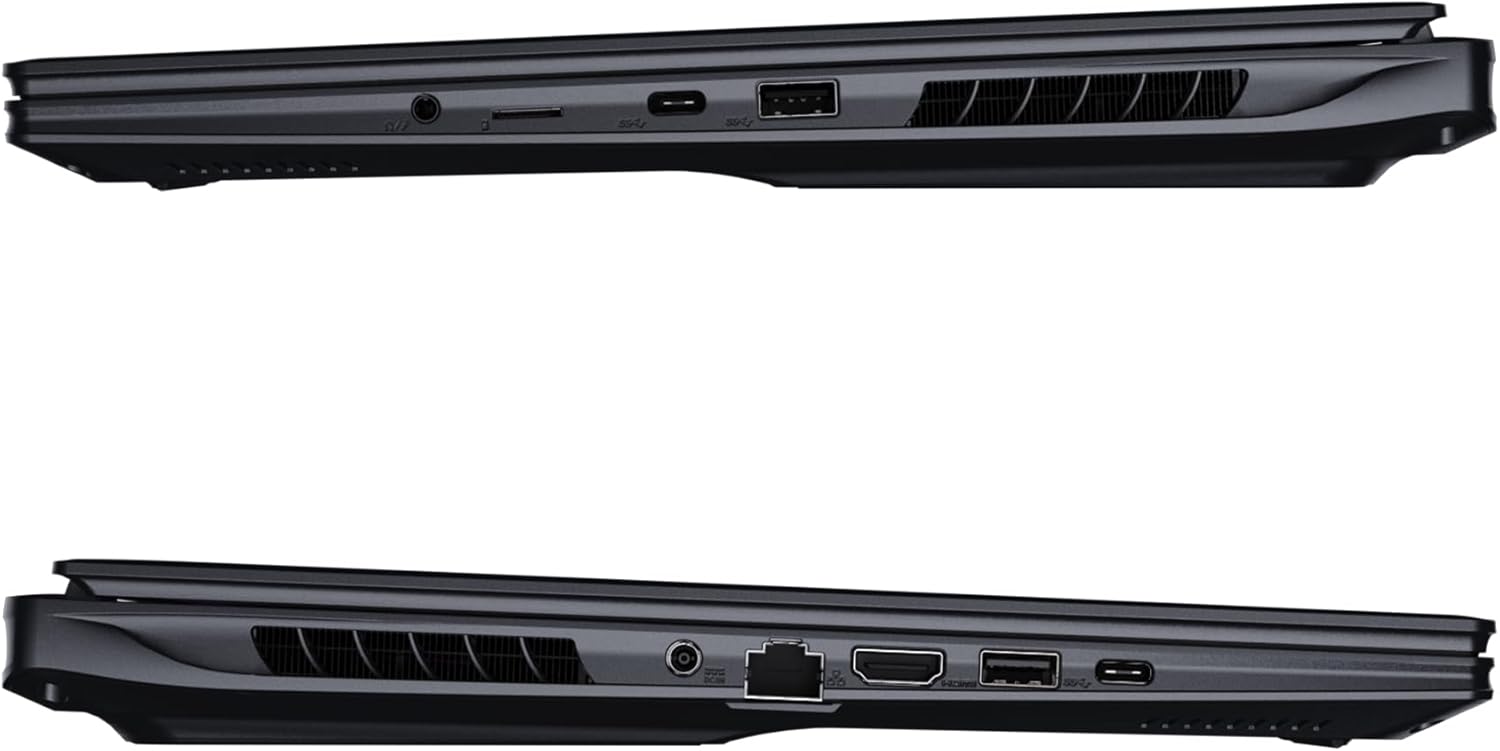
Irudia: Albokoa view of the laptop illustrating the available ports for connectivity.
- USB atakak: Konektatu USB gailuak, hala nola saguak, teklatuak edo kanpoko biltegiratzea.
- HDMI ataka: Connect to an external display or TV.
- Thunderbolt 4 ataka: For high-speed data transfer and display output.
- Ethernet ataka: Kable bidezko sare konexiorako.
- Aurikularrak Jack: Audio irteera entzungailuetara edo kanpoko bozgorailuetara bidaltzeko.
- Wi-Fi 7: Connect to wireless networks via the integrated Wi-Fi 7 module.
- Bluetooth 5.4: Bluetooth gaitutako gailuekin parekatu.
3. Zure ordenagailu eramangarria erabiltzea
3.1 Bistaratzeko Ezaugarriak
Your AORUS Elite 16 BWH features a 16-inch WQXGA (2560x1600) IPS display with a 165Hz refresh rate and 16:10 aspect ratio, offering a wide viewing experience. It supports Dolby Vision for enhanced visual quality and is Pantone validated for color accuracy.

Image: The laptop's 16:10 aspect ratio display, highlighting its IPS panel and Pantone validation.
3.2 Teklatua eta ukipen-panela
The laptop is equipped with a backlit keyboard for comfortable typing in various lighting conditions and a responsive touchpad for navigation.
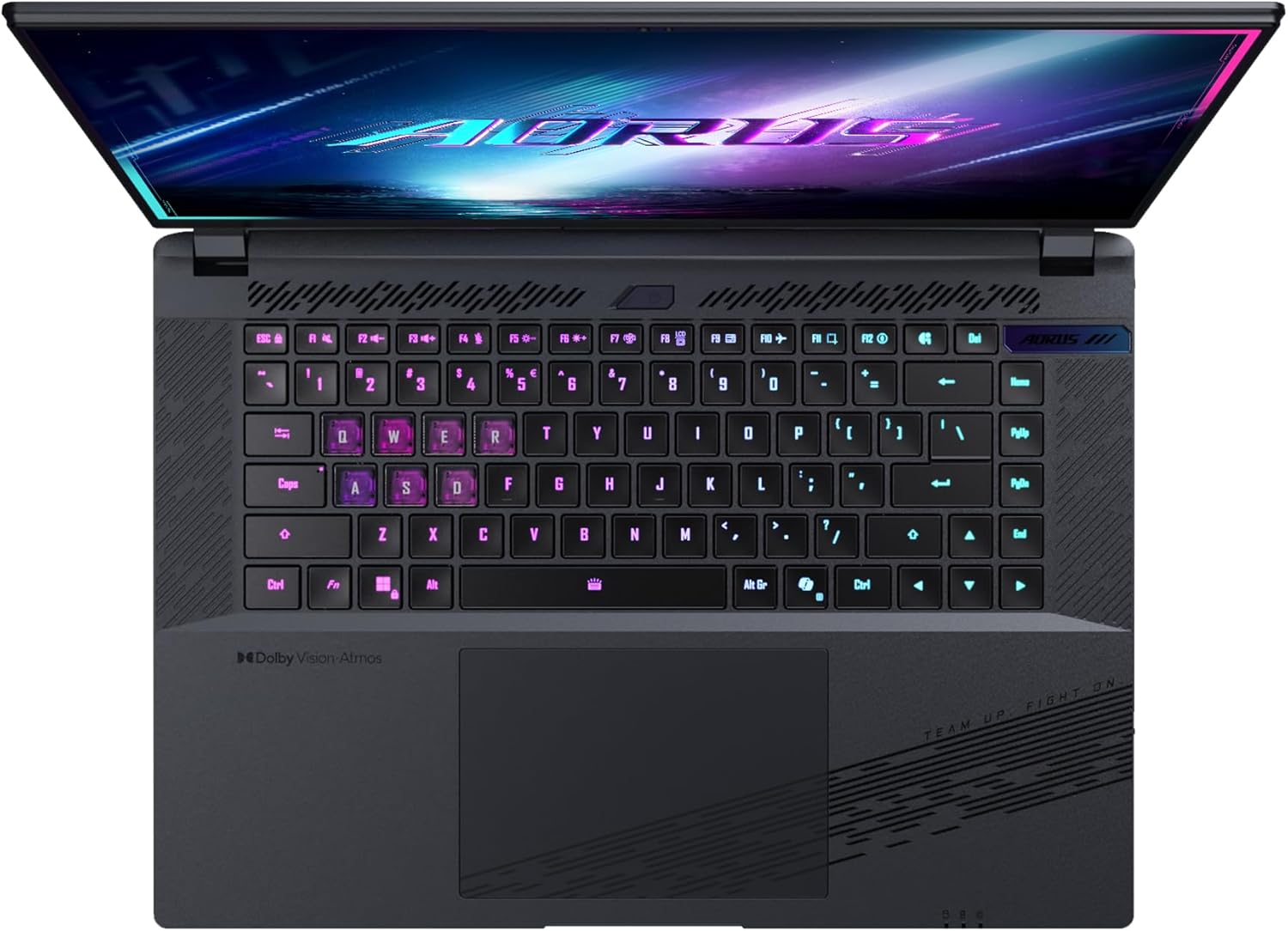
Irudia: Goitik behera view ordenagailu eramangarriaren teklatuaren erakustaldiaasing its backlit keys.
The keyboard also features a dedicated Copilot Key for quick access to AI functionalities in Windows 11.

Image: Close-up of the keyboard, highlighting the Copilot Key for AI features.
3.3 Audio-sistema
Experience immersive audio with Dolby Atmos support and integrated 2W speakers. The laptop also includes a built-in microphone for communication.

Image: Visual representation of Dolby Atmos and Dolby Vision audio and visual enhancements.
3.4 Errendimenduaren Ezaugarriak
The AORUS Elite 16 BWH is powered by an Intel Core Ultra 9 processor with an integrated NPU for AI acceleration and an NVIDIA GeForce RTX 5070 laptop GPU, ensuring high performance for gaming and demanding tasks. It also features Advanced Optimus with DDS Technology for optimized graphics performance.

Irudia: Xehetasun zehatza view of the Intel Core Ultra 9 processor chip.
Irudia: Xehetasun zehatza view of the NVIDIA GeForce RTX 50 Series laptop GPU chip.
3.5 GiMATE AI Agent
Utilize GiMATE, your personal AI agent, to optimize performance, manage smart cooling, enhance privacy, control power settings, and improve audio and voice functionalities.

Image: GiMATE AI Agent interface showing various optimization features.
4. Mantentzea
4.1 Hozte-sistema
The laptop features the WINDFORCE Infinity cooling system to maintain optimal temperatures during intensive use. Ensure the vents are clear of obstructions to allow proper airflow.

Image: Representation of the WINDFORCE Infinity cooling system.
4.2 Garbiketa
Use a soft, lint-free cloth to clean the screen and exterior surfaces. For stubborn marks, dampen the cloth slightly with water or a screen-cleaning solution. Avoid harsh chemicals.
4.3 Bateria zaintzea
Bateriaren iraupena luzatzeko, saihestu tenperatura altuenak eta ez utzi ordenagailu eramangarria denbora luzez guztiz kargatuta edo deskargatuta.
4.4 Software eguneraketak
Regularly update your Windows operating system, drivers, and GIGABYTE software to ensure optimal performance and security.
5. Arazoak
5.1 Energia arazoak
- Ordenagailu eramangarria ez da pizten: Ziurtatu korronte-egokitzailea ondo konektatuta dagoela eta entxufea funtzionatzen duela. Egiaztatu bateriaren karga-maila.
- Bateria ez da kargatzen: Egiaztatu korronte-egokigailua eta kablea ez daudela kaltetuta. Saiatu beste entxufe batekin.
5.2 Bistaratzeko arazoak
- Ez dago pantailarik: Connect an external monitor to check if the issue is with the laptop's screen. Ensure the laptop is powered on.
- Pantaila keinuka edo desitxuratuta: Eguneratu grafikoen kontrolatzaileak. Egiaztatu pantailaren kableen konexioak kanpoko monitore bat erabiltzen baduzu.
5.3 Konexio arazoak
- Wi-Fia ez da konektatzen: Egiaztatu Wi-Fi gaituta dagoen Windows ezarpenetan. Berrabiarazi zure bideratzailea eta ordenagailu eramangarria.
- Bluetooth gailua ez da parekatzen: Ensure the device is in pairing mode and within range. Update Bluetooth drivers.
5.4 Errendimendu Orokorreko Arazoak
- Errendimendu motela: Close unnecessary applications. Check for malware. Ensure sufficient free disk space.
- Gehiegizko berotzea: Ensure cooling vents are clear. Use the laptop on a hard, flat surface.
For more complex issues, refer to the GIGABYTE support webwebgunean edo jarri harremanetan bezeroarentzako zerbitzuarekin.
6. Zehaztapenak
| Ezaugarri | Xehetasuna |
|---|---|
| Marka | GIGABYTE |
| Ereduaren izena | AORUS ELITE 16 BWHC3FRC65SP |
| Pantailaren tamaina | 16 hazbete |
| Kolorea | Grisa |
| Disko gogorraren tamaina | 2000 GB (2x 1TB SSD Gen4) |
| CPU eredua | Intel Core Ultra 9 275HX |
| Instalatutako RAM tamaina | 32 GB DDR5 |
| Sistema eragilea | Windows 11 Pro |
| Ezaugarri Berezia | Backlit Keyboard, Memory Card Slot |
| Txartel grafikoaren deskribapena | Dedikatua |
| Koprozesadore grafikoa | NVIDIA GeForce RTX 5070 |
| Disko gogorraren teknologia | SSD |
| Elementuaren pisua | 2300 gramo |
| Webcam Capability | Yes (Frontal) |
| Txartel grafikoaren RAM tamaina | 8 GB GDDR6 |
| Onartutako gehienezko RAMa | 64 GB |
| Bateriaren energia-edukia | 99 Watt-hours (Lithium-polymer, 4 cells) |
| Konektibitatea | Bluetooth 5.4, Ethernet (10/1000 Mbit/s), HDMI (1 port), Thunderbolt 4 (1 port), USB 3.2 Gen 2 (2 ports), Wi-Fi 7 (802.11.be) |
| Prozesadorearen Abiadura | 2.7 GHz (Max 5.4 GHz) |
| Prozesadore kopurua | 24 |
| Pantailaren bereizmena | 2560 x 1600 pixel (WQXGA) |
| Bistaratzeko mota | IPS LCD |
| Audio Ezaugarriak | Dolby Atmos, 2x 2W Integrated Speakers, Integrated Microphone |
7. Bermearen informazioa
Your GIGABYTE AORUS Elite 16 BWH laptop comes with a 2 urteko berme mugatua. This warranty covers manufacturing defects and hardware malfunctions under normal use. Please retain your proof of purchase for warranty claims. For detailed terms and conditions, refer to the warranty card included with your product or visit the official GIGABYTE webgunea.
8. Laguntza
For technical assistance, driver downloads, and further product information, please visit the official GIGABYTE support webgunea. Maiz egiten diren galderak eta komunitate foroak ere aurki ditzakezu bertan.
- GIGABYTE Ofiziala Webgunea: www.gigabyte.com
- Bezeroarentzako arreta: Refer to your regional GIGABYTE webtokiko harremanetarako informazioa lortzeko gunea.