
Sarrera
The Polyend Step is a programmable 4-track drum machine pedal designed to provide rhythmic backing for musicians and guitar players. It offers a versatile and easy-to-use solution for practice, songwriting, and live performances. With a wide array of samples, customizable sequencing, and intuitive controls, the Polyend Step allows you to create unique and dynamic drum parts.
Ezaugarri nagusiak
- Programmable 4-track Drum Machine Pedal with 2,000+ Samples
- 16-step Sequencing for detailed rhythm creation
- 350 Rhythms to choose from across various genres
- Stereo I/O for flexible connectivity
- 200+ Kits for diverse sound palettes
Konfigurazio Gida
Follow these steps to set up your Polyend Step Drum Machine Pedal:
- Potentzia-konexioa: Connect a 9V 200mA center-negative power supply to the power input port on the pedal.
- Sarrerako konexioa: Connect your instrument (e.g., guitar) to the L (MONO) or R 1/4" input jacks. For mono signals, use the L (MONO) input.
- Irteerako konexioa: Connect the L (MONO) or R 1/4" output jacks to your amplifier, audio interface, or mixer. For mono output, use the L (MONO) output.
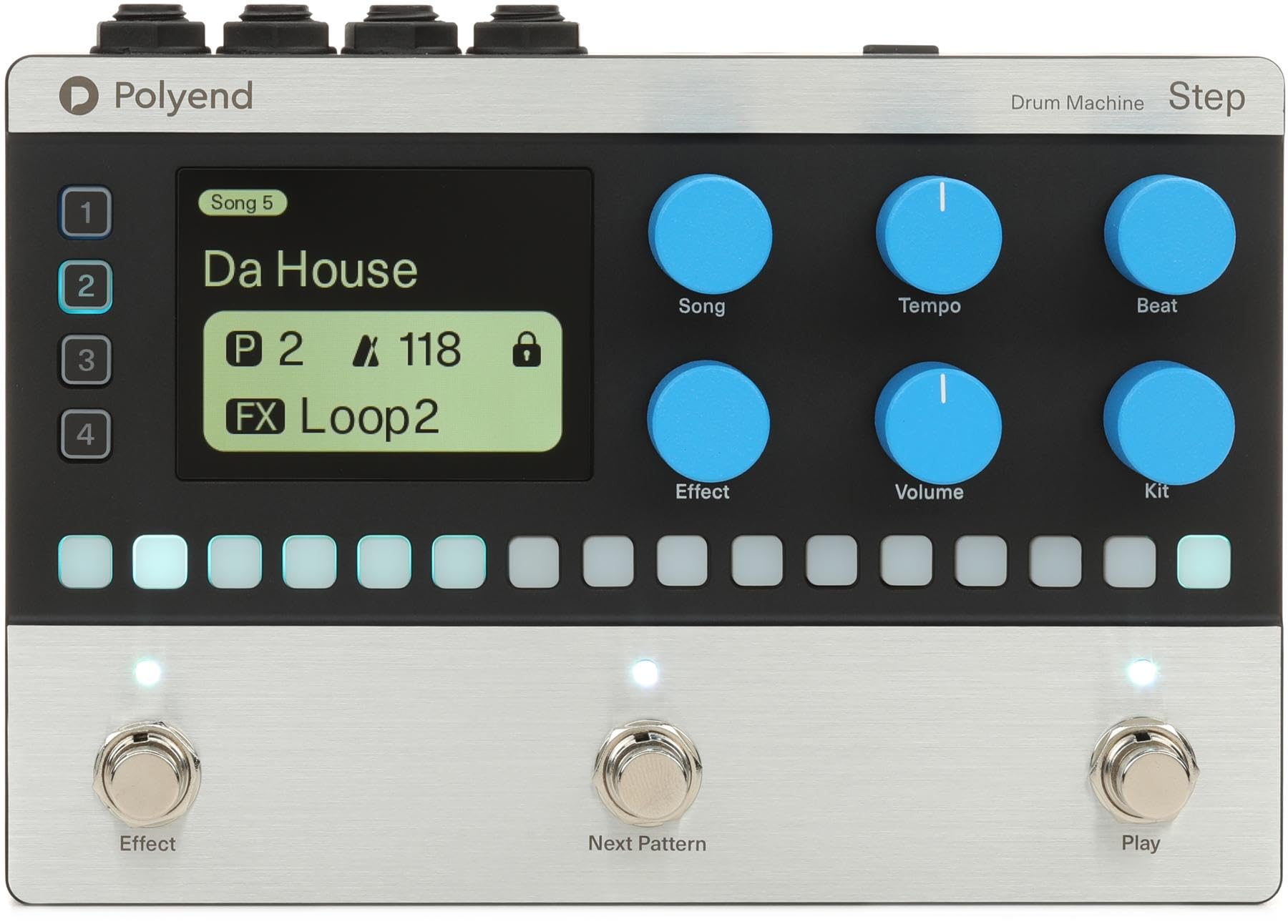
Funtzionamendu-argibideak
Kontrolak amaitu diraview
- Bistaratzeko pantaila: Shows current style, tempo, BPM, and other functional status information.
- GROUP/SAVE Knob: Switches to the group page, toggles parameters, adjusts values, and enters the slot save interface when held. In Tap Tempo mode, it adjusts BPM.
- SETTING/VOLUME Knob: Switches to the setting page, toggles parameters, adjusts values, and enters/exits global settings when held. It also adjusts the drum machine volume.
- FILL/TAP Footswitch (Left): Activates the fill function with a single tap. Enters Tap Tempo mode when held, allowing you to adjust playback speed by tapping.
- STOP/PLAY Footswitch (Right): Starts or stops drum machine playback.
Oinarrizko Funtzionamendua
- Erreprodukzioa hasten: Tap the STOP/PLAY footswitch (right) to begin playing the selected drum pattern. The LED will flash red and blue at the current BPM.
- Erreprodukzioa gelditzea: Tap the STOP/PLAY footswitch (right) again to stop playback. The LED will flash white.
- Activating Fill: During playback, tap the FILL/TAP footswitch (left) to activate a drum fill.
- Adjusting Tempo (Tap Tempo): Hold the FILL/TAP footswitch (left) for one second to enter Tap Tempo mode. Tap the footswitch repeatedly to set the desired BPM. The LED will flash according to the new BPM.
- Changing Rhythm Patterns: Use the GROUP/SAVE knob to navigate through different rhythm patterns and banks. Turn the knob to select a new pattern.
- Bolumena doitzea: Use the SETTING/VOLUME knob to adjust the overall volume of the drum machine.
- Accessing Global Settings: Hold the SETTING/VOLUME knob to enter global settings, where you can adjust frequency response and other parameters.
Zehaztapenak
| Ezaugarri | Xehetasuna |
|---|---|
| Ereduaren izena | Urratsa |
| Estiloa | Modernoa |
| Konektore mota | 3.5 mm-ko Jack, 6.35 mm-ko Jack |
| Konektibitate Teknologia | MIDI, Audio Jacks |
| Energia iturria | Battery Powered (requires 9V 200mA center-negative power supply) |
| Aurikularretarako Jack | 3.5 mm-ko jaka |
| Fabrikatzailea | Poliendoa |
| Elementuaren pisua | 2.83 kilo |
| Produktuaren neurriak | 11.4 x 5.65 x 3.6 hazbete |
| ASIN | B0F4MPRD1J |
| Elementuaren eredu-zenbakia | RM |
| Gorputzaren Materiala | Metala edo plastikoa |
| Kolore izena | beltza |
| Material Mota | Metala, Plastikoa |
| Trebetasun Maila | Denak |
| Tamaina | 5.65 x 11.4 x 3.6 hazbete |
Mantentzea
- Garbiketa: Erabili zapi leun eta lehor bat pedalaren kanpoaldea garbitzeko. Saihestu garbitzaile edo disolbatzaile urratzaileak.
- Biltegiratzea: Gorde pedala leku fresko eta lehor batean, eguzki-argitik eta muturreko tenperaturetatik babestuta.
- Manipulazioa: Kontuz ibili pedalari botoiak, etengailuak eta jackak kaltetu ez daitezen.
Arazoak konpontzea
- Soinurik ez: Ensure all cables (power, input, output) are securely connected. Check the volume settings on the pedal and your connected audio equipment. Verify the power supply meets the required specifications (9V 200mA center-negative).
- Ustekabeko portaera: If the pedal behaves unexpectedly, try disconnecting and reconnecting the power supply to perform a soft reset. If issues persist, consult the manufacturer's support resources.
- Footswitch Unresponsive: Ensure the footswitches are clean and free from debris. If a footswitch is still unresponsive, contact customer support.
Bermea eta Laguntza
For warranty information, technical support, or service inquiries, please refer to the official Polyend webwebgunera edo jarri harremanetan zuzenean bezeroarentzako arreta-zerbitzura. Gorde erosketaren frogagiria berme-erreklamazioetarako.