
1. Sarrera
Eskerrik asko erosketagatik.asing the JVC XS-N1154B Bluetooth Speaker. This manual provides essential information for the safe and efficient operation of your device. Please read it thoroughly before use and retain it for future reference.
2. Segurtasun informazioa
- Ez jarri bozgorailua tenperatura altuen, eguzki-argiaren eraginpean edo hezetasun handiaren eraginpean.
- Saihestu bozgorailua kolpe gogorrak erortzea edo jasaten.
- Ez saiatu bozgorailua desmuntatzen edo aldatzen. Horrek bermea baliogabetuko du.
- Keep the speaker away from water and liquids, despite its waterproof rating, to prevent damage to internal components.
- Erabili zehaztutako kargatzeko kablea eta korronte egokitzailea soilik.
- Garbitu bozgorailua zapi leun eta lehor batekin. Ez erabili garbitzaile edo disolbatzaile urratzailerik.
3. Paketearen edukia
Ziurtatu elementu guztiak paketean daudela:
- JVC XS-N1154B Bluetooth Speaker
- Kargatzeko kablea
- Erabiltzailearen eskuliburua
- Urruneko kontrola (barne badago)
4. Produktua amaitu daview
Ezagutu bozgorailuen osagaiak eta kontrolak.
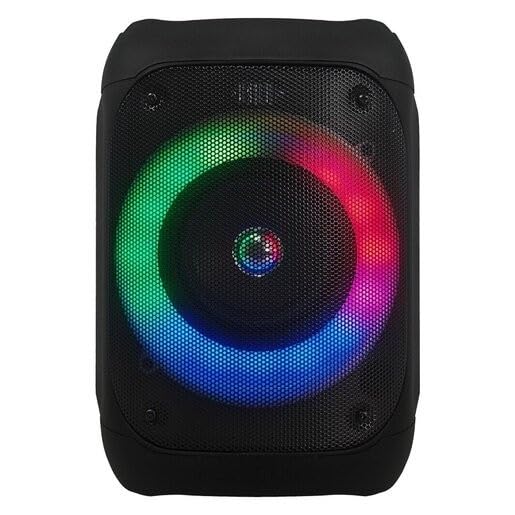
1. irudia: Aurrealdea view of the JVC XS-N1154B Bluetooth Speaker, showcasing the speaker grille and integrated music-activated LED lights.
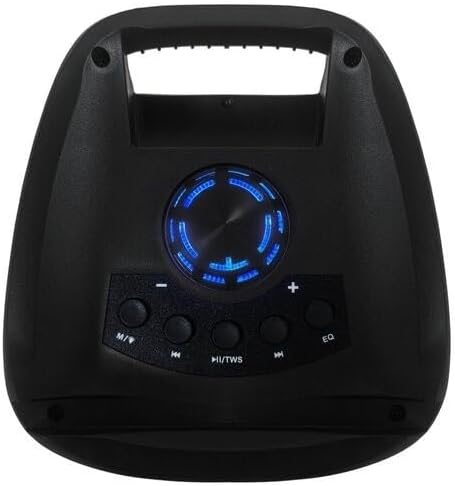
2. irudia: Goiena view of the JVC XS-N1154B Bluetooth Speaker, displaying the control panel with various buttons and the volume knob.
Kontrol panelaren funtzioak:
- Pizteko botoia: Bozgorailua pizten edo itzaltzen du.
- Modu (M) botoia: Switches between Bluetooth, USB, SD Card, and FM Radio modes.
- Play/Pause (►||) / TWS Button: Plays or pauses audio. Long press for TWS (True Wireless Stereo) pairing.
- Previous Track (◀◀) Button: Skips to the previous track or tunes down in FM mode.
- Next Track (►►) Button: Skips to the next track or tunes up in FM mode.
- EQ botoia: Berdinketa-aurrezarpenen artean txandakatzen da.
- Bolumen-eskulekua: Rotates to adjust the volume level.
5. Konfigurazioa
5.1 Bozgorailua kargatzea
- Konektatu kargatzeko kablea bozgorailuaren kargatzeko atakara.
- Konektatu kablearen beste muturra USB elikatze-egokitzaile egoki batera (ez dago barne) edo USB ataka elikagarri batera.
- Kargatzeko adierazlearen argia piztuko da, normalean gorriz, kargatzen ari den bitartean.
- Once fully charged, the indicator light may change color (e.g., turn off or turn blue/green). Disconnect the speaker from the power source.
5.2 Piztu/Itzaltzea
- Pizteko: Press and hold the Power button until the speaker powers on and you hear an audible prompt.
- Itzaltzeko: Sakatu eta eutsi berriro pizteko botoiari bozgorailua itzali arte.
6. Funtzionamendu-argibideak
6.1 Bluetooth parekatzea
- Ensure the speaker is powered on and in Bluetooth mode. If not, press the Mode (M) button to switch to Bluetooth mode. The speaker will indicate it is ready for pairing (e.g., a blinking LED or audible prompt).
- Zure gailu mugikorrean (smartphone-a, tableta, ordenagailu eramangarria), gaitu Bluetooth-a eta bilatu eskuragarri dauden gailuak.
- Select "JVC XS-N1154B" from the list of devices.
- Once paired, the speaker will provide an audible confirmation, and the Bluetooth indicator light will become solid.
- Orain zure gailuko audioa bozgorailuaren bidez erreproduzitu dezakezu.
6.2 USB/SD txartelaren erreprodukzioa
- Insert a USB flash drive or an SD card (with supported audio files) into the corresponding port on the speaker.
- The speaker will automatically switch to USB or SD card mode and begin playing audio. If not, press the Mode (M) button to select the correct input.
- Use the Previous Track (◀◀), Next Track (►►), and Play/Pause (►||) buttons to control playback.
6.3 FM irratiaren funtzionamendua
- Sakatu Modua (M) botoia FM irrati modura aldatzeko.
- To auto-scan and save available stations, press and hold the Play/Pause (►||) button. The speaker will scan and store stations automatically.
- Use the Previous Track (◀◀) and Next Track (►►) buttons to navigate between saved FM stations.
6.4 LED argi-modu
The speaker features music-activated LED lights. These lights typically synchronize with the audio playback. There may be an additional button or a combination of buttons to cycle through different light modes or to turn them off. Refer to the remote control section for specific controls if available.
6.5 Bolumen kontrola
Rotate the Volume Knob on the top panel clockwise to increase volume and counter-clockwise to decrease volume.
6.6 Urruneko kontrolaren erabilera
If your package includes a remote control, it provides convenient access to various functions:
- Potentzia: Piztu/Desaktibatu
- Modua: Switch input sources (Bluetooth, USB, SD, FM)
- +/- bolumena: Egokitu bolumena
- Erreproduzitu/Pausatu: Kontrolatu erreprodukzioa
- Aurrekoa/Hurrengoa: Skip tracks/stations
- EQ: Change equalizer presets
- LEDa: Control LED light modes (if applicable)
7. Mantentzea
7.1 Garbiketa
Wipe the speaker's exterior with a soft, dry, lint-free cloth. Do not use liquid cleaners, sprays, or solvents, as these may damage the finish or internal components. Ensure all ports are dry before use, especially given its waterproof nature.
7.2 Biltegiratzea
When not in use for extended periods, store the speaker in a cool, dry place, away from direct sunlight and extreme temperatures. It is recommended to charge the battery periodically to maintain its lifespan.
8. Arazoak
| Arazoa | Kausa posiblea | Irtenbidea |
|---|---|---|
| Bozgorailuak ez du pizten. | Bateria agortuta dago. | Kargatu bozgorailua guztiz. |
| Soinurik ez. | Volume is too low or muted. Device not paired correctly. | Increase volume. Re-pair Bluetooth device. Check audio source. |
| Bluetooth parekatzeak huts egiten du. | Bozgorailua ez dago parekatze moduan. Gailua urrunegi dago. Interferentziak. | Ensure speaker is in Bluetooth pairing mode. Move device closer. Turn off other Bluetooth devices. |
| USB/SD txartela ez da erreproduzitzen. | Okerra file formatua. Txartela/unitatea ez dago behar bezala sartuta. | Ziurtatu audioa files are in a supported format. Reinsert the USB drive/SD card. Press Mode button to select correct input. |
| FM irratiaren harrera eskasa da. | Seinale ahula. | Mugitu bozgorailua harrera hobea duen leku batera. |
9. Zehaztapenak
- Eredua: XS-N1154B
- Marka: JVC
- Konektibitatea: Bluetooth, USB, SD txartela
- Irratia: FM irrati digitala
- Potentzia irteera: 4 Watt
- Audio irteera modua: Estereoa
- Kontrol-metodoa: Urrunekoa
- Materiala: Plastikoa
- Iragazgaitza: Bai
- Energia iturria: Bateriaren bidez
- Neurriak: Gutxi gorabehera 18.6S x 18.9Z x 25.5A cm
- Pisua: 1.2 kg inguru
- Gailu bateragarriak: Ordenagailu eramangarria, Smartphone
10. Bermea eta Laguntza
10.1 Bermearen informazioa
This JVC XS-N1154B Bluetooth Speaker comes with a 1 Urteko Bermea erosketa-datatik aurrera. Berme honek fabrikazio-akatsak eta eskulanaren funtzionamendua estaltzen ditu erabilera normalaren pean. Ez ditu estaltzen erabilera okerrak, istripuek, baimenik gabeko aldaketek edo higadura normalak eragindako kalteak.
10.2 Bezeroarentzako laguntza
For technical assistance, warranty claims, or further inquiries, please contact JVC customer support through their official website or the retailer where the product was purchased. Please have your product model number (XS-N1154B) and proof of purchase ready when contacting support.