1. Sarrera
Eskerrik asko erosketagatik.asing the iFFALCON 40S55T 40-inch Full HD Google TV. This manual provides essential information for the safe and efficient use of your television. Please read it thoroughly before operating the device and retain it for future reference.
The iFFALCON 40S55T is a tunerless smart TV designed for streaming content, offering a Full HD display, Google TV operating system, Chromecast built-in, and Dolby Audio for an immersive entertainment experience.
2. Segurtasun informazioa
Jarraitu beti oinarrizko segurtasun neurriak telebista hau erabiltzean sute, deskarga elektriko eta lesio arriskua murrizteko.
- Ez jarri telebista euri edo hezetasunera.
- Ez ireki telebistaren c.asing; bidali mantentze-lan guztiak langile kualifikatuen esku.
- Ziurtatu aireztapen egokia telebistaren inguruan.
- Mantendu telebista eguzki-argitik, bero-iturrietatik eta eremu magnetiko indartsuetatik urrun.
- Use only the power cord and accessories supplied by the manufacturer.
- Deskonektatu telebista tximista-ekaitzetan edo denbora luzez erabili gabe dagoenean.
3. Paketearen edukia
Egiaztatu elementu guztiak kutxan daudela:
- iFFALCON 40S55T 40-inch Full HD Google TV
- Urruneko Kontrola
- Telebista-euskarria (2 pieza)
- Telebista-euskarrirako torlojuak
- Elikatze-kablea
- Berme Txartela
- Argibide eskuliburua (dokumentu hau)
4. Konfigurazioa
4.1 Telebistaren euskarria muntatzea
- Kontu handiz jarri telebista aurpegia behera gainazal bigun eta lau batean, pantaila kaltetu ez dadin.
- Lerrokatu euskarri pieza bakoitza telebistaren behealdeko zirrikituekin.
- Lotu euskarriak emandako torlojuak erabiliz. Ziurtatu ondo estututa daudela.
4.2 Potentzia konektatzea
Konektatu elikatze-kablea telebistaren elikatze-sarrerara eta gero entxufe batera. Telebista itxarote-moduan sartuko da.
4.3 Initial Setup (Google TV & Network)
Lehen aldiz piztean, telebistak Google TV-ren hasierako konfigurazio prozesuan gidatuko zaitu. Honek honako hauek barne hartzen ditu:
- Hizkuntza hautatzea.
- Wi-Fi sare batera konektatzen.
- Signing in with your Google account to access personalized content and apps.
- Baldintzak eta zehaztapenak onartzea.
4.4 Konektibitatea
The iFFALCON 40S55T offers various connection options for external devices.

Irudia: Gainetikview of the TV's connectivity options, including HDMI, USB, Bluetooth, and Wi-Fi.
- HDMI atakak: Konektatu kanpoko gailuak, hala nola joko-kontsolak, Blu-ray erreproduzitzaileak edo set-top kutxak.
- USB ataka: USB biltegiratze gailuak konektatzeko multimedia erreproduzitzeko files.
- Wi-Fi: For wireless internet connection to access streaming services and online features.
- Bluetootha: For connecting wireless headphones, speakers, or other Bluetooth-enabled accessories.
4.5 Tunerless Operation
This TV is designed as a tunerless model, meaning it does not have a built-in tuner for terrestrial (over-the-air) broadcasts. To watch terrestrial, BS, or CS broadcasts, an external tuner is required and must be purchased separately.

Image: The iFFALCON 40S55T TV showcasing its smart features, highlighting its tunerless design and ability to enjoy internet video content without an antenna connection.
5. Telebistaren funtzionamendua
5.1 Urruneko kontrola baino gehiagoview
The remote control provides access to all TV functions, including power, volume, channel navigation, and smart TV features. It also supports voice search via 'Hey Google'.

Image: The TV remote control, featuring quick access buttons for popular streaming services and a dedicated microphone button for voice commands.
- Pizteko botoia: Telebista pizten edo itzaltzen du.
- Nabigazio botoiak: Erabili norabide-tekla eta Ados botoia menuetan nabigatzeko.
- Bolumen/Kanal botoiak: Adjust volume and change channels (if an external tuner is connected).
- Aplikazioaren lasterbideen botoiak: Direct access to popular streaming services like Netflix, YouTube, etc.
- Mikrofonoaren botoia: Press and hold to activate 'Hey Google' voice search.
5.2 Google TV-ren ezaugarriak
Your iFFALCON TV runs on Google TV, providing a personalized and integrated entertainment experience.
- Edukien agregazioa: Google TV organizes movies, shows, and live TV from all your apps and subscriptions into one place.
- Gomendio pertsonalizatuak: Zurean oinarrituta viewing history and preferences, Google AI suggests content you might enjoy.
- Ahots bilaketa: Use the 'Hey Google' feature on your remote to quickly find content, get information, or control smart home devices.
- Chromecast integratua: Easily cast content from your smartphone, tablet, or computer directly to your TV screen.

Image: A smartphone screen mirroring content to the iFFALCON TV, demonstrating the Chromecast built-in feature for enjoying mobile content on a larger display.
5.3 Irudi ezarpenak
The TV incorporates advanced image processing technologies to deliver a superior viewesperientzia.
- AI PQ Processor: TCL's proprietary AiPQ Processor intelligently adjusts image quality at the pixel level, enhancing clarity, color, and contrast for a vivid and realistic picture.
- Full HD (FHD): Experience sharp and detailed images with Full High Definition resolution, offering 200% more detail than standard HD screens.

Image: A visual comparison illustrating the enhanced detail and clarity provided by Full HD resolution compared to standard HD.
- HDR10/HLG Support: Enjoy a wider range of colors and contrast with HDR10 and HLG compatibility, revealing stunning detail in both bright and dark scenes.

Image: The TV screen showcasing the vibrant and detailed picture quality achieved with HDR10/HLG technology.
- Mikro Iluntzea: This technology analyzes the image in hundreds of separate zones to adjust brightness and darkness independently, enhancing contrast and picture quality.

Image: A visual representation of Micro Dimming technology, illustrating how it enhances contrast and picture depth by adjusting brightness in specific areas of the screen.
5.4 Sound Settings (Dolby Audio)
The TV features Dolby Audio for clear, rich, and immersive sound.
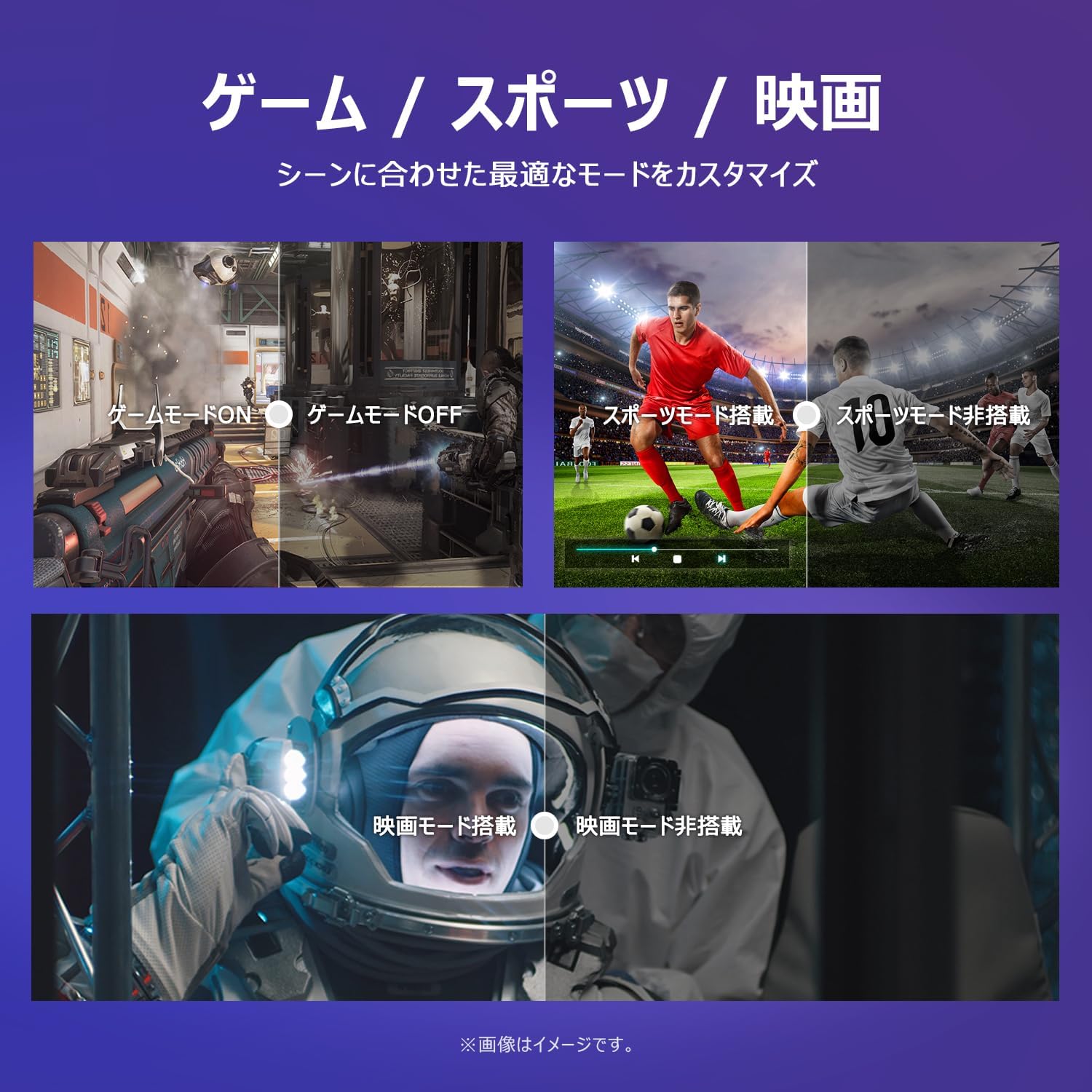
Image: The TV screen with a visual representation of sound, highlighting the immersive audio experience provided by Dolby Audio.
Access the sound settings menu to adjust modes like Standard, Music, Movie, or Custom to suit your preferences.
5.5 Joko modua
Activate Game Mode for an optimized gaming experience with reduced input lag.
Image: Visual comparisons demonstrating the optimized settings for Game Mode, Sports Mode, and Movie Mode, adapting the TV's performance to different content types.
The TV also offers dedicated Sports Mode and Movie Mode to enhance viewing for specific content types.
5.6 Sistemaren ezarpenak
The quick settings menu allows you to customize frequently used system settings and rearrange their order for intuitive and convenient access.

Irudia: A view of the TV's quick system settings interface, illustrating how users can easily access and customize various functions like brightness, picture mode, and network settings.
6. Mantentzea
Proper care and maintenance will extend the life of your television.
- Pantaila garbitzea: Garbitu pantaila astiro-astiro zapi leun eta pelusik gabeko batekin. Orban egoskorrak lortzeko, erabili telebistetarako bereziki diseinatutako pantaila-garbitzaile bat, zapiari aplikatuz, ez zuzenean pantailari.
- C garbiketaasing: Erabili zapi leun eta lehor bat telebista garbitzeko.asing. Ez erabili garbitzaile edo disolbatzaile urratzailerik.
- Aireztapena: Ziurtatu telebistaren atzealdeko aireztapen-irekidurak ez daudela blokeatuta, gehiegi berotzea saihesteko.
- Elikatze kablea: Aldian-aldian egiaztatu kable elektrikoa kaltetuta dagoen. Kaltetuta badago, jarri harremanetan bezeroarentzako arreta-zerbitzuarekin ordezkatzeko.
7. Arazoak
Telebistarekin arazoak badituzu, jo ezazu honako arazo eta irtenbide ohikoenei. Arazoak jarraitzen badu, jarri harremanetan bezeroarentzako arreta-zerbitzuarekin.
| Arazoa | Kausa posiblea | Irtenbidea |
|---|---|---|
| Botererik ez | Kable elektrikoa ez dago konektatuta; Entxufea ez dabil | Ensure power cable is securely plugged in; Test outlet with another device |
| Ez dago irudirik, baina soinua badago | Sarrera-iturri okerra; Kanpoko gailuaren arazoa | Press the 'Input' button on the remote to select the correct source; Check external device connections |
| Soinurik ez, baina irudia badago | Bolumena isilarazita edo baxuegia; Kanpoko audio sistemaren arazoa | Unmute or increase volume; Check audio cable connections to external sound system |
| Urruneko kontrola ez dabil | Bateriak agortuta; Oztopoa urrutiko agintearen eta telebistaren artean | Replace batteries; Remove any obstructions; Ensure remote is pointed at the TV's IR sensor |
| Ezin da wifira konektatu | Pasahitz okerra; Routerraren arazoa; Telebista routerretik urrunegi dago | Verify Wi-Fi password; Restart router; Move TV closer to router or use a Wi-Fi extender |
8. Zehaztapenak
Detailed technical specifications for the iFFALCON 40S55T TV:

Image: Dimensional drawing of the iFFALCON 40S55T TV, indicating its physical measurements.
| Ezaugarri | Zehaztapena |
|---|---|
| Pantailaren tamaina | 40 hazbetekoa |
| Bistaratzeko mota | VA Liquid Crystal |
| Ebazpena | Full HD (1920 x 1080) |
| Freskatze tasa | 60 Hz |
| Aspektu-erlazioa | 16:9 |
| Kontraste-erlazioa | 1000:1 |
| Sistema eragilea | Google TV |
| Audio Irteera | 20 Watts (2.1 channels) |
| HDMI atakak | 2 |
| USB atakak | 1 |
| Haririk gabeko konexioa | Wi-Fi, Bluetootha |
| Produktuaren neurriak (x x H x D) | 89.2 x 55.8 x 18.4 cm (euskarriarekin) |
| Produktuaren pisua | 4.63 kg |
| Horman muntatzeko bateragarria | Bai |
| Osagarriak barne | Stand, Remote Control, Warranty Card, Power Cable |
9. Bermea eta Laguntza
Your iFFALCON 40S55T TV comes with a manufacturer's warranty. Please refer to the included warranty card for specific terms, conditions, and duration of coverage.
For technical support, troubleshooting assistance beyond this manual, or warranty claims, please contact iFFALCON customer service. Contact information can typically be found on the warranty card or the official iFFALCON webgunea.
Please have your model number (40S55T) and purchase date ready when contacting support.