
1. Bukatu daview
The VAIO SX-R Laptop is a high-performance portable computer designed for productivity and creative tasks. It features an Intel Core Ultra 7 processor, a vibrant 14-inch WQXGA touch display, ample memory, and fast storage, all running on Windows 11 Pro.

Figure 1: VAIO SX-R Laptop, open view.
2. Produktuaren ezaugarriak
- Intel Core Ultra 7 Processor: Equipped with 16 cores and AI-enhanced performance for speed and intelligent task management.
- 14" WQXGA Touch Display (2560x1600): High-resolution screen with wide color gamut and touch capability.
- 32 GB LPDDR5 RAM: Provides superior multitasking capabilities with instant responsiveness.
- 1TB PCIe NVMe SSD: Offers massive storage with ultra-fast read/write speeds.
- Windows 11 Pro: Includes enterprise-grade security and productivity features.
- IR Camera & Fingerprint Reader: Enhanced security and convenient login options.
- Carbon Fiber Chassis: Eraikuntza arina eta iraunkorra.
- Water Resistant Keyboard: Designed to withstand accidental spills.

Figure 2: Key features of the VAIO SX-R Laptop.
3. Gainbehera fisikoaview
3.1 Portuak eta konektoreak
The VAIO SX-R Laptop is equipped with a variety of ports for connectivity. Refer to the diagram below for port locations and types.
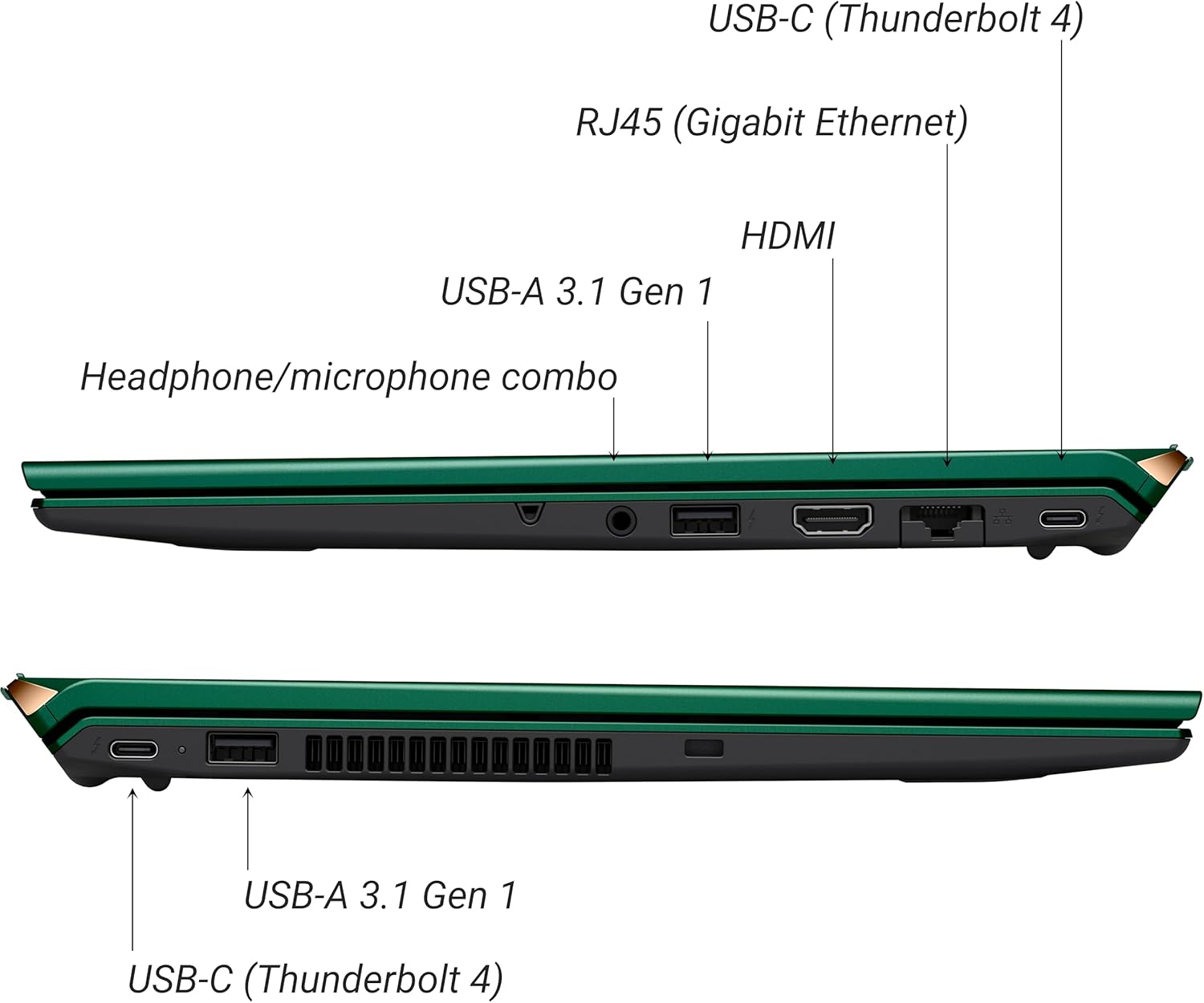
3. irudia: Aldea view of VAIO SX-R Laptop ports.
- USB-C (Thunderbolt 4): High-speed data transfer, video output, and power delivery.
- RJ45 (Gigabit Ethernet): Sare kable bidezko konexioetarako.
- HDMI: Kanpoko pantailetara konektatzeko.
- USB-A 3.1 1. belaunaldia: USB gailuak konektatzeko.
- Entzungailuen/mikrofonoaren konbinazio-jacka: Audio sarrera eta irteerarako.
3.2 Teklatua eta ukipen-panela
The laptop features a full-sized keyboard and a responsive touchpad for navigation and input.

4. irudia: Teklatuaren eta ukipen-panelen diseinua.
4. Konfigurazioa
4.1 Hasierako piztea
- Unpack the VAIO SX-R laptop and all accessories.
- Konektatu korronte-egokitzailea ordenagailu eramangarriaren kargatzeko atakara eta gero entxufe batera.
- Open the laptop lid. The system may power on automatically or you may need to press the power button located on the top right of the keyboard.
- Jarraitu pantailan agertzen diren argibideei Windows 11 Pro konfigurazioa osatzeko, hizkuntza, eskualdea, sareko konexioa eta erabiltzaile-kontua sortzea barne.
4.2 Sare batera konektatzea
- Wi-Fi: During initial setup or via Windows settings, select your preferred Wi-Fi network and enter the password. The VAIO SX-R supports Wi-Fi 7 for fast and stable wireless connectivity.
- Kable bidez (Ethernet): Konektatu Ethernet kable bat zure routerretik edo modemetik ordenagailu eramangarriaren RJ45 atakara.
5. Funtzionamendu-argibideak
5.1 Piztu/Itzali eta lo egin
- Piztu: Ireki tapa edo sakatu pizteko botoia.
- Itzali: Egin klik Hasi botoian, eta ondoren Pizteko > Itzali aukeran.
- Lo egin: Itxi tapa edo egin klik Hasi botoian, eta ondoren Pizteko > Lo egiteko.
5.2 Using the Touch Display
The 14-inch WQXGA display supports touch input. You can interact with the screen using gestures similar to a tablet or smartphone.
5.3 IR Camera and Fingerprint Reader
For enhanced security and convenience, the laptop includes an IR camera for Windows Hello face recognition and a fingerprint reader.
- Windows Hello Face Recognition: Configure this feature in Windows Settings > Accounts > Sign-in options. The IR camera will recognize your face to unlock the device.
- Hatz-marken irakurgailua: Set up your fingerprint in Windows Settings > Accounts > Sign-in options for quick and secure access.
6. Mantentzea
6.1 Arreta orokorra
- Keep the laptop in a clean, dry environment.
- Saihestu ordenagailu eramangarria muturreko tenperaturetara edo eguzki-argitara zuzenean jartzea.
- Ez jarri objektu astunak ordenagailu eramangarriaren gainean.
6.2 Garbiketa
- Erabili zapi leun eta lihorik gabeko bat pantaila eta kanpoaldea garbitzeko.
- Orban egoskorretarako, arinki garbituampGarbitu oihalak urarekin edo pantaila garbitzeko soluzio batekin.
- Do not spray cleaners directly onto the laptop.
6.3 Bateria zaintzea
- Bateriaren iraupena luzatzeko, saihestu bateria maiz erabat deskargatzea.
- Denbora luzez erabiltzen ez baduzu, gorde ordenagailu eramangarria karga partzialarekin (% 50 inguru).
7. Arazoak
7.1 Energia arazoak
- Ordenagailu eramangarria ez da pizten: Ziurtatu korronte-egokitzailea ondo konektatuta dagoela eta entxufea funtzionatzen duela. Saiatu beste entxufe batekin.
- Bateria ez da kargatzen: Egiaztatu korronte-egokitzailea eta kablea kaltetuta dauden. Ziurtatu kargatzeko ataka garbi dagoela.
7.2 Bistaratzeko arazoak
- Ez dago pantailarik: Konektatu kanpoko monitore bat arazoa ordenagailu eramangarriaren barneko pantailan dagoen egiaztatzeko.
- Ukipen-pantailak ez du erantzuten: Restart the laptop. Ensure display drivers are up to date.
7.3 Konexio arazoak
- Ez dago Wi-Fi konexiorik: Check if Wi-Fi is enabled in Windows settings. Restart your router. Update wireless drivers.
- Bluetooth-ak ez du funtzionatzen: Ensure Bluetooth is enabled and your device is discoverable.
8. Zehaztapenak
| Ezaugarri | Xehetasuna |
|---|---|
| Ereduaren izena | VAIO SX-R (VJS4R1X0811G) |
| Prozesadorea | Intel Core Ultra 7 (16-Core, AI-Boosted) |
| Sistema eragilea | Windows 11 Pro |
| Bistaratzea | 14 Inches WQXGA Touch (2560x1600) |
| RAM | 32 GB LPDDR5 |
| Biltegiratzea | 1 TB PCIe NVMe SSD |
| Grafikoak | Intel Arc grafiko integratuak |
| Haririk gabeko konexioa | 802.11ax (Wi-Fi 7), Bluetooth |
| Portuak | USB-C (Thunderbolt 4) x2, USB-A 3.1 Gen 1 x3, HDMI x1, RJ45 (Gigabit Ethernet) x1, Headphone/microphone combo x1 |
| Kamera | IR Camera (Windows Hello compatible) |
| Segurtasun Ezaugarriak | Fingerprint Reader, IR Camera |
| Bateriaren iraupena | Up to 10 Hours (Average) |
| Pisua | 3.1 kilo |
| Neurriak (LxWxH) | 14.2 x 15 x 3.3 hazbete |
9. Durability and Testing
VAIO laptops are engineered with Japanese precision and undergo rigorous quality control to ensure reliability and performance. This includes various tests to withstand daily use.
9.1 Manufacturing and Quality Assurance
Video 1: VAIO Manufacturing and Durability Testing. This video demonstrates the quality control processes and durability tests performed on VAIO laptops, including keystroke testing, dust testing, LCD screen pressure testing, and opening/closure testing.
9.2 Key Durability Features
- Water Resistant Keyboard: The keyboard is designed to resist damage from accidental liquid spills.
- Screen Durability: The display undergoes pressure testing to ensure resilience.
- Jaitsiera proba: The laptop is tested to withstand drops from up to 3 feet.

Figure 5: Water resistant keyboard testing.

Figure 6: Screen durability test in progress.

Figure 7: 3-foot drop test for VAIO laptops.
10. Bermea eta Laguntza
Your VAIO SX-R Laptop comes with a standard manufacturer's warranty. For specific warranty terms and conditions, please refer to the documentation included with your product or visit the official VAIO support webgunea.
For technical support, troubleshooting assistance, or service requests, please contact VAIO customer support. Information regarding support channels can be found on the VAIO webgunean edo zure produktuaren ontzian.
Protection plans are available for purchase to extend coverage beyond the standard warranty. Options include 2-Year and 4-Year Protection Plans, as well as a Complete Protect + Norton 360 monthly plan.