
1. Sarrera
Welcome to the user manual for your new Nubia Flip 5G smartphone. This guide provides essential information to help you set up, operate, and maintain your device. The Nubia Flip 5G combines a compact, foldable design with advanced features, including a dual AMOLED display, a versatile external screen, and AI-powered functionalities.
Key features of your Nubia Flip 5G include:
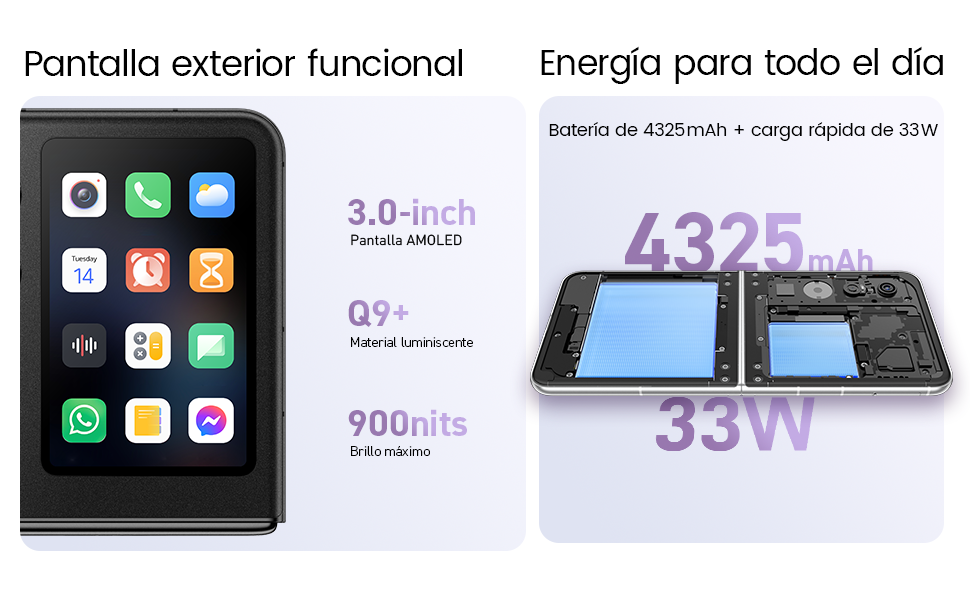
- Dual AMOLED Displays: Enjoy a fluid 120 Hz refresh rate on both the 6.9-inch internal display and the 3-inch external display.
- Fully Functional External Display: Access 100% of your applications directly from the external screen without unfolding the phone.
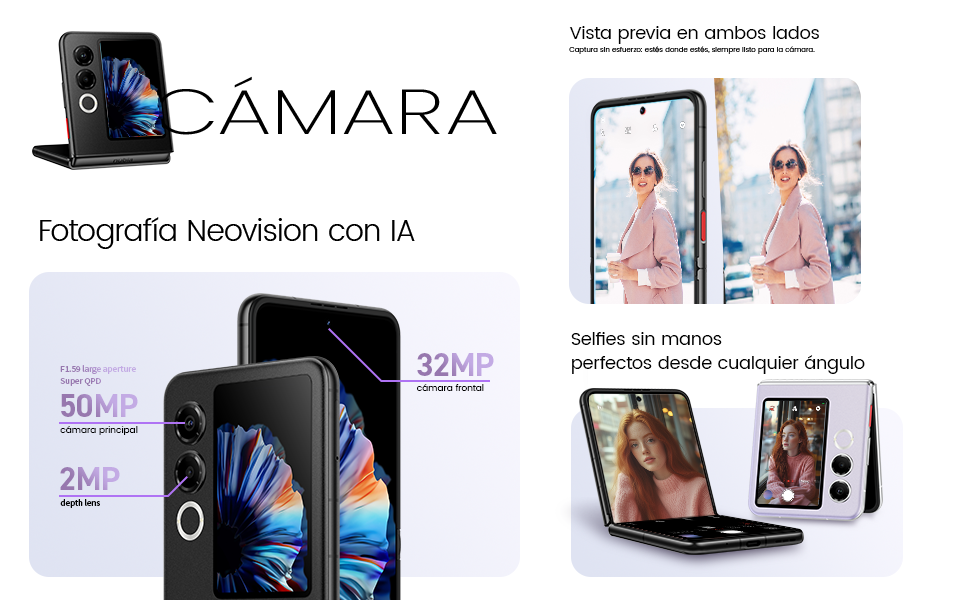
- Kamera Sistema Aurreratua: Capture high-quality photos with the 50 MP main camera, supported by AI features and 4K stabilized video recording. Utilize the external screen for high-resolution selfies.
- AI-Powered Enhancements: Benefit from features like AI Magic Photos for editing and live translation for voice calls.
- Iraupen luzeko bateria: Equipped with a 4325 mAh battery and 33W fast charging, allowing 50% charge in under 20 minutes.
2. Konfigurazioa
2.1. Unboxing eta Hasierako Ikuskapena
Kontu handiz atera elementu guztiak paketetik. Ziurtatu osagai hauek daudela:
- Nubia Flip 5G telefonoa
- USB kablea
- Telefono-zorroa
- Babes Filma
Inspect the device for any visible damage. If any components are missing or damaged, contact customer support.
2.2. SIM txartela sartzea
- Itzali gailua.
- Aurkitu SIM txartelaren erretilua telefonoaren alboan.
- Use the SIM ejector tool (not included, typically found with your SIM card) to open the tray.
- Jarri Nano-SIM txartela(k) erretiluan, urrezko kontaktuak behera begira dituela. Gailu honek SIM bikoitza onartzen du.
- Kontu handiz sartu berriro erretilua telefonoan.
2.3. Piztea eta hasierako konfigurazioa
- Press and hold the Power button until the Nubia logo appears.
- Jarraitu pantailan agertzen diren argibideei hizkuntza hautatzeko, Wi-Fi sare batera konektatzeko eta zure Google kontua konfiguratzeko.
- Segurtasun-funtzioak konfiguratzen lagunduko dizute, hala nola hatz-marken bidezko desblokeoa eta aurpegiaren ezagutza.
3. Gailuaren funtzionamendua
3.1. Understanding the Dual Display

Your Nubia Flip 5G features two displays: a large 6.9-inch internal foldable AMOLED screen and a compact 3-inch external AMOLED screen. Both screens offer a smooth 120 Hz refresh rate for an enhanced visual experience.
- Internal Display: Ideal for immersive content consumption, gaming, and detailed tasks.
- Kanpoko pantaila: Provides quick access to notifications, widgets, music controls, and even full applications without needing to unfold the phone. Swipe left or right to navigate through different functions.
3.2. Kameraren funtzionaltasuna

The Nubia Flip 5G is equipped with a powerful 50 MP main camera and a secondary portrait camera, enhanced with AI for superior image quality. The 32 MP front camera ensures clear video calls and selfies.
- High-Resolution Selfies: Use the external screen as a viewfinder to take selfies with the high-quality rear cameras.
- Eskurik gabeko argazkilaritza: Partially fold the phone and place it on a flat surface to capture photos and videos without needing a tripod.
- 4K Stabilized Video: Record smooth, high-definition videos with advanced stabilization.
3.3. IAren ezaugarriak
The device integrates several AI functions to enhance user experience:
- AI Magic Photos: Utilize AI for intelligent photo editing and enhancement.
- Live Call Translation: Experience real-time translation during voice calls, breaking down language barriers.
3.4. Bideoa gainetikview
Produktu ofizialaren bideo emanaldiaasing the Nubia Flip 5G's design, versatile external display, hands-free selfie capabilities, and long-lasting battery.
4. Bateria eta kargatzea

The Nubia Flip 5G is equipped with a 4325 mAh battery, designed to provide extended usage. It supports 33W fast charging, allowing you to quickly replenish the battery. A 50% charge can be achieved in less than 20 minutes.
- Use the provided USB cable and a compatible 33W charger for optimal fast charging.
- Avoid using non-certified chargers or cables to prevent damage to the device.
5. Mantentzea
Proper care ensures the longevity and optimal performance of your Nubia Flip 5G.
- Pantaila zaintzea: The foldable screen is delicate. Avoid pressing hard on the screen, especially near the crease. Keep sharp objects away from the display.
- Garbiketa: Erabili zapi leun eta lihorik gabeko bat pantaila eta gorputza garbitzeko. Saihestu produktu kimiko gogorrak edo material urratzaileak.
- Uraren erresistentzia: While the device may have some level of splash resistance, it is not fully waterproof. Avoid submerging the phone in water or exposing it to excessive moisture.
- Tenperatura: Operate the device within recommended temperature ranges. Extreme heat or cold can affect battery life and performance.
- Software eguneraketak: Regularly update your device's software to ensure you have the latest features, security patches, and performance improvements.
6. Arazoak
If you encounter issues with your Nubia Flip 5G, try the following common troubleshooting steps:
- Gailua ez da pizten: Ziurtatu bateria kargatuta dagoela. Konektatu kargagailua eta itxaron minutu batzuk berriro pizten saiatu aurretik.
- Pantailak ez du erantzuten: Restart the device by pressing and holding the Power button. If unresponsive, perform a forced restart (refer to device-specific instructions if standard restart fails).
- Aplikazioak kraskatzen: Garbitu arazoa duen aplikazioaren cachea edo instalatu berriro. Ziurtatu zure gailuaren softwarea eguneratuta dagoela.
- Bateriaren iraupen eskasa: Adjust screen brightness, disable unnecessary background apps, and turn off features like GPS or Bluetooth when not in use.
- Konexio arazoak (Wi-Fi/Bluetooth): Toggle Wi-Fi or Bluetooth off and on. Restart your router or the connected device.
- Gehiegizko berotzea: Close demanding applications, reduce screen brightness, and avoid direct sunlight. If overheating persists, contact support.
For more complex issues, refer to the official Nubia support webwebgunean edo jarri harremanetan bere bezeroarentzako zerbitzuarekin.
7. Zehaztapenak
Below are the detailed technical specifications for the Nubia Flip 5G (Model: 123447101014):
| Ezaugarri | Zehaztapena |
|---|---|
| Sistema eragilea | Android 14 |
| Elementuaren pisua | 193 g |
| Paketearen neurriak | 21.1 x 9 x 3.2 cm; 193 gramo |
| Pilak | 1 C bateriak behar dira. (barne) |
| Modelo zenbakia | 123447101014 |
| Konektibitate Teknologiak | Bluetooth, NFC, USB, Wi-Fi |
| GPSa | Egia |
| Ezaugarri bereziak | Stereo speakers, Mobile Hotspot capability, Dual SIM, Built-in GPS |
| Bistaratzeko beste ezaugarri batzuk | Haririk gabekoa |
| Giza Interfazearen Sarrera | Ukipen-pantaila |
| Eskanerraren Ebazpena | 2790 x 1188 |
| Beste kameraren ezaugarri batzuk | Aurrean, Atzean |
| Audio Jack | Ezezaguna |
| Forma-faktorea | Pantaila tolesgarria |
| Kolorea | Beltza |
| Bateriaren Potentzia Balorazioa | 4325 mAh |
| Telefonoz hitz egiteko denbora | 24 ordu |
| RAM Tamaina | 8 GB |
| CPU eredua | Mediatek Dimensity 9000 |
| CPU Abiadura | 2 GHz |
| Memoria Ahalmena | 8 GB |
| Pantailaren tamaina | 6.9 hazbete |
| Freskatze tasa | 120 Hz |
| Ereduaren izena | ZTE Nubia Flip |
8. Bermea eta Laguntza
Your Nubia Flip 5G smartphone comes with a standard manufacturer's warranty. Please refer to the warranty card included in your product packaging for specific terms and conditions, including coverage duration and claim procedures.
For technical support, service, or additional information, please visit the official Nubia website or contact their authorized customer service channels. Keep your purchase receipt and device serial number handy when seeking support.