
1. Sarrera
Thank you for choosing the GOBOULT Astra Neo Bluetooth In-Ear Earbuds. This manual provides essential information for setting up, operating, and maintaining your earbuds to ensure optimal performance and longevity. Please read this manual thoroughly before use.
2. Segurtasun informazioa
- Ez jarri entzungailuak edo kargatzeko zorroa muturreko tenperaturen, hezetasunaren edo likidoen eraginpean.
- Saihestu gailua erortzea, kolpeak ematea edo desmuntatzea.
- Erabili emandako kargatzeko kablea edo C motako kable ziurtatua soilik kargatzeko.
- Entzun bolumen moderatuan entzumen-kalteak saihesteko.
- Mantendu haurren eta maskoten eskura.
3. Paketearen edukia
Egiaztatu elementu guztiak zure paketean daudela:
- GOBOULT Astra Neo Earbuds (Left and Right)
- Kargatzeko kaxa
- C motako karga-kablea
- Belarri-kuxinak (tamaina desberdinak)
- Erabiltzailearen eskuliburua
- Berme Txartela
4. Produktua amaitu daview
The GOBOULT Astra Neo earbuds feature a sleek design with touch controls and a compact charging case. The case includes breathing LED lights for status indication.

Image: GOBOULT Astra Neo Earbuds and Charging Case. The image displays the black earbuds removed from their charging case, which features a glowing blue LED strip.

Image: GOBOULT Astra Neo Comfort Grip Case and Earbuds. This image highlights the textured surface of the charging case and earbuds, along with the breathing case lights.
5. Konfigurazioa
5.1 Entzungailuak eta zorroa kargatzea
Lehenengo aldiz erabili aurretik, kargatu guztiz entzungailuak eta kargatzeko zorroa.
- Jarri entzungailuak kargatzeko zorroan. Ziurtatu ondo sartuta daudela.
- Konektatu C motako kargatzeko kaxako kargatzeko atakara eta energia-iturri batera.
- The LED indicator on the case will illuminate during charging and turn off or change color when fully charged.
A 10-minute charge provides approximately 100 minutes of playtime.

Image: GOBOULT Astra Neo Fast Charging Feature. This image illustrates the 70-hour playtime and the fast charging capability: 10 minutes of charge equals 100 minutes of playtime.
5.2 Gailu batekin parekatzea (Bluetooth 5.4)
The Astra Neo uses Bluetooth 5.4 with Blink & Pair technology for quick and stable connections.
- Ireki kargatzeko zorroa. Aurikularrak automatikoki sartuko dira parekatze moduan.
- Zure gailuan (telefono adimenduna, tableta, ordenagailu eramangarria), gaitu Bluetooth-a.
- Bilatu available Bluetooth devices and select "GOBOULT Astra Neo" from the list.
- Behin konektatuta, ahots-abisu batek parekatzea behar bezala egin dela baieztatuko du.

Image: GOBOULT Astra Neo Bluetooth 5.4 Pairing. This image shows a smartphone screen displaying a successful Bluetooth 5.4 connection to 'Astra Neo', emphasizing power efficiency and stable connection.
6. Funtzionamendu-argibideak
6.1 Ukitu Kontrolak
The Astra Neo earbuds feature intuitive touch controls on each earbud:
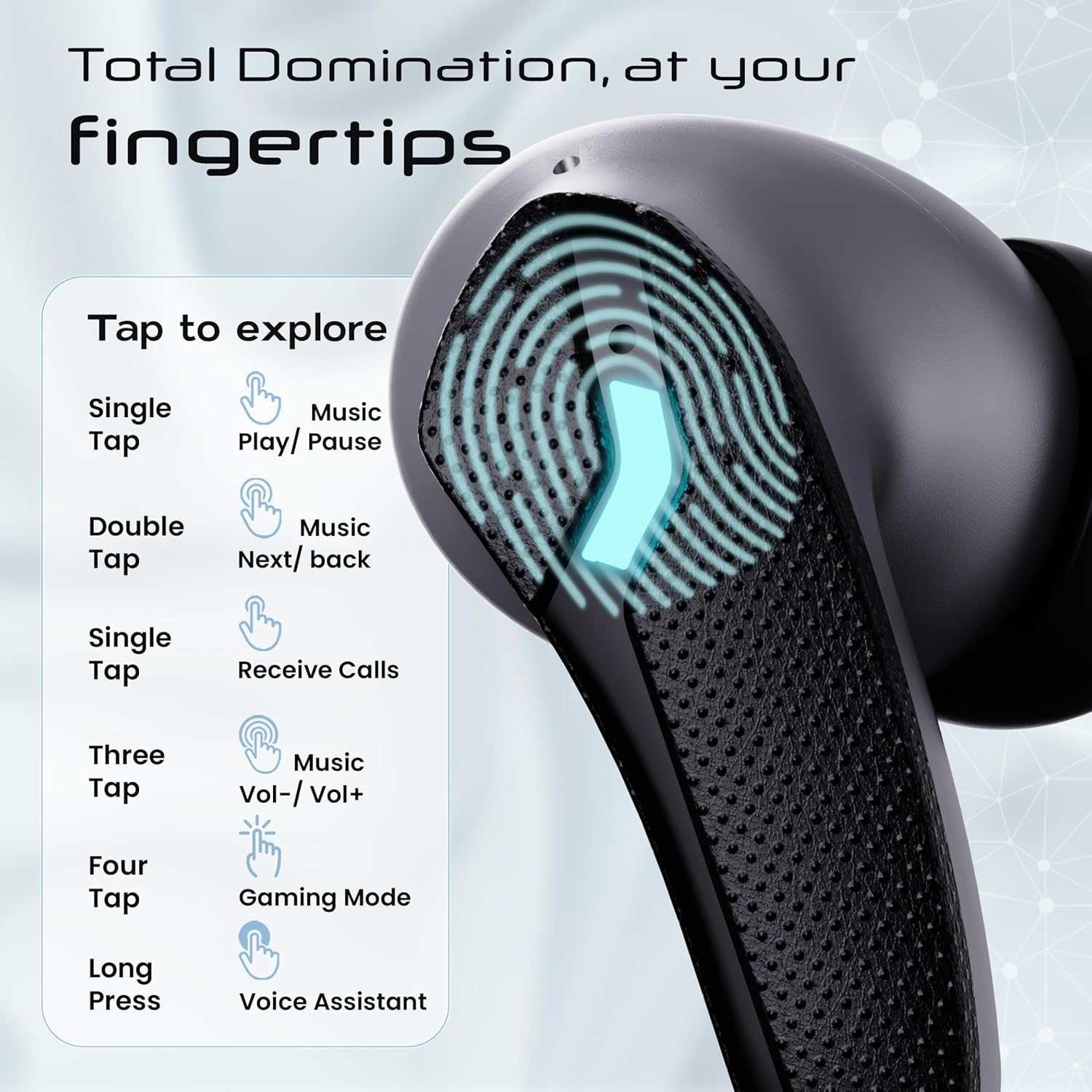
Image: GOBOULT Astra Neo Touch Controls Guide. This graphic details the various touch gestures for controlling music, calls, gaming mode, and voice assistant.
- Ukitu bakarra: Play/Pause music, Receive Calls.
- Sakatu birritan: Music Next/Back (specific earbud for each function).
- Three Tap: Music Volume Up/Down (specific earbud for each function).
- Four Tap: Aktibatu Joko Modua.
- Prentsa luzea: Activate Voice Assistant (Google Assistant/Siri).
6.2 Gaming Mode (40ms Low Latency)
Activate Gaming Mode for a synchronized audio experience during gameplay, reducing audio delay to 40ms.
- To activate: Four tap on either earbud.
- To deactivate: Four tap again on either earbud.

Image: GOBOULT Astra Neo Gaming Mode with 40ms Low Latency. This image depicts a user playing a mobile game with the earbuds, highlighting the ultra-low latency feature for an immersive gaming experience.
6.3 ZEN Quad Mic ENC for Calls
The ZEN Quad Mic Environmental Noise Cancellation (ENC) system ensures clear voice calls by filtering out background noise.

Image: GOBOULT Astra Neo ZEN Quad Mic ENC Technology. This image illustrates the internal components and the function of the 4 microphones for clear in-game communication and crystal-clear calling with Acoustic Echo Cancellation (AEC).
6.4 EQ moduak
The Astra Neo earbuds support 4 EQ modes for customized audio experiences. Refer to the product packaging or official GOBOULT website for specific instructions on how to switch between these modes, as this functionality is typically managed via a companion app or specific touch gestures not detailed here.
7. Mantentzea
7.1 Garbiketa
- Garbitu astiro-astiro entzungailuak eta kargatzeko zorroa oihal leun, lehor eta pelusik gabeko batekin.
- Ez erabili produktu kimiko gogorrak, garbiketa-disolbatzaileak edo garbigarri indartsuak.
- Garbitu entzungailuen eta zorroaren kargatzeko kontaktuak aldizka, behar bezala kargatzen direla ziurtatzeko.
7.2 Urarekiko Erresistentzia (IPX5)
The Astra Neo earbuds are IPX5 water-resistant, meaning they are protected against sweat, rain, and splashes. They are not designed for submersion in water.
- Ez murgildu entzungailuak nahita uretan.
- If exposed to sweat or rain, wipe them dry before placing them back in the charging case.

Image: GOBOULT Astra Neo IPX5 Water Resistance and Voice Assistant. This image highlights the earbuds' sweatproof, rainproof, and splashproof capabilities, along with compatibility with Google Assistant and Hey Siri.
7.3 Biltegiratzea
Erabiltzen ez dituzunean, gorde entzungailuak kargatzeko zorroan babesteko eta kargatuta mantentzeko.
8. Arazoak
- Entzungailuak ez dira parekatzen: Ensure both earbuds are in the charging case, then open the lid to re-enter pairing mode. Check your device's Bluetooth settings and try reconnecting.
- Entzungailu bakarra funtzionatzen du: Jarri bi entzungailuak berriro zorroan, itxi tapa, itxaron segundo batzuk eta ireki berriro. Honek askotan berriro sinkronizatzen ditu.
- Soinurik ez: Egiaztatu zure gailuaren eta entzungailuen bolumen-maila. Ziurtatu entzungailuak behar bezala konektatuta daudela zure gailura.
- Kargatzeko arazoak: Clean the charging contacts on the earbuds and inside the case. Ensure the charging cable is securely connected and the power source is active.
- Deien kalitate eskasa: Ziurtatu mikrofonoak ez daudela oztopo. Saiatu ingurune lasaiago batera joaten.
9. Zehaztapenak
Key technical specifications for the GOBOULT Astra Neo Earbuds:
| Ezaugarri | Zehaztapena |
|---|---|
| Ereduaren izena | Astra Neo |
| Bluetooth bertsioa | 5.4 |
| Jolas-ordua | 70 ordu arte (kargatzeko zorroarekin) |
| Karga azkarra | 10 mins charge = 100 mins playtime |
| Latentzia baxua | 40ms (Joko modua) |
| Gidariaren tamaina | 13mm BoomX Drivers |
| Mikrofonoa | ZEN Quad Mic ENC |
| Uraren Erresistentzia | IPX5 |
| Kontrol-metodoa | Ukitu |
| Konektibitate Teknologia | Bluetooth, Haririk gabekoa |
| Aurikularretarako Jack | Type-C Fast Charging Jack |
| Elementuaren pisua | 47 gramo |
| Produktuaren neurriak | 6.2 x 5.3 x 3.2 cm |
| Bateria mota | Litio Polimeroa |
| Bluetooth barrutia | 10 metro |
| Inpedantzia | 32 Ohm |

Image: GOBOULT Astra Neo 13mm BoomX Drivers. This image highlights the 13mm BoomX drivers, emphasizing crystal clear sound and support for MSBC, SBC, and AAC codecs.
10. Bermea eta Laguntza
The GOBOULT Astra Neo Earbuds come with a 1 urteko fabrikatzailearen bermea from the date of purchase. This warranty covers manufacturing defects. For warranty claims or technical support, please refer to the contact information provided on your warranty card or visit the official GOBOULT webgunea.