
1. Sarrera
The HICALL C100 PRO - P15 Mixing Console is an all-in-one audio solution designed for professional live streaming, recording, and content creation. This device integrates a high-sensitivity microphone, a multi-functional sound card, and advanced audio processing capabilities to deliver clear, high-quality sound. It features dual DSP cores for real-time noise cancellation, a variety of audio modes, sound effects, and voice filters to enhance audience engagement. With its long-lasting battery and broad compatibility, the C100 PRO - P15 offers a versatile and portable audio experience.
2. Paketearen edukia
Mesedez, egiaztatu behean zerrendatutako elementu guztiak zure paketean sartuta daudela. Elementuren bat falta bada edo hondatuta badago, jarri harremanetan bezeroarentzako arreta-zerbitzuarekin.
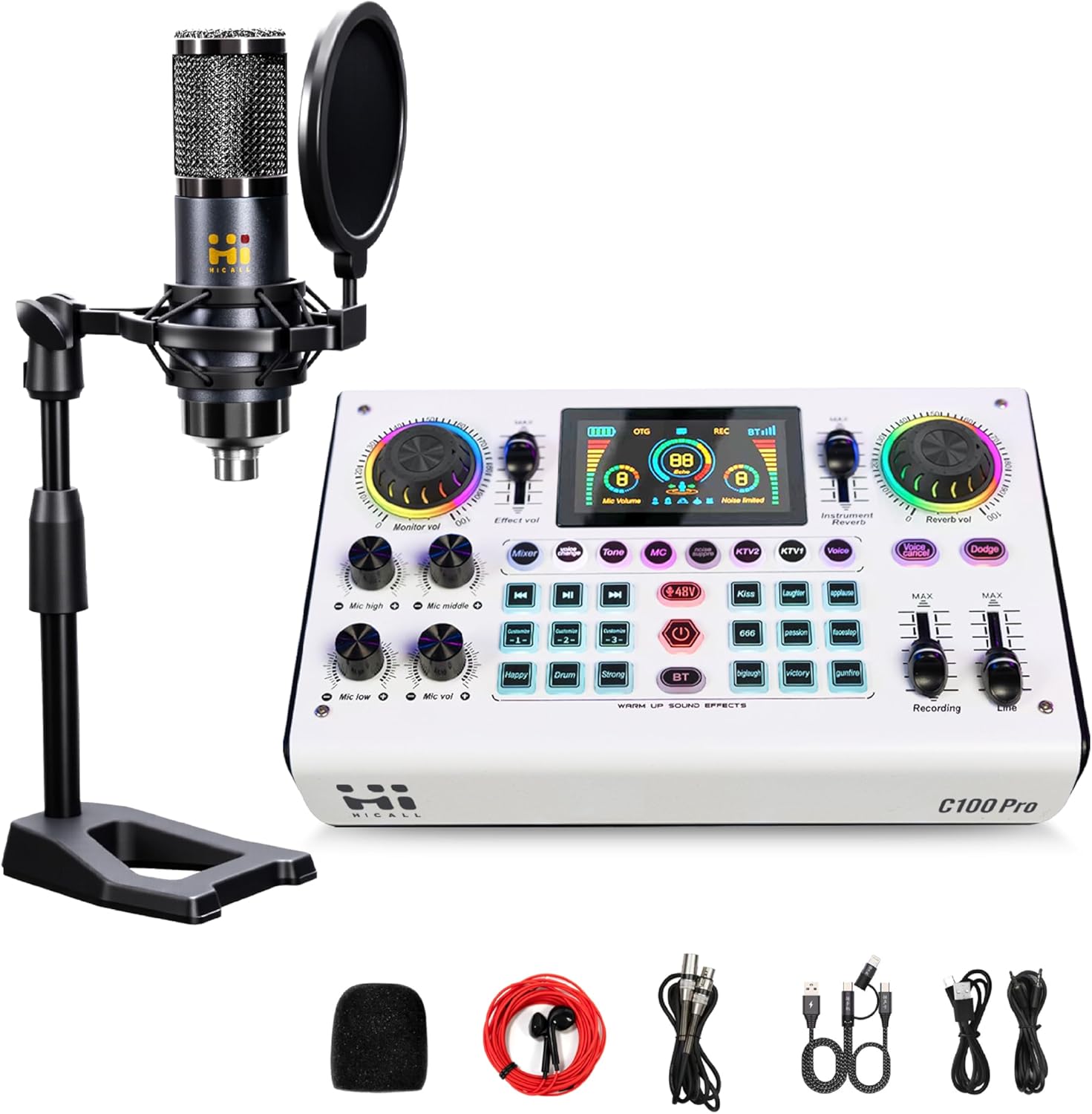
Image: The HICALL C100 PRO - P15 Mixing Console kit, including the sound card, condenser microphone, desktop stand, pop filter, foam microphone cover, and various connection cables.
- HICALL C100 PRO - P15 Mixing Console (Sound Card)
- Kondentsadore Mikrofonoa
- Mahaigaineko mikrofono-euskarria
- Pop iragazkia
- Mikrofonoaren apar-estalkia
- XLR to 3.5mm Microphone Cable
- 3.5 mm-ko audio kableak (x2)
- USB-Ctik USB-Arako datu-kablea
- USB-C USB-C datu kablea
3. Produktua amaitu daview
The C100 PRO - P15 Mixing Console features an intuitive layout with various controls for audio input, output, effects, and monitoring. Key features include:
- Dual DSP Cores: For real-time noise cancellation and zero-latency audio processing.
- Multiple Audio Modes: 8 live modes (e.g., singing, chatting, EDM) to suit diverse content styles.
- Soinu efektuak: 9 built-in sound effects and 3 customizable sound effects.
- Ahots-aldatzailea: 5 voice filters (male, female, baby, robot, monster) for interactive content.
- Bateriaren iraupen luzea: 2900mAh battery providing over 12 hours of operation.
- Bateragarritasun Unibertsala: Works with phones, tablets, PCs, and major streaming platforms.
4. Konfigurazioa eta konexioak
Follow these steps to connect your HICALL C100 PRO - P15 Mixing Console to your devices.

Image: A detailed diagram illustrating the connection ports on the rear of the mixing console and examples of how to connect microphones, instruments, speakers, headphones, and mobile devices/PCs.
4.1 Portuaren identifikazioa
- 2-/Earpieces/Speakers: 3.5mm output for headphones or external speakers.
- Mikrofonoa: 3.5mm input for condenser microphones.
- Musical Instrument: 6.35mm input for instruments.
- XLR-48V (Canon Interface): XLR input for 48V condenser microphones.
- Lerroa: 3.5mm input for external audio sources (e.g., background music from a phone).
- Live 1 / Live 2: 3.5mm outputs for connecting to mobile phones for live broadcasting.
- PC Live / OTG: USB-C port for connecting to a computer (PC/Mac) or mobile device (OTG) for live streaming and charging.
- Potentzia: USB-C port for power input and charging.
4.2 Konexio-urratsak
- Mikrofonoa konektatu:
a. For the included condenser microphone, connect its 3.5mm cable to the MIKROA portua.
b. For 48V condenser microphones, use an XLR cable to connect to the XLR-48V port. Ensure 48V phantom power is enabled on the console if required. - Connect Headphones/Speakers: Plug your headphones or speakers into the 2-/Earpieces/Speakers 3.5mm port for monitoring audio.
- Connect to Live Device (Phone/Tablet): Use a 3.5mm audio cable to connect from the Zuzenean 1 or Zuzenean 2 port on the console to the audio input (headphone jack or adapter) of your mobile device.
- Connect to Computer (PC/Mac): Use the USB-C to USB-A or USB-C to USB-C cable to connect the PC Live / OTG port on the console to your computer. The computer should recognize the console as an audio input/output device.
- Connect External Audio Source (Optional): If you wish to play background music from another phone, connect it to the Lerroa input using a 3.5mm audio cable.
- Piztu: Connect the console to a power source using the Boterea USB-C port and the provided cable. Press and hold the power button to turn on the device.
5. Funtzionamendu-argibideak
This section details the various functions and controls of the HICALL C100 PRO - P15 Mixing Console.
5.1 Smart Noise Reduction
The console features a one-click intelligent noise reduction function, powered by dual DSP cores, to effectively filter out environmental noise and improve audio clarity, especially in noisy environments.

Image: A visual representation of the noise reduction feature, showing a waveform with significant background noise before processing and a cleaner waveform after processing, with a button labeled 'noise suppre' highlighted on the console.
- To activate/deactivate noise reduction, locate the dedicated Zarata Ezabatzea button on the console and press it. The display will indicate its status.
5.2 Audio Modes and Voice Changer
Enhance your live broadcasts with various audio modes and fun voice filters.

Image: The HICALL C100 PRO - P15 Mixing Console displaying its 8 distinct live modes (e.g., KTV, Chat, Singing) and 9 live audio effects, along with 3 custom sound effect buttons.
- Live Modes: Select from 8 pre-set live modes (e.g., KTV, Chat, Singing, EDM) to optimize your audio for different content types. Press the corresponding mode button on the console.
- Ahots-aldatzailea: Transform your voice with 5 different filters.

Image: A close-up of the HICALL C100 PRO - P15 Mixing Console highlighting the 'Voice Change' button and illustrating the 5 available voice filters: Male, Female, Baby, Robot, and Monster, each activated by successive presses of the button.
- Sakatu Ahots aldaketa button repeatedly to cycle through Male, Female, Baby, Robot, and Monster voices.
5.3 Custom Soundpads and Audio Effects
Trigger various sound effects to add flair to your broadcasts.
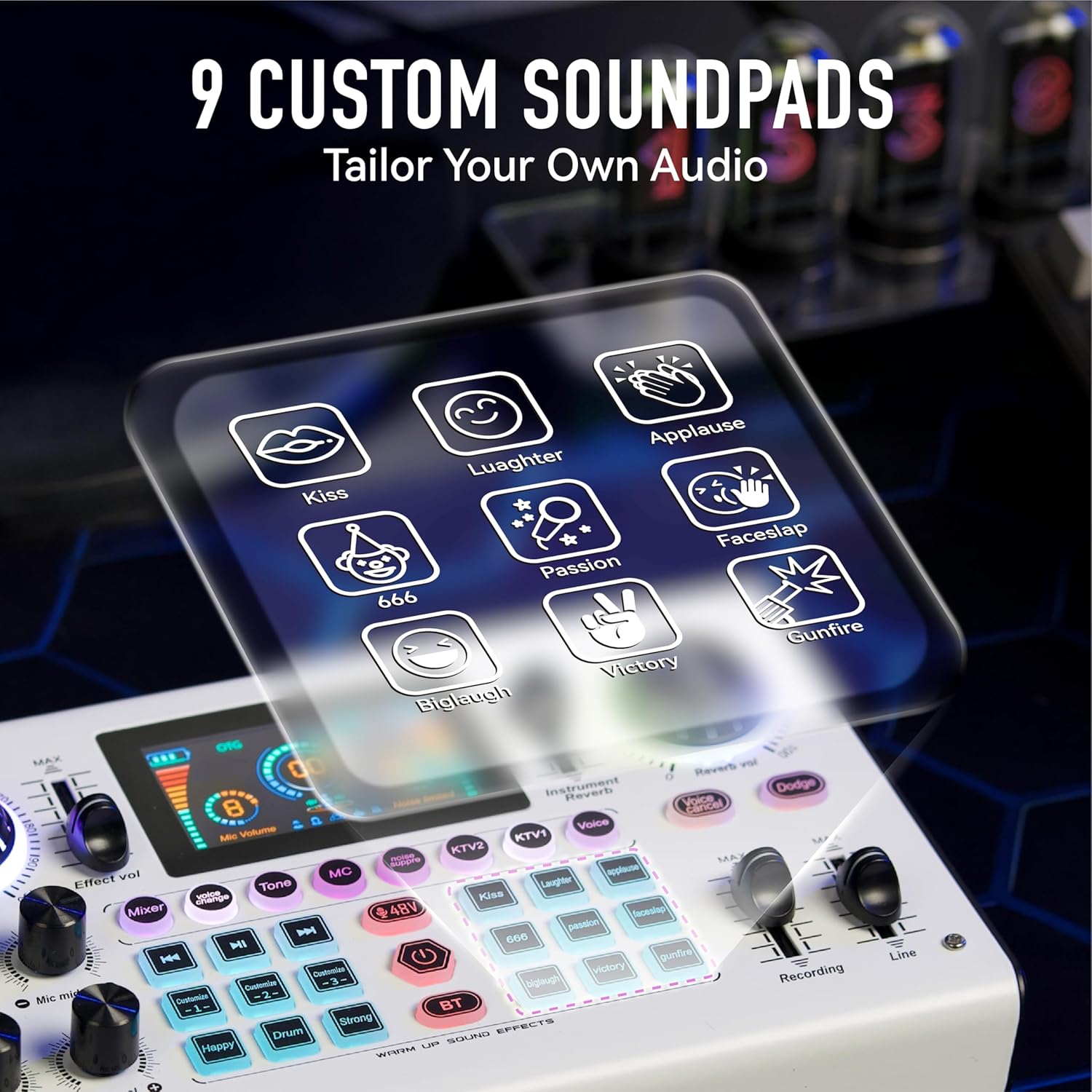
Image: The HICALL C100 PRO - P15 Mixing Console with an overlay showing 9 custom soundpad icons, including Kiss, Laughter, Applause, Faceslap, 666, Passion, Victory, Gunfire, and Big Laugh.
- The console features 9 pre-set sound effects (e.g., Kiss, Laughter, Applause, Gunfire). Press the corresponding button to play the effect.
- There are also 3 customizable sound effect buttons. Refer to the full manual for instructions on how to record and assign custom sounds.
5.4 Kontrol Orokorrak
- Bolumenaren botoiak: Adjust microphone volume (Mic high, Mic middle, Mic low, Mic vol), monitor volume, effect volume, instrument volume, and reverb volume using the dedicated knobs.
- Fader: Control recording and line input levels with the faders.
- Bluetooth (BT): Activate Bluetooth to connect a mobile device wirelessly for background music.
- 48V-ko Phantom Power: Enable or disable 48V phantom power for compatible microphones.
6. Cross-Platform Compatibility and Power
The HICALL C100 PRO - P15 is designed for extensive compatibility and prolonged use.

Image: The HICALL C100 PRO - P15 Mixing Console highlighting its 2900mAh battery capacity and illustrating its compatibility with phones (iOS/Android), PCs (MAC/Windows), laptops (MAC/Windows), and iPads, as well as major streaming platforms like Instagram, Facebook, Live.me, Amazon, TikTok, and YouTube.
- Bateria: Equipped with a 2900mAh battery, providing over 12 hours of continuous operation on a full charge.
- Kargatzen: Charge the device via the USB-C Boterea port using the provided cable and a standard USB power adapter (not included).
- Bateragarritasuna: Seamlessly connects with iOS/Android phones, Windows/Mac PCs, laptops, and tablets. It supports major streaming platforms including TikTok, YouTube, Facebook, Instagram, and Live.me.
7. Zehaztapenak
| Ezaugarri | Xehetasuna |
|---|---|
| Modelo zenbakia | C100 PRO - P15 |
| Marka | HICALL (Generic) |
| Konektibitate Teknologia | USB2, Bluetooth |
| Konektore mota | XLR, 3.5mm, 6.35mm, USB-C |
| Energia iturria | Bateriaz elikatua (2900 mAh) |
| Kanal kopurua | 2 |
| Produktuaren neurriak | 14.76" L x 2.99" W x 8.07" H |
| Paketearen neurriak | 14.76 x 8.07 x 2.99 hazbete |
8. Arazoak
If you encounter issues with your HICALL C100 PRO - P15 Mixing Console, please refer to the following common solutions:
- Soinu-irteerarik ez:
a. Check all cable connections to ensure they are secure.
b. Verify that the volume knobs for microphone, monitor, and main output are turned up.
c. Ensure the console is powered on and has sufficient battery charge.
d. If connected to a computer, check your computer's sound settings to ensure the console is selected as the input/output device. - Audioaren kalitate eskasa/zarata:
a. Activate the Zarata Ezabatzea ezaugarria.
b. Ensure microphone gain (Mic high, Mic middle, Mic low) is not set too high, which can cause distortion.
c. Check for loose cable connections or interference from other electronic devices. - Mikrofonoa ez dabil:
a. Ensure the microphone is correctly plugged into the appropriate port (3.5mm MIC or XLR-48V).
b. If using an XLR condenser microphone, ensure 48V phantom power is enabled on the console. - Ordenagailuak ez du gailua ezagutzen:
a. Try a different USB-C cable or USB port on your computer.
b. Restart both the console and your computer.
9. Mantentzea
To ensure the longevity and optimal performance of your HICALL C100 PRO - P15 Mixing Console, follow these maintenance guidelines:
- Garbiketa: Use a soft, dry cloth to wipe the surface of the console. Avoid using liquid cleaners or abrasive materials.
- Biltegiratzea: Gorde gailua leku fresko eta lehor batean, eguzki-argitik eta muturreko tenperaturetatik babestuta.
- Manipulazioa: Handle the console with care to prevent drops or impacts that could damage internal components.
- Bateria zaintzea: For optimal battery life, avoid fully discharging the battery frequently. Charge the device regularly, even if not in use for extended periods.
10. Bermea eta Laguntza
For warranty information, please refer to the terms and conditions provided at the time of purchase or contact your retailer. Optional protection plans may be available for extended coverage.
If you require further assistance or have questions not covered in this manual, please contact HICALL customer support through the retailer's platform or the official HICALL webgunea (eskuragarri badago).