Sarrera
This manual provides comprehensive instructions for the safe and efficient operation of your Generic Digital Poultry Hatcher Incubator. This intelligent incubator is designed for fully automatic incubation, brooding, and hatching, eliminating the need for additional accessories. Please read this manual thoroughly before operating the device to ensure optimal performance and successful hatching results.
Produktuaren osagaiak
Familiarize yourself with the main components of your incubator:
- Eragiketa panela: For controlling settings and monitoring status.
- Host Cover: The top protective casing of the incubator.
- Fan Cover: Protects the internal fan for air circulation.
- Roller Egg Tray: Holds eggs and performs automatic turning.
- Hatch Net: Used during the hatching phase.
- Water Tray Bottom Plate: Holds water for humidity control.
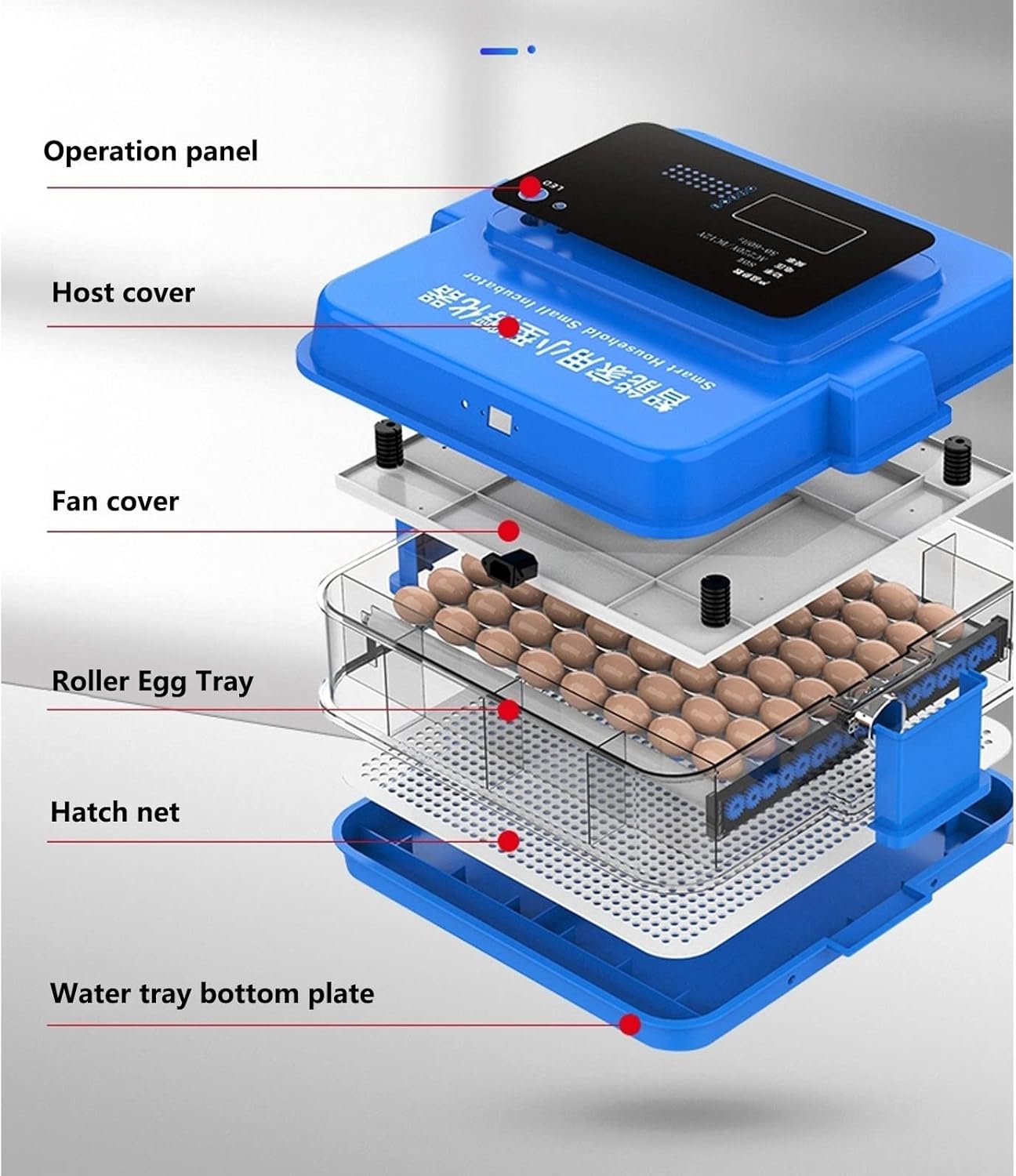
Irudia: Lehertuta view illustrating the various components of the incubator, including the top operation panel, host cover, fan cover, roller egg tray, hatch net, and the water tray bottom plate.
Konfigurazioa
- Despaketatzea: Kontu handiz atera osagai guztiak paketetik. Egiaztatu kalterik dagoen.
- Muntaia: Place the water tray bottom plate on a stable, level surface. Position the hatch net, then the roller egg tray. Ensure the fan cover and host cover are securely placed.
- Potentzia-konexioa: Connect the power cord to the incubator and then to a suitable power outlet.
- Aurreberoketa: Before placing eggs, operate the incubator for at least 2-4 hours to stabilize temperature and humidity.
- Adjustable Egg Tray: The distance between the rollers on the egg tray can be adjusted to accommodate different egg sizes (chicken, duck, goose, pigeon, quail, parrot eggs). Adjust the rollers by gently sliding them to fit your specific egg type.
Funtzionamendu-argibideak
1. Kontrol panela baino gehiagoview
The LED display on the operation panel provides real-time information and allows for setting adjustments.

Irudia: The operation panel showing the LED display for temperature and humidity, along with buttons for setting parameters and an integrated egg lamp for candling.
- LED pantaila: Shows current temperature, humidity, hatching days, and egg turning countdown.
- Set Up Buttons: Used to adjust temperature, humidity, and other parameters.
- Egg Lamp: Integrated light for candling eggs to check development.
- Vent Holes: Located on the panel for air circulation.
2. Automatic Egg Turning
The incubator features an automatic egg turning mechanism to ensure even heating and prevent embryo adhesion. The system rotates eggs once every 120 minutes.

Irudia: Visual representation of the 360-degree automatic roller system, which ensures eggs are evenly heated by rotating them regularly.
The rotation frequency is pre-set but can be adjusted if necessary through the control panel settings, depending on the specific requirements of different egg types.
3. Tenperatura eta Hezetasuna Kontrola
The incubator intelligently controls temperature and humidity within optimal ranges for successful hatching. The digital screen monitors these parameters in real-time.

Irudia: Goiena view of the incubator highlighting the 8 air outlets that facilitate intelligent control of temperature and humidity, maintaining stable conditions for the eggs.
Ensure the working environment temperature is between 15-30℃ for optimal incubator performance.
4. External Water Addition
To maintain appropriate humidity levels, water can be added externally without opening the incubator cover, thereby reducing temperature loss.

Irudia: A hand demonstrating the external water filling process, where water is added through a designated hole on the side of the incubator, preserving internal temperature and humidity.
Locate the small water filling hole on the side of the incubator and use a suitable bottle to add water to the water tray bottom plate as needed.
Mantentzea
- Garbiketa: After each hatching cycle, disconnect the power and thoroughly clean all internal components. Use a mild disinfectant solution and wipe down surfaces. Ensure all parts are dry before reassembly or storage.
- Ur-ontzia: Regularly clean the water tray to prevent mold or bacterial growth.
- Egg Rollers: Inspect egg rollers for any debris or blockages. Clean gently if necessary.
- Biltegiratzea: When not in use, store the incubator in a clean, dry place away from direct sunlight and extreme temperatures.
Arazoak konpontzea
| Arazoa | Kausa posiblea | Irtenbidea |
|---|---|---|
| Incubator not powering on. | Power cord not connected, power outlet issue. | Egiaztatu kablearen konexioa. Probatu entxufea beste gailu batekin. |
| Temperature fluctuations. | Room temperature too unstable, incubator lid not sealed properly. | Place incubator in a stable environment (15-30℃). Ensure lid is securely closed. |
| Hezetasuna baxuegia. | Insufficient water in the water tray. | Add water to the external filling hole. Ensure water tray is filled. |
| Eggs not turning. | Egg roller mechanism obstructed, motor malfunction. | Check for obstructions. If problem persists, contact support. |
| Poor hatching rate. | Incorrect temperature/humidity, infertile eggs, improper egg handling. | Verify settings against recommended values for your egg type. Ensure eggs are fresh and handled correctly. |
Zehaztapenak

Irudia: Dimensions of the incubator (55 cm x 52 cm x 56 cm) and detailed egg capacities for various poultry types for both 256-piece and 280-piece models.
| Parametroa | Balioa |
|---|---|
| Produktuaren izena | Intelligent Incubator |
| Materiala | PP (polipropilenoa) |
| Capacity (256-piece model) | 256 Chicken Eggs, 170 Duck Eggs, 128 Goose Eggs, 384 Pigeon Eggs, 640 Quail Eggs |
| Capacity (280-piece model) | 280 Chicken Eggs, 186 Duck Eggs, 140 Goose Eggs, 420 Pigeon Eggs, 700 Quail Eggs |
| Boterea | 80W |
| Lan-ingurunea | 15-30 ℃ |
| Pisua | 13.2 kg |
| Neurriak (gutxi gorabehera) | 55 cm (Zabalera) x 52 cm (Sakonera) x 56 cm (Altuera) |
Laguntza
For any questions or assistance regarding your incubator, please contact our customer service. We aim to respond to all inquiries within 24 hours.
Contact information is typically provided with your purchase or on the product packaging.


