
1. Sarrera
Thank you for choosing the Roadstar RDM-710DSP Bluetooth 3xUSB Car Stereo. This manual provides essential information for the proper installation, operation, and maintenance of your new car stereo. Please read this manual thoroughly before using the product to ensure optimal performance and safety.
The RDM-710DSP is a mechless car stereo designed to provide high-quality audio and versatile connectivity options for your vehicle. It features Bluetooth 5.0 for wireless audio streaming and hands-free calling, three USB inputs for media playback, and a sophisticated Digital Sound Processor (DSP) with a 32-band equalizer for precise audio customization.
2. Produktuaren ezaugarriak
- Mechless Car Stereo design (no CD/DVD mechanism)
- Multi-color display with seven selectable color options
- Digital Sound Processor (DSP) with 32-band equalizer
- TDA7388 amplifier for robust audio output
- Bluetooth 5.0 for wireless audio streaming and hands-free communication
- Three USB inputs for diverse media playback and charging
- FM radio tuner (5807)
- Six RCA outputs for external ampzutabe-konexioak
- Subwoofer irteera dedikatua
- High Pass Filter (HPF) and Low Pass Filter (LPF) functions for audio crossover management
- Time and day display function
- ISO standards compliant for easy installation
- Folder selection feature for organized media browsing
- Controllable via included remote control
- Mobile application control support
3. Paketearen edukia
Mesedez, egiaztatu paketea elementu hauek dituen:
- Roadstar RDM-710DSP Car Stereo Unit
- Kableatu Harness
- Muntatzeko hardwarea (torlojuak, euskarriak)
- Urruneko Kontrola
- Erabiltzailearen eskuliburua (dokumentu hau)
Elementuren bat falta edo hondatuta badago, jarri harremanetan zure saltzailearekin berehala.
4. Segurtasun informazioa
- Instalazioa: Always have the unit installed by a qualified technician to prevent damage to the unit or your vehicle. Incorrect wiring can cause fire or electrical shock.
- Elikatze-iturria: Konektatu unitatea lurrerako konektore negatiboa duen 12V-ko korronte zuzeneko elikatze-iturri batera soilik.
- Gidatzeko segurtasuna: Do not operate the unit in a way that distracts you from driving. Always keep your attention on the road.
- Bolumen maila: Keep the volume at a level where you can still hear outside traffic sounds. Excessive volume can impair your hearing.
- Hezetasuna: Do not expose the unit to moisture or water to prevent electrical shock.
- Garbiketa: Erabili zapi leun eta lehor bat garbitzeko. Ez erabili garbitzaile edo disolbatzaile urratzailerik.
5. Konfigurazioa eta instalazioa
5.1 Kableatutako konexioak
The RDM-710DSP is designed to be ISO standards compliant, simplifying wiring. Refer to the wiring diagram provided with the unit for specific connections. Ensure all connections are secure and properly insulated to prevent short circuits.
- Potentzia: Connect the yellow wire to the constant 12V supply, the red wire to the accessory 12V supply (switched by ignition), and the black wire to a good chassis ground.
- Hizlariak: Connect speaker wires to the corresponding vehicle speaker wires. Pay attention to polarity (+/-).
- Antena: Connect the vehicle's FM antenna to the antenna input.
- RCA irteerak: Kanporako amplifiers, connect the six RCA outputs (Front L/R, Rear L/R, Subwoofer) to your amplifier-en sarrerak.
5.2 Unitatea muntatzea
Insert the metal mounting sleeve into the dashboard opening. Bend the tabs outward to secure the sleeve. Slide the RDM-710DSP unit into the mounting sleeve until it clicks into place. Ensure the unit is firmly secured.
5.3 Hasierako piztea
After installation, turn on your vehicle's ignition. The unit should power on. Follow any on-screen prompts for initial setup, such as setting the clock.
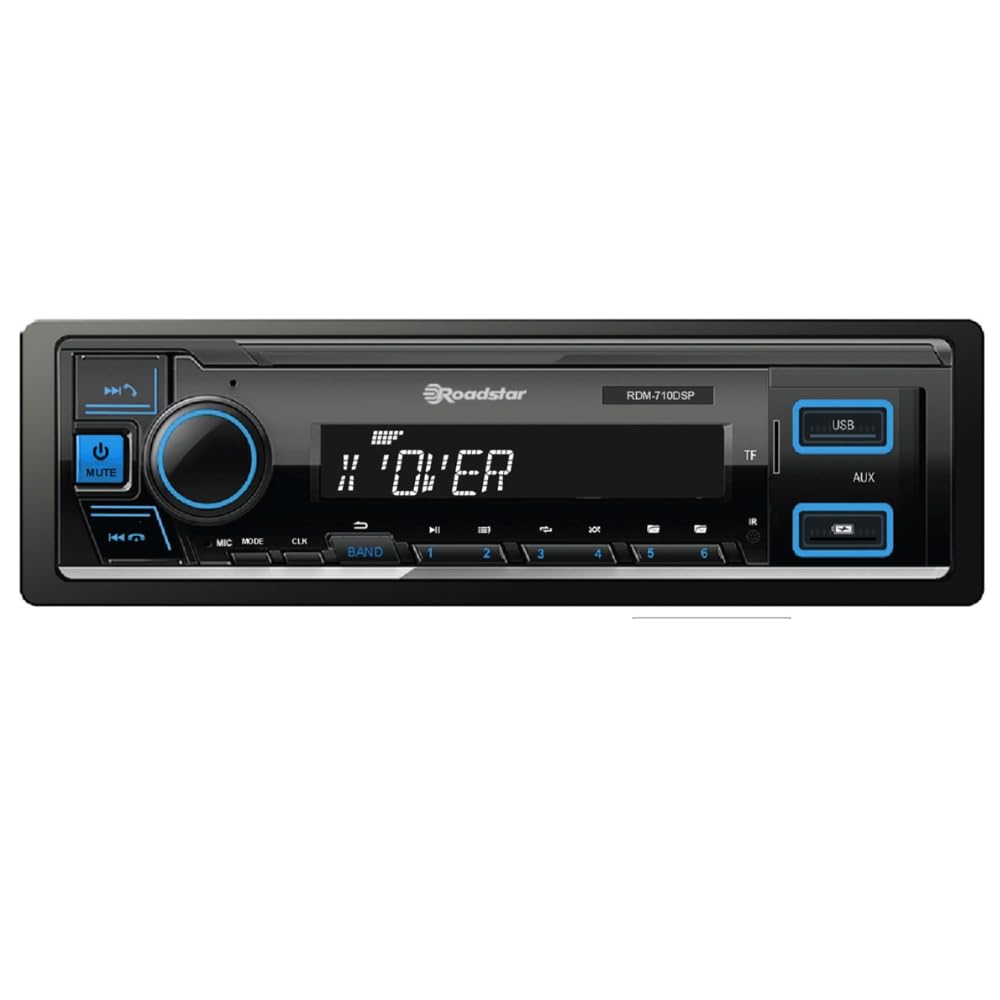
1. irudia: Aurrealdea view of the Roadstar RDM-710DSP Car Stereo. This image displays the main unit with its multi-color display, control buttons, and USB ports.
6. Funtzionamendu-argibideak
6.1 Oinarrizko kontrolak
- Pizteko botoia: Sakatu unitatea pizteko / itzaltzeko.
- Bolumen-eskulekua: Biratu bolumen maila doitzeko. Sakatu audio ezarpenetara sartzeko.
- Modu botoia: Press to cycle through available sources (FM, Bluetooth, USB1, USB2, USB3, AUX).
- Pantaila: The multi-color display shows current source, track information, radio frequency, time, and day. You can customize the display color through the settings menu.
6.2 Remote Control and Mobile App
The unit can be controlled using the included remote control. Point the remote control towards the unit's IR sensor. For advanced control, download the dedicated mobile application from your smartphone's app store. Pair your phone via Bluetooth to use the app.
7. Bluetooth konexioa
7.1 Bluetooth gailu bat parekatzea
- Turn on the RDM-710DSP and select the Bluetooth source using the Mode button.
- Gaitu Bluetootha zure gailu mugikorrean eta bilatu eskuragarri dauden gailuak.
- Select "RDM-710DSP" from the list of found devices.
- If prompted, enter the PIN code (usually "0000").
- Once paired, the unit will confirm the connection, and you can stream audio or make calls.
7.2 Bluetooth audio erreprodukzioa (A2DP)
After pairing, you can play music from your Bluetooth-enabled device. Use the unit's controls or your phone to play, pause, skip tracks, and adjust volume.
7.3 Hands-Free Calling (HFP)
When a call comes in, the unit will display the caller ID (if supported). Press the Answer button on the unit or remote to accept the call. Use the unit's microphone for communication and the car speakers for audio output.
8. USB erreprodukzioa
The RDM-710DSP features three USB inputs. Connect a USB flash drive containing audio files (e.g., MP3, WMA) to any of the USB ports. The unit will automatically switch to USB mode and begin playback.
- Nabigazioa: Use the forward/backward buttons to skip tracks. Use the folder selection feature to browse through directories on your USB device.
- Onartutako formatuak: The unit supports common audio formats. Refer to the technical specifications for a complete list.
- Kargatzen: USB ports may also provide charging capabilities for compatible devices.
9. Irratiaren funtzionamendua
Press the Mode button to select FM radio. The unit will display the current frequency.
- Bilaketa automatikoa: Press and hold the seek buttons to automatically scan for and store strong stations.
- Eskuzko sintonizazioa: Briefly press the seek buttons to manually tune to the next frequency.
- Aurrez ezarritako geltokiak: Use the numeric buttons (if available on the unit or remote) to select preset stations.
10. Soinu ezarpenak
The RDM-710DSP features a powerful Digital Sound Processor (DSP) to customize your audio experience.
- Equalizer: Access the 32-band equalizer through the audio settings menu. Adjust individual frequency bands to tailor the sound to your preference.
- HPF/LPF: High Pass Filter (HPF) and Low Pass Filter (LPF) settings allow you to define the frequency range sent to your speakers and subwoofer, optimizing sound quality and preventing distortion.
- Subwoofer irteera: Adjust the subwoofer level and phase through the audio settings.
- RCA irteerak: The six RCA outputs provide clean, pre-amplified signals for connecting external amplifiers, allowing for a more powerful and customized sound system.
11. Mantentzea
- Unitatea garbitzea: Use a soft, dry cloth to wipe the front panel. Do not use harsh chemicals, solvents, or abrasive cleaners, as they may damage the finish or display.
- USB atakak: Keep USB ports free from dust and debris.
- Arreta orokorra: Saihestu unitatea tenperatura altuen, eguzki-argiaren eraginpean denbora luzez edo hezetasun gehiegizkoaren eraginpean jartzea.
12. Arazoak
If you encounter problems with your RDM-710DSP, refer to the following table for common issues and solutions.
| Arazoa | Kausa posiblea | Irtenbidea |
|---|---|---|
| Botererik ez | Incorrect wiring; Blown fuse; Vehicle ignition off | Check power and ground connections; Replace fuse if necessary; Turn vehicle ignition ON. |
| Soinurik ez | Volume too low; Mute function active; Incorrect speaker wiring; Amplifier not powered (if external) | Increase volume; Deactivate mute; Check speaker connections and polarity; Ensure external amplifier elikatzen da. |
| Bluetootha ez da konektatzen | Bluetooth not enabled on phone; Unit not in pairing mode; Device already paired to another unit | Enable Bluetooth on your phone; Ensure unit is in Bluetooth mode; Forget device on phone and re-pair. |
| USB gailua ez da ezagutzen | Onartu gabe file system; Damaged USB device; Incompatible file formatua | Ensure USB is FAT32 formatted; Try a different USB device; Check supported file formatuak. |
| Urruneko kontrola ez dabil | Dead battery; Obstruction between remote and unit; Remote not pointed correctly | Replace remote battery; Remove obstructions; Point remote directly at the unit's IR sensor. |
Irtenbide hauek probatu ondoren arazoa konpontzen ez bada, jarri harremanetan bezeroarentzako arreta-zerbitzuarekin.
13. Zehaztapenak
| Ezaugarri | Zehaztapena |
|---|---|
| Eredua | RDM-710DSP |
| Marka | Roadstar |
| Bluetooth bertsioa | 5.0 |
| USB atakak | 3 |
| Berdinketa | 32 bandako DSP |
| RCA irteerak | 6 (Front L/R, Rear L/R, Subwoofer) |
| AmpIC delikatzailea | TDA7388 |
| Sintonizatzailea | FM (5807) |
| Pisua | 0.65 kilogramo |
| Dakarten osagaiak | Car Stereo Unit |
14. Bermea eta Laguntza
14.1 Bermearen informazioa
Warranty information for the Roadstar RDM-710DSP is not specified in the product details. Please refer to your purchase receipt or contact your retailer for details regarding warranty coverage and terms.
14.2 Bezeroarentzako laguntza
For technical assistance, troubleshooting beyond this manual, or service inquiries, please contact your authorized Roadstar dealer or visit the official Roadstar weblaguntza baliabideen gunea.