
Sarrera
This manual provides detailed instructions for the setup, operation, maintenance, and troubleshooting of your ATTACK SHARK X82 PRO HE Magnetic Gaming Keyboard. Designed for high-performance gaming, this keyboard features advanced magnetic switches, a rapid trigger system, and versatile connectivity options. Please read this manual thoroughly to ensure optimal performance and longevity of your device.

Image: The ATTACK SHARK X82 PRO HE Magnetic Gaming Keyboard in its Comic color variant, showcasinbere diseinu trinkoa eta RGB argiztapena esker.
Produktuaren Ezaugarriak
- Ultra-Fast 8000Hz Polling Rate: Achieves a 0.1ms response time with a 128K scan rate for competitive gaming.
- Magnetic Hall Effect Switches: Features custom-designed "Magnetic Crystal" switches, compatible with N-pole-down magnetic switches for customization. Includes precision-tuned stabilizers and factory-lubed components.
- Adjustable Actuation Rapid Trigger: Offers fully customizable RT activation points from 0.1–3.4mm with 0.01mm trigger precision and dual zero dead zones.
- Eraikuntza kalitate sendoa: Constructed with a top-mount structure and aluminum positioning plate for enhanced typing consistency and stability. Incorporates dual-layer PORON sandwich foam for improved acoustics.
- Tri-Mode Wireless Connectivity: Supports 2.4GHz wireless, Bluetooth, and wired USB-C connections.
- Iraupen luzeko bateria: Equipped with a 5000mAh battery for extended wireless usage.
- C01Ultra Aviation Cable: Provides stable data transmission and fast charging in wired mode, featuring magnetic shielding.
- Full RGB Customization: Offers 16.8 million colors, dynamic lighting modes, and custom light strips.
- Teklatu iraunkorrak: Comes with factory original-profile PBT keycaps, including 5-side sublimated "Manga" edition keycaps.
- Cloud-Based Driver: Web-based software for easy setup of lighting, macros, actuation points, and game profiles without installation.

Irudia: Gehiagoview of the ATTACK SHARK X82 PRO HE keyboard highlighting its key features such as 75% layout, magnetic switches, tri-mode connection, QMK web driver, PBT keycaps, 16.8M RGB lighting, and 8KHz polling rate.
Konfigurazioa
1. Kutxa irekitzea eta edukia
Carefully open the product packaging. Ensure all components are present:
- ATTACK SHARK X82 PRO HE Jokoetarako Teklatu Magnetikoa
- USB Type-C to Type-A Cable (C01Ultra Aviation Cable)
- Keycap eta Switch Puller
- 2.4GHz Wireless Dongle (often stored in a compartment on the keyboard)

Image: The C01Ultra RGB Coiled Keyboard Cable, a Type-C to USB-A HyperSpeed line with 8KHz return rate, included with the keyboard.
2. Hasierako konexioa
The keyboard supports three connection modes: wired, 2.4GHz wireless, and Bluetooth.
- Kable modua: Connect the provided USB Type-C cable to the keyboard and your computer's USB-A port. The keyboard will automatically switch to wired mode and begin charging.
- 2.4 GHz Haririk gabeko modua: Locate the 2.4GHz wireless dongle (usually stored in a slot on the keyboard's underside). Plug the dongle into an available USB-A port on your computer. Switch the keyboard's mode selector to 2.4G. The keyboard should connect automatically.
- Bluetooth modua: Switch the keyboard's mode selector to BT. On your computer or device, search for Bluetooth devices and select "ATTACK SHARK X82 PRO HE" to pair.

Image: The ATTACK SHARK X82 PRO HE keyboard displaying its tri-mode connectivity options (Bluetooth, 2.4G Wireless, Wired) and compatibility with various devices including Windows, Mac, gaming consoles, laptops, PCs, smartphones, and tablets.
Funtzionamendu-argibideak
Oinarrizko Erabilera
Once connected, the keyboard functions as a standard QWERTY keyboard. The 75% layout provides essential keys while maintaining a compact form factor.
Function Key Combinations (FN)
The keyboard features an FN key for accessing secondary functions and controlling RGB lighting. Specific combinations may vary, but common functions include:
- FN + \|: Aldatu argi modua
- FN + Sartu: Aldatu argiaren kolorea
- FN + Gora gezia: Handitu atzeko argiaren distira
- FN + Behera gezia: Murriztu atzeko argiaren distira
- FN + Ezkerreko gezia: Murriztu atzeko argiaren abiadura
- FN + eskuineko gezia: Handitu atzeko argiaren abiadura
- FN + Maiuskulak: Aldatu argi-barra modua
- FN + A: Aldatu argi-barraren kolorea
- FN + X: Aldatu argiaren kolorea
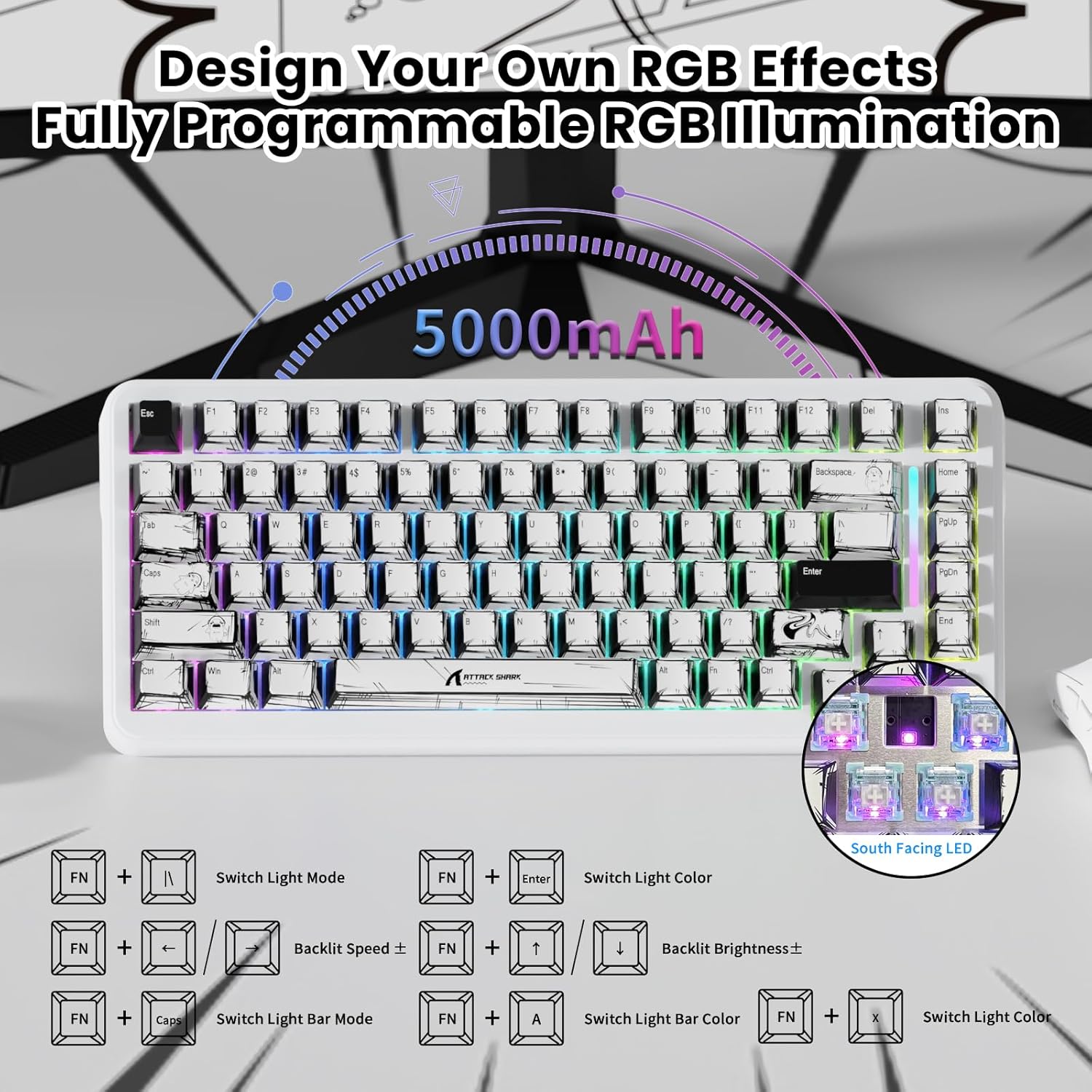
Image: The ATTACK SHARK X82 PRO HE keyboard illustrating various FN key combinations to control RGB lighting effects, brightness, and speed.
Konektibitate moduak
The X82 PRO HE offers flexible connectivity to suit various setups:
- Kable bidez (USB-C): Provides the most stable connection with an 8000Hz polling rate for minimal latency. Ideal for competitive gaming.
- 2.4 GHz-ko haririk gabekoa: Utilizes a dedicated USB dongle for a low-latency wireless experience, suitable for gaming without cables.
- Bluetootha: Connects to a wide range of devices (laptops, tablets, smartphones) for general use.
To switch between modes, use the physical switch located on the keyboard. The keyboard is compatible with Windows and Mac operating systems. For PS4/Xbox connections, an external converter may be required.
Video: Demonstrates the Hall Effect Rapid Trigger Keyboard with 0.01mm Precision, showcasing its responsiveness and customization for gaming.
Customization (Software & RGB)
Cloud-Based Driver
The X82 PRO HE utilizes a web-based cloud driver for comprehensive customization. No software installation is required. Simply connect your keyboard and access the driver via a web arakatzailea:
- Adjust RGB lighting effects and colors.
- Set macros for complex commands.
- Fine-tune actuation points for individual keys (0.1-3.4mm).
- Configure game modes and user profiles.

Image: The software interface for the ATTACK SHARK X82 PRO HE, showing options to tailor your gaming setup, including DKS, Snap Tap, and Zero Deadzone settings.
RGB Argiztapena
Beyond FN key combinations, the cloud driver allows for advanced RGB customization, including per-key effects and dynamic lighting modes. The keyboard features 16.8 million colors and custom light strips for a personalized aesthetic.
Video: A demonstration of the customizable RGB lighting on the magnetic keyboard, suitable for various gaming genres like FPS, MOBA, and MMO.
Mantentzea
Garbiketa
Teklatuaren itxura eta funtzionaltasuna mantentzeko:
- Erabili zapi leun eta lehor bat teklatuaren gainazala garbitzeko.
- Teklen arteko hautsa eta hondakinak kentzeko, erabili aire konprimatua.
- Saihestu produktu kimiko gogorrak edo material urratzaileak erabiltzea.
Tekla-tapoia eta etengailuaren ordezkapena
The included keycap and switch puller can be used to remove keycaps and magnetic switches for cleaning or replacement. Exercise caution to avoid damaging the switches or PCB.
Arazoak konpontzea
| Gaia | Irtenbide posiblea |
|---|---|
| Teklatuak ez du erantzuten | Check cable connection (wired mode), ensure dongle is properly inserted (2.4GHz mode), or re-pair via Bluetooth. Ensure keyboard is charged. |
| RGB argiak ez du funtzionatzen | Verify FN key combinations or check settings in the cloud-based driver. |
| Giltzak ez dira erregistratzen edo bi aldiz idazten ari dira | Clean under keycaps. If issue persists, check actuation settings in the cloud driver. Consider updating keyboard firmware if available. |
| Haririk gabeko konexioa ezegonkorra | Ensure no interference from other wireless devices. Move closer to the receiver/device. |
For further assistance, refer to the official ATTACK SHARK support resources.
Zehaztapenak
| Ezaugarri | Xehetasuna |
|---|---|
| Eredua | X82 PRO HE |
| Bozketa-tasa | 8000Hz (Wired), 1000Hz (2.4GHz/Bluetooth) |
| Etengailuak | Magnetic Hall Effect Switches |
| Aktuazio-eremua | 0.1mm – 3.4mm (Adjustable) |
| Konektibitatea | Tri-Mode (USB-C Wired, 2.4GHz Wireless, Bluetooth) |
| Bateria Edukiera | 5000mAh |
| Giltzak | PBT Double Shot, Manga Graffiti Design |
| Diseinua | % 75 (83 tekla) |
| RGB Argiztapena | 16.8 Million Colors, Customizable Effects |
| Gailu bateragarriak | PC, ordenagailu eramangarria, joko kontsola, telefono adimenduna, tableta |
| Materiala | Aluminioa (Kokapen-plaka) |
| Elementuaren pisua | 2.77 kilo |
| Paketearen neurriak | 14.48 x 7.6 x 2.13 hazbete |
Bermea eta Laguntza
Bermeari buruzko informazioa eta laguntza teknikoa lortzeko, jo ezazu ATTACK SHARK ofizialera. webwebgunera edo jarri harremanetan bezeroarentzako arreta-zerbitzura. Gorde erosketa-agiria erosketaren frogagiri gisa berme-erreklamazioetarako.


