
Sarrera
This manual provides detailed instructions for the assembly, operation, and maintenance of your FLEXISPOT One-Piece Standing Desk with Rattan Drawers. Please read this manual thoroughly before installation and use to ensure proper function and safety. Keep this manual for future reference.

Image: The FLEXISPOT One-Piece Standing Desk in black with rattan drawers, featuring a monitor shelf and an integrated control panel.
Segurtasun informazio garrantzitsua
Produktuari lesioak edo kalteak saihesteko, jarraitu segurtasun-jarraibide hauek:
- Jarraitu beti muntatzeko argibideak arretaz.
- Mantendu haurrak eta maskotak muntaketa gunetik urrun.
- Use appropriate tools and safety gear during assembly.
- Ziurtatu konexio guztiak ondo daudela mahaia erabili aurretik.
- Ez gainkargatu mahaia. Gehienezko pisu-ahalmena 110 lb-koa da.
- Altuera doitzean, eskuak eta objektuak mugitzen diren piezetatik urrun eduki.
Paketearen edukia
Verify that all components are present before beginning assembly. The desk ships in two separate packages.
- Desktop with integrated monitor shelf and rattan drawers
- Desk frame and legs
- Kontrol panela
- Korronte egokitzailea eta kableak
- Muntaketa-tresnak (torlojuak, arandelak, tresnak)
- Erabiltzailearen eskuliburua

Image: A diagram illustrating the dimensions of the desk components and indicating that the product ships in two separate packages.
Muntatzeko jarraibideak
Assembly typically takes approximately one hour. Refer to the separate detailed assembly guide included in your package for step-by-step instructions and diagrams. Ensure all fasteners are correctly identified and used in their designated locations.
- Deskonprimitu osagai guztiak eta egiaztatu paketearen edukiaren zerrendarekin.
- Attach the desk legs to the desktop frame using the provided hardware.
- Connect the control panel and motor cables as instructed.
- Secure any cable management components.
- Place the desk in its desired location.
Konfigurazioa
After assembly, connect the desk to a power source.
- Plug the power adapter into the desk's control box.
- Entxufatu korronte-kablea entxufe elektriko estandar batean.
- The desk is now ready for initial use.
Funtzionamendu-argibideak
Altuera doitzea
The desk features an electric motor system for smooth height transitions.
- Sakatu Gora gezia mahaia altxatzeko botoia.
- Sakatu Behera gezia mahaia jaisteko botoia.
- The desk can adjust between 28.9 inches (minimum) and 46.5 inches (maximum).
- The motor operates quietly, typically below 50dB.

Image: The desk shown at its minimum (28.9") and maximum (46.5") adjustable heights.
Memoria aurrezarpenak
Program up to three preferred height settings for quick adjustments.
- Egokitu mahaia nahi duzun altuerara.
- Sakatu M button, then press one of the numbered preset buttons (1, 2, edo 3) within 3 seconds to save the current height.
- To recall a saved height, simply press the corresponding numbered preset button.

Irudia: Gertutik view of the desk's control panel, highlighting the up/down arrows and memory preset buttons.
Monitorearen apala
The integrated monitor shelf is designed to elevate screens to an ergonomic eye level.
- Place your monitor(s) on the shelf to reduce neck and back strain.
- This helps maintain proper posture during extended work sessions.

Image: Visual comparison of poor posture versus ergonomic sitting and standing postures facilitated by the adjustable desk.
Rattan Drawers
The desk includes both sliding-door desktop compartments and an under-desk drawer for organized storage.
- Use the desktop compartments (47.2"x8.7"x5.5") for easy access to frequently used items.
- The under-desk drawer (23.6"x11.8"x3.9") provides discreet storage for documents or books.
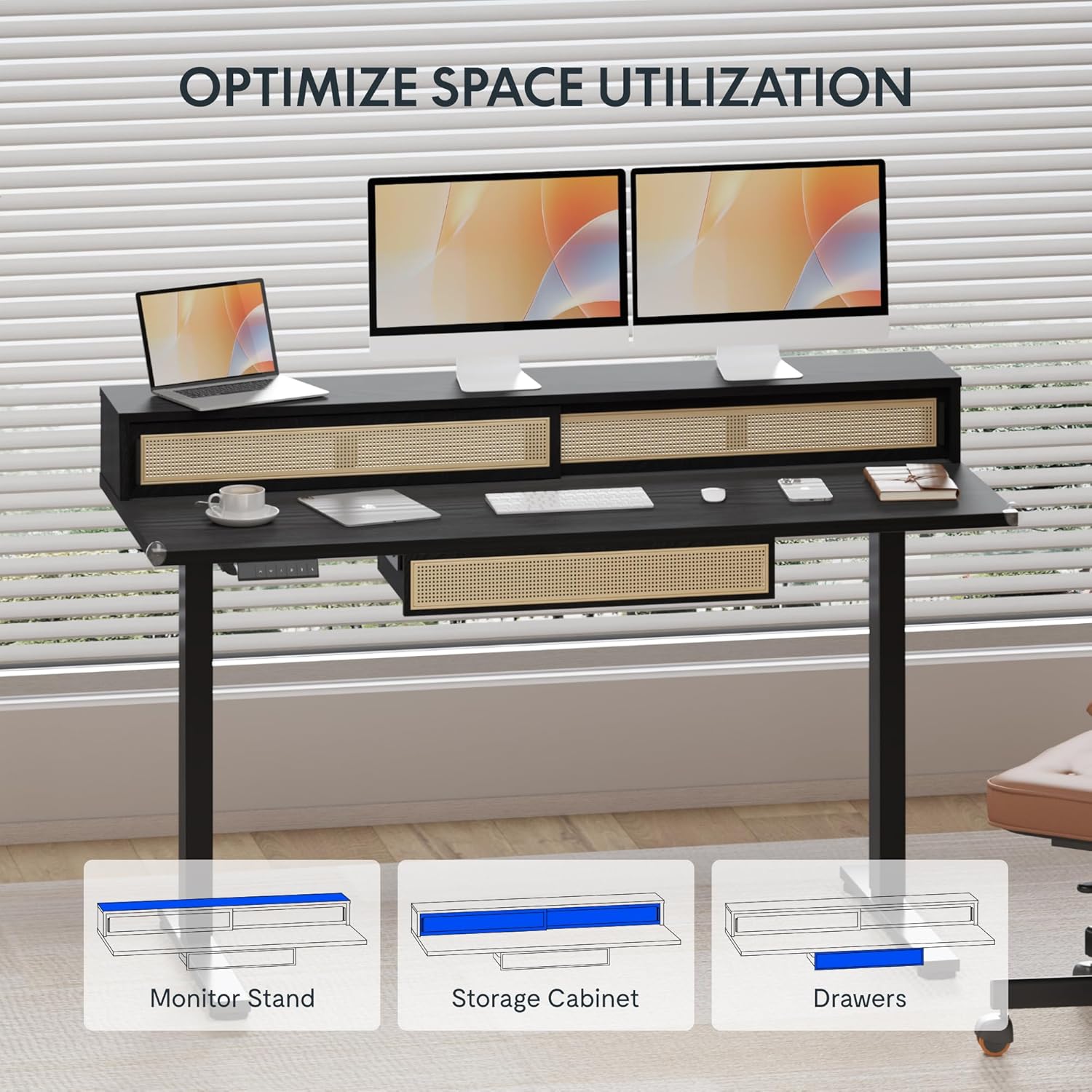
Image: An illustration demonstrating the various storage options, including the monitor stand, storage cabinet, and drawers, for optimal space utilization.
Mantentzea
Mantentze-lan erregularrak zure mahaiaren iraupena eta errendimendu optimoa bermatzen ditu.
- Garbiketa: Garbitu mahaiaren gainazalak zapi leun etaamp oihal. Saihestu garbitzaile urratzaileak edo akabera kaltetu dezaketen produktu kimiko gogorrak.
- Ikuskapena: Aldian-aldian egiaztatu torloju eta azkoin guztiak ondo estututa daudela ziurtatzeko. Beharrezkoa bada, berriro estutu.
- Kableen kudeaketa: Ensure cables are neatly organized and not interfering with the desk's movement.
Arazoak konpontzea
Zure mahaiarekin arazoak badituzu, jo ezazu honako ohiko irtenbide hauetara:
| Arazoa | Kausa posiblea | Irtenbidea |
|---|---|---|
| Mahaia ez da mugitzen edo ez da kontrolei erantzuten. | Power connection issue, cable disconnected, motor error. | Check power cord connection to outlet and desk. Ensure all motor cables are securely connected. Unplug and replug the power for 10 seconds to reset. |
| Mahaia modu irregularrean mugitzen da edo zarata ezohikoa egiten du. | Uneven load, loose connections, obstruction. | Ensure weight is evenly distributed. Check for any obstructions under the desk. Verify all assembly screws are tight. |
| Memoria aurrezarpenak ez dute funtzionatzen. | Aurrezarpenak ez dira behar bezala gorde. | Re-save the desired height settings by pressing 'M' then the preset number within 3 seconds. |
Zehaztapenak
| Ezaugarri | Xehetasuna |
|---|---|
| Marka | FLEXISPOT |
| Produktuaren neurriak (L x W x H) | 23.6"D x 47.2"W x 29"H (at lowest point) |
| Kolorea | Beltza |
| Oinarrizko materiala | Altzairu aleazioa |
| Goiko material mota | Egurra |
| Gutxieneko Altuera | 28.9 hazbete |
| Gehienezko Altuera | 46.5 hazbete |
| Tiradera kopurua | 1 (under-desk) |
| Enclosed Shelves | 2 (sliding-door desktop compartments) |
| Ezaugarri Berezia | Corded electric height adjustment, Memory Presets |
| Beharrezko muntaia | Bai |
Bermea eta Laguntza
FLEXISPOT provides comprehensive warranty coverage for your standing desk:
- Frame and Motor: 5 urteko estaldura.
- Elektronika: 2 urteko estaldura.
This warranty ensures lasting security for your workspace investment. For customer support, technical assistance, or warranty claims, please refer to the contact information provided in your product packaging or visit the official FLEXISPOT webgunea.