Sarrera
This manual provides essential information for setting up, operating, maintaining, and troubleshooting your Thunderobot Zero 18 Pro 5070 Ti Gaming Laptop. Please read this guide thoroughly to ensure optimal performance and longevity of your device.
Kutxan dagoena
Desontziratzean, egiaztatu behean zerrendatutako elementu guztiak daudela:
- THUNDEROBOT Zero Laptop
- Elikatze-moldagailua
- Erabiltzailearen eskuliburua (dokumentu hau)
- Berme Txartela
If any items are missing or damaged, contact your retailer or Thunderobot customer support immediately.
Konfigurazioa
Hasierako piztea
- Connect the power adapter to the laptop's power input port and then to a wall outlet.
- Ireki ordenagailu eramangarriaren estalkia.
- Sakatu pizteko botoia ordenagailu eramangarria pizteko.
- Jarraitu pantailan agertzen diren argibideei Windows 11 Home konfigurazioa osatzeko.
Periferikoak konektatzea
Utilize the available ports to connect external devices such as a mouse, keyboard, external display, or other accessories. Refer to the "Connectivity (Ports)" section for port details.
Funtzionamendu-argibideak
Piztu/Itzali
- To power on: Press the power button located on the keyboard deck.
- To shut down: Click the Start button, then Power, and select "Shut down".
- To restart: Click the Start button, then Power, and select "Restart".
- To sleep: Close the laptop lid or click the Start button, then Power, and select "Sleep".
Keyboard and RGB Lighting
The laptop features a full-size keyboard with per-key customizable RGB backlighting and a dedicated numeric keypad.
- Per-Key RGB Backlight: Customize individual key lighting through the AI Intelligent Control Center software.
- Funtzio-teklak: Erabili Fn key in combination with other keys for various functions (e.g., volume control, screen brightness, keyboard backlight adjustment).
- Performance Mode Switching: Dedicated keys (Fn+Space) allow for quick toggling between performance profiles.
- One-Click Cooling: A dedicated key (often near the numeric keypad) can activate maximum cooling. Ensure cooling mode is exited before using the first three keys to switch modes.
Bistaratzeko Ezaugarriak
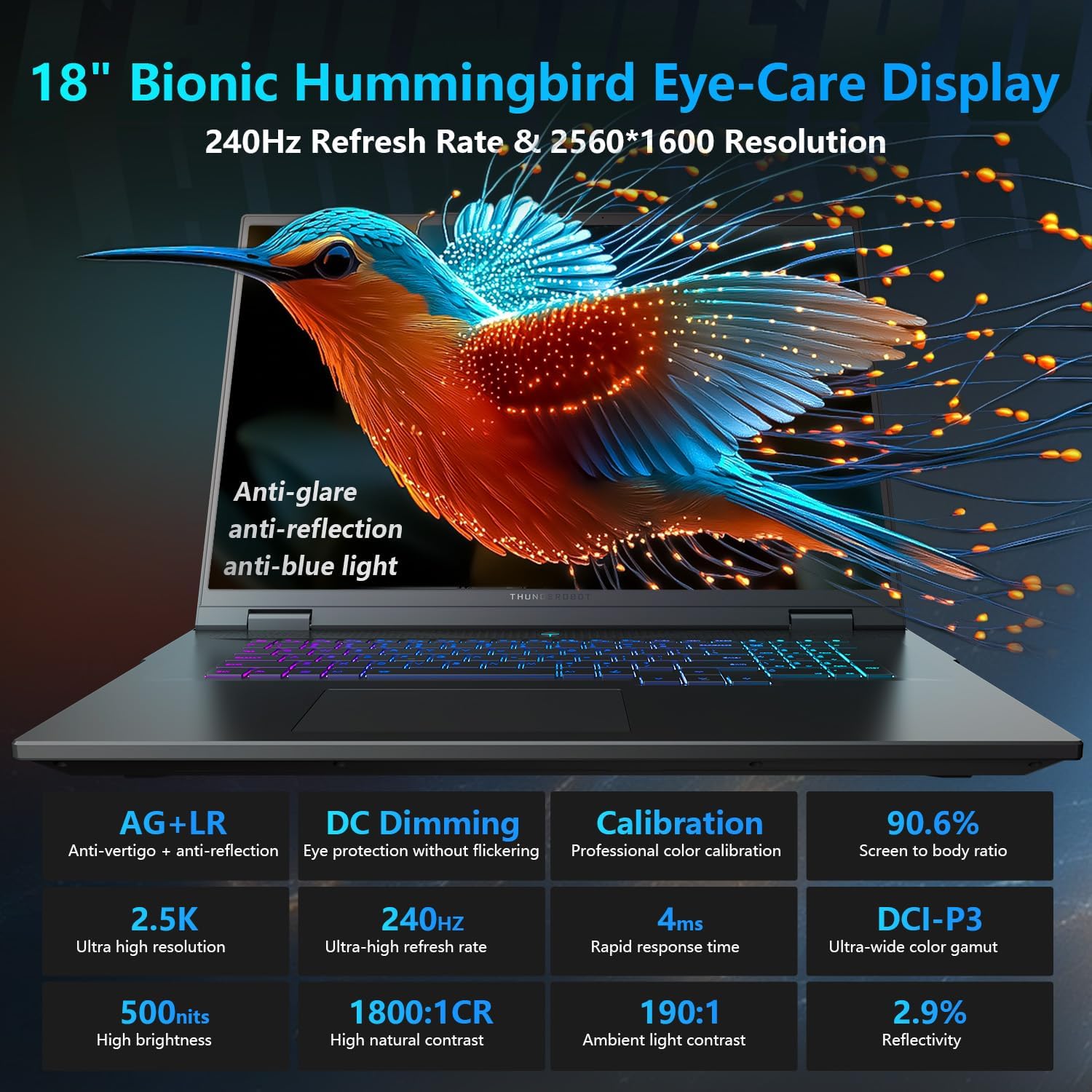
The 18-inch QHD+ (2560x1600) Bionic Hummingbird Eye-Care display offers a 240Hz refresh rate and 4ms response time for clear and fluid visuals. It includes anti-glare, anti-reflection, and anti-blue light technologies for eye comfort.

Connectivity (Ports)
The laptop is equipped with various ports for extensive connectivity:
- 3 x Superspeed USB Type-A ports
- 2 x Superspeed USB Type-C ports (including Thunderbolt 5 support)
- 1 x HDMI port (HDMI 2.1)
- 1 x RJ-45 Ethernet port
- 1 x Audio ataka (3.5 mm)
- UHS-II SD txartelen irakurgailua
- Wi-Fi 6E for high-speed wireless internet
- Bluetooth for wireless peripheral connections

Hozte Sistema
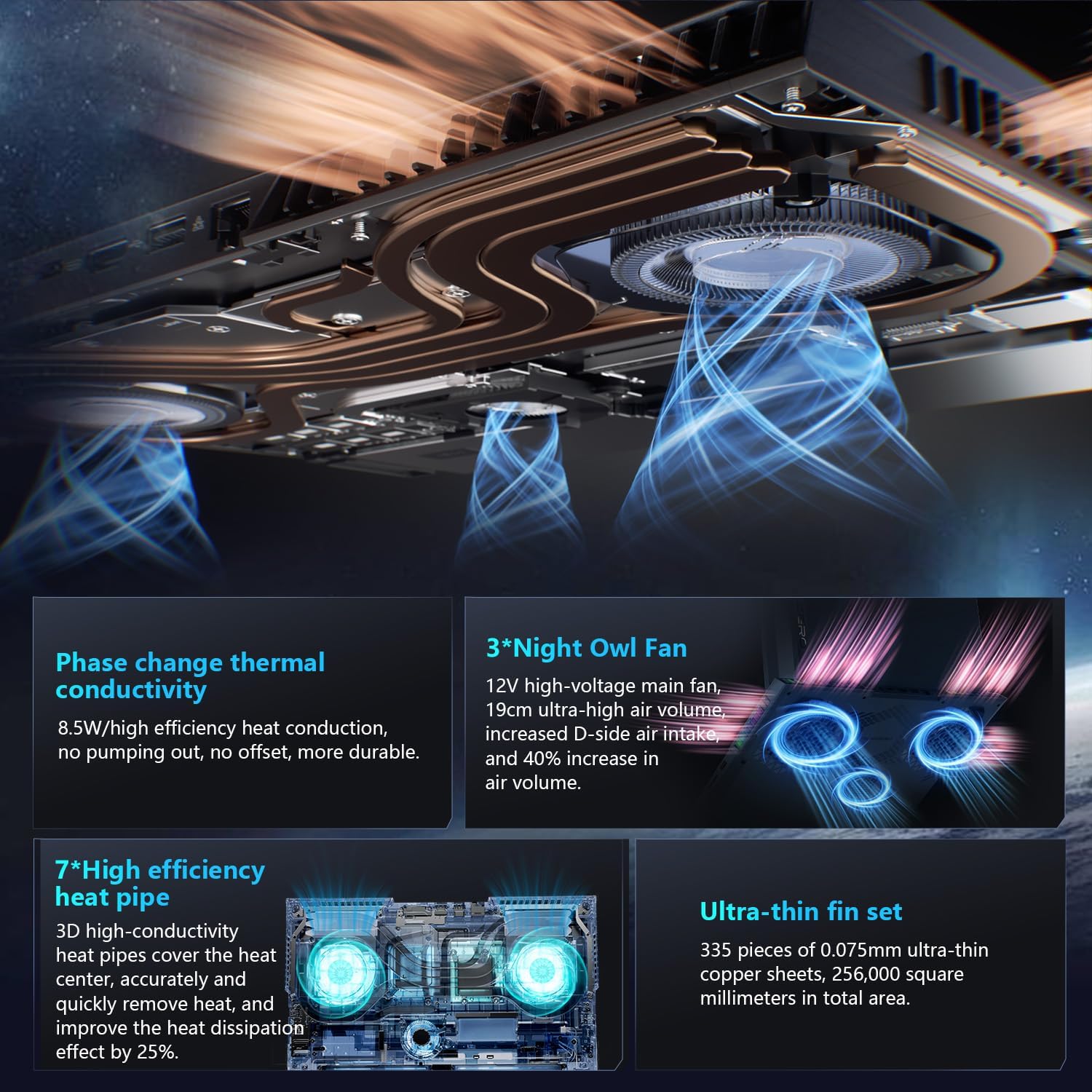
The advanced cooling system features 3 Night Owl fans, 7 high-efficiency heat pipes, and 338 ultra-thin copper fins to ensure optimal thermal management during intensive use, allowing for 270W super performance release.
AI Intelligent Control Center
The AI Intelligent Control Center software allows for comprehensive system management, including performance tuning, intelligent light adjustment, and personalized customization. This includes monitoring CPU/GPU temperatures and fan speeds.
- Performance Tuning: Adjust power settings for quiet, balanced, or turbo modes.
- Intelligent Light Adjustment: Customize keyboard, strip, and logo RGB lighting effects.
- Sistemaren jarraipena: View real-time CPU and GPU status.
Note: System mode switching in Control Center requires the device to be connected to a power source.
Mantentzea
Zure ordenagailu eramangarria garbitzea
- Pantaila: Erabili lipurrik gabeko zapi leun bat dampUrarekin edo pantaila-garbitzaile batekin garbitu. Saihestu produktu kimiko gogorrak.
- Teklatua eta txasisa: Erabili zapi leun bat gainazalak garbitzeko. Zirrikituetako hautsa bada, erabili aire konprimatua.
- Oihalak: Aldian-aldian garbitu hozte-aireztapenak aire konprimituarekin hautsa pilatzea saihesteko, errendimenduan eragina izan baitezake.
Bateria zaintzea
- Saihestu bateria maiz erabat deskargatzea.
- Denbora luzez erabiltzen ez baduzu, gorde ordenagailu eramangarria leku fresko eta lehor batean.
- Bateriaren osasun optimoa lortzeko, saihestu tenperatura muturrekoak.
Software eguneraketak
Regularly check for and install operating system updates (Windows Update) and driver updates (via Thunderobot's official website or the AI Intelligent Control Center) to ensure system stability and performance.
Arazoak konpontzea
| Arazoa | Kausa posiblea | Irtenbidea |
|---|---|---|
| Ordenagailu eramangarria ez da pizten. | Argindarrik ez, bateria deskargatuta edo hardware arazo bat. |
|
| Pantaila hutsik edo beltzez dago. | Display settings, external monitor connected, or hardware issue. |
|
| Erabilera bitartean gehiegi berotzea. | Blocked vents, high performance settings, or dust buildup. |
|
| Wi-Fi konexio arazoak. | Wi-Fi disabled, driver issues, or router problems. |
|
For further assistance, please contact Thunderobot customer support.
Zehaztapenak
| Ezaugarri | Xehetasuna |
|---|---|
| Ereduaren izena | Zero 18 Pro |
| Prozesadorea | Intel Core Ultra 9 275HX (24 Cores, 24 Threads, up to 5.40GHz) |
| Grafikoak | NVIDIA GeForce RTX 5070 Ti (8 GB GDDR6 Dedicated) |
| RAM | 32 GB DDR5 (4800 MHz) |
| Biltegiratzea | 2 TB PCIe M.2 SSD |
| Bistaratzea | 18-inch QHD+ (2560x1600) 240Hz Bionic Hummingbird Eye-Care Display |
| Sistema eragilea | Windows 11 Home |
| Konektibitatea | Wi-Fi 6E, Bluetooth, 3x USB-A, 2x USB-C (Thunderbolt 5), HDMI 2.1, RJ-45, Audio Port |
| Teklatua | Per-Key RGB Backlit, Numeric Keypad |
| Neurriak (LxWxH) | 16.04 x 11.78 x 1.41 hazbete |
| Elementuaren pisua | 15 kilo |
| Energia iturria | AC eta bateria |
Bermea eta Laguntza
Every Thunderobot laptop includes a 12 hilabeteko bermea, offering expert support, thorough diagnostics, and genuine parts if a repair is needed. Additionally, a 90 eguneko bermea is provided on all warranty replacement parts, ensuring hassle-free repairs. Your complete satisfaction is our commitment.
For technical support, warranty claims, or service inquiries, please visit the official Thunderobot website or contact their customer service department. Keep your purchase receipt and serial number handy for faster service.