
Sarrera
The eppfun SK003Pro is a Bluetooth 5.4 hands-free car speakerphone designed for clear communication and safe driving. It features advanced noise reduction, voice control integration, and multi-point connectivity.
Ezaugarri nagusiak:
- Bluetooth 5.4 teknologia: Integrates the latest low-energy Bluetooth 5.4 chip for longer transmission distance and faster speed.
- Komunikazio argia: Equipped with a Bluetooth 5.4 chipset, integrated speaker, echo and background noise reduction, and volume control for clear calls.
- Esku libreko deiak: Utilizes an integrated microphone and DSP technology for effective noise reduction and excellent sound quality. The 3W integrated speaker delivers clear and loud audio.
- Ahots kontrola: Supports safe driving with calls and navigation via Google Assistant/Siri Assistant.
- Puntu anitzeko konexioa: Connects to two devices simultaneously, allowing easy switching between music and calls.
- Instalazio erraza: Simple pairing with your mobile phone and attachment to the sun visor with the included clip.
1. Konfigurazioa eta instalazioa
Follow these steps to set up your eppfun SK003Pro speakerphone:
- Gailua kargatu: Before first use, fully charge the speakerphone using the provided USB Type-C cable. A full charge takes approximately 1.5 hours.

Image: The USB Type-C charging port and ON/OFF switch are located on the side of the device. Connect the provided cable to charge.
- Piztu: Slide the ON/OFF switch to the "ON" position. The device will enter pairing mode.
- Parekatu zure telefonoarekin:
- Gaitu Bluetooth telefono mugikorrean.
- Bilatu eskuragarri dauden Bluetooth gailuak.
- Select "eppfun SK003Pro" from the list to connect. A confirmation tone will sound upon successful pairing.
- Install in Vehicle: Attach the speakerphone to your car's sun visor using the integrated clip. Ensure it is securely fastened and does not obstruct your view.

Image: The speakerphone is designed to clip easily onto the car's sun visor for optimal microphone and speaker placement.
2. Funtzionamendu-argibideak
2.1 Oinarrizko funtzioak
- Deiak erantzutea / amaitzea: Sakatu Deitzeko botoia (phone icon) once to answer an incoming call or end an ongoing call.
- Deiak ukatzea: Eduki sakatuta Deitzeko botoia 2 segundoz sarrerako dei bat ukatzeko.
- Bolumen kontrola: Erabili '+' eta '-' buttons to adjust the call volume or media playback volume.
- Berriz markatu azken zenbakia: Sakatu bi aldiz Deitzeko botoia markatutako azken zenbakia berriro markatzeko.
2.2 Voice Assistant (Siri/Google Assistant)
The eppfun SK003Pro supports voice commands through your phone's assistant.
- Aktibatu Ahots Laguntzailea: Sakatu Mikrofonoaren botoia (microphone icon) once to activate Siri or Google Assistant on your connected phone.
- You can then use voice commands for navigation, making calls, sending messages, and more, ensuring safe driving.
2.3 Puntu anitzeko konexioa
The device can connect to two mobile phones simultaneously.
- Pair the first phone as described in the "Setup" section.
- After the first phone is connected, put the speakerphone back into pairing mode (usually by briefly disconnecting and reconnecting, or by holding the call button if it has a dedicated pairing function - refer to specific device prompts if available).
- Pair the second phone.
- The speakerphone will now be connected to both devices, allowing you to switch between them for calls or media.

Image: The speakerphone supports connecting to two mobile phones simultaneously, enabling seamless switching between devices.
3. Mantentzea
- Garbiketa: Erabili zapi leun eta lehor bat gailua garbitzeko. Ez erabili garbitzaile likidorik edo aerosolik.
- Biltegiratzea: Gorde gailua leku fresko eta lehor batean, eguzki-argitik eta muturreko tenperaturetatik babestuta.
- Bateria zaintzea: To prolong battery life, avoid fully discharging the battery frequently. Charge the device regularly, even if not in use for extended periods. The high-quality lithium battery offers up to 500 hours of standby time.

Image: The device features an 800mAh lithium battery, providing extended standby time and reliable performance.
4. Arazoak
If you encounter issues with your eppfun SK003Pro, refer to the following solutions:
| Arazoa | Kausa posiblea | Irtenbidea |
|---|---|---|
| Ezin da telefonoarekin parekatu. | Bluetooth is off on phone; device is not in pairing mode; device battery is low. |
|
| Poor call quality / Others cannot hear me clearly. | Microphone obstruction; low volume; environmental noise; device not positioned correctly. |
|
| No sound from speakerphone. | Volume too low; device not connected; media routed to phone speaker. |
|
| Ahots-laguntzaileak ez du erantzuten. | Not activated; phone settings. |
|
5. Zehaztapenak
| Ezaugarri | Xehetasuna |
|---|---|
| Marka | eppfun |
| Modelo zenbakia | SK003Pro |
| Kolorea | Grisa |
| Konektibitate Teknologia | Bluetooth 5.4 |
| Gailu bateragarriak | Smartphone, Tablet |
| Materiala | Akrilonitrilo butadieno estirenoa (ABS), metala |
| Bozgorailuaren irteera | 3W (Dual 3W speakers, 40MM Graphene Diaphragm)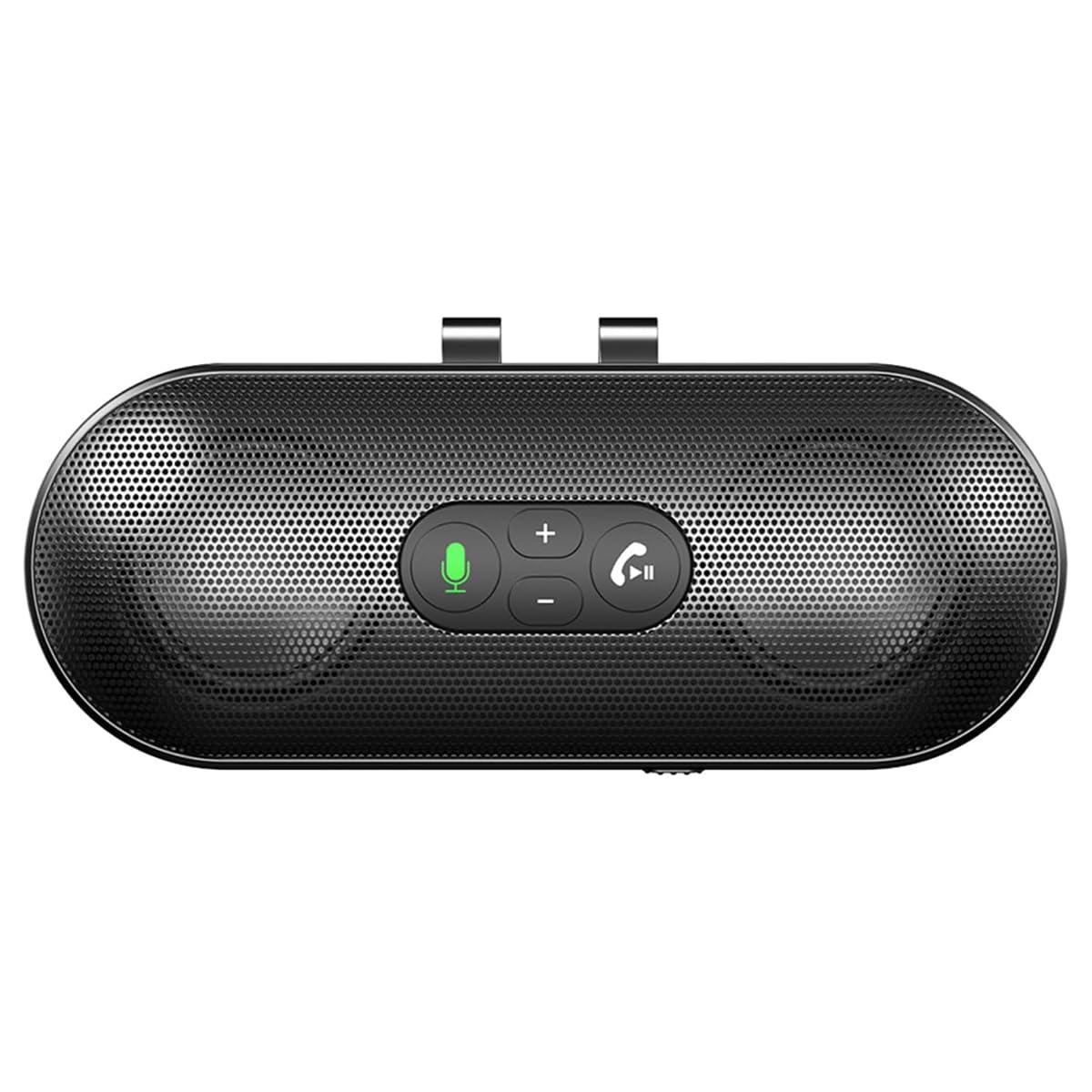 Image: The speakerphone features a powerful audio system with dual 3W speakers and 40mm Graphene Diaphragms for clear and loud sound. |
| Mikrofonoa | Integrated, High-definition with DSP noise reduction |
| Bateria mota | Litio-ioizko bateria (800 mAh) |
| Kargatzeko ataka | USB C motakoa |
| Kargatzeko Denbora | 1.5 ordu gutxi gorabehera |
| Egonean Denbora | Gehienez 500 ordu |
| Jatorrizko Herrialdea | Txina |
6. Bermearen informazioa
The eppfun SK003Pro comes with a manufacturer's warranty.
- Fabrikatzailearen bermea: 1 urte
- Mesedez, gorde zure erosketa-froga berme-erreklamazioetarako.
- Warranty does not cover damage caused by misuse, accidents, unauthorized repairs, or normal wear and tear.
7. Bezeroarentzako arreta
For further assistance or inquiries, please contact eppfun customer support:
- Fabrikatzailea: eppfun
- Webgunea: www.eppfun.com (Oharra: Hau leku-markatzailea da URL, please refer to your product packaging or official documentation for the correct support webgunea.)
- Posta elektronikoa: support@eppfun.com (Note: This is a placeholder email, please refer to your product packaging or official documentation for the correct support email.)
When contacting support, please provide your product model number (SK003Pro) and a detailed description of the issue.