
EasySMX D10
EasySMX D10 Wireless Gaming Controller User Manual
Comprehensive guide for setup, operation, and maintenance of your EasySMX D10 controller.
Produktua amaituview
The EasySMX D10 Wireless Gaming Controller is designed for competitive gamers, offering ultra-low latency and broad compatibility across multiple platforms. It features advanced components such as TMR Joysticks, Dual-Mode Triggers, and Mechanical Keys for precise and responsive gameplay. The controller also includes customizable RGB lighting, remappable back buttons, and a convenient charging dock.

Image: EasySMX D10 Wireless Gaming Controller with its charging dock, showcasinbere diseinua eta RGB argiztapena azpimarratuz.
Paketearen edukia
Before proceeding with setup, please ensure all items are present in the package:
- EasySMX D10 Wireless Gaming Controller
- Magnetic Intelligent Charging Dock
- USB-C kargatzeko kablea
- 2.4G Wireless Dongle (stored in the charging dock)
- Erabiltzailearen eskuliburua

Image: The EasySMX D10 controller, its charging dock, USB-C cable, and user manual, as typically found in the product packaging.
Konfigurazioa
Hasierako karga
It is recommended to fully charge the controller before first use. The controller includes a magnetic intelligent charging dock for convenience.
- Connect the USB-C charging cable to the charging dock and a power source (e.g., PC USB port, USB wall adapter).
- Place the EasySMX D10 controller onto the magnetic charging dock. The controller will automatically align and begin charging.
- The RGB lighting on the controller and dock will indicate charging status. A full charge typically takes approximately 2.5 hours.

Image: The EasySMX D10 controller securely placed on its intelligent charging dock, ready for charging.
Kontrolagailua konektatzea
The EasySMX D10 supports wired, 2.4G wireless, and Bluetooth connections.
2.4G Wireless Connection (Recommended for PC)
- Locate the 2.4G wireless dongle, which is conveniently stored within the charging dock.
- Plug the 2.4G wireless dongle into an available USB port on your PC or compatible device.
- Turn on the controller. It should automatically connect to the dongle. The controller offers a 1000Hz polling rate in 2.4G wireless mode for minimal latency.
Bluetooth Connection (for Switch, iOS, Android)
- Ziurtatu kontrolatzailea piztuta dagoela.
- On your device (Switch, iOS, Android), navigate to the Bluetooth settings.
- Bilatu available devices and select "EasySMX D10" (or similar) to pair.
- For Nintendo Switch, the 6-axis gyroscope feature is supported via Bluetooth.
Kablezko konexioa
Connect the controller directly to your PC or compatible device using the USB-C cable. The controller will function immediately, also supporting a 1000Hz polling rate in wired mode.
Funtzionamendu-argibideak
Kontrolatzailearen diseinua eta funtzioak
Familiarize yourself with the key components of your EasySMX D10 controller:
- TMR joystickak: High-sensitivity, anti-drift joysticks optimized for precision in FPS and racing games.
- EasyPos D-pad: Delivers precise 8-way movement with millisecond response, ideal for fighting and retro games.
- Dual-Mode Triggers: Switch between Hall linear triggers (longer travel for racing/shooting) and micro-switch tactile triggers (shorter travel for action/fighting).
- Botoi mekanikoak: Face buttons (A, B, X, Y) feature 1.0mm actuation and a 5M+ click life, providing tactile feedback similar to a mechanical keyboard.
- Programmable Back Buttons (M1, M2): Two remappable buttons on the rear of the controller for custom commands.
- RGB argiztapena: Customizable lighting effects integrated into the controller's design.
- Vibration Motors: Adjustable vibration feedback for enhanced immersion.
Pertsonalizazio Ezaugarriak
RGB argiztapena doitzea
The controller features customizable RGB lighting with multiple modes and color combinations. Refer to the included user manual for specific button combinations to cycle through lighting effects and adjust brightness.
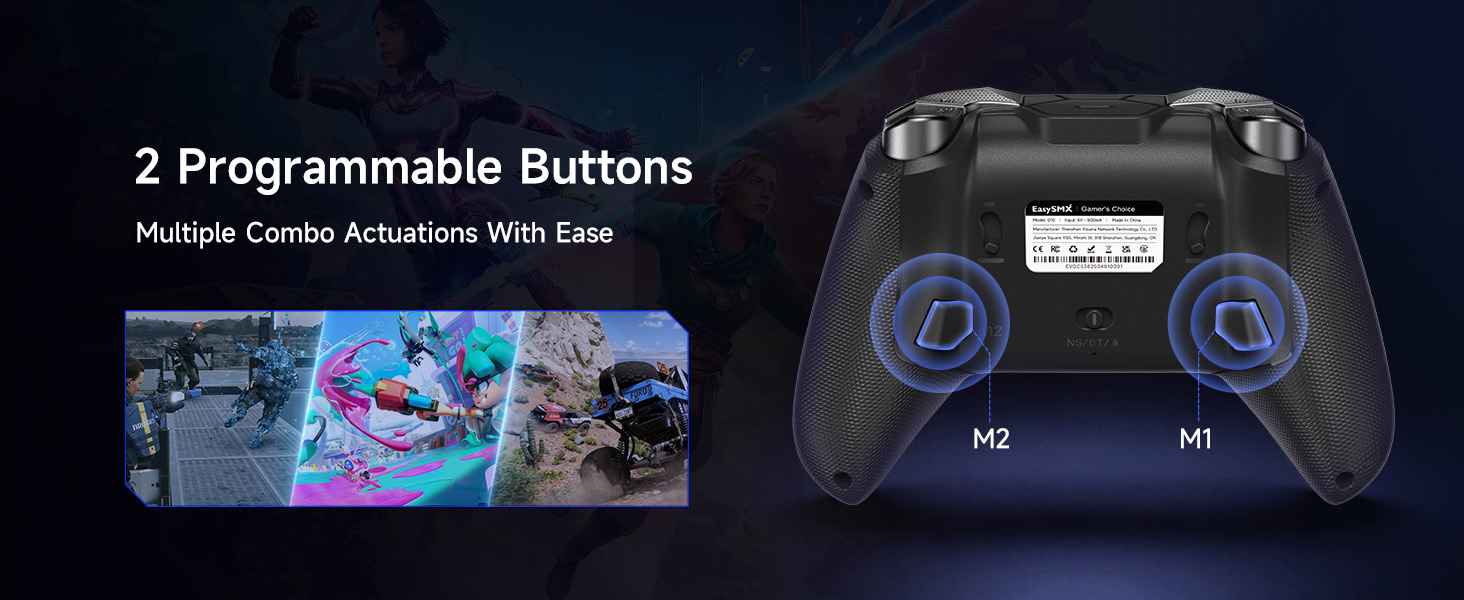
Image: Three EasySMX D10 controllers demonstrating various customizable RGB lighting options.
Remapping Back Buttons
The two back buttons (M1 and M2) can be programmed to replicate other button inputs, allowing for quick access to complex commands or frequently used actions. Consult the detailed instructions in the full user manual for the remapping process.

Image: A diagram highlighting the two programmable buttons (M1 and M2) located on the underside of the EasySMX D10 controller.
Bibrazioaren doikuntza
The intensity of the controller's vibration can be adjusted to suit personal preference, offering four distinct levels for immersive gameplay. Specific button combinations are used to cycle through these vibration settings.

Image: A visual representation of the four adjustable vibration levels for the EasySMX D10 controller.
Trigger Mode Switching
The D10 controller features innovative dual-mode triggers. A physical switch on the underside of each trigger allows you to toggle between Hall linear mode (for precise analog input in racing or flight simulators) and micro-switch tactile mode (for rapid, clicky input in shooters or fighting games).

Irudia: Xehetasun zehatza view of the EasySMX D10's triggers, illustrating the two distinct modes: Hall Effect for longer travel and Microswitch for immediate actuation.
D-pad and Joysticks
The EasySMX D10 incorporates an exclusive EasyPos D-pad for lightning-fast actuation and ultra-precise 8-way movement. The TMR Joysticks are designed for anti-drift performance and high precision, making them suitable for demanding game genres.

Image: An exploded diagram detailing the internal components of the EasySMX D10's EasyPos D-pad, highlighting its design for precise movement.

Irudia: Mozketa bat view illustrating the advanced TMR (Tactile Magnetic Resistance) technology used in the EasySMX D10 joysticks for optimized precision and durability.
Mantentzea
Garbiketa
To maintain the longevity and appearance of your controller:
- Use a soft, dry cloth to wipe down the controller's surface regularly.
- Zikinkeria egoskorrerako, apur bat lehortuampGarbitu zapi bat urarekin edo garbitzaile leun eta ez-urratzaile batekin. Saihestu gehiegizko hezetasuna.
- Do not use harsh chemicals, solvents, or abrasive materials, as these can damage the controller's finish or internal components.
- Use a cotton swab or compressed air to clean around buttons and joysticks if dust or debris accumulates.
Biltegiratzea
When not in use, store the controller in a cool, dry place away from direct sunlight, extreme temperatures, and high humidity. Utilizing the charging dock for storage helps keep the controller organized and charged.
Arazoak konpontzea
| Arazoa | Kausa posiblea | Irtenbidea |
|---|---|---|
| Kontrolatzailea ez da pizten. | Bateria baxua. | Charge the controller using the charging dock or USB-C cable. |
| Kontrolatzailea ez da haririk gabe konektatzen. | Out of range, interference, or incorrect pairing mode. | Ensure controller is within range. Re-pair the controller via Bluetooth or re-insert the 2.4G dongle. Check for other wireless devices causing interference. |
| Input lag or unresponsiveness. | Wireless interference, low battery, or distance from receiver. | Move closer to the receiver/device. Ensure controller is fully charged. Try a wired connection to rule out wireless issues. |
| Joysticks or buttons not responding correctly. | Software glitch, physical obstruction, or calibration issue. | Restart the controller and the connected device. Check for any physical debris around buttons/joysticks. Refer to the full manual for joystick/trigger calibration procedures if available. |
| Bibrazioak ez du funtzionatzen edo ahulegia/indartsuegia da. | Vibration setting is off or set to an extreme level. | Adjust the vibration intensity using the controller's built-in controls. |
Zehaztapenak
- Eredua: D10
- Bateragarritasuna: Windows PC, Android, Nintendo Switch, Nintendo Switch 2, iOS
- Konektibitatea: Kable bidezkoa (USB-C), 2.4G haririk gabekoa, Bluetooth
- Bozketa-tasa: 1000Hz (Wired & 2.4G)
- Joystickak: TMR (Tactile Magnetic Resistance) Sensors
- D tekla: EasyPos™ 8-way precision
- Eragileak: Dual-Mode (Hall Linear & Micro-switch Tactile)
- Botoiak: Full Mechanical, 1.0mm actuation, 5M+ click life
- Bateria: Litio-ioizko bateria 1 (barne), 1000 mAh
- Kargatzeko denbora: Approx. 2.5 hours (via USB-C and charging dock)
- Ezaugarri bereziak: Customizable RGB Lighting, 2 Remappable Back Buttons, 6-axis Gyroscope (Switch only), Adjustable Vibration
- Neurriak: 7.17 x 6.42 x 2.83 hazbete
- Pisua: 11.2 ontza
- Fabrikatzailea: EasySMX
- Jatorrizko herrialdea: Txina
Bermea eta Laguntza
EasySMX produktuak fidagarritasun eta errendimendurako diseinatuta daude. Bermeari buruzko informazioa, laguntza teknikoa edo zerbitzu-kontsultak egiteko, jo ezazu EasySMX webgune ofizialera. webgunera edo jarri harremanetan zuzenean bezeroarentzako arreta-zerbitzuarekin.
Official EasySMX Store: EasySMX Amazon Store
Mesedez, gorde zure erosketa-froga berme-erreklamazioetarako.
Erlazionatutako dokumentuak - D10
 |
BEITONG BTP-KP20 Haririk gabeko Joko-Padailearen Erabiltzaile Eskuliburua BEITONG BTP-KP20 haririk gabeko joko-padaren erabiltzailearen eskuliburu osoa, non ezaugarriak, konfigurazioa, PC, Switch, iOS eta Androiderako konexioa eta arazoak konpontzea zehaztuta dauden. |
 |
Womier SK75 TMR teklatuaren erabiltzailearen eskuliburua: Ezaugarriak, konfigurazioa eta tekla konbinazioak Womier SK75 TMR % 75eko haririk gabeko aluminiozko teklatu magnetikoaren erabiltzailearen eskuliburu osoa. Windows/macOS-erako FN tekla konbinazioak, bateriaren kudeaketa, moduen ezarpenak eta ohiko galderei erantzuten die. |
 |
AJAZZ i610T Bluetooth modu bikoitzeko teklatu mekanikoaren erabiltzailearen eskuliburua AJAZZ i610T Bluetooth modu bikoitzeko teklatu mekanikoaren erabiltzailearen eskuliburua, oinarrizko parametroak, teklaren funtzioak, adierazle-argiak, etengailuen funtzionamendua eta bermearen informazioa zehaztuz. |
 |
CHERRY XTRFY K5 PRO TMR COMPACT Joko Teklatuaren Erabilera Eskuliburua CHERRY XTRFY K5 PRO TMR COMPACT joko-teklaturako funtzionamendu-eskuliburu osoa. Ikasi konfigurazioari, ezaugarriei, pertsonalizazioari, segurtasunari eta arazoak konpontzeari buruz. |
 |
EasySMX D10 Gaming Controller User Manual Comprehensive user manual for the EasySMX D10 multi-mode gaming controller, detailing features, button functions, connectivity, and troubleshooting for PC, Switch, and Android devices. |
 |
EasySMX D10 Plataforma Anitzeko Joko Kontrolagailuaren Erabiltzaile Eskuliburua EasySMX D10 plataforma anitzeko joko-kontrolagailuaren erabiltzailearen eskuliburua, konexio-argibideak, turboa eta programazioa bezalako funtzioak, kargatzea, segurtasun-informazioa eta zehaztapenak biltzen dituena. |
Ask a question about this manual
Ask about setup, troubleshooting, compatibility, parts, safety, or missing instructions. Manuals+ will review the question and use this page’s manual context to help answer it.