1. Sarrera
The Hama WM-450 Multi-Device Wireless Mouse is an optical mouse designed for versatile use across multiple devices. It features 7 buttons, a scroll wheel, and supports wireless connectivity via Bluetooth (two channels) and a 2.4 GHz radio frequency (one channel) using a USB-A receiver. This allows simultaneous connection to up to three devices, with quick switching between them. An integrated AI Assist button enhances productivity by activating an inter-program AI assistant. The mouse is designed for comfortable and silent operation.

1.1. irudia: Amaituview of the Hama WM-450 mouse highlighting its key features: Bluetooth connectivity, 10-meter wireless range, USB-A receiver, and battery power.
2. Konfigurazioa
2.1 Bateriaren instalazioa
- Kokatu bateriaren konpartimendua saguaren azpialdean.
- Ireki bateriaren konpartimenduaren estalkia.
- Insert the two AAA batteries (included) according to the polarity markings (+/-) inside the compartment.
- Itxi bateriaren konpartimenduaren estalkia ondo.
2.2 Piztu/Itzaltzea
Slide the ON/OFF switch, located on the underside of the mouse, to the 'ON' position to power on the mouse. Slide it to 'OFF' when not in use to conserve battery life.
2.3 Connecting via USB-A Receiver (2.4 GHz Radio)
- Remove the USB-A receiver from its storage slot on the underside of the mouse.
- Plug the USB-A receiver into an available USB-A port on your computer, laptop, or compatible device.
- The mouse should be automatically recognized and ready for use. This connection uses the 2.4 GHz radio channel.
2.4 Bluetooth bidez konektatzea
The mouse supports two Bluetooth channels for connecting to different devices.
- Ziurtatu sagua piztuta dagoela.
- Press the channel switch button (usually on the underside or top of the mouse) to select either Bluetooth Channel 1 or Bluetooth Channel 2. The corresponding indicator light will flash.
- Zure gailuan (ordenagailua, tableta, telefonoa), joan Bluetooth ezarpenetara eta gaitu Bluetooth.
- Bilatu new devices. The mouse should appear as 'Hama WM-450' or similar.
- Hautatu parekatzeko sagua. Jarraitu pantailan agertzen diren argibideei.
- Once paired, the indicator light will stop flashing and remain solid for a few seconds, indicating a successful connection.

Image 2.1: The underside of the Hama WM-450 mouse, illustrating the battery compartment, the ON/OFF switch, and the integrated storage for the USB-A receiver.
3. Funtzionamendua
3.1 Oinarrizko funtzioak
- Ezkerreko klik: Lehen mailako hautaketa eta aktibazioa.
- Egin klik eskuineko botoiarekin: Testuinguru-menuetara sartzen da.
- Korritzeko gurpila: Dokumentuetan zehar nabigatzen du eta web pages. The high-quality aluminum scroll wheel provides precise control.
- Klik isilaren botoiak: Ezkerreko eta eskuineko klik egiteko botoiak isilpeko funtzionamendurako diseinatuta daude, ingurune isiletan zarata murriztuz.
3.2 Gailu Anitzeko Kommutazioa
To switch between connected devices (USB-A, Bluetooth 1, Bluetooth 2), press the dedicated channel switch button on the mouse. The mouse will instantly connect to the selected device.
3.3 Side Navigation Buttons
The mouse features two practical side buttons. These buttons typically function as 'Back' and 'Forward' for easier navigation in web nabigatzaileak, file explorers, and applications like Outlook.

3.1. irudia: Plano hurbila view of the two side navigation buttons on the Hama WM-450 mouse, used for 'Back' and 'Forward' functions.
3.4 DPI doikuntza
The mouse includes a DPI switch button, usually located near the scroll wheel. Press this button to cycle through different sensitivity settings: 800, 1200, and 1600 DPI (Dots Per Inch). Choose the DPI setting that best suits your preference and task.
3.5 AI Assist Button
The dedicated AI Assist button activates an inter-program AI assistant, designed to enhance productivity. Refer to your device's software documentation for specific functionalities enabled by this feature.
4. Mantentzea
4.1 Garbiketa
To clean the mouse, use a soft, dry, lint-free cloth. For stubborn dirt, slightly dampen the cloth with water or a mild cleaning solution. Avoid using harsh chemicals, abrasive cleaners, or excessive moisture, as these can damage the mouse.
4.2 Bateria ordezkatzea
When the mouse performance degrades or the indicator light signals low battery, replace the two AAA batteries. Always use fresh batteries of the same type.
4.3 USB Receiver Storage
When transporting the mouse or not using the 2.4 GHz radio connection, store the USB-A receiver in its dedicated slot on the underside of the mouse to prevent loss.
5. Arazoak
- Saguak ez du erantzuten:
- Ziurtatu sagua piztuta dagoela.
- Egiaztatu bateriaren maila eta ordeztu behar izanez gero.
- For USB-A connection, ensure the receiver is securely plugged into a working USB port. Try a different USB port.
- Bluetooth konexiorako, ziurtatu Bluetooth gaituta dagoela zure gailuan eta sagua parekatuta dagoela. Saiatu sagua berriro parekatzen.
- Ensure the correct channel (USB-A, BT1, BT2) is selected on the mouse.
- Konexio etengabea:
- Move the mouse closer to the receiver/device. The effective range is up to 10 meters, but obstacles can reduce this.
- Avoid using the mouse near other wireless devices that might cause interference.
- Kurtsorearen mugimendua irregularra edo motela da:
- Garbitu saguaren azpialdeko sentsore optikoa.
- Ensure you are using the mouse on a suitable surface. Highly reflective or transparent surfaces may affect performance.
- Adjust the DPI setting to a higher value if the cursor is too slow.
- Side buttons or AI Assist button not working:
- Ensure your operating system or application supports these functions.
- Check for any specific software or driver requirements for your device.
6. Zehaztapenak
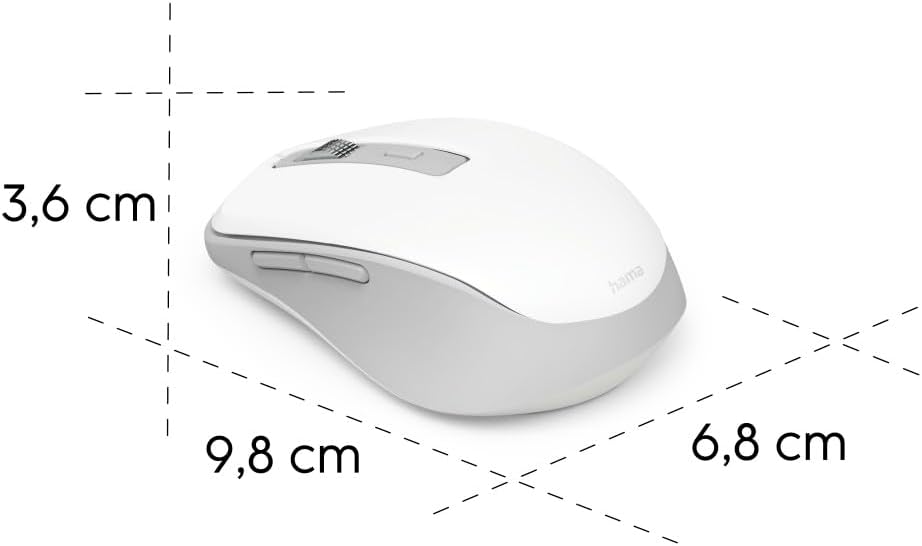
Image 6.1: Dimensional diagram of the Hama WM-450 mouse, indicating its length, width, and height.
| Marka | Hama |
| Ereduaren izena | WM-450 |
| Modelo zenbakia | 00173080 |
| Konektibitate Teknologia | Bluetooth, 2.4 GHz Radio (USB-A) |
| Wireless Range | Gehienez 10 metro |
| Sensor Teknologia | Optikoa |
| DPI ezarpenak | 800, 1200, 1600 |
| Botoi kopurua | 7 (including scroll wheel click) |
| Energia iturria | 2 x AAA bateria (barne) |
| Neurriak (L x W x H) | 9.8 x 6.8 x 3.6 cm (gutxi gorabehera) |
| Pisua | 140 gramo |
| Gailu bateragarriak | PC, Tablet, Laptop, Smartphone, iPad |
| Ezaugarri bereziak | Multi-device connectivity (3 devices), AI Assist button, Silent click buttons, Side navigation buttons, Retractable USB receiver, Polymer-coated mouse feet, High-quality aluminum scroll wheel. |
| Materialaren osaera | At least 20% recycled materials |
| Enbalajea | %100 plastikorik gabekoa |
7. Bermea eta Laguntza
For warranty information, technical support, or service inquiries, please refer to the warranty card included with your product or visit the official Hama webgunea. Bezeroarentzako arreta-zerbitzurako harremanetarako datuak normalean fabrikatzailearen webgunean daude eskuragarri. webgunea.