
1. Bukatu daview
The Roku Select Series HD TV provides a streamlined entertainment experience. This 32-inch 720p HD television integrates the Roku operating system for easy access to streaming content, live TV, and various applications. It features a voice remote for convenient control and includes technologies like Bluetooth Headphone Mode and Dolby Audio for enhanced sound.
Ezaugarri nagusiak
- Streaming etengabea: Fast Wi-Fi and quick app launches for immediate entertainment access.
- Extensive Content: Access to thousands of streaming apps, free movies, shows, and live TV channels.
- Hasierako pantaila pertsonalizagarria: Organize apps and content for personalized viewing.
- Softwarearen eguneratze automatikoak: Ensures access to the latest features and applications.
- Etxe adimendunaren integrazioa: Compatible with Roku Voice, Siri, Alexa, and Google Assistant for voice control. Supports Apple AirPlay for content sharing.
- Clear HD Picture: 720p HD resolution with Roku Smart Picture technology for optimized visuals.
- Ahots urrunekoa: Search, play, and control streaming with voice commands.
- Audio hobetua: Designed for clear speech and louder sound with Dolby Audio technology.
- Bluetooth entzungailuen modua: Private listening with wireless headphones.
Image: Roku 32-inch Select Series HD Smart TV with included remote control.
2. Zer dago kutxan
Konfigurazioarekin jarraitu aurretik, egiaztatu osagai guztiak daudela.
- Roku Select Series 32" HD TV
- Euskarriak eta torlojuak
- Roku Voice Remote with batteries (2 AAA)
- Elikatze-kablea
- Erabiltzailearen eskuliburua (dokumentu hau)

Image: Contents of the Roku Select Series TV packaging.
3. Konfigurazioa
3.1 Paketatzea
Kontu handiz atera telebista eta osagarri guztiak paketetik. Gorde ontzia etorkizunean garraio edo zerbitzu beharretarako.
3.2 Standa lotzea
- Jarri telebistaren pantaila beherantz gainazal leun eta garbi batean, marradurak saihesteko.
- Lerrokatu telebistaren euskarriak telebistaren behealdeko torloju-zuloekin.
- Lotu euskarriak emandako torlojuak erabiliz. Ziurtatu ondo estututa daudela.
3.3 Periferikoak konektatzea
Connect your devices to the appropriate ports on the back of the TV.
- HDMI: Connect up to three HDMI devices (e.g., cable box, gaming console, Blu-ray player) to the HDMI ports.
- USBa: Use the USB port for media playback or connecting compatible accessories.
- Optikoa (S/PDIF): Kanpoko audio-sistema batera konektatzeko.
- Sare elektrikoa Konektatu elikatze-kablea telebistara eta gero hormako entxufe batera.
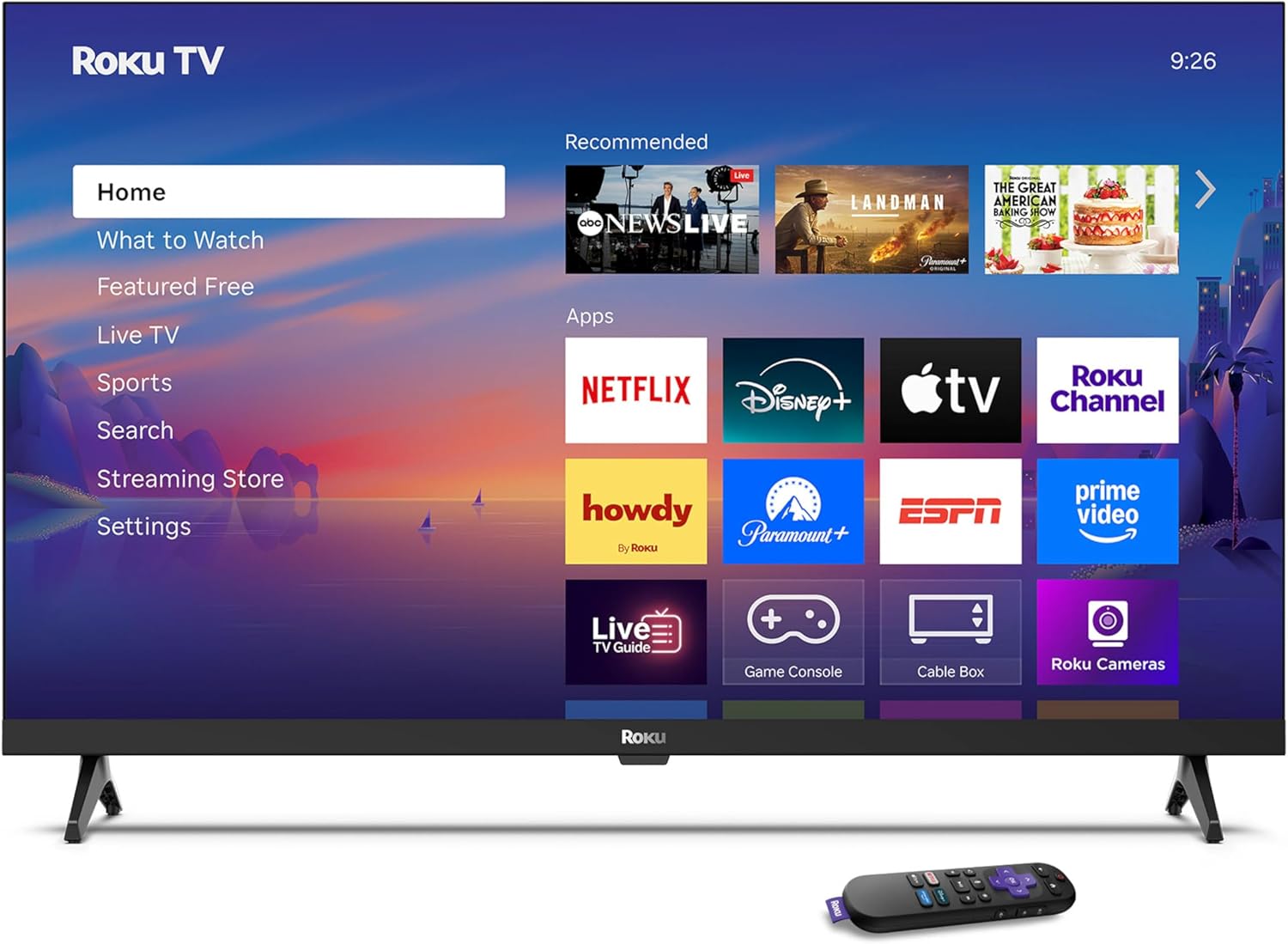
Image: Rear panel connections including HDMI, USB, and optical ports.
3.4 Hasierako piztea eta sareko konexioa
- Plug in the TV and press the power button on the remote or TV.
- Jarraitu pantailan agertzen diren argibideei zure hizkuntza hautatzeko eta zure Wi-Fi sarera konektatzeko.
- Activate your Roku account or create a new one.
Bideoa: Amaiera batview of the Roku TV operating system, demonstrating its user interface and features. This video is provided by Roku, Inc.
4. Funtzionamendu-argibideak
4.1 Ahots-urrutiko agintea erabiltzea
The Roku Voice Remote allows for intuitive control of your TV and streaming content.
- Ahots bilaketa: Press and hold the voice button and speak your command to search for content, launch apps, or control playback.
- Nabigazioa: Erabili norabide-tekla menuetan zehar mugitzeko eta elementuak hautatzeko.
- Aplikazioko lasterbideak: Botoi dedikatuek streaming zerbitzu ezagunetarako sarbide azkarra eskaintzen dute.

Image: Features of the Roku Voice Remote, highlighting voice control and shortcut buttons.
4.2 Hasierako pantailan nabigatzea
The Roku Home Screen provides access to all your installed apps, inputs, and settings.
- Hasiera: Returns you to the main home screen.
- Zer ikusi: Discover recommended content.
- Zuzeneko telebista: Access free live television channels.
- Streaming denda: Browse and add new streaming channels.
- Ezarpenak: Adjust TV and system preferences.

Image: The Roku TV home screen interface.
4.3 Irudi eta soinu ezarpenak doitzea
Pertsonalizatu zure viewing and listening experience through the settings menu.
- Irudi modua: Select from predefined modes like Standard, Vivid, Sports, or Movie. Roku Smart Picture automatically optimizes settings.
- Soinu modua: Aukeratu soinu profesionalafiles or enable features like Night Mode for reduced volume fluctuations.
- Bluetooth entzungailuen modua: Pair your wireless headphones for private audio.

Image: Picture mode settings on the Roku TV.

Image: Bluetooth Headphone Mode in use.

Image: Dolby Audio technology for clear sound.
5. Mantentzea
5.1 Pantaila garbitzea
Telebistaren pantaila garbitzeko, astiro-astiro zapi leun, lehor eta pelusik gabeko batekin garbitu. Orban egoskorrak izanez gero, astiro-astiro garbitu.ampGarbitu zapi bat urarekin edo pantailarentzat segurua den garbiketa-soluzio batekin. Saihestu produktu kimiko gogorrak edo material urratzaileak erabiltzea.
5.2 Software eguneraketak
Your Roku TV automatically receives software updates when connected to the internet. These updates provide new features, performance improvements, and bug fixes. Ensure your TV remains connected to the internet for optimal performance.
6. Arazoak
If you encounter issues with your Roku TV, refer to the following common solutions:
- Potentziarik gabe: Ziurtatu kablea ondo konektatuta dagoela telebistara eta funtzionatzen duen entxufe batera. Saiatu beste entxufe batekin.
- Irudi/soinurik ez: Verify that the correct input source is selected. Check all cable connections (HDMI, audio). Restart the TV by unplugging it for 30 seconds and plugging it back in.
- Urrunekoa ez dabil: Replace the AAA batteries in the remote. Ensure there are no obstructions between the remote and the TV. For voice remote issues, re-pair the remote if necessary (refer to Roku support for specific steps).
- Sareko konexio arazoak: Restart your Wi-Fi router and modem. Go to the TV's settings menu, then Network, and try reconnecting to your Wi-Fi network.
- Aplikazioa ez da kargatzen/huts egiten ari da: Try restarting the app. If the issue persists, remove the app from the home screen, restart the TV, and then re-add the app from the Streaming Store.
7. Zehaztapenak
| Ezaugarri | Xehetasuna |
|---|---|
| Pantailaren tamaina | 32 hazbete |
| Bistaratzeko Teknologia | LED |
| Ebazpena | 720p |
| Freskatze tasa | 60 Hz |
| Ezaugarri bereziak | Bluetooth Headphone Mode, Dolby Audio, Voice Remote |
| Konektibitate Teknologia | Bluetooth konexioa, Wi-Fi |
| HDMI portuak guztira | 3 |
| USB portuak guztira | 1 |
| Audio Sarrera | HDMI |
| Sistema eragilea | Roku OS |
| Muntatze Mota | Table Mount, Wall Mount |
| VESA muntaketa estandarra | 200 x 200 mm |
| Produktuaren neurriak (L x W x H) | 7" L x 28.3" W x 18.3" H |
| Elementuaren pisua | 7.5 kilo |
| Modelo zenbakia | 32R2D5 |
| UPC | 829610008974 |
8. Bermearen informazioa
8.1 Berme mugatua
Roku warrants the hardware against defects in materials and workmanship under normal use for a period of one (1) year from the date of purchase ("Warranty Period"). If Roku determines that the device’s hardware is defective during the Warranty Period, Roku’s sole obligation, and your exclusive remedy, will be to either repair or replace the unit with either a new or rebuilt device, at its option. This warranty applies if the product is used in accordance with the provided documentation.
8.2 Itzulketa politika
You may return a device for any reason:
- Within thirty (30) days from the date of purchase from Roku.
- Within the applicable return period if purchased from an authorized reseller or distributor.
Additional details regarding product returns can be found on the Roku support site.
9. Laguntza
For further assistance, troubleshooting guides, and frequently asked questions, please visit the official Roku support webgunea: