Sarrera
Thank you for choosing this replacement laptop keyboard. This product is designed to be compatible with specific Medion AKOYA laptop models, offering a reliable and functional replacement for your original keyboard. Please review this manual thoroughly before installation and use to ensure proper functionality and to avoid damage.
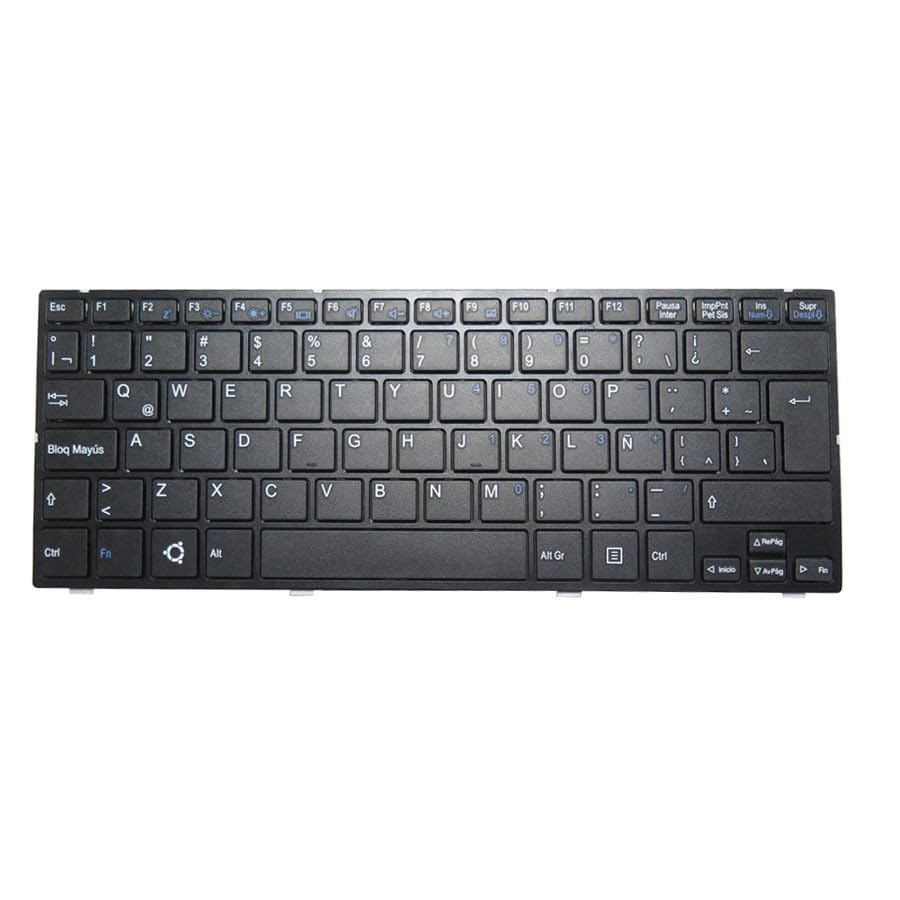
An image of the black Latin America LA layout laptop keyboard with frame, compatible with Medion AKOYA E11201 and other models.
Konfigurazioa eta Instalazioa
Before proceeding with installation, ensure your laptop is powered off and disconnected from any power source. It is recommended to consult your laptop's service manual or a professional technician for detailed disassembly and reassembly instructions specific to your Medion AKOYA model. Incorrect installation can damage your device.
- Egiaztatu bateragarritasuna: Carefully check that the model numbers listed in this manual match your laptop's model. The compatible models include Medion AKOYA E11201, MD61860, MD64070, MD62380, MD62341, MD62249, MD62378, MD62368, MD62122, MD62081, MD61958, MD61992.
- Prestatu lan-eremua: Work on a clean, static-free surface to prevent damage to electronic components.
- Desmihiztatu: Follow your laptop's service manual to carefully remove the old keyboard. This typically involves removing screws, disconnecting ribbon cables, and releasing klipak.
- Teklatu berria instalatu: Connect the new keyboard's ribbon cable securely to the motherboard connector. Ensure it is properly seated and locked. Position the new keyboard into its frame.
- Berriz muntatzea: Reassemble your laptop by reversing the disassembly steps. Ensure all screws and components are correctly placed and secured.
- Proba funtzionaltasuna: Power on your laptop and test all keys to ensure proper operation before fully securing all covers.
An image of the black Latin America LA layout laptop keyboard with frame, ready for installation into a compatible Medion AKOYA laptop.
Funtzionamendua
This replacement keyboard functions identically to your original laptop keyboard. All standard keys, including alphanumeric, function keys (F1-F12), and special characters, will operate as expected. Ensure proper driver installation if prompted by your operating system, though typically, standard keyboard drivers are automatically recognized and installed.
Mantentzea eta zaintzea
To ensure the longevity and optimal performance of your keyboard, follow these care guidelines:
- Garbiketa: Erabili lipurrik gabeko zapi leun bat dampened with water or a mild cleaning solution to wipe the keycaps. Avoid spraying liquids directly onto the keyboard. Compressed air can be used to remove dust and debris from between keys.
- Saihestu isurketak: Mantendu likidoak teklatutik urrun barneko osagaiei kalterik ez egiteko.
- Erabilera leuna: Avoid excessive force when typing or cleaning, as this can damage key mechanisms.
Arazoak konpontzea
If you encounter issues with your new keyboard, consider the following common solutions:
- Giltzak ez dute erantzuten: Ensure the keyboard ribbon cable is securely connected to the motherboard. Re-seat the cable if necessary. Restart your laptop.
- Gako-irteera okerra: Check your operating system's keyboard language settings to ensure they match the physical layout of your keyboard (Latin America LA).
- Aldizkako funtzionaltasuna: This could indicate a loose connection. Re-open the laptop and verify all connections.
- Gidariaren arazoak: Although rare for standard keyboards, if issues persist, check your laptop manufacturer's website for updated keyboard drivers.
- Kalte fisikoa: Inspect the keyboard for any visible damage. If damage occurred during installation, it may affect functionality.
Arazoa konpontzeko urratsek ez badute konpontzen, jarri harremanetan bezeroarentzako arreta-zerbitzuarekin.
Produktuaren zehaztapenak
| Ezaugarri | Xehetasuna |
|---|---|
| Produktuaren neurriak | 16.93 x 7.09 x 2.76 hazbete |
| Elementuaren pisua | 10.6 ontza |
| Fabrikatzailea | Generikoa |
| ASIN | B0F927GDFL |
| Eskuragarri dagoen lehen data | 3ko martxoaren 2025a |
Bermearen informazioa
Produktu hau a 90 eguneko bermea from the date of purchase. This warranty covers manufacturing defects and ensures the product is free from material and workmanship flaws under normal use. It does not cover damage caused by misuse, accidents, unauthorized modifications, or improper installation. Please retain your proof of purchase for warranty claims.
Bezeroarentzako Arreta
For technical assistance, warranty claims, or any questions regarding your Generic Laptop Keyboard, please contact the seller directly through the platform where you made your purchase. When contacting support, please provide your order number and a detailed description of the issue.
It is crucial to verify your laptop model or product part number before purchasing. If you have disassembly pictures, sending them to the seller can assist in identifying the correct product or troubleshooting issues.


