
Kuizil T70
Kuizil erloju adimendunaren erabiltzailearen eskuliburua
Eredua: T70
Sarrera
Thank you for choosing the Kuizil Smart Watch. This device is designed to enhance your daily life by combining advanced fitness tracking, health monitoring, and smart communication features. With its 1.91-inch HD color screen and robust IP68 waterproof rating, it is suitable for various activities and lifestyles. This manual provides detailed instructions to help you set up, operate, and maintain your new smartwatch.
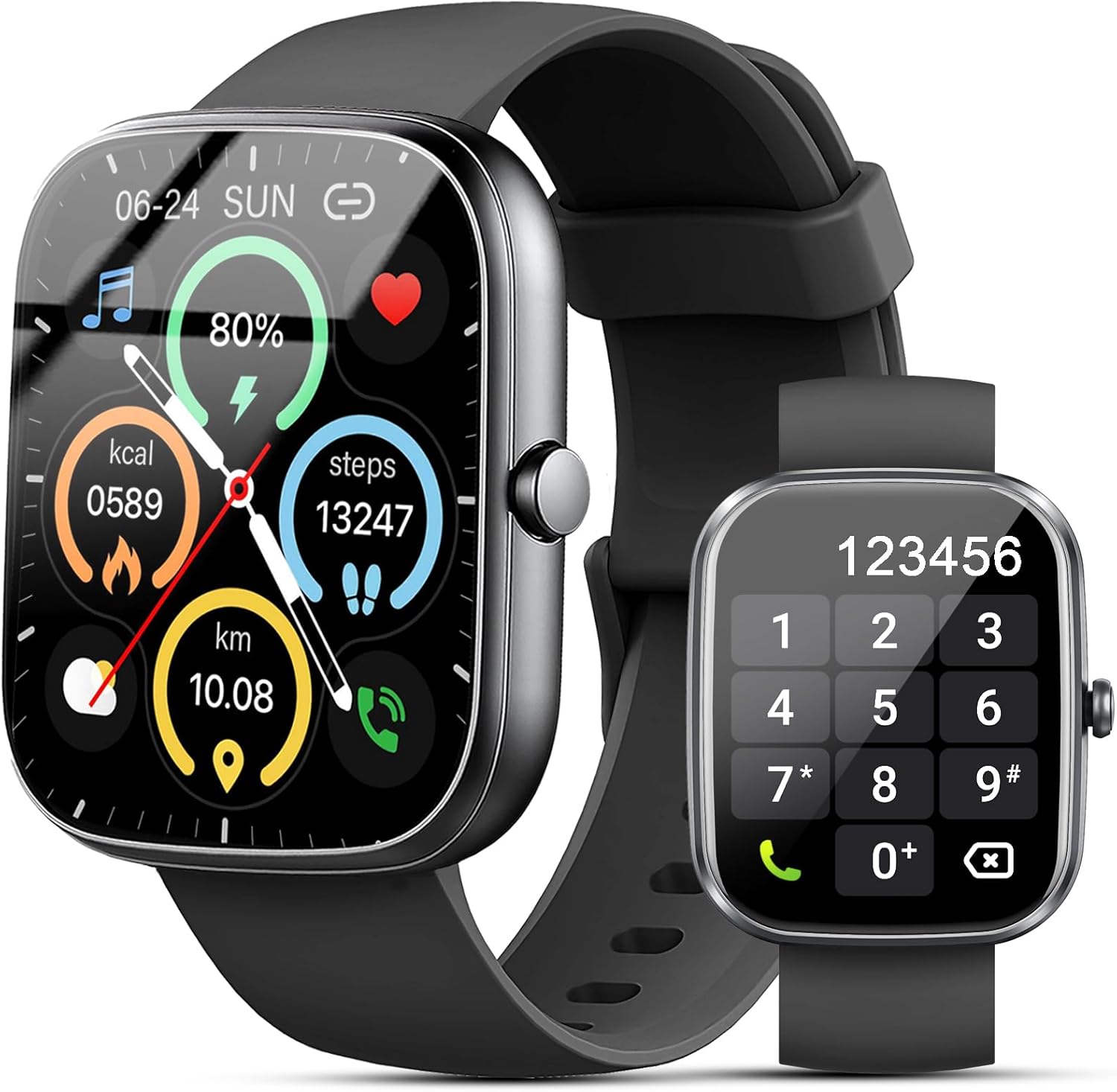
Figure 1: Kuizil Smart Watch with fitness data and call interface.
Kutxan dagoena
Mesedez, egiaztatu elementu guztiak zure paketean daudela:
- Erloju adimenduna (unitate 1)
- Watch Band (1 unit)
- Kargatzeko kable magnetikoa (unitate 1)
- Erabiltzailearen eskuliburua (unitate 1)

Figure 2: Package contents of the Kuizil Smart Watch.
Konfigurazio Gida
1. Erloju adimenduna kargatzea
Before first use, fully charge your smartwatch. Connect the magnetic charging cable to the charging points on the back of the watch and plug the USB end into a standard USB power adapter (not included). A full charge typically takes 2 hours.
- Ensure the charging pins are clean and properly aligned with the watch's charging contacts.
- Erlojuaren pantailak kargatze-egoera adieraziko du.
2. Aplikazioaren deskarga eta parekatzea
To unlock the full functionality of your Kuizil Smart Watch, you need to download and connect it to the companion app, "Gloryfit".
- Deskargatu aplikazioa: Bilatu "Gloryfit" in the Apple App Store (for iOS devices) or Google Play Store (for Android devices) and install it.
- Gaitu Bluetootha: On your smartphone, go to Settings and ensure Bluetooth is turned on.
- Open Gloryfit App: Launch the "Gloryfit" app and follow the on-screen instructions to create an account or log in.
- Gehitu gailua: Within the app, navigate to the "Device" or "Add Device" section. The app will search for nearby smartwatches. Select "T70" from the list of found devices to initiate pairing.
- Berretsi parekatzea: A pairing request may appear on both your phone and the watch. Confirm the pairing on both devices.

Figure 3: Bluetooth call and notification features.
3. Bluetooth Call Function Setup
For the call answering/making function, an additional Bluetooth connection is required:
- After successfully pairing the watch with the "Gloryfit" app, go to your smartphone's Bluetooth settings.
- Look for a device named "T70-Audio" or similar in the list of available devices.
- Tap on "T70-Audio" to connect. Once connected, you will be able to make and receive calls directly from your smartwatch.
Funtzionamendu-argibideak
Nabigazioa
The Kuizil Smart Watch features a full touch screen and a side button for navigation:
- Irristatu gora/behera: Joan menuetan eta jakinarazpenetan zehar.
- Irristatu ezkerrera/eskuinera: Access quick functions or different data screens (e.g., heart rate, weather, activity summary).
- Sakatu: Hautatu elementu bat edo berretsi ekintza bat.
- Alboko botoia: Sakatu hasierako pantailara itzultzeko edo gailua esnatzeko. Luze sakatu pizteko aukeren atzipena ikusteko.

Figure 4: The 1.91" HD color screen.
Bluetooth Call and Message Notifications
Once connected via Bluetooth, your smartwatch can handle calls and display messages:
- Deiak erantzutea/egitea: Use the built-in HD speaker and microphone to answer incoming calls or dial numbers directly from the watch. You can also view call history and store contacts.
- Mezuen jakinarazpenak: Receive vibrating alerts for social media messages (Facebook, WhatsApp, Instagram, Twitter, etc.) and SMS. You can read message previews directly on the watch screen.
Osasunaren Jarraipena
The smartwatch is equipped with advanced sensors for comprehensive health tracking:
- Bihotz taupadaren jarraipena: Continuously monitors your heart rate in real-time.
- Odol-oxigenoaren (SpO2) monitorizazioa: Zure odoleko oxigeno saturazio mailak neurtzen ditu.
- Loaren jarraipena: Automatically tracks your sleep patterns (deep sleep, light sleep, wakeful sleep) and provides detailed analysis in the "Gloryfit" app to help improve sleep habits.

Figure 5: Health monitoring features including heart rate, SpO2, and sleep tracking.
Kirol moduak eta jardueren jarraipena
The watch supports over 100 sport modes to accurately record your exercise data:
- Jardueren jarraipena: Records daily steps, calories burned, distance, and active minutes.
- Kirol moduak: Select from various activities like running, cycling, walking, basketball, yoga, football, and more. The watch will track relevant metrics for each mode.

Figure 6: Over 100 sport modes supported by the smartwatch.
Beste funtzio praktiko batzuk
Your Kuizil Smart Watch includes a variety of useful features:
- Tenporizadorea eta kronometroa: Denbora zehatza lortzeko.
- Iratzargailua: Ezarri alarma anitz.
- Aurkitu zure telefonoa: Bilatu parekatutako telefonoa.
- Sedentarioaren abisua: Jarduerarik gabeko aldi baten ondoren mugitzeko eskatzen dizu.
- Musika kontrola: Kontrolatu musika erreprodukzioa zure telefonoan.
- Eguraldi Iragarpena: Lortu eguraldiaren eguneraketak denbora errealean.
- Argazkien kontrola: Aktibatu telefonoaren kamera urrunetik.
- Emakumezkoen Zikloaren Jarraipena: Monitor menstrual cycles.
- Ez molestatu modua: Silence notifications.
- Distira doitzea: Customize screen brightness.

7 Irudia: Gainetikview of additional practical functions.
Mantentzea
Zure erloju adimenduna garbitzea
To ensure optimal performance and hygiene, regularly clean your smartwatch:
- Garbitu pantaila eta erlojuaren gorputza zapi leun eta lihorik gabeko batekin.
- Orban egoskorretarako, apur bat dampGarbitu oihalak urarekin. Saihestu produktu kimiko gogorrak edo material urratzaileak erabiltzea.
- Kargatze eraginkorra bermatzeko, garbitu kargatzeko kontaktuak aldian-aldian.
Urarekiko erresistentzia (IP68)
The Kuizil Smart Watch has an IP68 waterproof rating, meaning it is resistant to dust and can withstand immersion in water up to 1.5 meters for 30 minutes. This makes it suitable for daily activities like hand washing, face washing, and sweating during exercise.
Ohar garrantzitsua:
- Do not use the watch in hot water, saunas, or steam rooms, as steam can penetrate the seals and cause damage.
- Avoid using the watch in seawater, as salt can corrode the device.
- The water resistance is not permanent and may decrease over time with normal wear and tear.
Bateria zaintzea
Bateriaren iraupena eta iraupena maximizatzeko:
- Charge the watch fully before its first use.
- Saihestu bateria maiz erabat deskargatzea.
- Gorde erlojua leku fresko eta lehor batean denbora luzez erabiltzen ez duzunean.

Figure 8: Battery capacity and typical usage times.
Arazoak konpontzea
If you encounter issues with your Kuizil Smart Watch, please refer to the following common solutions:
- Erlojua ez da pizten: Ziurtatu erlojua guztiz kargatuta dagoela. Konektatu kargatzeko kableari eta energia-iturri bati gutxienez 30 minutuz.
- Ezin da telefonoarekin parekatu:
- Ziurtatu Bluetooth-a gaituta dagoela telefonoan eta erlojua irismen-eremuan dagoela.
- Berrabiarazi telefonoa eta erlojua.
- Make sure you are using the "Gloryfit" app and not trying to pair directly through your phone's Bluetooth settings for the main connection.
- For call function, ensure "T70-Audio" is connected in your phone's Bluetooth settings.
- Osasun-datu okerrak:
- Ziurtatu erlojua eskumuturrean ondo eramaten duzula, eskumuturreko hezurra baino hatz baten zabalera gorago.
- Mantendu garbi erlojuaren atzealdeko sentsore-eremua.
- Saihestu mugimendu gehiegi neurketak egiten diren bitartean.
- Jaso ez diren jakinarazpenak:
- Egiaztatu aplikazioen jakinarazpenen baimenak zure telefonoan.
- Ensure the watch is connected to the "Gloryfit" app.
- Verify that "Do Not Disturb" mode is not active on the watch.
- Bateriaren iraupen laburra:
- Murriztu pantailaren distira.
- Mugatu bihotz-maiztasunaren etengabeko monitorizazioa edo energia asko kontsumitzen duten funtzioen maiztasuna.
- Ziurtatu erlojua guztiz kargatuta dagoela aldi bakoitzean.
For further assistance, please refer to the "Help" or "FAQ" section within the "Gloryfit" app or contact Kuizil customer support.
Zehaztapenak
| Ezaugarri | Xehetasuna |
|---|---|
| Modelo zenbakia | T70 |
| Pantailaren tamaina | 1.91 Inches HD Color Screen |
| Bistaratzeko ebazpena | 320*380 pixel |
| Konektibitatea | Bluetootha |
| Iragazgaitzaren balorazioa | IP68 |
| Bateriaren iraupena (erabilera arrunta) | 5-7 egun |
| Bateriaren iraupena (etenean) | Gutxi gorabehera. 30 egun |
| Kargatzeko Denbora | Gutxi gorabehera. 2 ordu |
| OS bateragarria | iOS 9.0 eta berriagoa, Android 6.0 eta berriagoa |
| Osasunaren Jarraipena | Heart Rate, SpO2, Sleep Tracking |
| Kirol moduak | 100+ |
| Elementuaren pisua | 3.2 ontza |
| Paketearen neurriak | 6.81 x 3.74 x 0.75 hazbete |
Bermea eta Laguntza
Your Kuizil Smart Watch is covered by a standard manufacturer's warranty. For specific warranty terms and conditions, please refer to the documentation included with your purchase or contact Kuizil customer support.
If you require technical assistance, have questions about your device, or need to report an issue, please contact Kuizil customer support through the contact information provided on the official Kuizil website or within the "Gloryfit" app.
For the latest updates, FAQs, and additional resources, please visit the official Kuizil brand store on Amazon: Kuizil Store.
Ask a question about this manual
Ask about setup, troubleshooting, compatibility, parts, safety, or missing instructions. Manuals+ will review the question and use this page’s manual context to help answer it.