
TOOBUR IDW17
TOOBUR IDW17 Smart Watch User Manual
Eredua: IDW17
1. Produktua amaitu daview
The TOOBUR IDW17 Smart Watch is designed to enhance your daily life with a range of smart features and health tracking capabilities. This manual provides essential information for setting up, operating, and maintaining your device.
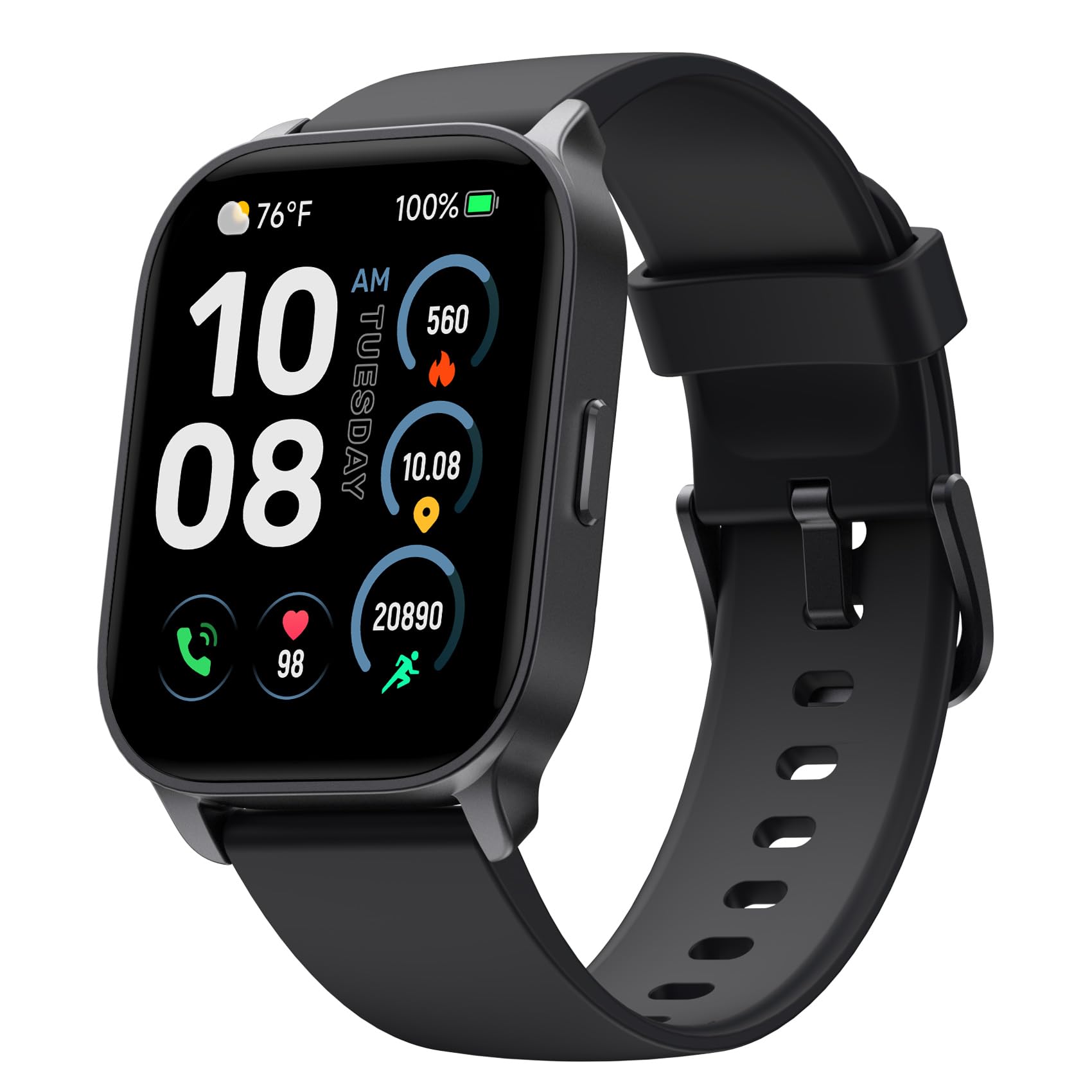
Image: TOOBUR IDW17 Smart Watch, Midnight Black variant.
Ezaugarri nagusiak:
- Eskurik gabeko komunikazioa: Make and receive calls directly from your wrist. Receive notifications for social media, SMS, and email.
- Osasunaren jarraipena integrala: Monitor heart rate, stress levels, and daily activity across over 100 workout modes.
- Advanced Sleep Analysis: Track REM, light, and deep sleep patterns to gain insights into your sleep quality.
- Bateriaren iraupen hedatua: Enjoy up to 10 days of typical use or 30 days on standby with a quick 2.5-hour charge.
- Estilo pertsonalizatua: Features a large 2.01" HD screen with over 100 customizable watch faces, including options to upload your own photos.
- Diseinu iraunkorra: IP68 waterproof rating for everyday use and various activities.
2. Zer dago barne
Upon unboxing your TOOBUR IDW17 Smart Watch, please verify that all the following items are present:
- TOOBUR IDW17 Erloju Adimenduna
- Kargatzeko kablea
- Erabiltzailearen Gida

Image: The TOOBUR Smart Watch, charging cable, and user guide as packaged.
3. Konfigurazio gida
3.1 Hasierako karga
Before first use, charge the smart watch for at least 1 hour. If the battery is completely drained, charge for at least 30 minutes before powering on.

Image: The smart watch being charged, highlighting its battery life.
3.2 Aplikazioaren deskarga eta parekatzea
- Deskargatu VeryFit App from your smartphone's app store (compatible with Android and iOS).
- Open the VeryFit App and follow the on-screen instructions to create an account or log in.
- Gaitu Bluetootha zure telefonoan.
- In the VeryFit App, search for your TOOBUR IDW17 Smart Watch and pair it. Ensure the watch is powered on and within Bluetooth range.
3.3 Bluetooth Connection for Calls and Notifications
To enable call and notification features, ensure your watch is connected to your phone via Bluetooth. Answering calls requires a separate Bluetooth connection to the phone, usually prompted during initial setup or within the app.
To receive phone notifications, the VeryFit App must be running in the background, and Bluetooth must remain connected to both the phone and the VeryFit App.
4. Funtzionamendu-argibideak
4.1 Oinarrizko nabigazioa
- Irristatu gora/behera: Joan menuetan eta jakinarazpenetan zehar.
- Irristatu ezkerrera/eskuinera: Sartu widget azkarretara edo erloju-esfera desberdinetara.
- Sakatu: Hautatu elementu bat edo berretsi ekintza bat.
- Alboko botoia: Press to return to the home screen or access the app list. Long press for Smart Voice Assistant.
4.2 Deiak egitea eta jasotzea
Once connected to your phone via Bluetooth, you can make and receive calls directly from your watch. This feature allows for hands-free communication without needing to reach for your phone.

Image: The smart watch showing an incoming call.
4.3 Jakinarazpenak
Receive real-time notifications for SMS, emails, and various social media apps directly on your watch. Please note that replying to messages from the watch is not supported.

Image: The smart watch displaying a message notification.
4.4 Osasunaren jarraipena
The watch offers comprehensive health monitoring features:
- Bihotz taupadaren jarraipena: Jarrai ezazu etengabe zure bihotz-maiztasuna egun osoan zehar.
- Odol-oxigenoaren (SpO2) monitorizazioa: Neurtu zure odoleko oxigeno saturazio mailak.
- Estresaren jarraipena: Gain insights into your stress levels.
- Loaren jarraipena: Analyze your sleep stages (REM, light, deep) and duration to improve sleep habits.

Image: The smart watch displaying health tracking data.

Image: The smart watch and app interface showing sleep monitoring details.
4.5 Activity Tracking and Sport Modes
The watch supports over 100 sport modes to track your workouts. It monitors steps, distance covered, and calories burned, providing a comprehensive overview of your physical activity.

Image: The smart watch interface showing various sport modes and activity tracking.
4.6 Erlojuaren aurpegiak pertsonalizatzea
Personalize your watch with over 100 customizable watch faces available through the VeryFit App. You can also upload your own photos to create unique watch faces.

Irudia: Adibamples of customizable watch faces on the smart watch.
4.7 Ahots-laguntzaile adimenduna
Long press the side button to activate the Smart Voice Assistant. Use voice commands for various functions, such as checking the weather or setting reminders.

Image: The smart watch interacting with a voice assistant.
4.8 Ezaugarri gehigarriak
Explore more functionalities through the watch interface and the VeryFit App, including:
- Aurkitu Nire Telefonoa
- Weather Reminder
- Kameraren Kontrola
- Musika Kontrola
- Iratzargailua
- Tenporizadorea eta kronometroa
- Arnasketa Entrenamendua
- Sedentarioen abisua
- Edateko ura abisua

Image: The smart watch interface showing icons for various functions.
5. Mantentzea
5.1 Erlojua garbitzea
Garbitu aldizka erlojua eta uhala zapi leun eta lehor batekinamp oihal. Saihestu gailua kaltetu dezaketen produktu kimiko gogorrak edo material urratzaileak erabiltzea.
5.2 Urarekiko erresistentzia (IP68)
The TOOBUR IDW17 Smart Watch is IP68 waterproof, meaning it can withstand immersion in water up to 1.5 meters for 30 minutes. It is suitable for daily activities like hand washing, rain, and shallow water swimming.
Note: The watch is NOT suitable for diving, swimming in the sea, or use in a sauna, as these conditions may exceed its water resistance capabilities.

Image: The smart watch shown with water splashes, indicating its waterproof feature.
6. Arazoak
6.1 Konexio arazoak
- Erlojua ez da aplikaziora konektatzen: Ensure Bluetooth is enabled on your phone and the watch is powered on. Try restarting both the watch and your phone's Bluetooth.
- Jaso ez diren jakinarazpenak: Verify that the VeryFit App is running in the background on your phone and that Bluetooth remains connected. Check app permissions for notifications.
- Deskonexio maiztasunak: Try restarting the watch and your phone's Bluetooth. Ensure the watch and phone are within close proximity.
6.2 Aholku orokorrak
- Watch unresponsive: Saiatu erlojua berrabiarazten alboko botoia sakatuta mantenduz.
- Datu zehaztugabeak: Ensure the watch is worn snugly on your wrist, but not too tight. For sleep tracking, wear the watch throughout the night.
For more detailed function introductions and precautions, refer to the documents available within the VeryFit App.

Image: Visual representation of common questions or troubleshooting points.
7. Zehaztapenak
| Ezaugarri | Xehetasuna |
|---|---|
| Ereduaren izena | IDW17 |
| Marka | TOOBUR |
| Pantailaren tamaina | 2.01 hazbete |
| Forma | Laukizuzena |
| Bateriaren zelulen konposizioa | Litio Polimeroa |
| Haririk gabeko komunikazio estandarra | Bluetootha |
| Konektibitate Teknologia | Bluetootha |
| Sistema eragilea | Wear OS 2.0 |
| Pisua | 1.41 ontza (40 gramo) |
| Produktuaren neurriak | 9.8 x 1.5 x 0.39 hazbete |
| Giza Interfazearen Sarrera | Ukipen-pantaila |
| Eskanerraren Ebazpena | 320 x 340 |
| Uraren Erresistentzia | IP68 |
| Ezaugarri bereziak | Bluetooth Calls, Notifications, Heart Rate, Sleep Tracker, Step Calorie Counter, Activity Tracker, 100 Sport Modes, Find My Phone |
8. Bermea eta Laguntza
For warranty information and customer support, please refer to the official TOOBUR website or contact their customer service directly. Additional support resources, including detailed function guides and FAQs, are available within the VeryFit App.
Always ensure you have the latest version of the VeryFit App installed for optimal performance and access to the most current support documentation.
Ask a question about this manual
Ask about setup, troubleshooting, compatibility, parts, safety, or missing instructions. Manuals+ will review the question and use this page’s manual context to help answer it.