
1. Segurtasun-argibide garrantzitsuak
- Read these instructions thoroughly before operating the device.
- Gorde jarraibide hauek etorkizuneko erreferentzia izateko.
- Kontuan izan produktuaren eta funtzionamendu-argibideetako abisu guztiak.
- Jarraitu argibide guztiak.
- Ez erabili aparatu hau uraren ondoan.
- Garbitu zapi lehor batekin bakarrik.
- Ez blokeatu aireztapen-irekidurak. Instalatu fabrikatzailearen argibideen arabera.
- Ez instalatu bero-iturri inongo ondoan, esate baterako, erradiadoreak, bero-erregistroak, sukaldeak edo beste aparatu batzuk (barne ampberoa sortzen duten argitzaileak).
- Babestu korronte-kablea oinez ibiltzetik edo atxilotzetik, batez ere entxufeetan, erosotasun-harguneetan eta aparatutik irteten diren puntuetan.
- Erabili soilik fabrikatzaileak zehaztutako eranskinak/osagarriak.
- Deskonektatu aparatu hau tximista-ekaitzetan edo denbora luzez erabiltzen ez duzunean.
- Jarri zerbitzu-zerbitzu guztiak zerbitzu-pertsonal kualifikatuari. Zerbitzua behar da aparatua edozein modutan hondatu denean, hala nola, elikatze-kablea edo entxufea hondatuta dagoenean, likidoa isuri denean edo objektuak aparatura erori direnean, aparatua euria edo hezetasuna jasan duenean, ez du normalean funtzionatzen. , edo erori egin da.
2. Paketearen edukia
Egiaztatu behean zerrendatutako elementu guztiak zure paketean sartuta daudela:
- GOBOULT X400 Soundbar
- BoomX Subwoofer
- Urruneko Kontrola
- Erabiltzailearen eskuliburua (dokumentu hau)
- Berme Txartela
- Energia-egokitzailea/kablea
- Kable Laguntzailea

Irudia: Gainetikview of the GOBOULT X400 system components and key features.
3. Konfigurazio gida
3.1 Jartzea
For optimal audio performance, place the soundbar centrally below your television. Position the BoomX subwoofer on the floor near the soundbar, ensuring it has adequate space for bass dispersion. The two satellite speakers should be placed to the left and right of your listening area for a true 5.1 surround sound experience.

Image: Recommended placement of the soundbar and subwoofer in a home environment.
3.2 Connecting the Subwoofer
Connect the wired BoomX subwoofer to the 'SUBWOOFER OUT' port on the soundbar using the provided cable.
3.3 Energia-konexioa
Connect the power cable to the soundbar's power input and then plug it into a wall outlet. Ensure the power switch on the soundbar (if present) is in the 'ON' position.
3.4 Audio Sarrerako Konexioak
The GOBOULT X400 offers multiple connectivity options:
- HDMI ARC: For the best audio quality and control, connect an HDMI cable from your TV's HDMI ARC port to the soundbar's HDMI ARC port. This allows your TV remote to control the soundbar's volume.
- Optikoa: Connect an optical cable from your TV's optical output to the soundbar's OPTICAL input.
- AUX: Use a 3.5mm auxiliary cable to connect devices with an AUX output to the soundbar's AUX input.
- USBa: Sartu USB unitate bat USB atakan audioa erreproduzitzeko files zuzenean.
Irudia: Xehetasun handikoa view of the soundbar's input ports for various audio sources.
3.5 5.1 Channel Surround Sound Configuration
The X400 system includes a soundbar, a subwoofer, and two satellite speakers to deliver a 5.1 channel surround sound experience. Ensure the satellite speakers are connected to the soundbar and positioned appropriately to create an immersive audio field around the listener.

Image: Visual guide for setting up the 5.1 channel surround sound system.
4. Funtzionamendu-argibideak
4.1 Piztu/Itzali
Sakatu Boterea urrutiko agintearen edo soinu-barraren botoia unitatea pizteko edo itzaltzeko.
4.2 Sarrera iturriaren hautaketa
Sakatu Sarrera button on the remote control to cycle through available input sources: Bluetooth, HDMI ARC, Optical, AUX, USB. The selected input will be displayed on the soundbar's LED panel.
4.3 Bolumen kontrola
Erabili VOL+ eta Boluntario buttons on the remote control or the soundbar to adjust the volume level.
4.4 Bluetooth parekatzea
- Select Bluetooth input mode on the soundbar. The LED display will show "BT" and flash, indicating it's in pairing mode.
- Zure gailu mugikorrean, gaitu Bluetootha eta bilatu eskuragarri dauden gailuak.
- Select "GOBOULT X400" from the list. Once connected, the LED display will show a steady "BT".
4.5 EQ moduak
The GOBOULT X400 features multiple equalizer (EQ) modes to optimize your listening experience. Press the dedicated Filma, Musika, edo Berriak buttons on the remote control to switch between modes.
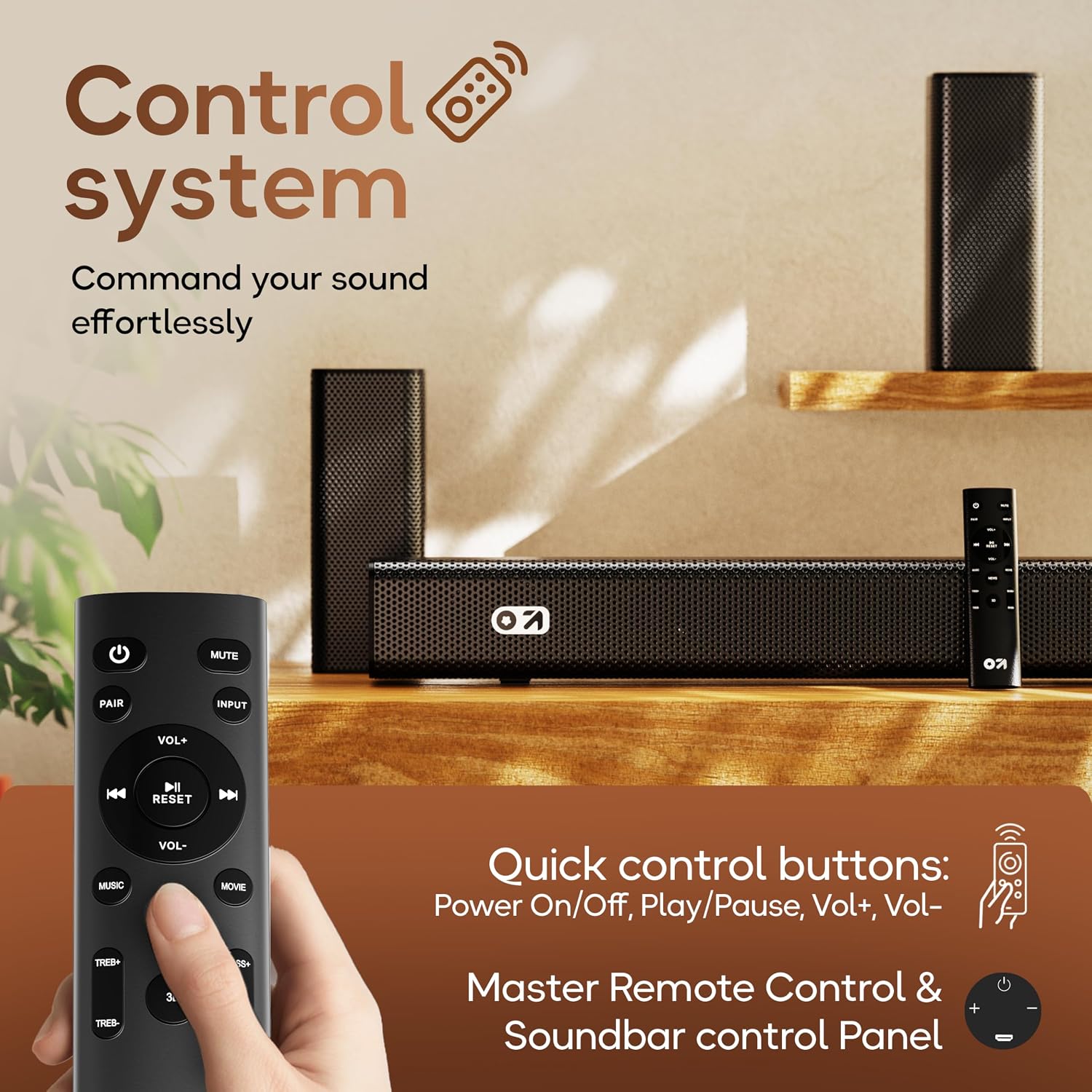
4.6 Urruneko kontrolaren funtzioak

Image: Layout and functions of the GOBOULT X400 remote control.
- Potentzia: Soinu-barra pizten edo itzaltzen du.
- Ezkutatu: Soinua desaktibatu edo aktibatzen du.
- Sarrera: Audio sarrerako iturria hautatzen du.
- VOL+/VOL-: Master bolumena doitzen du.
- Erreproduzitu/Pausatu: Controls media playback (Bluetooth/USB modes).
- Aurrekoa/Hurrengoa: Skips tracks (Bluetooth/USB modes).
- EQ Modes (Movie, Music, News): Selects preset sound profiles.
- PARE: Bluetooth parekatzea abiarazten du.
- RESET Soinu ezarpenak lehenetsitako balioetara berrezartzen ditu.
- TREB+/TREB-: Goi-mailak doitzen ditu.
- BASS+/BASS-: Baxu-mailak doitzen ditu.
5. Mantentzea
To ensure the longevity and optimal performance of your GOBOULT X400 soundbar system, follow these maintenance guidelines:
- Garbiketa: Use a soft, dry cloth to clean the surfaces of the soundbar and subwoofer. Do not use liquid cleaners, aerosols, or abrasive materials, as they may damage the finish or internal components.
- Aireztapena: Ziurtatu soinu-barraren eta subwooferraren aireztapen-irekidurak ez daudela blokeatuta. Aire-fluxu egokiak gehiegi berotzea eragozten du.
- Biltegiratzea: Unitatea denbora luzez gordetzen baduzu, deskonektatu entxufetik eta gorde leku fresko eta lehor batean, eguzki-argitik eta muturreko tenperaturetatik babestuta.
- Uraren esposizioa: While the product is water-resistant, avoid direct exposure to water or high humidity to prevent damage.
6. Arazoak
If you encounter issues with your GOBOULT X400, refer to the following common problems and solutions:
| Arazoa | Kausa posiblea | Irtenbidea |
|---|---|---|
| Botererik ez | Kable elektrikoa ez dago konektatuta; Entxufea ez dago aktibo | Ziurtatu elikatze-kablea soinu-barrara eta funtzionatzen duen entxufe batera ondo konektatuta dagoela. |
| Soinurik ez | Incorrect input source; Volume too low; Mute activated; Incorrect cable connection | Hautatu sarrera-iturri zuzena. Igo bolumena. Desaktibatu isilaraztea. Egiaztatu audio-kablearen konexioak. |
| Bluetooth parekatzeak huts egin du | Soinu-barra ez dago parekatze moduan; Gailua urrunegi dago; Interferentzia | Ensure soundbar is in Bluetooth pairing mode. Move device closer. Clear previous pairings on your device. |
| Urruneko kontrola ez dabil | Bateriak agortuta; Oztopoa; Urrutiko agintea irismenetik kanpo | Replace remote control batteries. Remove any obstructions between remote and soundbar. Ensure remote is within operating range. |
| Subwoofer-ak ez du baxua sortzen | Subwoofer cable loose; Bass level set too low | Check the connection of the subwoofer cable to the soundbar. Increase bass level using the remote control. |
7. Zehaztapenak
Detailed technical specifications for the GOBOULT X400 Soundbar System:

Irudia: Barnekoa view of the BoomX Dual Driver, highlighting its design for enhanced bass response.
| Ezaugarri | Zehaztapena |
|---|---|
| Marka | GOBOULT |
| Ereduaren izena | Bassbox X400 |
| Bozgorailuaren irteera-potentzia maximoa | 400 Watt |
| Audio-kanal kopurua | 5.1 |
| Konektibitate Teknologia | Auxiliary, Bluetooth, USB, HDMI ARC, Optical |
| Bluetooth bertsioa | 5.3 |
| Bluetooth barrutia | 10 metro |
| Audio irteera modua | Inguratu |
| Hizlari mota | Soinu barra kabledun subwooferarekin |
| Kontrol-metodoa | Urrunekoa |
| Produktuaren Ezaugarriak | Bass Boost, LED Light, USB Port, Water Resistant |
| Energia iturria | Kable elektrikoa |
| Elementuaren neurriak (L x W x H) | 8D x 9Z x 7.5A zentimetro (Soinu-barra) |
| Elementuaren pisua | 7.6 kilogramo |
8. Bermea eta Laguntza
8.1 Bermearen informazioa
The GOBOULT X400 Soundbar System comes with a 1 urteko fabrikatzailearen bermea from the date of purchase. This warranty covers manufacturing defects and ensures reliable operation under normal use. Please retain your purchase receipt and the warranty card for any warranty claims.
8.2 Bezeroarentzako laguntza
For technical assistance, troubleshooting, or warranty inquiries, please contact GOBOULT customer support. Refer to the contact information provided on your warranty card or visit the official GOBOULT webgunea laguntza xehetasunetarako.