
VEVOR JDP-6000
VEVOR Aquarium 24V DC Water Pump User Manual
Model: JDP-6000 | Brand: VEVOR
1. Sarrera
Thank you for choosing the VEVOR Aquarium 24V DC Water Pump. This versatile device is engineered to provide optimal water circulation and wave-making capabilities for your aquatic environment. It combines the functions of a wave maker, circulation pump, and water pump, offering flexible installation options for both internal and external use. With its intelligent controller, you can easily adjust water flow, wave frequency, and utilize a convenient feeding mode to maintain a healthy and dynamic habitat for your aquatic life.

Image: The VEVOR Aquarium 24V DC Water Pump, showcasing the pump unit and its intelligent controller.
2. Segurtasun-argibideak
Ponpa erabili aurretik, irakurri arretaz segurtasun-jarraibide guztiak. Jarraibide hauek ez jarraitzen badituzu, deskarga elektrikoak, sua edo lesio larriak gerta daitezke.
- Deskonektatu beti energia-iturria mantentze-lan edo garbiketa egin aurretik.
- This pump is designed for use with water only. Do not use with flammable or corrosive liquids.
- Ensure the power cord and plug are not damaged. Do not operate the pump with a damaged cord or plug.
- Do not immerse the controller in water. It is not waterproof.
- Ensure the pump is securely placed or mounted to prevent accidental movement.
- Mantendu haurren eskura.
- If the pump shows any signs of malfunction, immediately disconnect it from the power supply.
3. Paketearen edukia
Egiaztatu elementu guztiak paketean daudela:
- 1 x Aquarium Water Pump Wave Maker
- 1 x Egokigailua
- 1 x kontrolagailua
- 1 x Erabiltzailearen eskuliburua
- 1 x 1-inch Connector
- 1 x 1-1/4-inch Connector
- 1 x 1-inch & 3/4-inch Connector
- 2 x O-eraztun
- 4 x Gomazko kuxin
4. Konfigurazioa eta instalazioa
The VEVOR water pump offers flexible installation options for various aquatic setups.
4.1 Kokapen aukerak
The pump can be installed either internally within your aquarium or externally for sump systems. The included rubber suction cups ensure secure fixation.
- Internal Placement: Submerge the pump completely in the aquarium water. Use the suction cups to secure it to the bottom or side glass.
- External Placement: Connect appropriate tubing to the inlet and outlet. Ensure the pump is placed on a stable, level surface. The rubber foot pads help reduce vibration and noise.
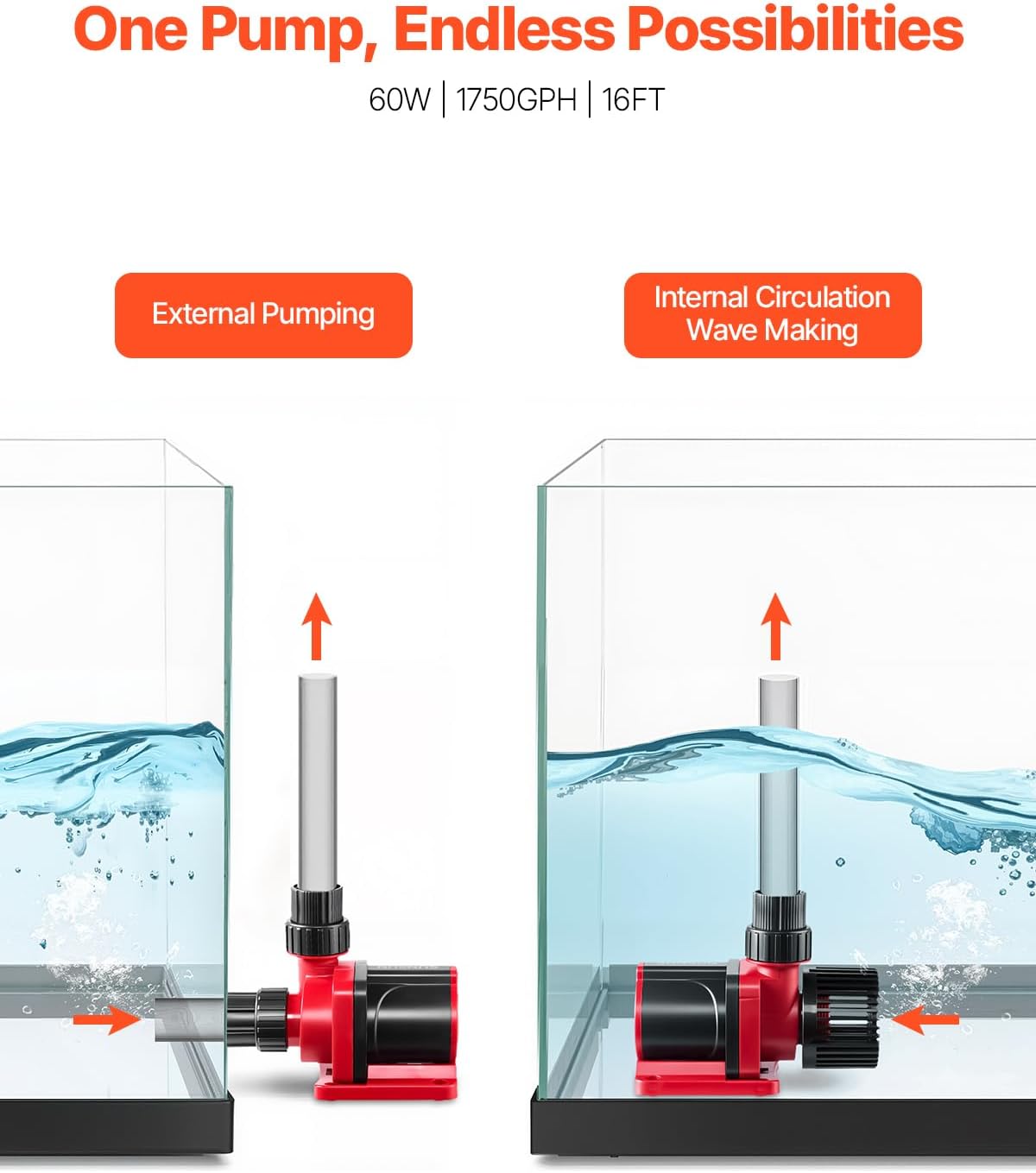
Image: Illustration demonstrating the pump's capability for both external pumping and internal circulation/wave making within an aquarium setup.
4.2 Connecting Nozzles
Select the appropriate connector (3/4 inch, 1 inch, or 1-1/4 inch) based on your tubing requirements. The threaded fittings ensure a stable and reliable connection.

Image: The pump with various nozzle sizes (3/4 inch, 1 inch, 1 1/4 inch) for adaptable water flow options.
4.3 Energia-konexioa
Connect the pump to the provided DC 24V adapter, then plug the adapter into a standard electrical outlet. Ensure all connections are secure before powering on.
5. Funtzionamendu-argibideak
The intelligent controller allows for precise control over the pump's functions.

Image: Close-up of the VEVOR intelligent controller, highlighting the one-button switch, five-level flow rate indicators, and multi-level adjustment buttons.
5.1 Kontrolatzailearen funtzioak
- Power Button (DC-24V): Press to turn the pump on or off.
- Flow Rate Adjustment (+/-): Use the '+' and '-' buttons to adjust the water flow rate. There are 5 levels of flow rate indicated by the LEDs.
- Wave Mode Selection: The controller supports multiple wave modes. Refer to the full user manual (PDF) for detailed instructions on cycling through and setting specific wave patterns.
5.2 Feeding Mode
The built-in feeding mode temporarily pauses the pump's operation to allow for feeding without food being immediately drawn into the filtration system.

Image: Visual guide to the feeding function: single click for 15-minute mode, double click for 60-minute mode, triple click to turn off.
- Klik bakarra: Activates the 15-minute feeding mode. The pump will pause for 15 minutes and then resume normal operation.
- Egin klik bikoitza: Activates the 60-minute feeding mode. The pump will pause for 60 minutes and then resume normal operation.
- Klik hirukoitza: Deactivates the feeding mode and resumes normal pump operation immediately.
6. Mantentzea
Regular maintenance ensures optimal performance and longevity of your pump.
6.1 Cleaning the Pump
The pump is designed for easy disassembly and cleaning.

Image: Instructions for easy disassembly and cleaning, showing the detachable front panel and impeller.
- Deskonektatu ponpa elikadura-iturritik.
- Carefully detach the front panel and impeller cover.
- Kendu bulkada.
- Clean all components, including the impeller, impeller housing, and intake screen, using a small brush and clean water. Remove any debris, algae, or mineral buildup.
- Rinse thoroughly and reassemble all parts securely.
Gomendioa: Perform cleaning every 2-4 weeks, or more frequently depending on water conditions and debris accumulation.
7. Arazoak
If you encounter issues with your VEVOR water pump, refer to the following common problems and solutions:
| Arazoa | Kausa posiblea | Irtenbidea |
|---|---|---|
| Ponpa ez da pizten | No power supply; Damaged power cord/adapter; Controller malfunction | Check power outlet; Inspect cord/adapter for damage; Ensure controller is properly connected and powered. |
| Emaria murriztua | Clogged intake/impeller; Kinked tubing; Incorrect flow setting | Clean pump and impeller; Straighten tubing; Adjust flow rate on controller. |
| Gehiegizko zarata/bibrazioa | Debris in impeller; Improper placement; Worn impeller | Clean impeller; Ensure pump is securely placed on rubber pads; Replace impeller if worn. |
| Ponpa tarteka gelditzen da | Overheating; Power fluctuations; Feeding mode activated | Check for blockages; Ensure proper ventilation (if external); Verify stable power; Check feeding mode status. |
Irtenbide hauek saiatu ondoren arazoa konpontzen ez bada, jarri harremanetan VEVOR bezeroarentzako arreta-zerbitzuarekin.
8. Zehaztapenak
Technical details for the VEVOR Aquarium 24V DC Water Pump (Model: JDP-6000):
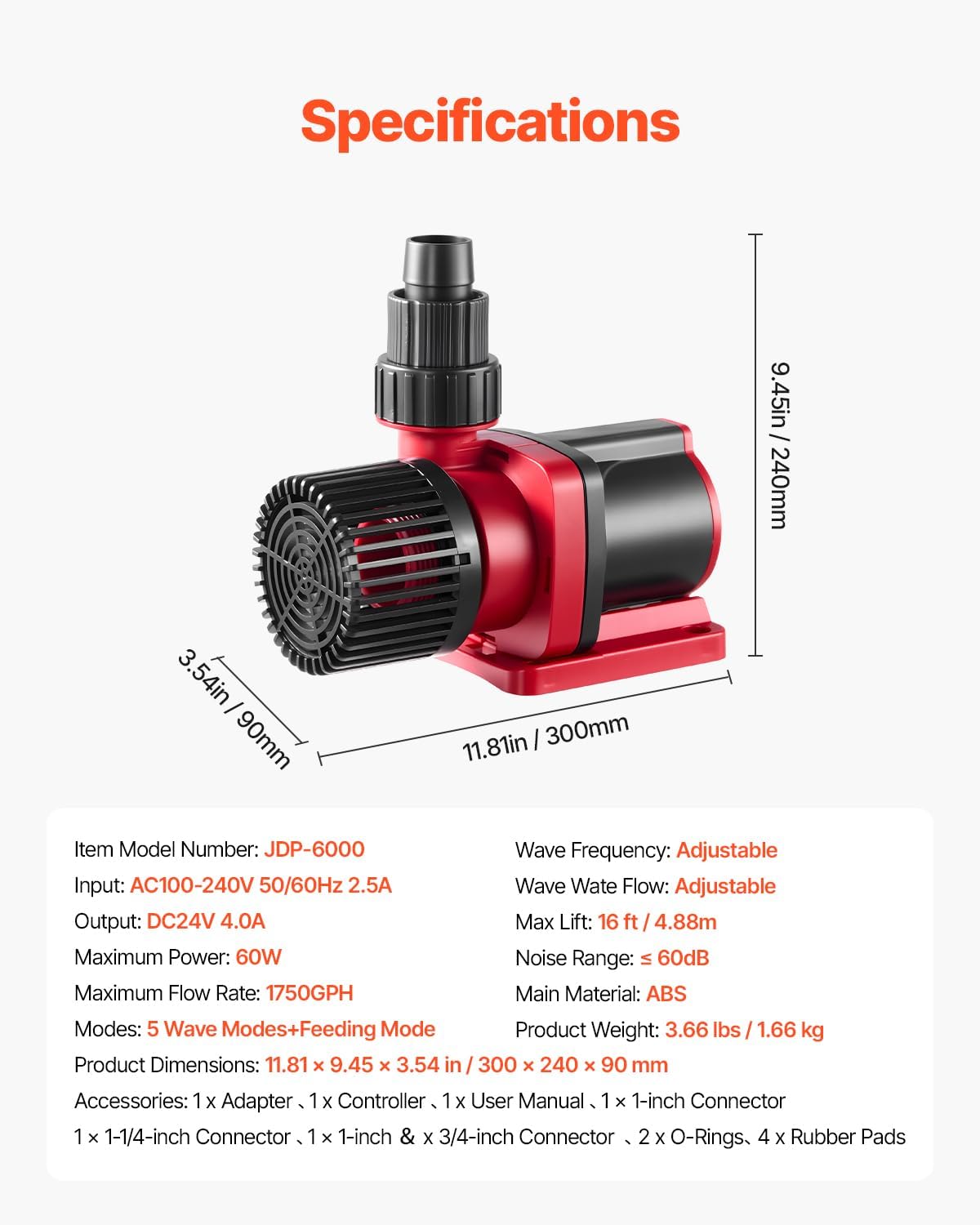
Image: Detailed diagram of the pump with key dimensions and a summary of its technical specifications.
- Elementuaren eredu-zenbakia: JDP-6000
- Sarrera: AC100-240V 50/60Hz 2.5A
- Irteera: DC24V 4.0A
- Gehienezko potentzia: 60W
- Gehienezko emaria: 1750 GPH (6624 L/H)
- Gehienezko igoera: 16 oin / 4.88 m
- Moduak: 5 Wave Modes + Feeding Mode
- Wave Frequency: Egokigarria
- Wave Water Flow: Egokigarria
- Zarata tartea: ≤ 60dB
- Material nagusia: ABS
- Produktuaren pisua: 3.66 lb / 1.66 kg
- Produktuaren neurriak: 11.81 x 9.45 x 3.54 hazbeteko / 300 x 240 x 90 mm
9. Bermea eta Laguntza
For warranty information, technical support, or any inquiries regarding your VEVOR Aquarium Water Pump, please refer to the official VEVOR webwebgunera edo jarri harremanetan zuzenean bezeroarentzako arreta-zerbitzura. Gorde erosketa-agiria berme-erreklamazioetarako.
Erabiltzailearen eskuliburu honen bertsio elektronikoa deskargatzeko eskuragarri dago: Erabiltzailearen eskuliburua (PDF)
Ask a question about this manual
Ask about setup, troubleshooting, compatibility, parts, safety, or missing instructions. Manuals+ will review the question and use this page’s manual context to help answer it.