
1. Sarrera
This manual provides detailed instructions for the TECKNET Bluetooth Wireless Mouse (Model: TK-MS058). This versatile mouse offers dual-mode connectivity (Bluetooth 5.2/3.0 and 2.4G USB Receiver), adjustable DPI settings, silent clicks, and a comfortable ergonomic design, making it ideal for various computing environments.
2. Paketearen edukia
Upon unboxing your TECKNET Bluetooth Wireless Mouse, please ensure all the following items are included:
- TECKNET Bluetooth Wireless Mouse (Model: TK-MS058)
- USB-C kargatzeko kablea
- 2.4G USB Receiver (stored inside the mouse)
- Erabiltzailearen eskuliburua
Bideoa: Unboxing and initial overview of the TECKNET Silent Thin Bluetooth Mouse, showing package contents including the mouse, USB-C charging cable, and user manual.
3. Produktua amaitu daview
Familiarize yourself with the components of your TECKNET Wireless Mouse:

- Ezkerreko/eskuineko klik botoiak: Saguaren botoi estandarrak.
- Scroll Wheel/Middle Button: For scrolling and middle-click functions.
- DPI/Low Battery Button: Located on the top, below the scroll wheel, for adjusting DPI and indicating low battery.
- C motako kargatzeko ataka: For recharging the mouse.
- BT1/BT2 Indicators: Blue LEDs indicating Bluetooth connection status for two different devices.
- USB Channel Indicator: Green LED indicating 2.4G USB receiver connection status.
- Switch potentziala: ON/OFF switch for the mouse.
- Switch Mode Button: Located on the bottom, for cycling between 2.4G, BT1, and BT2 modes.
- 2.4G USB hartzailea: Stored in a compartment on the bottom of the mouse.
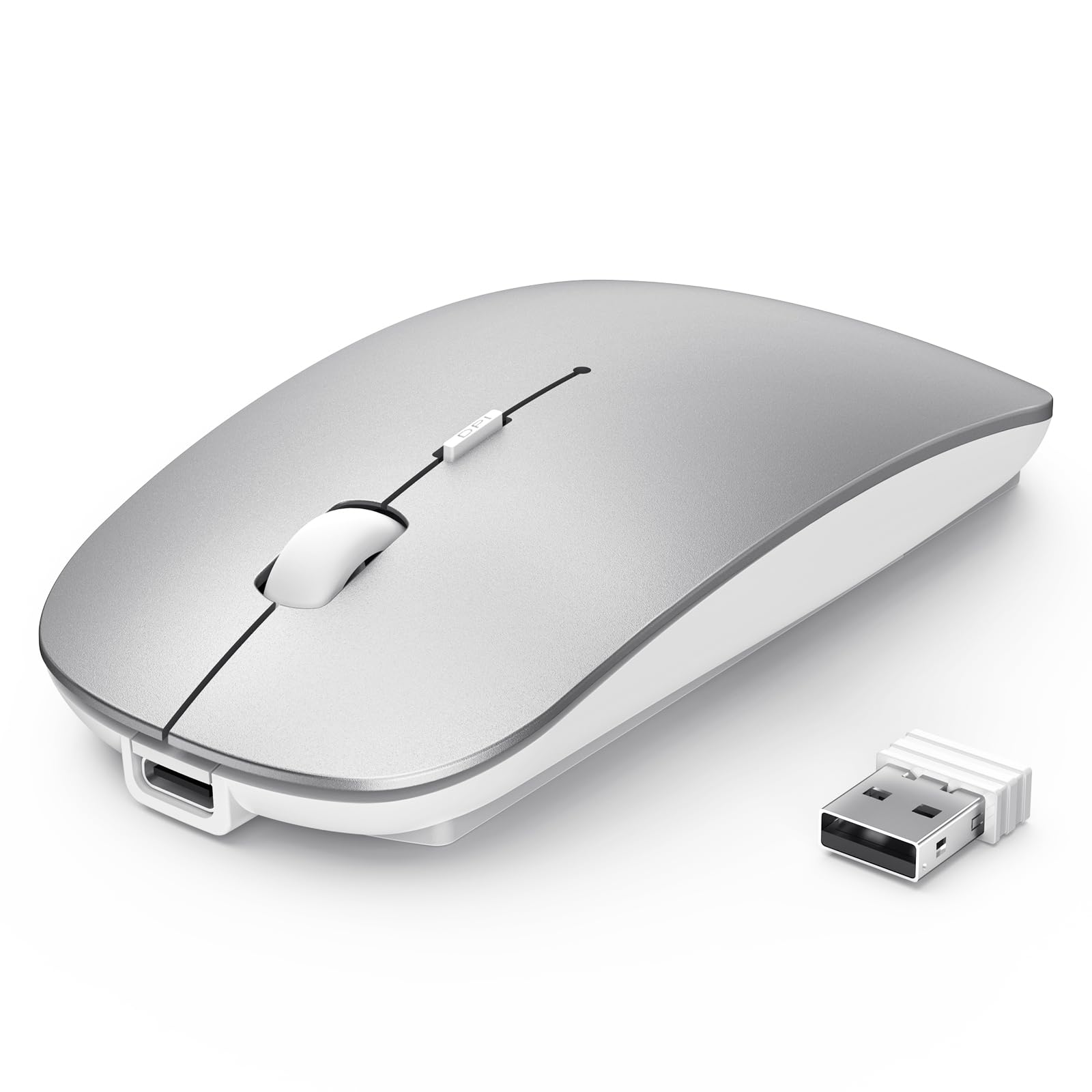
4. Konfigurazioa
4.1 Sagua kargatzea
The mouse features a built-in 500mAh rechargeable battery. To charge:
- Konektatu emandako USB-C kargatzeko kablea saguaren aurrealdeko kargatzeko atakara.
- Plug the other end of the cable into a USB power source (e.g., computer USB port, USB wall adapter).
- A red light will illuminate on the scroll wheel area while charging.
- The mouse fully charges in approximately 2.5 hours, providing up to 60 days of use (based on 2 hours/day).
- The mouse has a 12-month standby time and an auto-sleep feature after 30 minutes of inactivity to conserve power.

Bideoa: Demonstrates the charging process of the TECKNET Silent Wireless Mouse, showing the USB-C connection and the red indicator light during charging.
4.2 2.4G USB Receiver Connection
For devices with a standard USB-A port:
- Locate the 2.4G USB receiver in the compartment on the bottom of the mouse.
- Konektatu USB hargailua zure ordenagailuko edo gailuko USB-A ataka libre batera.
- Piztu sagua beheko pizteko etengailua erabiliz.
- Press the Switch Mode Button on the bottom until the green USB Channel Indicator light illuminates.
- The mouse should now be connected and ready for use.
4.3 Bluetooth konexioa (BT1 eta BT2)
The mouse supports two Bluetooth channels for connecting to multiple devices:
- Piztu sagua beheko pizteko etengailua erabiliz.
- Press the Switch Mode Button on the bottom to select either BT1 or BT2. The corresponding blue indicator light (BT1 or BT2) will flash.
- On your device (laptop, iPad, MacBook, PC, Desktop, Android), go to Bluetooth settings.
- Bilatu "TECKNET Mouse" or a similar device name and select it to pair.
- Once successfully paired, the blue indicator light will stop flashing and remain solid for a few seconds.
- Errepikatu urrats hauek beste Bluetooth kanala (BT1 edo BT2) erabiliz bigarren Bluetooth gailu batera konektatzeko.

Bideoa: Demonstrates the multi-mode connection capabilities of the TECKNET Silent Thin Bluetooth Mouse, showing how to switch between 2.4G USB and Bluetooth connections for different devices.
5. Funtzionamendu-argibideak
5.1 Konektatutako gailuen artean aldatzea
To switch between devices connected via 2.4G USB, Bluetooth 1, or Bluetooth 2, simply press the Switch Mode Button on the bottom of the mouse. The corresponding indicator light (green for 2.4G, blue for BT1/BT2) will confirm the active connection.
5.2 DPI sentikortasuna doitzea
The mouse offers 6 adjustable DPI settings (800, 1200, 1600, 2400, 3200, 4800) for precise control. To change the DPI:
- Press the DPI button located on the top of the mouse, below the scroll wheel.
- Each press cycles through the available DPI settings.
- An indicator light on the bottom of the mouse will flash a certain number of times to indicate the current DPI level (e.g., 1 flash for 800 DPI, 6 flashes for 4800 DPI).

5.3 Silent Click Design
The mouse features a silent click design, reducing click noise by approximately 90%. This makes it suitable for quiet environments such as libraries, cafes, or shared workspaces.
5.4 Ergonomic and Portable Design
The ultra-thin and ergonomic design of the mouse ensures comfort during prolonged use and makes it highly portable, fitting easily into bags or pockets.


6. Mantentzea
- Clean the mouse regularly with a soft, dry cloth. Avoid using harsh chemicals or abrasive materials.
- Keep the optical sensor clean to ensure accurate tracking.
- Gorde sagua leku fresko eta lehor batean, eguzki-argitik eta tenperatura altuetatik babestuta.
- Avoid dropping the mouse or subjecting it to strong impacts.
7. Arazoak
7.1 Saguak ez du erantzuten
- Ziurtatu sagua piztuta dagoela.
- Check the battery level and charge the mouse if necessary.
- Verify the correct connection mode (2.4G, BT1, or BT2) is selected using the Switch Mode Button.
- For 2.4G connection, ensure the USB receiver is securely plugged into the device. Try a different USB port.
- For Bluetooth connection, ensure Bluetooth is enabled on your device and the mouse is paired correctly. Try re-pairing the mouse.
- Berrabiarazi ordenagailua edo gailua.
7.2 Konexio etengabea
- Ensure the mouse is within the effective range (15m for 2.4G, 10m for Bluetooth).
- Minimize interference from other wireless devices or large metal objects.
- Ensure the mouse is on a suitable surface for optical tracking.
7.3 DPI Adjustment Not Working
- Ziurtatu sagua piztuta eta konektatuta dagoela.
- Press the DPI button firmly. Observe the indicator light on the bottom for flashes to confirm DPI changes.
8. Zehaztapenak
| Modelo zenbakia: | TK-MS058 |
| Produktuaren neurriak: | 4.48 x 2.26 x 0.93 hazbete |
| Elementuaren pisua: | 3.2 ontza |
| Konektibitate Teknologia: | Bluetooth 5.2/3.0, 2.4G USB Wireless |
| DPI ezarpenak: | 800, 1200, 1600, 2400, 3200, 4800 |
| Bateria: | 500mAh kargagarria |
| Kargatzeko denbora: | Gutxi gorabehera. 2.5 ordu |
| Bateriaren iraupena: | Up to 60 days (2 hours/day use) |
| Ezaugarri bereziak: | Wireless, Ultra-slim, Silent, Rechargeable, Ergonomic, Lightweight, Portable |
| Mugimenduak hautemateko teknologia: | Optikoa |
| Bateragarritasuna: | Windows, MacOS, Android, Linux, iOS, ChromeOS |
9. Bermea eta laguntza
TECKNET products are designed to provide reliable performance. For warranty information, technical support, or customer service inquiries, please refer to the contact details provided in the product packaging or visit the official TECKNET webgunea.