1. Sarrera
The Generic RHT20 is an environmental test equipment designed for accurately measuring and logging humidity and temperature data. This datalogger features an integrated LCD for real-time display of readings and provides reliable data collection for various applications. This manual provides essential information for the proper setup, operation, maintenance, and troubleshooting of your RHT20 device.
2. Segurtasun informazioa
- Irakurri arretaz argibide guztiak gailua erabili aurretik.
- Ez jarri gailua tenperatura altuen, eguzki-argiaren eraginpean edo hezetasun handiaren eraginpean.
- Saihestu gailua erortzea edo kolpe gogorren eraginpean jartzea.
- Ez saiatu gailua irekitzen edo aldatzen. Mantendu konponketa guztiak langile kualifikatuen esku.
- Bota bateriak tokiko araudiaren arabera.
3. Paketearen edukia
Egiaztatu elementu guztiak bertan daudela eta egoera onean daudela paketea hustu ondoren:
- RHT20 Humidity & Temperature Datalogger Unit
- Erabiltzailearen eskuliburua
- USB Cable (for data transfer and power, if applicable)
- Softwarearen CDa (hala badagokio)
4. Gailua amaitu daview
Familiarize yourself with the components of your RHT20 datalogger:
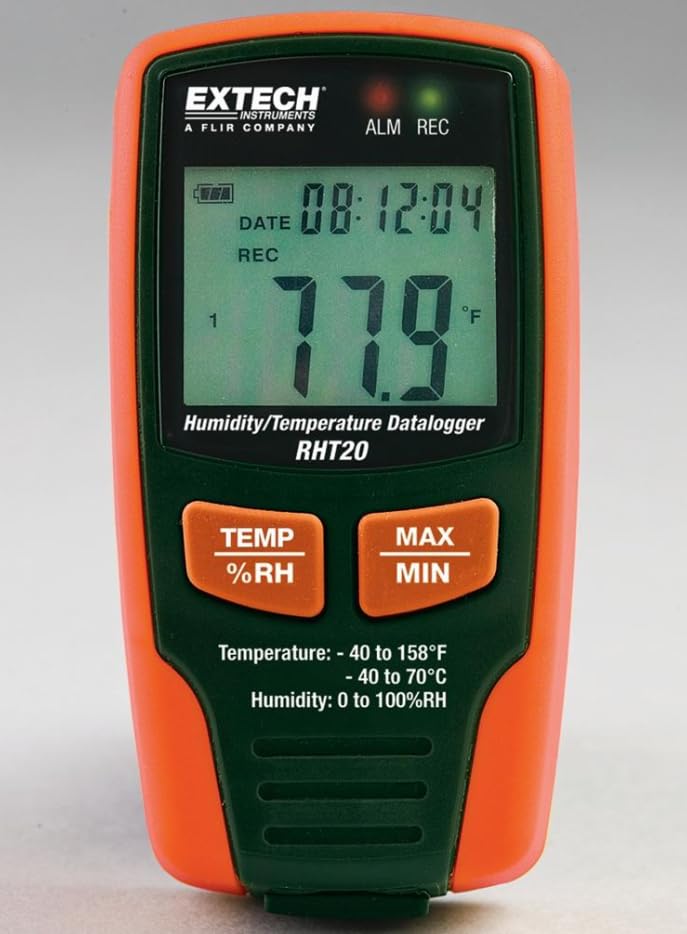
1. irudia: Aurrealdea view of the RHT20 Datalogger. This image displays the device's main body, featuring a prominent LCD screen for displaying real-time humidity and temperature readings, along with control buttons located below the screen.
4.1. Osagaiak
- LCD pantaila: Shows current temperature, humidity, battery status, and logging indicators.
- MODE botoia: Cycles through display modes or menu options.
- SET botoia: Enters settings menu or confirms selections.
- START/STOP botoia: Initiates or terminates data logging.
- USB ataka: For connecting to a computer for data download and configuration.
- Sentsore: Integrated humidity and temperature sensor (typically located at the top or side).
- Bateriaren konpartimendua: Gailuaren atzealdean kokatuta.
5. Konfigurazioa
5.1. Bateriaren instalazioa
- Locate the battery compartment cover on the back of the RHT20.
- Irristatu edo askatu estalkia irekitzeko.
- Insert the required batteries (e.g., AAA batteries) observing the correct polarity (+/-) as indicated inside the compartment.
- Jarri bateriaren konpartimenduaren estalkia ongi.
5.2. Piztu/Itzaltzea
- Pizteko: Eduki sakatuta HASI/GELDITU button for approximately 3 seconds until the LCD illuminates.
- Itzaltzeko: Eduki sakatuta HASI/GELDITU button for approximately 3 seconds until the LCD turns off.
5.3. Softwarearen instalazioa (aukerakoa)
If your application requires advanced configuration or data analysis, install the provided software (if applicable) on your computer by following the on-screen instructions from the installation CD or downloaded file.
6. Funtzionamendu-argibideak
6.1. Oinarrizko neurketa
Upon powering on, the RHT20 will immediately display the current ambient temperature and humidity readings on the LCD. Ensure the device is placed in the environment you wish to monitor.
6.2. Ezarpenak konfiguratzea
To adjust settings such as logging interval, alarm thresholds, or time/date:
- Eduki sakatuta EZARTU botoia ezarpenen menuan sartzeko.
- Erabili MODUA button to navigate through different parameters.
- Erabili EZARTU button to select a parameter and adjust its value.
- Sakatu MODUA to confirm the value and move to the next setting, or press HASI/GELDITU ezarpenen menutik irteteko.
6.3. Datuen erregistroa abiaraztea
To begin recording data:
- Ensure the device is powered on and configured as desired.
- Sakatu HASI/GELDITU button briefly. A logging indicator (e.g., a blinking REC icon) will appear on the LCD, confirming that data logging has started.
6.4. Stopping Data Logging
To cease recording data:
- Sakatu HASI/GELDITU button briefly. The logging indicator will disappear from the LCD, indicating that data logging has stopped.
6.5. Data Download
Erregistratutako datuak berreskuratzeko:
- Connect the RHT20 to your computer using the provided USB cable.
- Launch the RHT20 software (if applicable).
- Follow the software's instructions to download and analyze the recorded data.
7. Mantentzea
7.1. Garbiketa
- Garbitu gailua zapi leun eta lehor batekin.
- Ez erabili garbitzaile urratzailerik, disolbatzailerik edo produktu kimiko gogorrik.
- Ensure no liquid enters the sensor area or USB port.
7.2. Biltegiratzea
- Denbora luzez erabiltzen ez duzunean, kendu bateriak isuriak saihesteko.
- Gorde gailua leku fresko eta lehor batean, eguzki-argitik eta muturreko tenperaturetatik babestuta.
8. Arazoak
- Gailua ez da pizten: Egiaztatu bateriaren instalazioa eta ziurtatu bateriak berriak direla.
- Irakurketa okerrak: Ensure the sensor is clean and unobstructed. Allow the device to stabilize in the environment for a few minutes.
- Datuak ez dira erregistratzen: Verify that logging was initiated correctly (check for the logging indicator on the LCD). Ensure sufficient memory is available.
- Ezin da ordenagailura konektatu: Check USB cable connection. Ensure software drivers are installed correctly. Try a different USB port.
9. Zehaztapenak
| Zehaztapena | Balioa |
|---|---|
| Marka | Generikoa |
| Eredua | RHT20 |
| Elementuaren pisua | 7 libra (gutxi gorabehera 3.17 kg) |
| Fabrikatzailea | Extech |
| ASIN | B0FB7Y8MPX |
| Eskuragarri dagoen lehen data | 29ko maiatzaren 2025a |
10. Bermea eta Laguntza
Bermeari buruzko informazioa, laguntza teknikoa edo zerbitzu-kontsultak egiteko, jo erosketarekin batera emandako dokumentaziora edo jarri harremanetan fabrikatzailearekin zuzenean. Gorde erosketaren frogagiria berme-erreklamazioetarako.


