
1. Sarrera
This manual provides detailed instructions for the assembly, operation, maintenance, and troubleshooting of your FLEXISPOT EB2 electric height-adjustable desk frame. Please read this manual thoroughly before installation and use to ensure proper function and safety.
The FLEXISPOT EB2 desk frame features dual motors for smooth and quiet height adjustments, a wide height adjustment range, and a smart control panel with memory functions. It is designed to support various desktop sizes, offering flexibility for your workspace.
2. Segurtasun informazioa
- Jarraitu beti muntatzeko argibideak arretaz.
- Ensure the desk frame is securely mounted to the tabletop to prevent tipping.
- Do not exceed the maximum weight recommendation of 100 kg (dynamic load) or 125 kg (static load) to maintain stability and safety.
- Mantendu haurrak eta maskotak mahaitik urrun funtzionamenduan zehar.
- Ziurtatu mahaiaren ibilbidean oztoporik ez dagoela altuera doitzean.
- Do not open the motor housing or attempt to repair the unit yourself. Contact customer support for assistance.
- Deskonektatu korrontea garbiketa edo mantentze-lanak egin aurretik.
3. Paketearen edukia
Muntaketa hasi aurretik, egiaztatu osagai guztiak daudela. Paketeak normalean honako hauek ditu:
- Desk Legs (2) with integrated motors
- Crossbar/Frame (adjustable width)
- Control Panel with digital display
- Korronte egokitzailea eta kablea
- All necessary screws, bolts, and tools for assembly
- Cable management accessories (e.g., clips, hooks)
4. Konfigurazioa eta Muntaketa
Assembly is required for this product. Please follow the step-by-step instructions provided in the separate assembly guide included with your purchase. Ensure you have adequate space and assistance if needed.
Muntaketa-kontu garrantzitsuenak:
- Mahaigaineko bateragarritasuna: The frame is designed for tabletops with a width of 120 cm to 180 cm and a depth of 60 cm to 80 cm. The frame width is adjustable from 107 cm to 160 cm.
- Lotura segurua: Ensure all screws are tightened securely, especially those connecting the desktop to the frame.
- Kableen kudeaketa: Utilize the provided cable management solutions to keep wires tidy and prevent interference with desk movement.
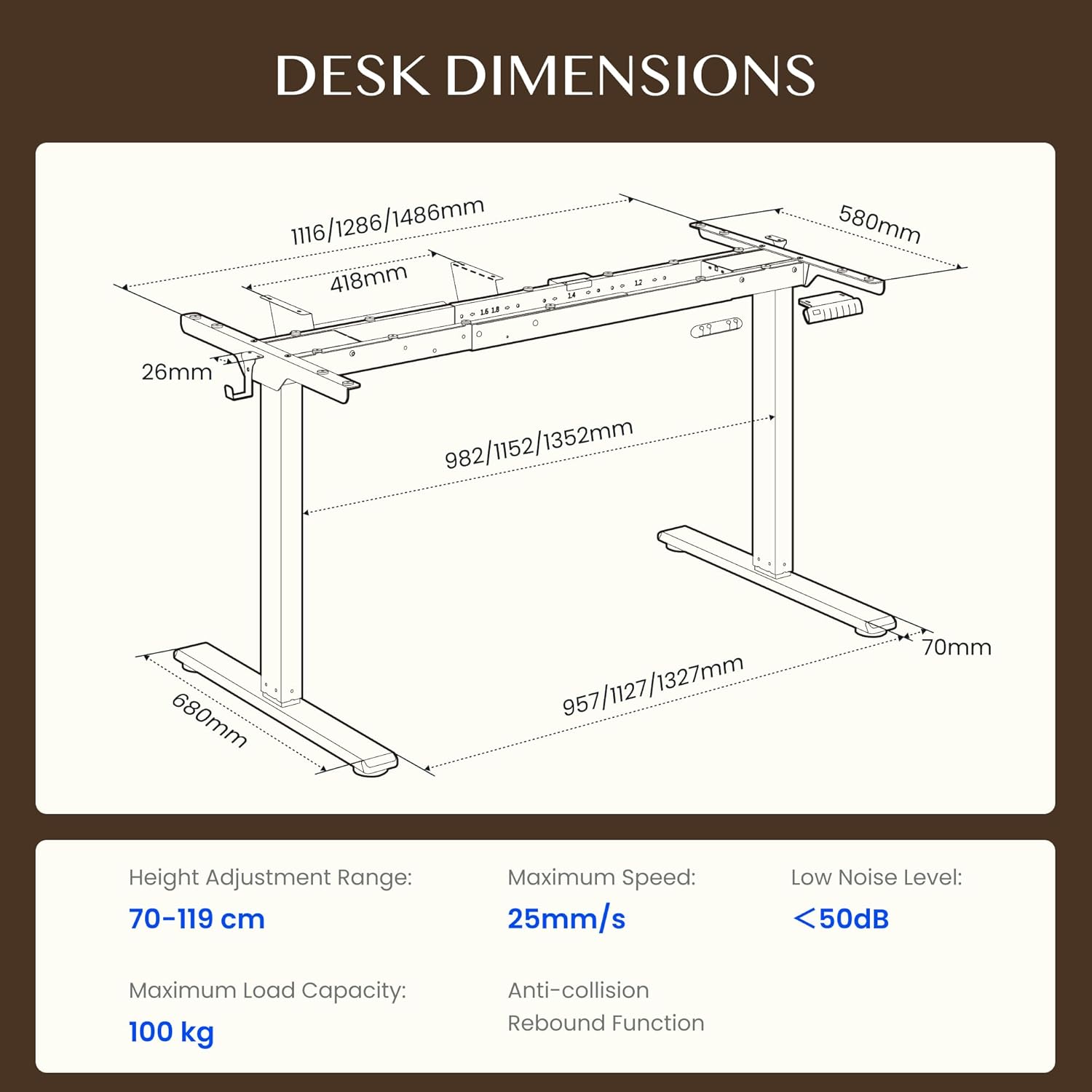
Figure 4.1: Detailed dimensions of the FLEXISPOT EB2 desk frame, showing adjustable width and height ranges, and overall structural measurements.

Figure 4.2: Illustration demonstrating the adaptable desktop size range for the FLEXISPOT EB2 frame, indicating minimum and maximum dimensions for compatible tabletops.
5. Funtzionamendu-argibideak
5.1 Piztea
Connect the power cable to the desk frame and then to a standard electrical outlet. The digital display on the control panel should illuminate.
5.2 Altuera doitzea
Erabili Up eta Behera arrow buttons on the control panel to manually adjust the desk height. The height range is from 70 cm to 119 cm.

Figure 5.1: Visual representation of the desk's height adjustment range, illustrating the minimum and maximum heights achievable with the FLEXISPOT EB2 frame.
5.3 Memoria aurrezarpenak
The control panel features 4 memory preset buttons (1, 2, 3, 4) to save and recall your preferred sitting and standing heights.
- Egokitu mahaia nahi duzun altuerara Gora/Behera botoiak erabiliz.
- Press and hold one of the memory buttons (1, 2, 3, or 4) until the display flashes or beeps, indicating the height has been saved.
- Gordetako altuera berreskuratzeko, sakatu dagokion memoria-botoia. Mahaia automatikoki mugituko da posizio horretara.

5.2. irudia: hurbileko planoa view of the smart control panel, highlighting the Up/Down buttons, 4 memory presets, and LED display for effortless height adjustment.
5.4 Sit/Stand Reminder
The control panel may include a sit/stand reminder button. Consult your specific control panel's instructions for activation and customization of reminder intervals.
5.5 Talkaren aurkako sistema
The desk frame is equipped with an anti-collision system. If the desk encounters an obstruction during height adjustment, it will automatically stop and reverse slightly to prevent damage.

Figure 5.3: Diagram illustrating the powerful dual motor system of the FLEXISPOT EB2, emphasizing stability, quiet operation, and efficiency.

5.4. irudia: Adibamples of simple desk helpers, including under-desk cable management, side hooks, and adhesive cable clips, designed to keep your workspace organized.
6. Mantentzea
- Garbiketa: Garbitu mahaiaren markoa oihal lehor batekin. Saihestu garbitzaile urratzaileak edo akabera kaltetu dezaketen produktu kimiko gogorrak erabiltzea.
- Ikuskapena: Aldian-aldian egiaztatu torloju eta konexio guztiak ondo estututa daudela ziurtatzeko. Beharrezkoa bada, berriro estutu.
- Kableen kudeaketa: Ensure cables are not pinched or tangled, which could impede desk movement or cause damage.
7. Arazoak
If you encounter issues with your FLEXISPOT EB2 desk frame, refer to the following common troubleshooting steps:
- Mahaia mugitzen ez da: Check if the power cable is securely connected to both the desk and the wall outlet. Ensure the outlet is functional.
- Uneven movement or strange noises: Ensure the desk is not overloaded. Check for any obstructions under or around the desk. Verify that all assembly screws are tight.
- Pantailan agertzen diren errore kodeak: Refer to the specific error code in your detailed assembly guide or contact customer support for assistance.
- Sistema berrezartzea: Some issues can be resolved by performing a system reset. Consult your assembly guide for specific reset procedures, which often involve holding down certain buttons.
If the problem persists after attempting these steps, please contact FLEXISPOT customer support.
8. Zehaztapenak
| Ezaugarri | Zehaztapena |
|---|---|
| Marka | FLEXISPOT |
| Modelo zenbakia | EB2B-EU |
| Altuera doitzeko tartea | 70 cm to 119 cm (27.56" to 46.85") |
| Frame Width (Adjustable) | 107 cm to 160 cm (42.13" to 62.99") |
| Recommended Tabletop Width | 120 cm to 180 cm (47.24" to 70.87") |
| Recommended Tabletop Depth | 60 cm to 80 cm (23.62" to 31.50") |
| Gehienezko Karga Edukiera | 100 kg (220 lbs) dynamic, 125 kg (275 lbs) static |
| Motor Mota | Motor Dualak |
| Doikuntza Abiadura | 2.5 cm/s (1 inch/s) |
| Zarata Maila | <50 dB |
| Erreserbako energia-kontsumoa | <0.5 W |
| Kontrol panela | 7-button digital display with 4 memory presets |
| Materiala | Altzairu aleazioa |
| Elementuaren pisua | 28 kilogramo (61.7 lb) |
| Ezaugarri bereziak | Anti-collision system, Sit/Stand reminder |
9. Bermea
The FLEXISPOT EB2 desk frame comes with a limited warranty. Please refer to the warranty card included with your product or visit the official FLEXISPOT webwebgunean estaldura eta iraupenari buruzko baldintza zehatzak ikusteko.
10. Bezeroarentzako arreta
For technical assistance, warranty claims, or any questions regarding your FLEXISPOT EB2 desk frame, please contact FLEXISPOT customer support through their official webgunea edo zure produktuaren ontzian emandako harremanetarako informazioa.
Please have your model number (EB2B) and purchase information ready when contacting support.