
1. Sarrera
The Fosi Audio ZH3 is an all-in-one desktop HiFi Digital-to-Analog Converter (DAC), headphone amplifier, and preamplifier. Designed for audiophiles, it features premium chipsets and a fully balanced circuit design to deliver high-fidelity audio with low noise and distortion. This manual provides detailed instructions for setting up, operating, and maintaining your ZH3 device.

Image 1.1: The Fosi Audio ZH3, an all-in-one desktop HiFi DAC/Headphone Amp/Aurreamp.
2. Ezaugarri nagusiak
- All-in-One Desktop Solution: Combines DAC, headphone amplifier, and preamplifier functionalities, ideal for HiFi headphones or active speakers.
- Soinu-kalitate paregabea: Features an AKM4493SEQ DAC, XMOS XU316 processor, and four OPA1612 amplifiers. Supports PCM up to 768kHz/32bit and DSD512.
- Zarata gutxiko diseinua: Self-developed dual-power balanced amplifier circuit with multiple ultra-low-noise LDOs and capacitors ensures a noise floor as low as 1.9µV.
- Irteera handiko potentzia: Offers 6.35mm single-ended (640mW@32Ω x2) and 4.4mm balanced (2570mW@32Ω x2) outputs. A 3-level gain switch accommodates headphones from 16Ω to 300Ω.
- Konektibitate polifazetikoa: Inputs include coaxial, optical, USB, and RCA. Outputs include 4.4mm, 6.35mm, RCA, and XLR.
- UAC Mode Switching: Ensures compatibility with game consoles for both music and gaming audio.
- Rich Customization: Includes bass/treble EQ adjustments, 6 filter types (including Bypass mode), and two swappable op-amps for personalized sound.
- Intuitive Display and Controls: Integrated screen for function display and a multi-function knob for easy navigation.
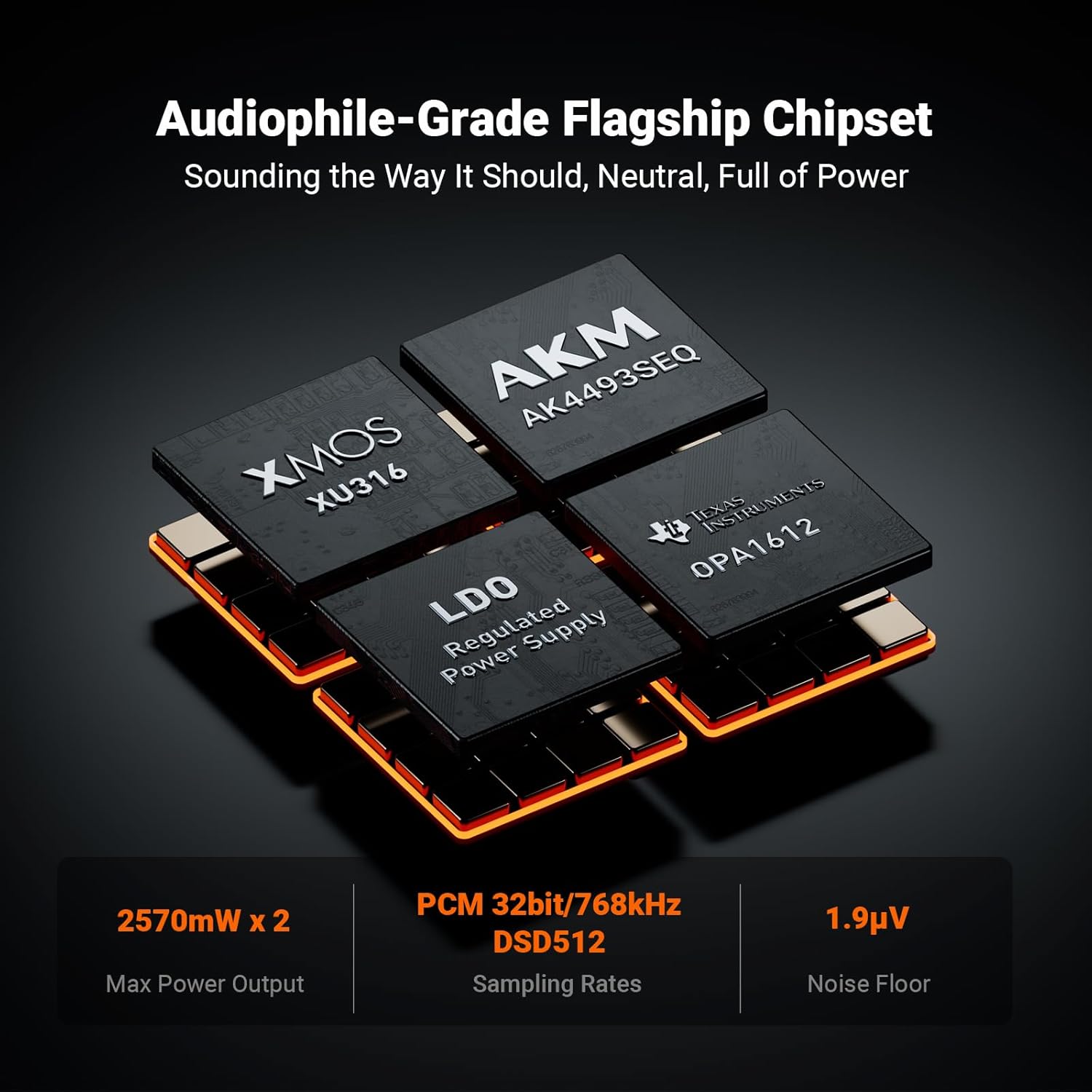
Image 2.1: Internal components highlighting the AKM4493SEQ DAC, XMOS XU316 processor, and OPA1612 ampigogailuak.
3. Zer dago kutxan
Mesedez, egiaztatu paketearen edukia jasotzean elementu guztiak daudela ziurtatzeko:
- Fosi Audio ZH3 entzungailuak AmpDAC biziagoa
- 6.35 mm-ko egokitzailea
- 12V-ko abiarazte-kablea
- IR Urruneko Kontrola
- Erabiltzailearen eskuliburua
- USB-A USB-C kablea
- DC 12V korronte egokitzailea

Image 3.1: Visual representation of all items included in the Fosi Audio ZH3 product package.
4. Konfiguratzeko argibideak
Follow these steps to set up your Fosi Audio ZH3:
- Lekua: Place the ZH3 on a stable, flat surface, away from direct sunlight, heat sources, and moisture.
- Potentzia-konexioa: Connect the DC 12V Power Adapter to the 'DC 12V' input on the rear panel of the ZH3, then plug it into a power outlet.
- Sarrera-iturburuaren konexioa:
- USB Sarrera: Connect your computer, mobile phone, or game console (PS5/PS4/Switch) to the 'USB IN' port using the provided USB-A to USB-C cable.
- Sarrera optikoa: Connect an optical cable from your audio source to the 'OPT IN' port.
- Sarrera koaxiala: Connect a coaxial cable from your audio source to the 'COAX IN' port.
- RCA sarrera: Connect RCA cables from your audio source to the 'RCA IN' ports.
- Output Device Connection:
- Entzungailuak: Connect your headphones to either the 6.35mm 'PO' (single-ended) or 4.4mm 'BAL' (balanced) headphone jacks on the front panel. Use the 6.35mm adapter if necessary.
- Active Speakers/Ampbiziagoa: Connect RCA cables from the 'RCA OUT' ports or XLR cables from the 'XLR OUT' ports to your active speakers or power ampbiziagoa.
- 12V Trigger (Optional): If you have compatible Fosi Audio devices, connect the 12V Trigger Cable between the '12V TRIGGER IN' and '12V TRIGGER OUT' ports to synchronize power on/off with other equipment.
- Piztu: Press the multi-function knob on the front panel or the power button on the remote control to turn on the device.

4.1 irudia: Xehetasun zehatza view of the front and rear panels, showing all input and output connections.

Image 4.2: Diagram illustrating various connection possibilities for the ZH3 with different audio sources and output devices.
5. Funtzionamendu-argibideak
5.1 Aurrealdeko panelaren kontrolak
- Funtzio anitzeko botoia:
- Prentsa: Power on/off, confirm selection in menu.
- Biratu: Adjust volume, navigate menu options.
- LCD pantaila: Shows current input, sampling rate, volume level, and menu settings.
- Entzungailuak: 6.35mm (PO) and 4.4mm (BAL) for headphone output.
5.2 Urruneko kontrolaren funtzioak
The included IR remote control provides convenient access to all ZH3 functions:
- Pizteko botoia: Gailua pizten edo itzaltzen du.
- +/- bolumena: Irteerako bolumena doitzen du.
- Sarrerako botoia: Cycles through available input sources (USB, Optical, Coaxial, RCA).
- Iragazki botoia: Selects different digital filter types.
- EQ botoia: Activates or deactivates bass/treble equalization.
- Mututu botoia: Audio irteera desaktibatu edo aktibatu egiten du.
- Menuen nabigazioa: Use arrow keys and OK button to navigate and select menu options on the LCD display.

Image 5.1: The Fosi Audio ZH3 unit alongside its infrared remote control.
6. Pertsonalizazio aukerak
The Fosi Audio ZH3 offers several ways to tailor the sound to your preference:
6.1 EQ Adjustments
The device features adjustable bass and treble controls. These can be accessed via the menu or dedicated buttons on the remote. Adjusting these allows you to fine-tune the low and high frequencies of your audio output.

Image 6.1: Visual representation of the bass and treble equalization controls.
6.2 Iragazki digitalak
The ZH3 includes 6 different digital filter types, including a Bypass mode. These filters can subtly alter the sound characteristics, allowing you to experiment and find the sound profile you prefer. Refer to the on-screen menu for filter selection.
6.3 Swappable Op-Amps
For advanced users, the ZH3 supports swapping two of its operational ampigogailuak (op-amps). This allows for further sound customization by changing the analog characteristics of the output stage. Refer to Fosi Audio's official resources for guidance on safe op-amp ordezkoa.

Image 6.2: The ZH3's display interface, showing options for gain, UAC mode, and filter settings including bypass.
7. Mantentzea
To ensure the longevity and optimal performance of your Fosi Audio ZH3, follow these maintenance guidelines:
- Garbiketa: Use a soft, dry cloth to clean the exterior of the device. Avoid using harsh chemicals, solvents, or abrasive cleaners, as these can damage the finish.
- Aireztapena: Ziurtatu gailuak aireztapen egokia duela. Ez blokeatu aireztapen-irekidurarik.
- Biltegiratzea: When not in use for extended periods, store the device in a cool, dry place, away from extreme temperatures and humidity.
- Potentzia: Disconnect the power adapter from the wall outlet during lightning storms or when unused for long periods.
8. Arazoak
If you encounter issues with your Fosi Audio ZH3, refer to the following common problems and solutions:
| Arazoa | Kausa posiblea | Irtenbidea |
|---|---|---|
| Botererik ez | Energia-egokitzailea ez dago konektatuta edo akastuna. | Ensure the power adapter is securely connected to the device and a working power outlet. Try a different outlet. |
| Ez dago soinu irteerarik | Incorrect input/output selection, volume too low, or faulty cables. | Verify the correct input source is selected. Check volume level. Ensure all audio cables are securely connected and not damaged. Test with different headphones/speakers. |
| Soinu distortsionatua | Input signal too high, faulty cables, or impedance mismatch. | Reduce the volume of the input source. Check cables for damage. Ensure headphone impedance is within the supported range (16Ω-300Ω). |
| Urruneko kontrola ez dabil | Dead batteries, obstruction, or remote out of range. | Replace batteries in the remote. Ensure no obstructions between the remote and the device's IR receiver. Operate within effective range. |
| USB input not recognized | Driver issues, incorrect UAC mode, or cable problem. | Install necessary USB drivers for your operating system if prompted. Check UAC mode settings on the device. Try a different USB cable or port. |
If the problem persists after trying these solutions, please contact Fosi Audio customer support for further assistance.
9. Zehaztapenak
| Ezaugarri | Xehetasuna |
|---|---|
| Produktuaren neurriak | 9.45 x 11.81 x 2.76 hazbete |
| Elementuaren pisua | 2.87 kilo |
| Modelo zenbakia | ZH3 |
| DAC chipset | AKM4493SEQ |
| USB Processor | XMOS XU316 |
| Supported PCM | 768kHz/32bit arte |
| Onartutako DSD | DSD512 |
| Zarata Solairua | ≤1.9µV |
| 6.35 mm-ko irteerako potentzia | 640mW@32Ω x2 |
| 4.4mm Balanced Output Power | 2570mW@32Ω x2 |
| Headphone Impedance Range | 16Ω-tik 300Ω-ra |
| Sarrerak | Coaxial, Optical, USB-C, RCA, 12V Trigger |
| Irteerak | 4.4mm, 6.35mm, RCA, XLR, 12V Trigger |
| Konektibitate Teknologia | Coaxial, Optical, USB-C, RCA |
| Audio irteera modua | Estereoa |
| Fabrikatzailea | Fosi Audio |
10. Bermea eta laguntza
10.1 Bermearen informazioa
Fosi Audio products typically come with a standard manufacturer's warranty. Please refer to the warranty card included in your product packaging or visit the official Fosi Audio website for detailed warranty terms and conditions specific to the ZH3 model. Keep your purchase receipt as proof of purchase for warranty claims.
10.2 Bezeroarentzako laguntza
For technical assistance, troubleshooting beyond this manual, or warranty inquiries, please contact Fosi Audio customer support:
- Webgunea: Visit the official Fosi Audio webMaiz egiten diren galderen, laguntza-baliabideen eta harremanetarako informazioaren gunea.
- Posta elektronikoa: Kontsultatu zure produktuaren dokumentazioa bezeroarentzako arreta-zerbitzuko helbide elektronikoa lortzeko.
- Lineako denda: You can also find support information on the Fosi Audio Store on Amazon.