
1. Sarrera
This manual provides essential instructions for setting up, operating, maintaining, and troubleshooting your FUNYET 2-in-1 Laptop, Model FUN01-05. This device features a 14.1-inch Full HD touchscreen, an Intel Core i7-1265U processor, 16GB RAM, and a 512GB SSD, running Windows 11 Pro. Its 360-degree reversible screen allows for versatile usage modes.
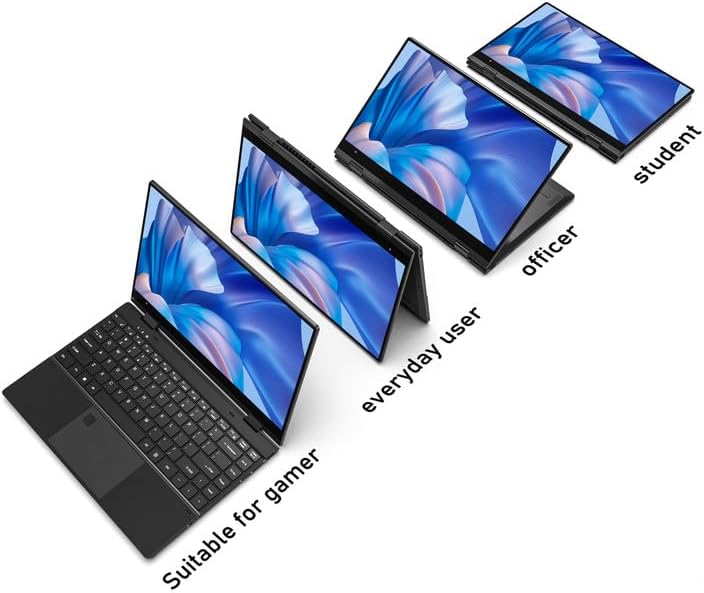
Figure 1: FUNYET 2-in-1 Laptop showcasing its versatile modes.
2. Paketearen edukia
Egiaztatu elementu guztiak paketean daudela:
- FUNYET 2-in-1 Touch Screen Laptop
- AC egokigailua
- Berme Txartela
- Argibideak (eskuliburu hau)
3. Konfigurazioa
3.1 Hasierako kargatzea eta piztea
- Connect the AC adapter to the DC-IN port on the laptop and plug it into a power outlet.
- Allow the laptop to charge for at least 30 minutes before initial use.
- Press and hold the Power Button (located on the side) until the screen illuminates.
3.2 Windows 11 Pro konfigurazioa
Follow the on-screen prompts to complete the Windows 11 Pro initial setup. This includes selecting your region, language, connecting to a Wi-Fi network, and creating a user account.
3.3 Hatz-marken irakurgailuaren konfigurazioa
For enhanced security and quick access, set up the fingerprint reader:
- Joan Windows Ezarpenak > Kontuak > Saioa hasteko aukerak atalera.
- Under "Windows Hello Fingerprint," click "Set up" and follow the instructions to register your fingerprint.

Figure 2: Backlit keyboard and integrated fingerprint reader.
4. Funtzionamendu-argibideak
4.1 Energiaren kudeaketa
- Piztu: Sakatu pizteko botoia.
- Lo egiteko modua: Briefly press the Power Button or close the lid.
- Itzali: Joan Hasi menura > Energia > Itzali.
- Berrabiarazi: Joan Hasi menura > Energia > Berrabiarazi.
4.2 2-in-1 Modes
The laptop's 360-degree hinge allows for four primary modes:
- Notebook Mode: Idazteko eta produktibitaterako ordenagailu eramangarriaren konfigurazio estandarra.
- Zutik egoteko modua: Fold the keyboard back to prop up the screen for viewedukia ematea.
- Karpa modua: Position the laptop in an inverted 'V' shape, ideal for touch interaction or presentations in confined spaces.
- Tablet modua: Fold the screen completely back against the base for a tablet experience.

Figure 3: Different operational modes of the 2-in-1 laptop.
4.3 Touchscreen and Keyboard
- Ukipen-pantaila: Use gestures similar to a smartphone or tablet for navigation and interaction.
- Atzeko argiztatutako teklatua: The keyboard features a backlight for use in low-light conditions. The backlight can typically be toggled or adjusted using function keys (e.g., Fn + F5).
4.4 Konektibitatea
Your laptop supports various connectivity options:
- Wi-Fi 6: For high-speed wireless internet access. Connect via Windows Settings > Network & Internet > Wi-Fi.
- Bluetooth 5.2: For connecting wireless peripherals like headphones, mice, or keyboards. Pair devices via Windows Settings > Bluetooth & devices.
- Portuak: The laptop includes various ports for external devices.

Figure 4: Laptop ports and their functions.
Eskuragarri dauden portuak:
- DC-IN (potentzia sarrera)
- USB 3.1 Type-C (Video Output, Data Transfer, Charging)
- Audio Port (Headphones/Microphone)
- Pizteko botoia
- TF Card Slot (for storage expansion up to 1TB)
- USB 3.1 A motakoa
5. Mantentzea
5.1 Garbiketa
- Erabili zapi leun eta lihorik gabeko bat pantaila eta kanpoaldea garbitzeko.
- Orban egoskorretarako, dampen the cloth slightly with water or a screen-safe cleaner.
- Avoid harsh chemicals, abrasives, or excessive moisture.
5.2 Bateria zaintzea
- Bateriaren iraupena maximizatzeko, saihestu bateria maiz erabat deskargatzea.
- Denbora luzez erabiltzen ez duzunean, gorde ordenagailu eramangarria leku fresko eta lehor batean.
- The laptop features a 38 Watt-hour Lithium-Ion battery, providing up to 8 hours of usage.
5.3 Kudeaketa Termikoa
The laptop is designed with an improved thermal system to maintain optimal operating temperatures. Ensure proper airflow by not blocking the ventilation openings, especially during intensive tasks.

Figure 5: Laptop thermal design for efficient cooling.
6. Arazoak
Arazoak badituzu, saiatu oinarrizko arazoak konpontzeko urrats hauekin:
- Potentziarik gabe: Ziurtatu korronte-egokitzailea ondo konektatuta dagoela ordenagailu eramangarrira eta funtzionatzen duen entxufe batera. Saiatu beste entxufe batekin.
- Pantaila ez da bistaratzen: Connect an external monitor to check if the issue is with the laptop's display. Restart the laptop.
- Errendimendu motela: Itxi beharrezkoak ez diren aplikazioak. Begiratu Windows eguneraketak. Ziurtatu biltegiratze leku nahikoa duzula.
- Wi-Fi/Bluetooth arazoak: Toggle Wi-Fi/Bluetooth off and on in Windows Settings. Restart the laptop. Check router/device connections.
- Erakutsi akatsak: Ensure your Windows operating system and graphics drivers are up to date. This can often resolve display anomalies.
- Ukipen-pantaila ez du erantzuten: Restart the laptop. Ensure the screen is clean and free of debris.
For persistent issues, refer to the support section or contact customer service.
7. Zehaztapenak
| Ezaugarri | Xehetasuna |
|---|---|
| Marka | FUNYET |
| Ereduaren izena | Magbook |
| Modelo zenbakia | FUN01-05 |
| Pantailaren tamaina | 14.1 hazbete |
| Bistaratzeko ebazpena | 1920 x 1080 pixel (FHD) |
| Bistaratzeko mota | LCD, Touchscreen, Glossy Finish |
| Prozesadorea | Intel Core i7-1265U (4.8 GHz arte, 8 nukleo, 12 hari) |
| RAM | 16 GB DDR4 (3733 MHz) |
| Biltegiratzea | 512 GB SSD (PCIE x 4), expandable up to 1TB with TF card |
| Sistema eragilea | Windows 11 Pro |
| Grafikoak | Intel Iris Xe Graphics integratua |
| Haririk gabeko konexioa | Wi-Fi 6, Bluetooth 5.2 |
| Portuak | USB 3.1 Type-A, USB 3.1 Type-C, DC-IN, Audio Jack, TF Card Slot |
| Kamera | Front 2 MP |
| Segurtasuna | Hatz-markak hautematea |
| Bateria | 38 Watt Hours Lithium Ion (up to 8 hours) |
| Pisua | 3 kilo |
| Neurriak (L x Z x L) | 12.7" x 8.6" x 0.6" |
8. Bermea eta Laguntza
8.1 Bermearen informazioa
Your FUNYET 2-in-1 Laptop comes with a 2 urteko berme mugatua. This warranty covers manufacturing defects and hardware malfunctions under normal use. Please retain your proof of purchase for warranty claims.
Gainera, a 180 eguneko doako itzulketa politika is offered from the date of purchase.
8.2 Bezeroarentzako laguntza
For technical assistance, warranty claims, or any product-related inquiries, please contact FUNYET customer support:
- Telefono-laguntza: +1 800-986-9631 (English phone support available)
- Lineako laguntza: 24/7 instant online support is available. Please visit the official FUNYET webharremanetarako datuak lortzeko gunea.