
Sarrera
This manual provides detailed instructions for the setup, operation, and maintenance of your TANALAZ K71Pro Portable Karaoke Machine. Please read this manual thoroughly before using the product to ensure proper function and longevity. Keep this manual for future reference.
Produktua amaituview
Osagaiak barne:
- 1 x TANALAZ K71Pro Karaoke Speaker
- 2 x Haririk gabeko mikrofonoak
- 1 x Microphone Base/Holder
- 1 x USB-C kargatzeko kablea
- 1 x Erabiltzailearen eskuliburua
Ezaugarri nagusiak:
- Diseinu trinkoa eta eramangarria: Measures 3.7 x 3.14 x 3.42 inches, weighing 0.65 lbs, with a hand strap for easy transport.
- Haririk gabeko mikrofono bikoitzak: Allows for duet singing with 5 voice-changing effects (original, female, male, monster, baby voice).
- Integrated Microphone Base: Provides organized storage and prevents microphones from falling. Compatible with TANALAZ K8, K21, K32, K79 microphones.
- Bluetooth 5.3 konexioa: Ensures stable and long-distance wireless transmission for audio streaming from smartphones, tablets, and computers.
- Multi-functional Speaker: Can be used as a standalone Bluetooth speaker.
- Vibrant LED Party Lights: Dynamic color-changing lights integrated into the speaker to enhance the user experience.
- Erreprodukzio aukera anitz: Supports Bluetooth, AUX input, and TF Card (MicroSD card, not included) for versatile audio sources.
- Bateriaren iraupen luzea: Built-in 1200mAh battery provides 4-6 hours of continuous use.
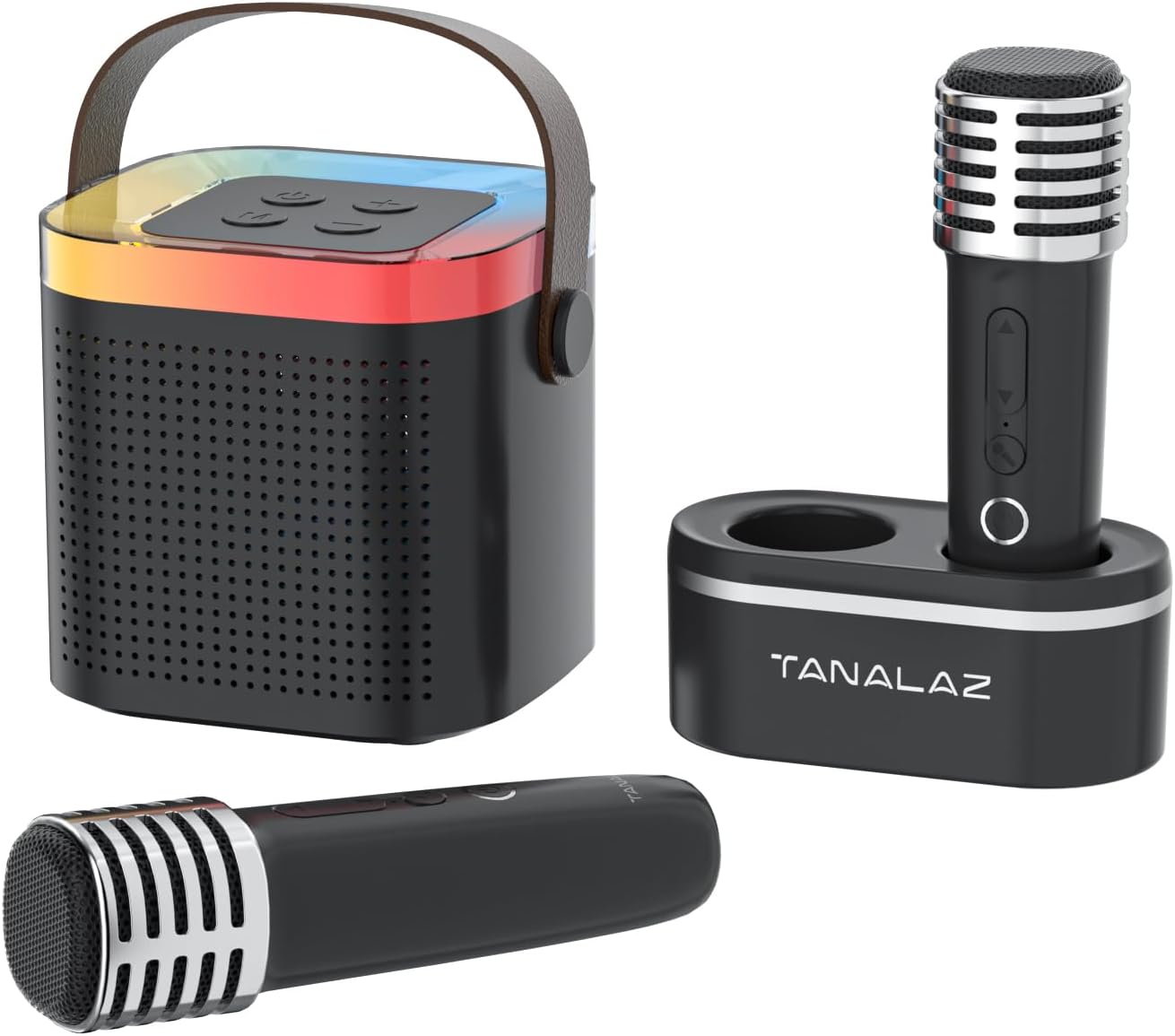
Image: The TANALAZ K71Pro karaoke machine, featuring the main speaker unit, two wireless microphones, and a dedicated microphone base for storage.

Irudia: Leherketa bat view illustrating the internal speaker components of the TANALAZ K71Pro, alongside the two wireless microphones and their base.
Konfigurazioa
- Charging the Devices:
- Connect the provided USB-C charging cable to the charging port on the karaoke speaker and a suitable USB power adapter (not included).
- Connect the USB-C charging cable to the charging ports on each wireless microphone and a suitable USB power adapter.
- The charging indicator lights will illuminate during charging and turn off or change color when fully charged. Allow sufficient time for a full charge before first use.
- Piztea:
- Press and hold the power button on the karaoke speaker until you hear a power-on prompt and the LED lights activate.
- Press and hold the power button on each wireless microphone until they power on.
- Bluetooth bidezko lotura
- Ensure the karaoke speaker is powered on and in Bluetooth pairing mode (usually indicated by a flashing LED light).
- Zure telefonoan, tabletan edo beste Bluetooth gaitutako gailu batean, joan Bluetooth ezarpenetara.
- Bilatu "K71Pro" (or similar name) in the list of available devices and select it to pair.
- Parekatu ondoren, bozgorailutik baieztapen soinua entzungo duzu.

Image: The TANALAZ K71Pro speaker demonstrating its wide compatibility and Bluetooth 5.3 connection with a laptop, tablet, and smartphone.
Funtzionamendua
Bozgorailuaren kontrolak:
- Pizteko botoia: Press and hold to turn on/off. Short press to play/pause music.
- Bolumen botoiak (+/-): Short press to adjust speaker volume.
- Modu botoia: Press to switch between Bluetooth, AUX, and TF Card modes.
- LED argiak: The speaker features integrated LED lights that change color automatically.
Mikrofonoaren kontrolak:
- Pizteko botoia: Eduki sakatuta pizteko/desaktibatzeko.
- Volume/Echo Buttons: Use to adjust microphone volume and echo effect.
- Ahotsa aldatzeko botoia: Short press to cycle through 5 voice effects:
- Jatorrizko ahotsa
- Emakumezko Ahotsa
- Gizonezko Ahotsa
- Munstro Ahotsa
- Haur Ahotsa

Image: The two wireless microphones highlighting the five available voice-changing effects for enhanced entertainment.
Connecting via AUX/TF Card:
- AUX sarrera: Connect an audio device using a 3.5mm AUX cable (not included) to the AUX port on the speaker. Switch the speaker to AUX mode.
- TF txartela: Insert a TF (MicroSD) card (not included) with pre-loaded music into the TF card slot on the speaker. Switch the speaker to TF Card mode.
Mantentzea
- Garbiketa: Use a soft, dry cloth to clean the surface of the speaker and microphones. Do not use liquid cleaners or abrasive materials.
- Biltegiratzea: Store the device in a cool, dry place away from direct sunlight and extreme temperatures. Use the microphone base to store microphones securely.
- Bateria zaintzea: To prolong battery life, avoid fully discharging the device frequently. Charge the device regularly, even if not in use for extended periods.
- Uraren esposizioa: Gailu hau ez da iragazgaitza. Saihestu uraren edo hezetasun handiaren eraginpean jartzea.
Arazoak konpontzea
| Arazoa | Kausa posiblea | Irtenbidea |
|---|---|---|
| Argindarrik ez / Gailua ez da pizten | Bateria gutxi edo gailua itzalita dago. | Charge the speaker and microphones fully. Press and hold the power button to turn on. |
| Ezin da Bluetooth bidez parekatu | Bluetooth not enabled, device too far, or already paired to another device. | Ensure Bluetooth is enabled on your device. Move closer to the speaker. Disconnect from other devices and try pairing again. |
| Bozgorailutik soinurik ez | Volume too low, incorrect mode, or device not connected. | Increase speaker volume. Ensure correct mode (Bluetooth, AUX, TF Card) is selected. Verify successful Bluetooth pairing or cable connection. |
| Mikrofonoa ez dabil | Microphone off, low battery, or volume too low. | Turn on the microphone. Charge the microphone. Increase microphone volume. |
| Ahots-aldagailua ez dabil | Botoi-sakatze okerra. | Ensure you are short-pressing the voice changer button to cycle through effects. |
Zehaztapenak
- Modelo zenbakia: K71Pro
- Marka: TANALAZ
- Neurriak: 3.7 x 3.14 x 3.42 inches (Speaker)
- Pisua: 0.65 lbs (Speaker)
- Konektibitatea: Bluetooth 5.3, AUX, TF Card
- Hizlari kopurua: 1
- Bateriaren edukiera: 1200mAh (Speaker)
- Bateriaren iraupena: 4-6 hours (Speaker)
- Kargatzeko ataka: USB C mota
- Gailu bateragarriak: Smartphones, Tablets, Laptops, Televisions
- Dakarten osagaiak: Speaker, 2 Wireless Microphones, Microphone Base, USB-C Cable, User Manual

Image: Detailed dimensions of the TANALAZ K71Pro karaoke speaker and wireless microphone.
Bermea eta Laguntza
For warranty information and customer support, please refer to the contact details provided with your purchase or visit the official TANALAZ webgunea. Gorde erosketa-agiria erosketaren frogagiri gisa, berme-erreklamazioetarako.
For further assistance, please contact TANALAZ customer service.