
ARNSSIEN Y5
ARNSSIEN Y5 4K 48MP Dual Screen Digital Camera User Manual
Eredua: Y5
Sarrera
This manual provides detailed instructions for the ARNSSIEN Y5 4K 48MP Digital Camera. Please read it thoroughly before using the camera to ensure proper operation and to maximize its features. This camera is designed for ease of use, making it suitable for beginners, children, and teenagers.

Image: The ARNSSIEN Y5 Digital Camera, showcasing its dual screen feature and compact design.
Paketearen edukia
Egiaztatu elementu guztiak zure paketean daudela:
- 1x Digital Camera
- 1x 32 GB-ko memoria txartel
- 1x C motako kablea
- 1x Txartel irakurgailua
- 1x Babes-poltsa
- 1x Korrila
- 1x Erabiltzailearen eskuliburua
- Opari-kutxa 1x

Image: All items included in the ARNSSIEN Y5 Digital Camera package, neatly arranged.
Kamera amaitu daview
Ohitu zaitez kameraren osagaiak eta kontrolak ezagutzen.
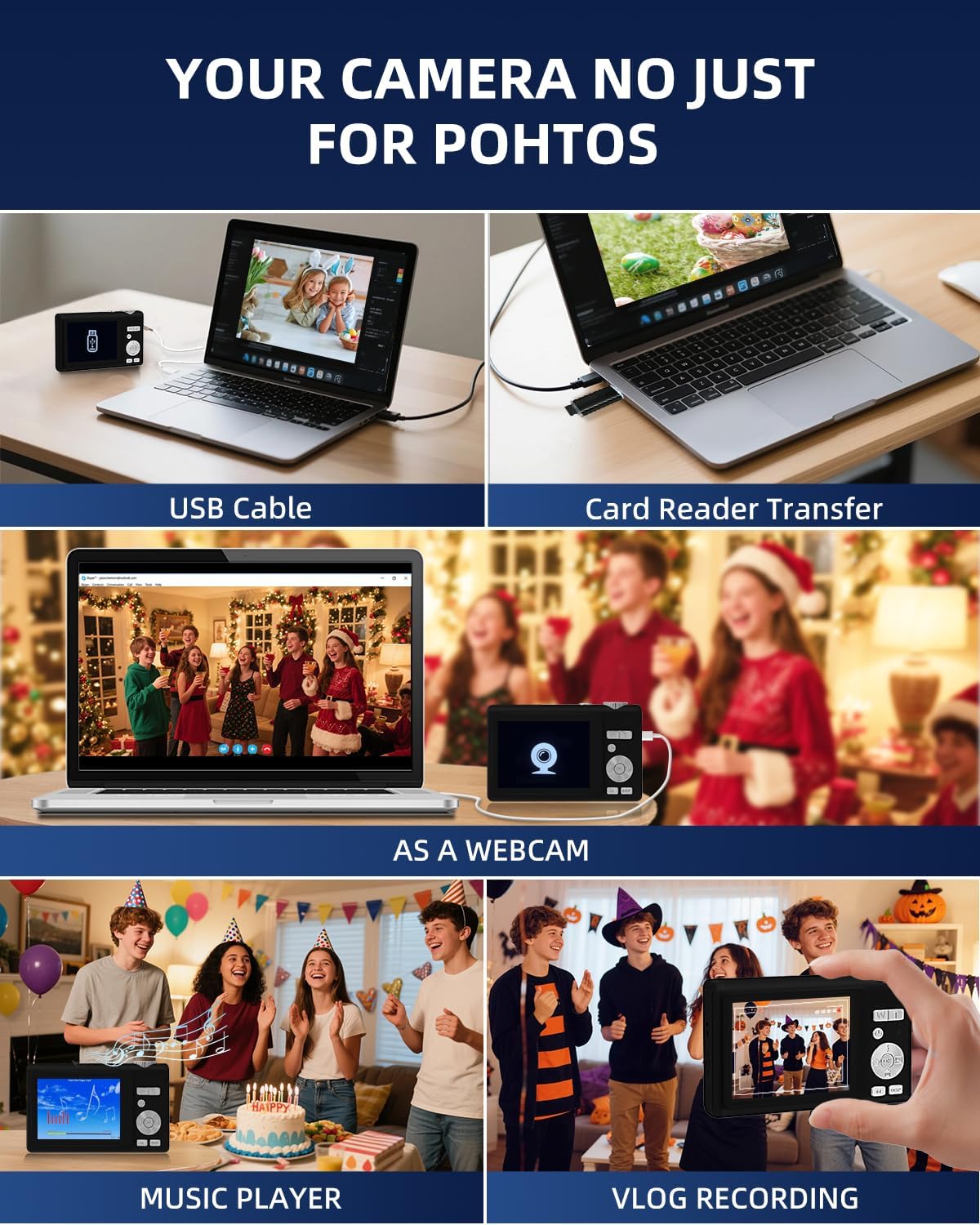
Image: Detailed diagram showing the camera's front, top, and rear views with labels for all buttons, ports, and screens.
- Mode Rotation Key: For selecting different camera modes.
- Obturadorearen botoia: To take photos or start/stop video recording.
- Flash argia: Integrated flash for low-light conditions.
- Kargatzeko ataka (C motakoa): For charging the camera and data transfer.
- Kargatu Lamp: Kargatzearen egoera adierazten du.
- TF txartelaren ataka: Slot for the microSD card.
- Selfie Display: The smaller front screen for self-portraits.
- Zoom Key (W/T): To zoom in (T) or zoom out (W).
- Pizteko botoia: To turn the camera on or off.
- Egoera adierazle argia: Shows camera's operational status.
- Up Button (Flash): Controls flash settings.
- Eskuineko botoia: Navigation or specific function button.
- Ados botoia: Confirms selections or accesses special effects (1-15 types).
- Behera botoia: Navigation or specific function button.
- DISP tekla: Switches to the selfie screen.
- Modu aldaketa: Toggles between photo and video modes.
- Ezkerreko botoia: Navigation or specific function button.
- Hang Rope Hole: Kordoia lotzeko.
- Bozgorailua: Audioa erreproduzitzeko.
Konfigurazioa
1. Bateria kargatzea
Before first use, fully charge the camera. Connect the camera to a power source using the provided Type-C cable. The Charge Lamp kargatzeko egoera adieraziko du.
Note: The camera uses a built-in Lithium-polymer battery. No battery swaps are needed; simply charge and go.
2. Memoria txartela sartzea
The camera supports microSD cards up to 128GB. A 32GB memory card is included. Insert the memory card into the TF Card Port until it clicks into place.
Important: For optimal performance, format the SD card within the camera before its first use.
3. Piztu/Itzaltzea
Eduki sakatuta Pizteko botoia to turn the camera on or off.
Funtzionamendu-argibideak
1. Basic Photography and Videography
- Argazkiak ateratzen: Argazki moduan, sakatu Obturadorearen botoia to capture a 48MP image. The camera features autofocus for clear shots.
- Bideoak grabatzen: Switch to video mode using the Modu aldatzailea, eta, ondoren, sakatu Obturadorearen botoia to start/stop 4K video recording.
- Zooma: Erabili Zoom Key (W/T) to adjust the 16x digital zoom.
- Dual Screen Function: The camera has a 2.8" main screen and a 1.4" selfie screen. Press the DISP tekla to switch to the selfie screen for easy self-portraits.
2. Camera Settings and Modes
The camera offers various settings and modes for enhanced creativity and control. Access these through the menu system or dedicated buttons.

Image: On-screen display of photo mode settings including flash, anti-shake, burst, time-lapse, music player, photo size, white balance, exposure, ISO, scene, sharpness, quality, and general settings.

Image: On-screen display of video mode settings including audio recording, flash, video bitrate, motion detection, loop recording, music player, white balance, exposure, ISO, scene, sharpness, quality, and general settings.
- ISO: Adjusts light sensitivity.
- EV (esposizio-balioa): Controls image brightness.
- WB (White Balance): Corrects color cast based on lighting.
- WDR (barruti dinamiko zabala): Improves detail in both bright and dark areas.
- Flasha: Use the Up Button to cycle through flash modes (e.g., Auto, Fill-flash).
- Zorrotasuna: Irudiaren argitasuna doitzen du.
- Iragazkiak: Apply 15 different filter effects for creative shots.
- Edertasun modua: Enhances facial features in portraits.
- Tiro segida: Hainbat argazki bata bestearen atzetik ateratzen ditu azkar.
- Motela: Records video at a slower playback speed.
- Denbora-tartea: Captures images at set intervals to create a sped-up video.
- Stabilization (Anti-Shake): Kameraren mugimenduak eragindako lausotasuna murrizten du.
- Mugimendu-detekzioa: Camera starts recording when motion is detected.
- Composition Aid: Assists in framing your shots.

Image: A visual comparison demonstrating the effect of Beauty Mode when activated and deactivated on a group photo.

Image: A sequence of three images showing a snowboarder in mid-air, illustrating the continuous shooting feature.

Image: A four-panel sequence showing a person blowing bubbles, demonstrating the time-lapse feature with timestamps.

Image: A visual comparison showing the difference in image stability with Anti-Shake mode activated versus deactivated, illustrated with a skier.

Image: A multi-panel comparison demonstrating the effects of different sharpness levels, white balance modes, ISO settings, filter effects, and exposure values on an image.
3. Funtzio osagarriak
- Musika erreproduzitzailea: The camera includes a built-in music player.
- Webkamaren funtzioa: Connect the camera to a computer via USB-C to use it as a webkamara.
- File transferentzia: Transfer photos and videos to a computer using the Type-C cable or the included card reader.

Image: Illustration of two methods for transferring files: directly via USB cable to a laptop, and using a card reader for the memory card.
Mantentzea
- Garbiketa: Use a soft, dry cloth to clean the camera body. For the lens and screens, use a specialized lens cleaning cloth and solution. Avoid abrasive materials.
- Bateria zaintzea: To prolong battery life, avoid fully discharging the battery frequently. Charge the camera regularly, especially if not used for extended periods. Store the camera in a cool, dry place.
- Biltegiratzea: When not in use, store the camera in its protective pouch to prevent scratches and dust accumulation.
Arazoak konpontzea
| Arazoa | Kausa posiblea | Irtenbidea |
|---|---|---|
| Kamera ez da pizten. | Bateria baxua. | Charge the camera fully using the provided Type-C cable. |
| Ezin dira argazkiak/bideoak atera. | Memory card full or not inserted correctly. | Check memory card insertion. Delete unnecessary files or replace the card. Ensure the card is formatted. |
| Irudiak lausoak dira. | Anti-shake feature off, camera movement, or focus issue. | Ensure Anti-Shake is enabled. Hold the camera steady. For autofocus, hold down the shutter button halfway to lock focus before fully pressing. |
| Camera freezes or crashes. | Software akatsa edo memoria txartelaren arazoa. | Turn off the camera and restart. If the problem persists, remove and reinsert the memory card. |
If you encounter issues not listed here, please refer to the "Warranty & Support" section for assistance.
Zehaztapenak
| Ezaugarri | Xehetasuna |
|---|---|
| Modelo zenbakia | Y5 |
| Effective Capture Resolution | 48 megapixelekoa |
| Bideo Harrapaketa Ebazpena | 2160p (4K UHD) |
| Zoom optikoa | 16x |
| Zoom digitala | 16x |
| Irudi Egonkortzea | Optikoa |
| Foku automatikoa | Bai |
| Bistaratzeko mota | LCDa |
| Pantaila nagusiaren tamaina | 2.8 hazbete |
| Selfie Screen Size | 1.4 hazbete |
| Memoria Txartel Mota | microSD (TF Card) |
| Max Supported Memory Card | 128 GB |
| Memoria txartela barne | 32 GB |
| Bateria mota | Litio-polimeroa |
| Bateriaren batez besteko iraupena | 2 ordu |
| Konektibitate Teknologia | Micro USB (Type-C) |
| Neurriak (L x W x H) | 2.54 x 5.08 x 3.81 cm |
| Pisua | 250 gramo |
| Trebetasun Maila | Hasiberria |
| Onartua File Formatuak | JPEG, MP4 |
| Flasha | Integrated, Fill-flash automatic |
| Uraren Erresistentzia Maila | Ez iragazgaitza |
Bermea eta laguntza
- Bermea: This product comes with a 30-day warranty from the date of purchase. Please retain your proof of purchase.
- Bezeroarentzako laguntza: For any questions, technical assistance, or warranty claims, please contact ARNSSIEN customer support. 24-hour assistance is available. Refer to the contact information provided with your purchase or on the official ARNSSIEN webgunea.
Ask a question about this manual
Ask about setup, troubleshooting, compatibility, parts, safety, or missing instructions. Manuals+ will review the question and use this page’s manual context to help answer it.