
Sarrera
Welcome to your new NIMO 15.6" FHD Laptop N151. This manual provides essential information to help you get started, operate, maintain, and troubleshoot your device. Please read through these instructions carefully to ensure optimal performance and longevity of your laptop.
Konfigurazioa
1. Unboxing eta Hasierako Ikuskapena
Kontu handiz atera elementu guztiak paketetik. Ziurtatu osagai hauek daudela:
- 1 x Nimo N151 Laptop
- 1 x Type-C 65W PD Fast Charger
- 1 x Erabiltzailearen eskuliburua (dokumentu hau)
- Windows 11 Home (pre-installed)
Inspect the laptop for any physical damage. If any components are missing or damaged, contact customer support immediately.
2. Charging the Laptop
Before first use, fully charge your laptop. Connect the provided Type-C 65W PD Fast Charger to the Type-C charging port on your laptop and then to a power outlet. The charge LED indicator will illuminate.

Image: The NIMO laptop connected to its Type-C PD fast charger, illustrating the charging process.
3. Piztea eta hasierako konfigurazioa
Press the power button located on the keyboard. The laptop will boot up and guide you through the initial Windows 11 Home setup process. Follow the on-screen instructions to configure your language, region, network, and user account.
Zure ordenagailu eramangarria erabiltzea
Bistaratzea
Your NIMO laptop features a 15.6-inch Full HD (1920x1080) Anti-Glare IPS display. This display offers clear visuals and reduced eye strain, suitable for various tasks from work to entertainment.

Image: The NIMO laptop's 15.6-inch FHD IPS display, highlighting its narrow bezels and vibrant visual capabilities.
Keyboard and Fingerprint Sensor
The laptop is equipped with a backlit keyboard for comfortable typing in various lighting conditions and a numeric keypad for efficient data entry. A fingerprint sensor is integrated for secure and quick login.

Image: Close-up of the NIMO laptop's backlit keyboard, showcasing the fingerprint sensor and numeric keypad.
Webkamara
A 2MP webcam is integrated for video calls and online meetings.
Portuak eta Konektibitatea
The NIMO N151 offers a variety of ports for versatile connectivity:
- USB 3.0 portuak: Abiadura handiko datuak transferitzeko.
- USB 2.0 ataka: Periferikoak konektatzeko.
- HDMI ataka: Kanpoko pantailetara konektatzeko.
- Type-C Ports: One for charging (PD Fast Charger) and one for multifunction use.
- Mikro SD txartelaren zirrikitua: Biltegiratzea zabaltzeko edo transferitzeko files.
- Headphone Combo Jack: Audio sarrera/irteerarako.
- Kensington blokeoaren zirrikitua: Segurtasun fisikoagatik.
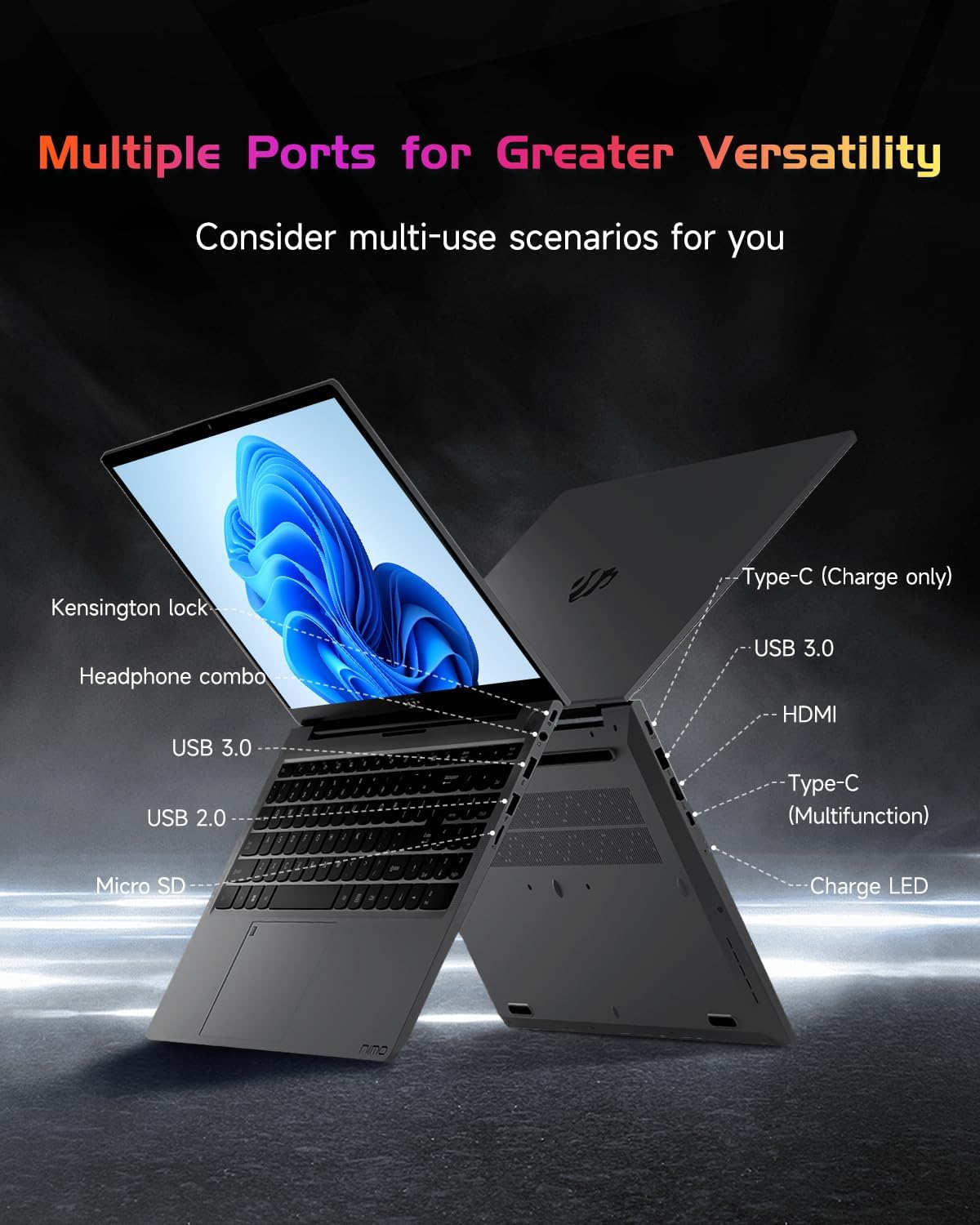
Irudia: Alboko profesionalafile of the NIMO laptop, displaying its array of ports for diverse connectivity needs.
Stay connected with integrated Wi-Fi 6 for fast wireless internet and Bluetooth 5.2 for connecting wireless accessories.
Prozesadorea eta errendimendua
Powered by the Intel Alder Lake-N100 12th Gen processor, the NIMO N151 delivers reliable performance for multitasking, streaming, and everyday computing tasks. It comes with 16GB DDR4 RAM and a 256GB PCIe SSD for fast startups and seamless operation.

Image: A visual representation of the Intel Alder Lake-N100 12th Gen processor, highlighting its role in the laptop's performance.
Sistema eragilea
The laptop comes pre-installed with Windows 11 Home, offering a modern and intuitive user experience.
Mantentzea
Zaintza Orokorra
- Gorde ordenagailu eramangarria leku garbi eta lehor batean, muturreko tenperaturetatik urrun.
- Avoid spilling liquids on the keyboard or screen.
- Use a soft, lint-free cloth to clean the screen and exterior. Do not use harsh chemicals.
- Ziurtatu aireztapen egokia, aire-haubideak ez blokeatzen.
Bateria zaintzea
To prolong battery life, avoid fully discharging the battery frequently. It is recommended to keep the battery charge between 20% and 80% when possible.
Arazoak konpontzea
Ohiko arazoak eta irtenbideak
- Ordenagailu eramangarria ez da pizten: Ensure the charger is properly connected and the battery has sufficient charge. Try holding the power button for 10-15 seconds to perform a hard reset.
- Pantaila hutsik dago: Connect an external monitor to check if the display is the issue. Restart the laptop.
- Wi-Fi konexio arazoak: Egiaztatu Wi-Fi gaituta dagoen Windows ezarpenetan. Berrabiarazi bideratzailea eta ordenagailu eramangarria.
- Errendimendu motela: Close unnecessary applications, check for malware, and ensure Windows is up to date.
For persistent issues, refer to the online support resources or contact NIMO customer service.
Zehaztapenak
| Ezaugarri | Xehetasuna |
|---|---|
| Marka | NIMO |
| Ereduaren izena | Nimo N151 |
| Pantailaren tamaina | 15.6 hazbete |
| Pantailaren bereizmena | 1920 x 1080 pixel (FHD) |
| Prozesadorea | Intel Pentium Quad Core N100 (up to 3.4 GHz) |
| RAM | 16 GB DDR4 |
| Memoria Abiadura | 3200 MHz |
| Disko gogorra | 256 GB-ko SSDa (PCIe) |
| Koprozesadore grafikoa | Grafiko Integratua |
| Sistema eragilea | Windows 11 Home |
| Haririk gabeko mota | 802.11a/b/g/n/ac (Wi-Fi 6) |
| Bluetootha | Bluetooth 5.2 |
| USB 2.0 Portuak | 1 |
| USB 3.0 Portuak | 3 |
| Bateriaren batez besteko iraupena | 5 ordu |
| Elementuaren pisua | 3.8 kilo |
| Produktuaren neurriak | 14.07 x 8.98 x 0.76 hazbete |
| Ezaugarri bereziak | Backlit Keyboard, Fingerprint Reader, HD Audio, Memory Card Slot, Numeric Keypad |
Bermea eta Laguntza
Your NIMO laptop is covered by a 2 urteko fabrikatzailearen bermea, ensuring peace of mind for your purchase. Additionally, NIMO offers a 90-Day Hassle-Free Return Policy.
For technical assistance, warranty claims, or returns, please contact NIMO customer support through their official channels. Refer to the contact information provided with your product or on the NIMO webgunea.
Produktuen bideoak
Watch these official videos for a comprehensive overview and demonstration of your NIMO laptop's features.
NIMO 15.6 Laptop Comprehensive Introduction
Video: A detailed introduction to the NIMO 15.6" FHD Laptop, showcasinbere diseinua eta funtzionalitate nagusiak.
NIMO Laptop: Perfect for Work and Study, Anytime, Anywhere
Video: This video highlights the NIMO laptop's versatility for both work and study environments, emphasizing its portability.
NIMO 15.6 FHD Laptop for Students Home Work
Video: A demonstration of the NIMO 15.6" FHD Laptop's suitability for students and home-based work tasks.
Efficiency Meets Convenience: Nimo Laptop
Video: This video showcases the NIMO laptop's efficiency and convenient features for daily use.
NIMO Laptop UGC
Video: User-generated content featuring the NIMO laptop, demonstrating real-world usage scenarios.
NIMO 15.6 FHD Laptop Promotion Video
Video: A promotional video for the NIMO 15.6" FHD Laptop, showcasinbere ezaugarriak eta onurak g.