
Sarrera
This manual provides essential information for setting up, operating, maintaining, and troubleshooting your NIMO 15.6-inch FHD Gaming Laptop, model Nimo N153. Please read this manual thoroughly before using your device to ensure proper function and longevity.

Image: The NIMO 15.6-inch FHD Gaming Laptop, showcasinbere diseinu dotorea.
Kutxan dagoena
Upon unboxing, verify that all items listed below are present:
- 1 x Nimo N153 Laptop
- 1 x Type-C 100W PD Fast Charger
- 1 x Erabiltzailearen eskuliburua (dokumentu hau)
- Windows 11 Home (pre-installed)
- Berme eta itzultze informazioa
Konfigurazioa
1. Hasierako piztea eta kargatzea
Before first use, connect the laptop to the power adapter and a wall outlet. The Type-C 100W PD Fast Charger is designed for efficient charging. Allow the battery to charge sufficiently before disconnecting.

Image: The compact Type-C 100W PD Fast Charger included with the laptop.
2. Operating System Setup (Windows 11)
Upon first boot, follow the on-screen instructions to complete the Windows 11 Home setup. This includes selecting your region, language, connecting to a Wi-Fi network, and creating a user account.
3. Hatz-marken irakurgailuaren konfigurazioa
For enhanced security, set up the integrated fingerprint reader. Navigate to Windows Settings > Accounts > Sign-in options and follow the prompts to register your fingerprint.

Image: Close-up of the laptop's keyboard, highlighting the fingerprint reader and backlit keys.
4. Periferikoak konektatzea
Ordenagailu eramangarriak kanpoko gailuak konektatzeko hainbat ataka ditu:
- USB atakak: Connect USB devices such as mice, keyboards, and external storage.
- HDMI ataka: Konektatu kanpoko monitore edo telebista batera pantaila zabalagoa lortzeko.
- Type-C Ports: For data transfer, charging, and connecting compatible Type-C accessories.
- Mikro SD txartelaren zirrikitua: Insert Micro SD cards for additional storage or data transfer.
- Aurikularrak Jack: Konektatu entzungailuak edo kanpoko bozgorailuak.
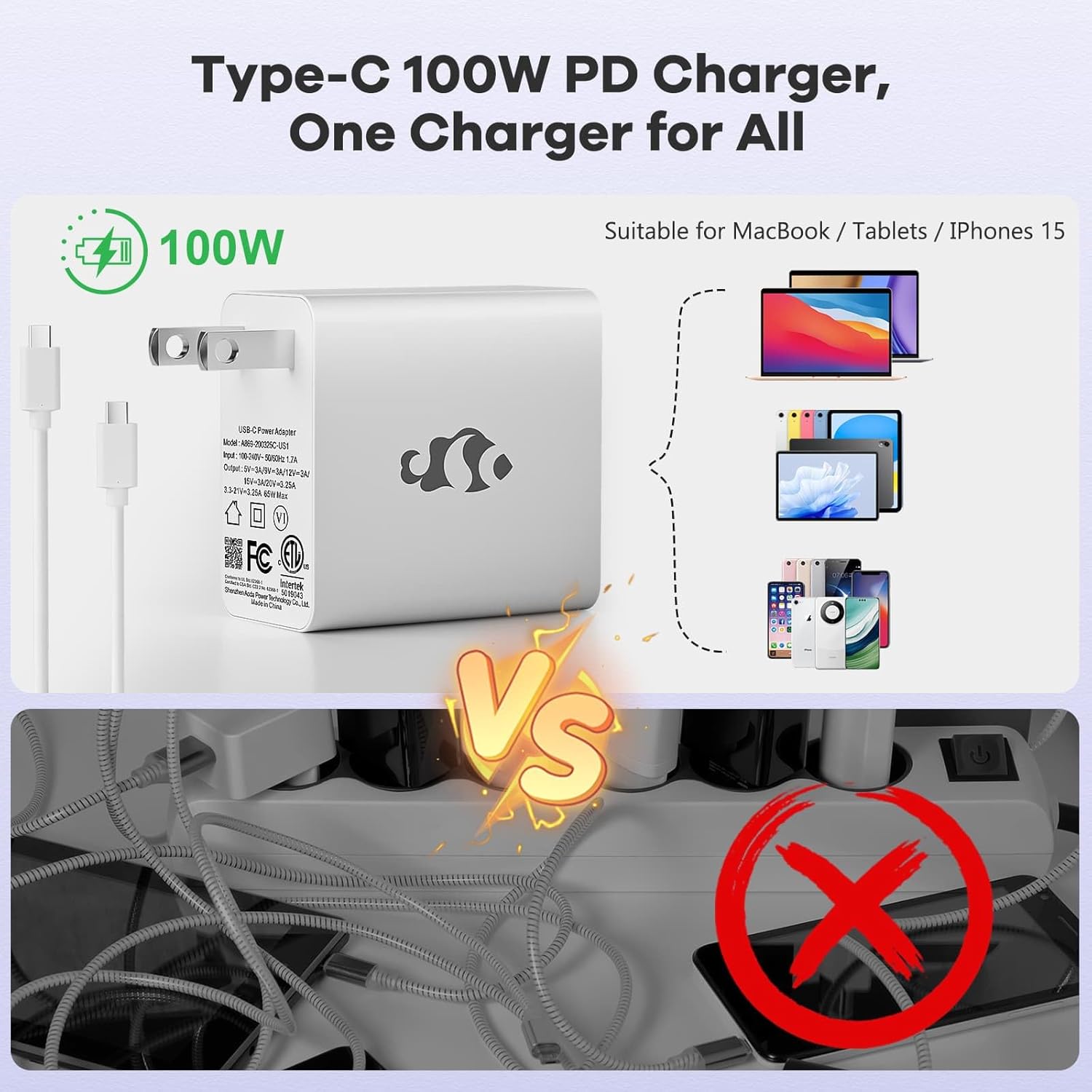
Image: Diagram illustrating the various ports available on the NIMO laptop, including USB, HDMI, Type-C, Micro SD, and headphone jack.
Funtzionamendu-argibideak
1. Piztu/Itzali eta Lo Modua
- Piztu: Sakatu teklatuan dagoen pizteko botoia.
- Itzali: Egin klik Windows-eko Hasi botoian, eta ondoren hautatu Energia > Itzali.
- Lo egiteko modua: Itxi ordenagailu eramangarriaren tapa edo egin klik Hasi botoian, eta ondoren hautatu Energia > Lo.
2. Keyboard and Touchpad Functions
- Atzeko argiztatutako teklatua: The keyboard features backlighting for use in low-light conditions. Use the dedicated function key (Fn + F key combination, typically) to adjust brightness or toggle it on/off.
- Zenbakizko teklatua: The full-size keyboard includes a numeric keypad for convenient data entry.
- Multi-touch Touchpad: Supports various gestures for navigation and control within Windows. Refer to Windows settings for touchpad gesture customization.
3. Haririk gabeko konexioa
- Wi-Fi: Haririk gabeko sare batera konektatzeko, egin klik ataza-barran dagoen Wi-Fi ikonoan, hautatu nahi duzun sarea eta idatzi pasahitza behar izanez gero.
- Bluetootha: Bluetooth gailuak parekatzeko, joan Windows Ezarpenak > Bluetooth eta gailuak atalera, eta jarraitu argibideei gailu berri bat gehitzeko.
4. Webcam Shield
The laptop is equipped with a physical webcam shield for privacy. Slide the shield to cover or uncover the webcam behar den moduan.
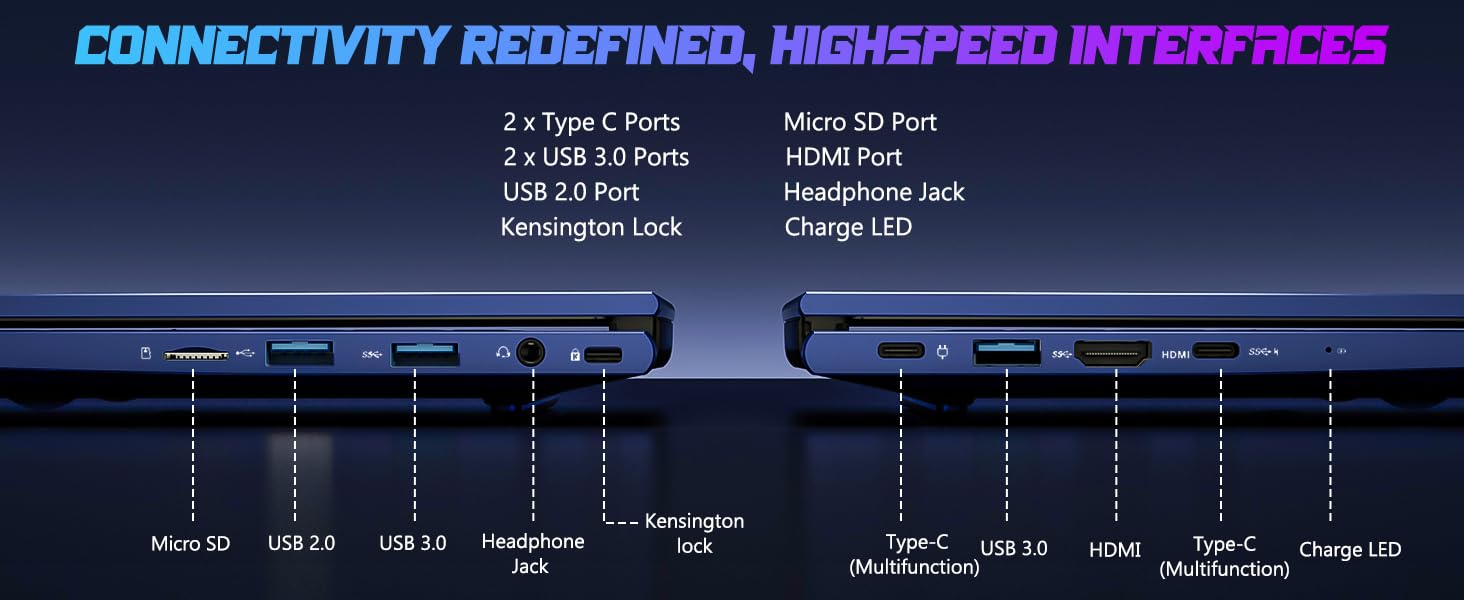
Image: Illustration of the laptop's webcam with a privacy shield feature.
5. Pantailaren ezaugarriak
The 15.6-inch FHD IPS anti-glare display (1920x1080 resolution) provides clear visuals. Adjust display settings such as brightness and resolution through Windows Display Settings.

Image: The NIMO laptop displaying a vibrant image on its 15.6-inch FHD IPS screen.
Mantentzea
1. Ordenagailu eramangarria garbitzea
- Pantaila: Erabili lipurrik gabeko zapi leun bat dampUrarekin edo pantaila-garbitzaile batekin garbitu. Ez ihinztatu likidoa zuzenean pantailan.
- Teklatua eta txasisa: Erabili zapi leun eta lehor bat. Zikinkeria egoskorra bada, ukitu apur batamp oihal bat erabil daiteke, likidorik irekiduretan sartzen ez dela ziurtatuz.
- Portuak: Mantendu atakak hauts eta hondakinik gabe. Erabili aire konprimatua beharrezkoa bada, lata zutik eutsiz.
2. Software eguneraketak
Regularly check for and install Windows updates to ensure system stability, security, and optimal performance. Go to Windows Settings > Windows Update.
3. Upgradability
The Nimo N153 laptop supports upgradable dual-channel memory and detachable RAM/SSD. If you plan to upgrade components, it is recommended to consult a qualified technician or refer to NIMO's official support resources to avoid voiding your warranty or damaging the device.
Arazoak konpontzea
If you encounter issues with your NIMO laptop, try the following basic troubleshooting steps:
- Potentziarik gabe: Ensure the charger is securely connected to both the laptop and a working power outlet. Check the charge LED indicator.
- Bistaratzeko arazoak: If the screen is blank, try connecting an external monitor via HDMI to check if the issue is with the laptop's internal display. Ensure display drivers are up to date.
- Konexio arazoak (Wi-Fi/Bluetooth): Restart the laptop and your router/Bluetooth device. Check Windows network settings to ensure Wi-Fi and Bluetooth are enabled.
- Errendimendu motela: Close unnecessary applications, check for malware, and ensure sufficient free storage space on the SSD.
- Sistemak blokeatzen du: Sakatu eta eutsi pizteko botoia 10-15 segundoz itzaltzeko, eta ondoren berrabiarazi ordenagailu eramangarria.
For more complex issues or if the problem persists, please contact NIMO customer support.
Zehaztapenak
| Ezaugarri | Xehetasuna |
|---|---|
| Marka | NIMO |
| Ereduaren izena | Nimo N153 |
| Pantailaren tamaina | 15.6 hazbete |
| Ebazpena | 1920x1080 Pixels (FHD IPS Anti-glare) |
| CPU eredua | AMD Ryzen 5 6600H (6 Cores, 12 Threads, up to 4.5 GHz) |
| Koprozesadore grafikoa | AMD Radeon 660M (Integrated GPU) |
| RAM memoria instalatuaren tamaina | 16 GB DDR5 (4800 MHz) |
| Disko gogorraren tamaina | 1 TB-ko SSDa (PCIe 4.0) |
| Sistema eragilea | Windows 11 Home |
| Ezaugarri bereziak | Backlit Keyboard, Fingerprint Reader, HD Audio, Numeric Keypad, Webcam Shield |
| Konektibitate Teknologia | Wi-Fi (802.11a/b/g/n/ac), Bluetooth |
| Portuak | 2x Type-C, 2x USB 3.0, 1x USB 2.0, 1x HDMI, 1x Micro SD, 1x Headphone Jack, Kensington Lock |
| Bateriaren iraupena | Up to 5 Hours (Usage), Up to 7 Hours (Standby) |
| Bateria Edukiera | 53.58 watt ordu |
| Kargagailua | 100W GaN Type-C PD Fast Charger |
| Elementuaren pisua | 3.8 kilo |
| Neurriak (L x Z x L) | 14.07" x 8.98" x 0.76" |
Oharra: zehaztapenak aldez aurretik jakinarazi gabe alda daitezke.
Bermea eta Laguntza
1. Fabrikatzailearen bermea
Your NIMO N153 laptop is covered by a 2 urteko fabrikatzailearen bermea from Nimo Direct Inc. This warranty covers defects in materials and workmanship under normal use. Please retain your proof of purchase for warranty claims.
2. Itzultzeko politika
NIMO offers a 90-day hassle-free return policy. If you are not satisfied with your purchase, you may return the product within 90 days of purchase. Refer to your purchase documentation for specific return procedures.
3. Bezeroarentzako arreta
For technical assistance, warranty claims, or any product-related inquiries, please contact NIMO customer support:
- Posta elektronikoa: service@nimopc.com
- Sarean: Visit the official NIMO weblaguntza baliabideen eta harremanetarako aukeren gunea.
Our dedicated support team is available to assist you.

Image: NIMO customer service representatives ready to assist.


