
Sarrera
The Lifepro TrimLite Vibration Plate with Handle brings whole-body vibration therapy home with an accessible, feature-rich design. Height-adjustable handlebars provide stability, while 99 speed levels and nine auto programs allow for varied intensity, from gentle lymphatic drainage to muscle activation workouts. Magnetic acupoints embedded in the non-slip platform offer acupressure benefits. Built-in Bluetooth enables audio streaming. Two resistance bands attach directly to the machine for upper-body engagement. This compact and quiet unit is suitable for any home gym space.
Konfigurazioa
Despaketatzea eta osagaien egiaztapena
Kontu handiz atera osagai guztiak paketetik. Egiaztatu barne dauden elementu guztiak daudela:
- Lifepro TrimLite bibrazio-plaka
- Height-adjustable Handlebar
- 2 Erresistentzia Bandak
- Urruneko Kontrola
- Elikatze kablea
- Erabiltzailearen eskuliburua (dokumentu hau)
- Assembly Tools (wrench, screws)

1. irudia: barne dauden osagaiak
Eskulekuaren muntaia
- Attach the height-adjustable handlebar to the designated mounting points on the vibration plate using the provided screws and tools. Ensure it is securely fastened.
- Adjust the handlebar height to a comfortable position for stability during use. The height can be set between 26.8 and 37.8 inches.

Figure 2: Handlebar for Stability
Resistance Band Attachment
Locate the attachment points on the sides of the vibration plate. Securely clip the resistance bands to these points. Ensure the bands are firmly attached before use.
Kokatzea
Place the vibration plate on a flat, stable surface. The four suction cup feet on the base will help keep the machine grounded during operation.
Funtzionamendu-argibideak
Piztu/Itzaltzea
Connect the power cord to the machine and then to a wall outlet. Press the power button on the control panel or remote to turn the unit on. Press again to turn off.
Kontrol Panela eta Urrunekoa erabiliz
The TrimLite features an LED display and push-button controls on the unit, as well as a remote control for convenience. The remote includes quick-speed buttons for Walk, Jog, and Run, and allows selection of 9 preset programs (P1-P9).
- Abiadura doitzea: Use the speed up/down buttons to select from 99 speed levels.
- Auto programak: Select one of the nine pre-programmed routines (P1-P9) for varied intensity and focus, such as lymphatic drainage or muscle activation.
- Tenporizadorea: Set your desired workout duration.
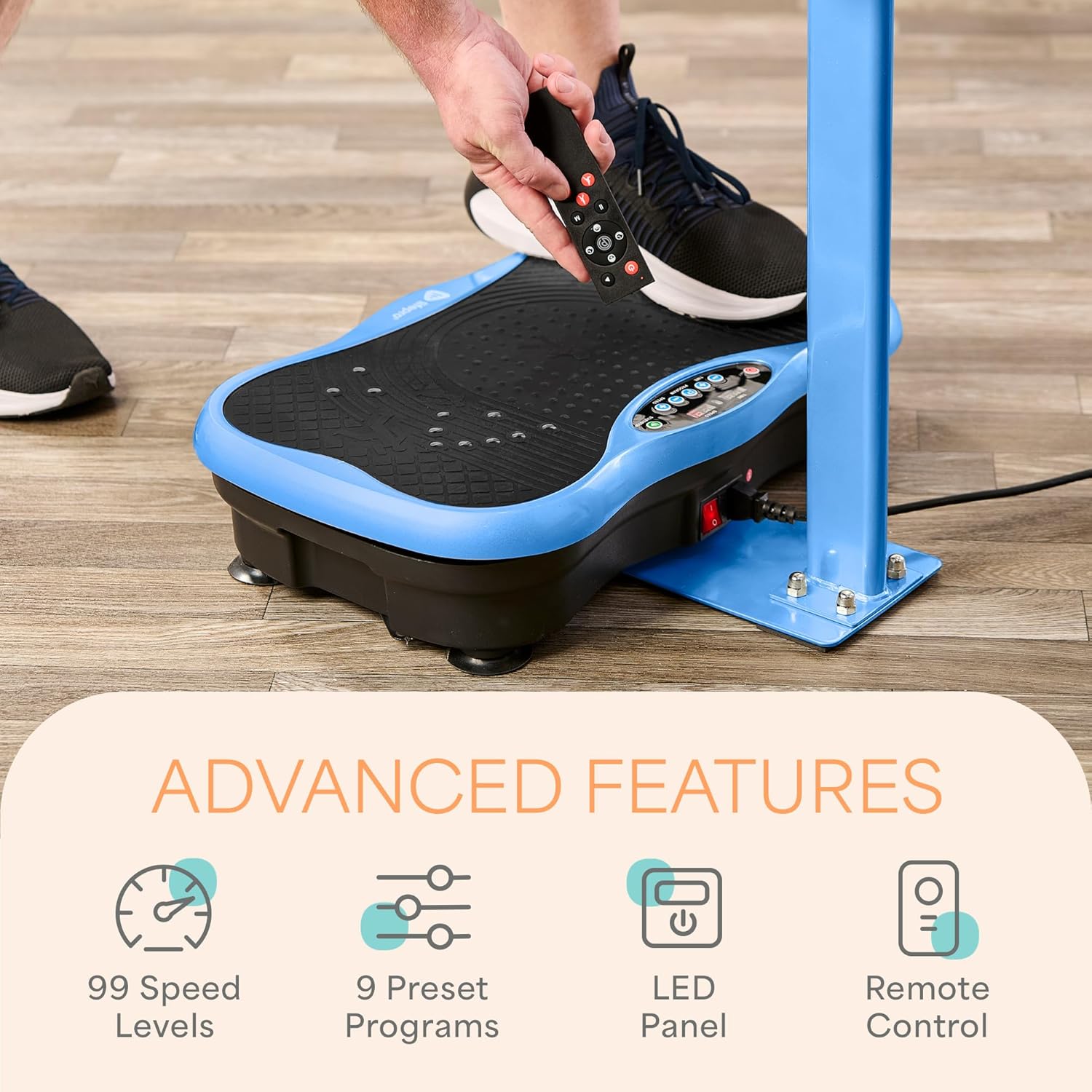
Figure 3: Control Panel and Remote
Resistance Band Usage
The attachable resistance bands can be used to incorporate upper-body exercises into your vibration therapy session. Hold the handles and perform exercises such as bicep curls, tricep extensions, or arm raises while standing on the plate.

Figure 4: Man Using Resistance Bands

Figure 5: Woman Using Resistance Bands
Akupuntu magnetikoak
The non-slip platform features embedded magnetic acupoints. Standing on these points during your session can provide additional acupressure stimulation.

Figure 6: Magnetic Acupoints
Bluetooth konexioa
The unit includes built-in Bluetooth. Pair your device to stream music or take calls during your workout sessions.
Gomendatutako Ariketak
The TrimLite Vibration Plate can be used for various exercises to target different muscle groups and wellness goals. Exampbesteak beste:
- Standing with knees slightly bent for general whole-body vibration.
- Squats or lunges while on the platform.
- Planks with hands or feet on the platform.
- Using resistance bands for upper body workouts.

Figure 7: Additional Exercises
Bideo didaktikoak
1. bideoa: Orokorra amaitu daview of the Lifepro TrimLite Vibration Plate, demonstrating basic functions and benefits.
Video 2: Demonstrates how to effectively use the Lifepro TrimLite Vibration Plate, focusing on exercises with the handlebar for enhanced stability and workout variety.
Mantentzea
Garbiketa
Wipe down the surface of the vibration plate with a soft, damp cloth after each use. Avoid using abrasive cleaners or solvents that could damage the finish. Ensure the unit is unplugged before cleaning.
Biltegiratzea
Store the unit in a cool, dry place away from direct sunlight and extreme temperatures. Ensure the power cord is neatly coiled to prevent damage.
Arazoak konpontzea
- Unitatea ez da pizten: Ensure the power cord is securely plugged into both the unit and a working electrical outlet. Check if the power switch on the unit is in the 'on' position.
- Bibraziorik ez: Verify the unit is powered on and a program or speed level has been selected. Ensure no objects are obstructing the platform's movement.
- Display shaking or difficult to read: This can occur during high vibration settings. Try reducing the speed or program intensity. If the issue persists at lower settings or when the unit is idle, contact customer support.
- Ezohiko zaratak: If you hear grinding, squeaking, or other abnormal noises, discontinue use immediately and contact customer support.
- Bluetooth konexio arazoak: Ensure your device's Bluetooth is enabled and the vibration plate is in pairing mode. Move your device closer to the unit.
For any issues not resolved by these steps, please refer to the Support section.
Zehaztapenak
| Ezaugarri | Xehetasuna |
|---|---|
| Marka | Lifepro |
| Modelo zenbakia | LP-TRMLT |
| Elementuaren pisua | 10.8 kg |
| Kolorea | Urdina |
| Materiala | Plastikoa |
| Produktuaren neurriak (L x W x H) | 20.3" L x 17.9" W x 26.8" H |
| Handlebar Height Range | 26.8" - 37.8" |
| Kontrol mota | Sakatu botoia |
| Bistaratzea | LED |
| Abiadura Mailak | 99 |
| Auto Programak | 9 (P1-P9) |
| Eragiketa modua | Automatikoa |
| Energia iturria | Kable elektrikoa |
| Wattage | 150W |
| Gehienezko pisuaren gomendioa | 149 kg (265 lb) |

8. irudia: Produktuaren neurriak
Bermearen informazioa
The Lifepro TrimLite Vibration Plate comes with a 2 urteko bermea. Please retain your proof of purchase for warranty claims. For detailed terms and conditions, refer to the official Lifepro webwebgunean edo jarri harremanetan bezeroarentzako laguntzarekin.
Laguntza
For further assistance, product registration, or to access additional resources, please visit the official Lifepro store or contact their customer support team.
- Lifepro Store: Visit the Lifepro Store on Amazon
- Bezeroarentzako arreta: Refer to the contact information provided in your product packaging or on the official Lifepro webgunea.


