
1. Sarrera
This manual provides instructions for the setup, operation, and maintenance of your Retroid Pocket Classic handheld gaming console. The Retroid Pocket Classic is a portable Android-based gaming device featuring a 3.92-inch OLED touchscreen, designed for a versatile gaming experience.

Image 1.1: Retroid Pocket Classic consoles in white and yellow.
2. Zer dago kutxan
Egiaztatu elementu guztiak paketean daudela:
- Retroid Pocket Classic Gaming Console
- Kargatzeko kablea (USB-C)
- Erabiltzailearen eskuliburua (dokumentu hau)
3. Gailua amaitu daview
Familiarize yourself with the physical components and controls of your Retroid Pocket Classic.
3.1 Aurrealdea View

3.1. irudia: Aurrealdea view of the Retroid Pocket Classic.
- 3.92-inch OLED Touchscreen: The primary display for all operations and gaming.
- D-Pad: Nabigaziorako eta jokatzeko norabide-sarrera.
- Ekintza-botoiak: (A, B, X, Y or similar layout) for in-game actions.
- Hasi/Hautatu botoiak: For game and system functions.
- Bozgorailuak: Audio irteera.
3.2 Top and Back View

3.2. irudia: Goian view showing shoulder buttons and ports.
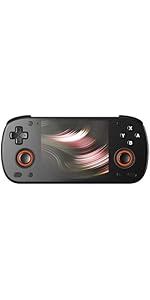
Image 3.3: Curved back design and trigger buttons.
- Sorbaldako botoiak (L1, R1): Goiko ertzean kokatua.
- Trigger Buttons (L2, R2): Located on the back, below the shoulder buttons.
- USB-C ataka: Kargatzeko eta datuak transferitzeko.
- 3.5 mm-ko audio-konexioa: Entzungailuak konektatzeko.
- Mikro SD txartelaren zirrikitua: Biltegiratzea zabaltzeko.
- Pizteko botoia: Gailua pizteko/itzaltzeko edo lo moduan jartzeko.
- Bolumen-botoiak: Audio irteera doitzeko.
3.3 Internal Components (Cooling)

Image 3.4: Integrated active cooling system.
The Retroid Pocket Classic features an integrated active cooling system designed to maintain optimal performance and manage heat during extended use.
4. Konfigurazioa
4.1 Hasierako karga
Before first use, fully charge the device. Connect the provided USB-C charging cable to the console's USB-C port and the other end to a compatible USB power adapter (not included). The device has a 5000mAh battery.
4.2 Piztu/Itzaltzea
- Pizteko: Sakatu eta eutsi pizteko botoia pantaila piztu arte.
- Itzaltzeko: Press and hold the Power button, then select "Power Off" from the on-screen options.
- Lo egiteko/esnatzeko: Sakatu labur pizteko botoia.
4.3 Wi-Fi konexioa
To access online features and download applications, connect to a Wi-Fi network:
- Joan zaitez Ezarpenak.
- Hautatu Sarea eta Internet.
- Sakatu Wi-Fi eta piztu ezazu.
- Hautatu nahi duzun sarea zerrendatik eta idatzi pasahitza eskatzen bazaizu.
4.4 Google kontuaren konfigurazioa
The Retroid Pocket Classic runs Android 14 and supports the Google Play Store. To download apps and games, you will need to sign in with a Google account during the initial setup process or later via the Settings menu.
4.5 Mikro SD txartelaren instalazioa
To expand the device's storage (128GB internal), insert a Micro SD card into the designated slot. Ensure the card is inserted correctly until it clicks into place. The device supports various Micro SD card capacities.
5. Funtzionamendu-argibideak
5.1 Android interfazean nabigatzea
The device operates on Android 14. Use the touchscreen for navigation, tapping icons to open applications, swiping to scroll, and using gestures for system controls. The D-pad and action buttons can also be used for navigation within compatible applications and games.
5.2 Downloading and Installing Applications
Applications and games can be downloaded from the Google Play Store. Open the Play Store app, search for your desired content, and follow the on-screen prompts to download and install.
Note: The Retroid Pocket Classic does not come with preloaded games. Users are responsible for acquiring and installing their own game content.
5.3 Biltegiratzea kudeatzea
To view and manage internal and external storage, go to Ezarpenak > Biltegiratzea. Here you can see storage usage and manage files. For optimal performance, ensure sufficient free space is available.
5.4 Bluetooth konexioa
The device supports Bluetooth 5.1 for connecting wireless accessories such as headphones or external controllers.
- Joan zaitez Ezarpenak.
- Hautatu Konektatutako gailuak.
- Sakatu Parekatu gailu berria and select your accessory from the list.
6. Mantentzea
6.1 Gailua garbitzea
Use a soft, dry, lint-free cloth to clean the device's exterior. For the screen, a screen cleaner specifically designed for electronics can be used. Avoid using harsh chemicals or abrasive materials.
6.2 Bateria zaintzea
Bateriaren iraupena luzatzeko:
- Saihestu muturreko tenperaturak.
- Ez deskargatu bateria guztiz maiz.
- Store the device with a partial charge if not used for extended periods.
6.3 Software eguneraketak
Egiaztatu eta instalatu sistemaren eguneraketak aldizka errendimendu eta segurtasun optimoa bermatzeko. Joan honera Ezarpenak > Sistema > Sistemaren eguneraketa eskuragarri dauden eguneratzeak egiaztatzeko.
7. Arazoak
7.1 Gailua ez da pizten
- Ziurtatu gailua behar bezala kargatuta dagoela. Konektatu energia-iturri batera gutxienez 30 minutuz.
- Try holding the Power button for 10-15 seconds to force a restart.
7.2 Wi-Fi konexio arazoak
- Egiaztatu Wi-Fia gaituta dagoela Ezarpenetan.
- Berrabiarazi zure Wi-Fi bideratzailea.
- Forget the network and reconnect, ensuring the password is correct.
7.3 Aplikazioak kraskatzen edo izozten dira
- Itxi eta berriro ireki aplikazioa.
- Garbitu aplikazioaren cachea eta datuak honen bidez: Ezarpenak > Aplikazioak > [Aplikazioaren izena] > Biltegiratzea eta cachea.
- Ensure the application is updated to its latest version.
- Berrabiarazi gailua.
7.4 Pantailak ez du erantzuten
- Berrabiarazi gailua pizteko botoia sakatuta edukiz.
- Ziurtatu pantaila garbi eta hondakinik gabe dagoela.
8. Zehaztapenak

Image 8.1: Retroid Pocket Classic detailed specifications.
| Ezaugarri | Xehetasuna |
|---|---|
| Ereduaren izena | RP CLASSIC |
| Prozesadorea | G1 Gen2 (8-Core Kryo CPU, 2 Performance Cores, 6 Efficiency Cores) |
| GPU | Adreno A12 |
| RAM | 6GB LPDDR4x @2133M |
| Biltegiratzea | 128GB EMMC 5.1 (expandable via Micro SD card) |
| Pantaila | 3.92-inch AMOLED, 1240x1080 @60fps |
| Sistema eragilea | Android 14 |
| Wi-Fi | Wi-Fi 5 |
| Bluetootha | Bluetooth 5.1 |
| Interfazea | USB-C / 3.5mm Audio Jack / TF Card Slot |
| Bideo Irteera | N/A |
| Bateria | 5000mAh |
| Kargatzeko Abiadura | 27 Watt |
| Neurriak | 138 x 89.8 x 26 mm (5.43 x 3.53 x 1 hazbete) |
| Pisua | 223 g (7.9 ontza) |
9. Bermea eta Laguntza
For warranty information and technical support, please refer to the official Retroid Pocket webwebgunera edo jarri harremanetan bezeroarentzako arreta-zerbitzura. Gorde erosketaren frogagiria berme-erreklamazioetarako.
Online resources and community forums may also provide helpful information and troubleshooting tips.