
1. Produktua amaitu daview
This manual provides essential information for the installation, operation, and maintenance of your SOYO Geforce GTX750Ti Graphics Card. Please read it carefully before use.
The SOYO Geforce GTX750Ti Graphics Card features 4GB GDDR5 memory and a 128-bit interface, designed for efficient data transfer and gaming performance. Built on a 28nm process, it balances power and efficiency. It includes HDMI, DVI, and VGA connectors for versatile display options and utilizes a PCI Express X16 3.0 bus interface for stable data transfer.
An efficient cooling system maintains optimal temperatures, and the card supports DirectX 12, OpenGL 4.6, and Vulkan for advanced graphics capabilities.
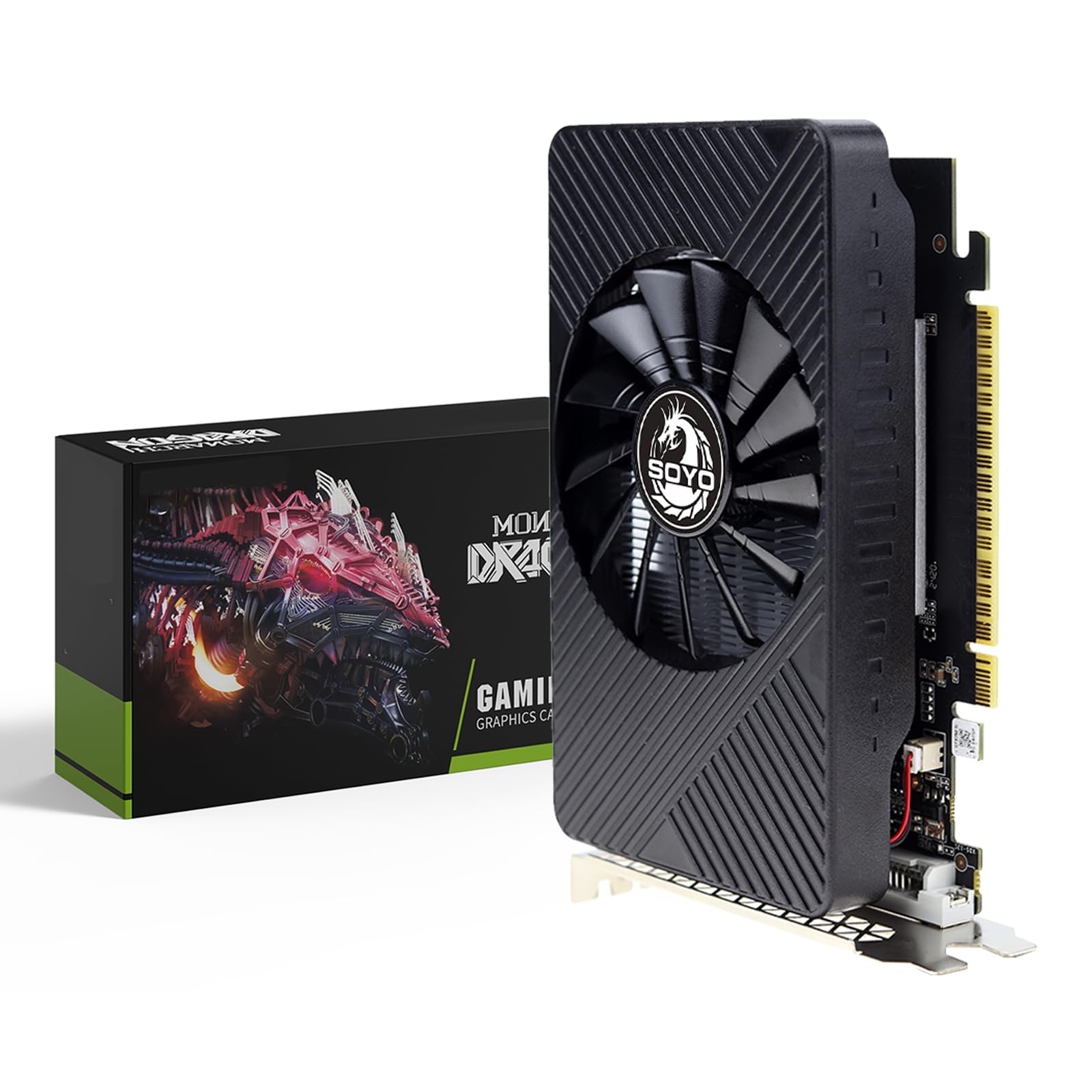
1.1. irudia: Aurrealdea view of the SOYO Geforce GTX750Ti Graphics Card, showcasing its single fan cooling system.
2. Instalazio gida
2.1 Sistemaren eskakizunak
- PCI Express x16 slot on motherboard
- Compatible motherboard with an available PCI Express x16 slot
- Adequate power supply unit (PSU)
- Compatible operating system (e.g., Windows 7/8/10/11 64-bit)
2.2 Instalazio fisikoa
- Itzali: Completely shut down your computer and unplug the power cord from the wall outlet.
- Kasu irekia: Ireki ordenagailuaren alboko panela plaka basera sartzeko.
- Kokatu zirrikitua: Identifikatu zure plaka basean PCI Express x16 zirrikitu libre bat.
- Kendu estalkia: Carefully remove the metal slot cover from the back of your computer case corresponding to the chosen PCI Express x16 slot.
- Txartela sartu: Align the graphics card with the PCI Express x16 slot and press it down firmly until it is securely seated. You should hear a click from the slot's retention clip.
- Txartel segurua: Lotu txartel grafikoa ordenagailuaren kaxan torlojua edo lokailua erabiliz.
- Itxi kasua: Replace the computer's side panel.
- Konektatu pantailak: Connect your monitor(s) to the graphics card's output ports (HDMI, DVI, or VGA).
- Piztu: Konektatu berriro korronte-kablea hormako entxufean eta piztu ordenagailua.

Image 2.1: The graphics card features HDMI, VGA, and DVI output ports for connecting various display types.
2.3 Gidariaren instalazioa
- Boot OS: Allow your computer to boot into the operating system. The system may install a generic display driver automatically.
- Deskargatu gidariak: Bisitatu NVIDIA ofiziala website or SOYO's support page to download the latest graphics drivers for the Geforce GTX750Ti.
- Exekutatu instalatzailea: Execute the downloaded driver installer and follow the on-screen prompts. It is recommended to perform a clean installation.
- Berrabiarazi: Restart your computer after the driver installation is complete to apply all changes.
3. Funtzionamendua
3.1 Pantailak konektatzea
Connect your monitor(s) to the available HDMI, DVI, or VGA ports on the graphics card. Ensure the cables are securely fastened.
3.2 Multi-Monitor Setup
The SOYO Geforce GTX750Ti supports multiple displays. After connecting your monitors, you can configure their arrangement and display modes (e.g., extended desktop, duplicate displays) through your operating system's display settings or the NVIDIA Control Panel.

Image 3.1: The graphics card supports connecting to multiple monitors simultaneously for an expanded workspace or gaming experience.
3.3 Software konfigurazioa
The NVIDIA Control Panel, installed with the drivers, allows you to fine-tune various graphics settings, including resolution, refresh rate, 3D settings, and color adjustments, to optimize your visual experience.
4. Mantentzea
4.1 Garbiketa
To ensure optimal performance and longevity, regularly clean the graphics card. With the computer powered off and unplugged, use compressed air to remove dust from the fan blades and heatsink fins. Avoid touching components directly.
4.2 Gidarien eguneraketak
Periodically check for and install the latest graphics drivers from the NVIDIA website. Driver updates often include performance improvements, bug fixes, and compatibility enhancements for new games and applications.
5. Arazoak
5.1 Ohiko arazoak eta irtenbideak
- Ez dago pantaila-irteerarik:
- Ensure the graphics card is fully seated in the PCI Express slot.
- Egiaztatu pantaila-kable guztiak ondo konektatuta daudela bai txartel grafikoari bai monitoreari.
- Check if your monitor is set to the correct input source (HDMI, DVI, VGA).
- Try connecting the monitor to a different output port on the graphics card or using a different cable.
- Display Artifacts or Distortion:
- Eguneratu zure grafikoen kontrolatzaileak azken bertsiora.
- Ziurtatu ordenagailuaren kaxaren barruko aire-fluxu egokia gehiegi berotzea saihesteko.
- Ohar garrantzitsua: Avoid using signal conversion adapters (e.g., HDMI-DVI, HDMI-VGA, DP-VGA) as they can cause artifacts, black screens, or no image. It is recommended to use direct HDMI, DVI, or VGA connections for better compatibility and stability.
- Poor Gaming Performance:
- Ziurtatu zure grafikoen kontrolatzaileak eguneratuta daudela.
- Check your system's CPU and RAM usage during gaming.
- Adjust in-game graphics settings to a lower preset.
6. Zehaztapen Teknikoak

Image 6.1: Key technical parameters of the SOYO Geforce GTX750Ti Graphics Card.
| Ezaugarri | Zehaztapena |
|---|---|
| Ereduaren izena | GTX750Ti |
| Koprozesadore grafikoa | NVIDIA GeForce GTX 750 TI |
| Grafikoen RAM tamaina | 4 GB |
| RAM grafiko mota | GDDR5 |
| Memoria Erlojuaren Abiadura | 5000 MHz |
| Bideo Irteerako Interfazea | DVI, HDMI, VGA |
| Txartel grafikoen interfazea | PCI-Express x16 |
| Zale kopurua | 1 |
| Display Maximum Resolution | 3840 x 2160 |
| Gailu bateragarriak | Mahaigaina |

Image 6.2: Physical dimensions of the SOYO Geforce GTX750Ti Graphics Card.
7. Bermea eta Laguntza
For warranty information, technical assistance, and customer support, please refer to the official SOYO website or contact your authorized retailer. It is recommended to keep your proof of purchase for any warranty claims.