
Sarrera
Thank you for choosing the DOSS Extreme Boom Pro D300 Bluetooth Speaker. This manual provides essential information for setting up, operating, and maintaining your speaker to ensure optimal performance and longevity. Please read this manual thoroughly before use.
Kutxan dagoena
- DOSS Extreme Boom Pro D300 Bluetooth bozgorailua
- USB-C kargatzeko kablea
- Erabiltzailearen eskuliburua (dokumentu hau)
Produktua amaituview
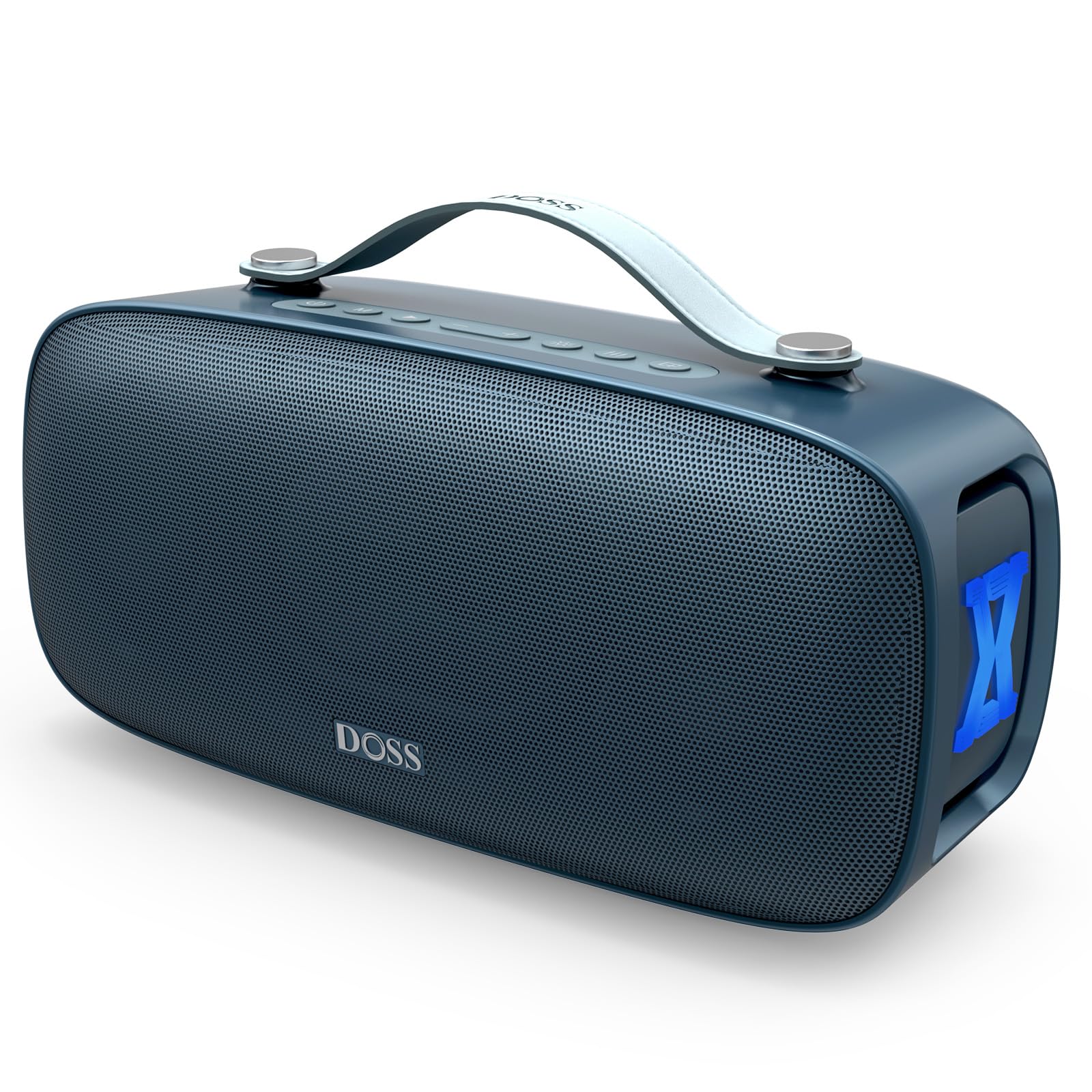
The DOSS Extreme Boom Pro D300 is a powerful portable Bluetooth speaker designed for immersive stereo sound and versatile use. It features intuitive controls, robust construction, and dynamic lighting effects.
Kontrolak eta Portuak
The speaker features a top-panel control interface for easy operation and a rear panel for various connectivity options.
- Goiko panela: Power, Play/Pause, Volume Up/Down, Mode, Lighting Effects, 3-Mode EQ, TWS Pairing. These buttons offer tactile feedback and are positioned for natural thumb's reach.
- Atzeko Panel: USB-C input (for charging), USB-A output (for power bank function), AUX input, TF-Card slot (for direct playlist access). These ports are protected by a sealed cover to maintain the speaker's waterproof rating.

Irudia: Goian view of the DOSS Extreme Boom Pro D300 speaker, highlighting the control buttons for power, mode, volume, play/pause, and extra bass. The handle is visible at the top.

Image: Close-up of the DOSS Extreme Boom Pro D300's rear panel, showing the DC IN (USB-C), USB-A, AUX, and TF-CARD ports, protected by a rubber flap.
Konfigurazioa
Piztu/Itzaltzea
- Press and hold the Power button on the top panel for 2 seconds to turn the speaker on or off.
Bluetooth parekatzea
- Turn on the DOSS Extreme Boom Pro D300 speaker.
- Bluetooth adierazlearen argia keinuka hasiko da, parekatze moduan dagoela adieraziz.
- On your device (smartphone, tablet, etc.), enable Bluetooth and search for "Extreme Boom Pro D300".
- Select the speaker to connect. A solid Bluetooth indicator light confirms successful pairing.
True Wireless Stereo (TWS) parekatzea
Connect two DOSS Extreme Boom Pro D300 speakers wirelessly for an immersive stereo sound experience.
- Piztu bi bozgorailuak.
- Select one speaker as the primary speaker and press its TWS button.
- Once paired, the TWS light of the primary speaker will turn solid orange, and the secondary speaker will flash orange slowly.
- Find "Extreme Boom Pro D300" on your Bluetooth device and connect it.
Funtzionamendu-argibideak
Oinarrizko Kontrolak
- Erreproduzitu/Pausatu: Sakatu Erreproduzitu/Pausatu botoia behin.
- Bolumena igo/behera: Sakatu '+' edo '-' botoiak.
- Hurrengoa / Aurreko pista: Sakatu eta eutsi '+' edo '-' botoiak.
- Modu botoia (M): Press to switch between Bluetooth, AUX, and TF-Card/USB playback modes.
Pro EQ Modes
The speaker offers three distinct EQ modes to customize your audio experience:
- Modu normala: Soinu profesional orekatuafile for everyday listening.
- Baxu modua: Enhanced bass for deeper, more impactful sound. Ideal for hip-hop and EDM.
- Treble Mode: Boosted treble for clearer vocals and crisp highs. Suitable for podcasts and audiobooks.
Switch between these modes directly from the top panel controls.

Image: The DOSS Extreme Boom Pro D300 speaker shown with three different EQ modes: Normal, Bass, and Treble, each depicted with a different background scenario.
Beat-Driven Lights
The speaker features LED lights that pulse to the rhythm of your music, creating an immersive visual experience. You can cycle through different lighting effects or turn them off using the dedicated button on the top panel.

Image: Multiple DOSS Extreme Boom Pro D300 speakers displaying four different beat-sync LED light presets: Flame, Energy, Ambient, and Flash.
Larrialdietako Energia Bankua
The built-in USB-A port allows you to charge your phone or tablet on the go. Connect your device using a compatible USB cable (not included, or use the included charging cable for the speaker).

Image: A DOSS Extreme Boom Pro D300 speaker on a wooden deck, charging a smartphone via its USB-A port, with a person sitting nearby.
Soinu Ezaugarriak
Experience powerful and immersive audio with the DOSS Extreme Boom Pro D300.
- 80W Powerful Audio: Delivers 107dB loudness for room-filling sound.
- Baxu hobetua: Tuned with side-mounted passive radiators for surprising low-end punch.
- Maiztasun-erantzuna: 20 KHz.
- Seinaleztapen-zarata ratioa: 80 dB.
Irudia: Leherketa bat view of the DOSS Extreme Boom Pro D300 speaker, illustrating its internal components including a 100W (50W) racetrack subwoofer, two 30W (15W) tweeters, and two bass passive radiators, contributing to 80W (160W Peak) sound output.
Portability & Durability
Designed for life on the move, the DOSS Extreme Boom Pro D300 is both portable and robust.
- IPX6 iragazgaitza: Resistant to spills, splashes, and rain. Suitable for outdoor use near pools or at the beach.
- 20 ordu jolasteko denbora: Enjoy up to 20 hours of music on a single charge (at 50% volume with bass and lights off).
- Eramateko heldulekua integratua: A sturdy handle makes it easy to transport your music anywhere.
- Pisua: Gutxi gorabehera 4.84 libera (2.2 kg).

Image: The DOSS Extreme Boom Pro D300 speaker placed on a rock near a waterfall, emphasizing its IPX6 waterproof rating, with two hikers in the background.

Image: A person carrying the DOSS Extreme Boom Pro D300 speaker by its handle while walking outdoors, with dimensions (11.89"D x 5.37"W x 2.55"H) and weight (4.85 pounds) overlaid.
Bideoa: Promozio bideo labur baten erakustaldiaasing the DOSS Extreme Boom Pro D300 speaker's features, including its design, sound, and portability.
Konektibitatea
- Bluetooth 5.4: Provides rock-solid wireless streaming up to 33 feet (10 meters).
- USB unitateko erreprodukzioa: Plug in a USB drive (not included) to play music directly from your playlist.
- AUX sarrera: Connect devices via a 3.5mm audio cable (not included) for wired playback.
Mantentzea
To ensure the longevity and optimal performance of your DOSS Extreme Boom Pro D300 speaker, follow these maintenance guidelines:
- Garbiketa: Garbitu bozgorailua leun batekin, damp oihal. Saihestu produktu kimiko gogorrak edo garbitzaile urratzaileak erabiltzea.
- Biltegiratzea: Gorde bozgorailua leku fresko eta lehor batean, eguzki-argitik eta muturreko tenperaturetatik babestuta.
- Uraren esposizioa: While IPX6 waterproof, avoid prolonged submersion in water. Ensure the rear port cover is securely closed before any water exposure.
- Kargatzen: Erabili emandako USB-C kablea kargatzeko. Saihestu kaltetutako kable edo kargagailurik erabiltzea.
Arazoak konpontzea
Ohiko arazoak eta haien konponbideak:
| Gaia | Irtenbidea |
|---|---|
| Unable to pair 2 speakers for stereo sound | 1. Piztu bi bozgorailuak. 2. Select a speaker as the primary speaker and press the TWS button. 3. Once paired, the TWS light of the primary speaker turns solid orange, and the secondary speaker flashes orange slowly. 4. Find "Extreme Boom Pro D300" on your Bluetooth device and connect it. |
| How to know how much battery power is left? | There are four LED indicator lights above the volume up and down buttons, each representing 25% of the battery level. When all four LED lights are on, it indicates 100% battery level, followed by 75%, 50%, and 25% respectively. When only one indicator light is on, representing 25% battery level, it means the speaker needs to be charged promptly. |
| What should I do if there is a problem with my product? | If you encounter any issues, such as inability to charge or sound interruptions, please contact our support team via email at support@dossav.com. |
| How to set auto-shutdown, sound alerts, and shuffle? | Itzaltze automatikoa: Press and hold the M button for 6 seconds to turn it on and off. Soinu-abisuak: Press and hold the volume down button for 6 seconds to turn on and off. Random playback (USB stick mode): Press and hold the TWS button for 6 seconds to turn on and off. |
Zehaztapenak
| Ezaugarri | Xehetasuna |
|---|---|
| Ereduaren izena | Muturreko Boom Pro D300 |
| Marka | DOSS |
| Hizlari mota | Subwoofer |
| Konektibitate Teknologia | Haririk gabekoa (Bluetooth 5.4) |
| Haririk gabeko Komunikazio Teknologia | Bluetootha |
| Bluetooth barrutia | 33 oinak (10 metro) |
| Bozgorailuaren irteera-potentzia maximoa | 160 watt (gailurra) |
| Maiztasun Erantzuna | 20 KHz |
| Seinaleen eta zarataren arteko erlazioa | 80 dB |
| Uraren Erresistentzia Maila | IPX6 (iragazgaitza) |
| Energia iturria | Bateriaz elikatua (bateria ez-estandarra 1 barne) |
| Jolas-ordua | Up to 20 hours (at 50% volume, bass and lights off) |
| Produktuaren neurriak | 11.89" L x 5.37" W x 2.55" H |
| Elementuaren pisua | 4.84 libra (2.2 kilogramo) |
| Materiala | Metala, Plastikoa |
| Fabrikatzailea | Wonders Tech |
Bermea eta laguntza
DOSS produktuek 12 hilabeteko bermea dute, erosketa-datatik aurrera, kalitatearekin lotutako edozein kezka estaltzen duena.
For any issues or assistance, please contact DOSS customer support:
- Telefonoa: 1-833-275-3677
- Posta elektronikoa: support@dossav.com

Image: A customer service representative with a headset, alongside DOSS support contact details: phone number 1-833-275-3677 and email support@dossav.com. Below, it states 'One-Year Warranty' for quality-related concerns.