
MicroBT M61S
WhatsMiner M61S User Manual
Comprehensive guide for the MicroBT WhatsMiner M61S SHA-256 BTC Miner
1. Produktua amaitu daview
The MicroBT WhatsMiner M61S is a high-performance cryptocurrency mining device designed for the SHA-256 algorithm, primarily used for Bitcoin (BTC) mining. This unit features a powerful 224 TH/s hashrate and operates with a power consumption of 4200W. It is engineered for efficient and stable mining operations.
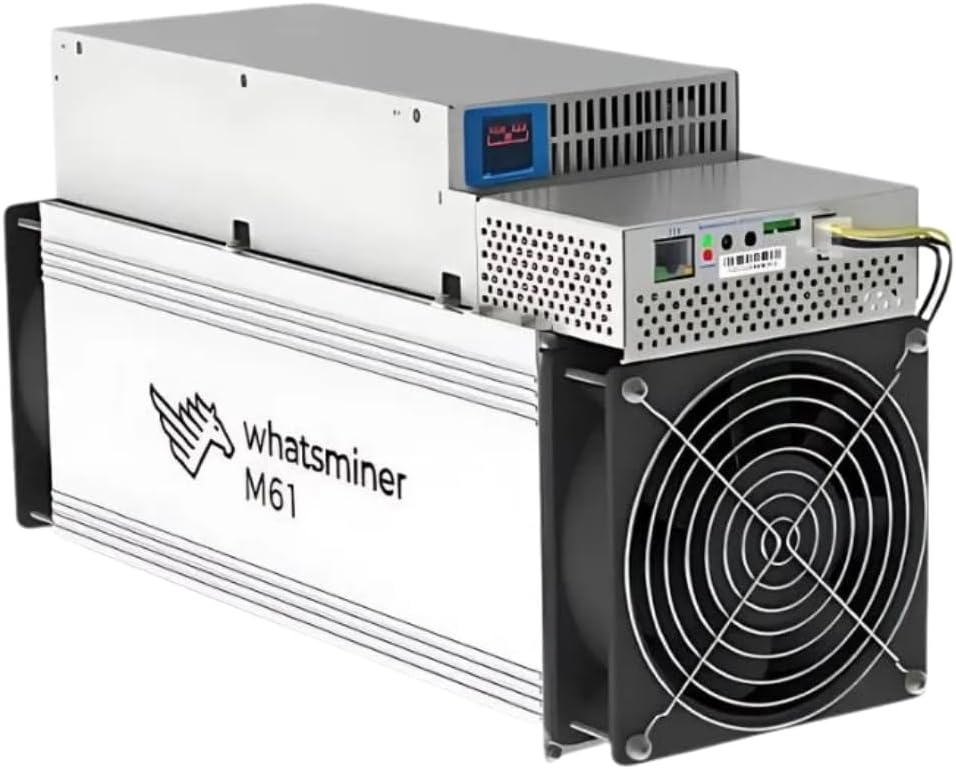
1. irudia: Aurrealdea eta alboa view of the WhatsMiner M61S, showcasinbere diseinu trinkoa eta hozte-haizagailua direla eta.
Ezaugarri nagusiak hauek dira:
- Hashrate altua: 224 TH/s for efficient SHA-256 mining.
- Energia-eraginkortasuna: 4200W power consumption, designed for 220-240V AC input.
- Hozte sendoa: Equipped with multiple fans to maintain optimal operating temperatures.
- Diseinu trinkoa: Dimensions of 430 x 155 x 226mm, suitable for various setups.
2. Konfigurazioa eta instalazioa
Before powering on your WhatsMiner M61S, ensure you have a stable power supply and a reliable internet connection. Proper ventilation is crucial for optimal performance and longevity of the device.
2.1 Desontziratzea eta ikuskatzea
- Carefully remove the miner from its packaging.
- Inspect the unit for any signs of physical damage during transit. If damage is found, contact your vendor immediately.
- Verify all components are present: WhatsMiner M61S unit, and integrated Power Supply Unit (PSU).
2.2 Potentzia konektatzea
The WhatsMiner M61S requires a 220-240V AC power source. Use the provided power cable to connect the miner to a suitable power outlet. Ensure the power circuit can handle the 4200W load.
2.3 Sareko konexioa
Connect an Ethernet cable from your router or network switch to the Ethernet port on the miner's control board. A stable wired connection is essential for consistent mining operations.

2. Irudia: Atzealdea view of the WhatsMiner M61S, highlighting the Ethernet port, reset button, IP Found button, and TF card slot.

3. irudia: Aldea view of the WhatsMiner M61S, showing the power input socket and overall chassis design.
3. Funtzionamendu-argibideak
3.1 Hasierako piztea
Once power and network cables are connected, switch on the power supply. The miner will begin its boot sequence. Allow a few minutes for the system to initialize.
3.2 Sartzea Web Interfazea
To configure your miner, you will need to access its web interface. You can find the miner's IP address using an IP scanner tool on your network or by pressing the "IP Found" button on the control board (refer to Figure 2) and checking your router's DHCP client list.
- Ireki a web browser and enter the miner's IP address in the address bar.
- Log in using the default credentials (refer to the manufacturer's documentation for default username and password, typically "admin" for both).
3.3 Meatzaritzarako konfigurazioa
barruan web interface, navigate to the "Miner Configuration" or "Pool Settings" section. Enter your mining pool URL, worker name, and password. Save the settings and restart the miner if prompted. The miner should then begin hashing.
4. Mantentzea
Regular maintenance ensures the longevity and stable performance of your WhatsMiner M61S.
4.1 Ingurumen Baldintzak
- Tenperatura: Maintain an ambient temperature between -5°C and 35°C (23°F to 95°F). Avoid direct sunlight or placement near heat sources.
- Hezetasuna: Keep humidity levels between 5% and 95% (non-condensing). High humidity can lead to corrosion.
- Hautsa: Operate the miner in a clean, dust-free environment as much as possible.
4.2 Garbiketa
Periodically clean the miner to prevent dust buildup, which can impede airflow and lead to overheating.
- Deskonektatu energia garbitu aurretik.
- Use compressed air to clear dust from fans, heatsinks, and vents.
- Garbitu kanpoaldea zapi lehor eta leun batekin. Ez erabili garbitzaile likidorik.
5. Arazoak
This section addresses common issues you might encounter with your WhatsMiner M61S.
| Arazoa | Kausa posiblea | Irtenbidea |
|---|---|---|
| Miner not powering on | No power, faulty power cable, PSU issue. | Check power connections, test power outlet, ensure PSU is properly connected. |
| Ez dago sareko konexiorik | Loose Ethernet cable, router issue, incorrect IP settings. | Verify Ethernet cable connection, restart router, check miner's IP configuration. |
| Low hashrate or no hashing | Incorrect pool settings, network issues, hardware fault. | Double-check pool URL, worker name, and password. Ensure stable internet. Check miner logs for hardware errors. |
| Gehiegi berotzea | Poor ventilation, dust buildup, high ambient temperature. | Improve airflow, clean fans and heatsinks, lower ambient room temperature. |
6. Zehaztapen Teknikoak
Detailed specifications for the WhatsMiner M61S:
| Ezaugarri | Zehaztapena |
|---|---|
| Fabrikatzailea | MikroBT |
| Eredua | WhatsMiner M61S |
| Algoritmoa | SHA-256 |
| Hashrate | 224 TH/s |
| Energia-kontsumoa | 4200W |
| liburukiatage Sarrera | 220-240V AC |
| Neurriak (L x W x H) | 430 x 155 x 226mm (16.93 x 6.1 x 8.9 hazbeteko) |
| Pisua | 13.5 kg (29.7 libra) |
| Zarata Maila | 75 db |
| Hozteko metodoa | Air Cooling (2 Fans) |
| Interfazea | Ethernet |
| Funtzionamendu-tenperatura | -5 °C eta 35 °C (23 °F eta 95 °F) |
| Funtzionamenduaren hezetasuna | %5etik %95era (kondentsatu gabe) |
| Txip Tamaina | 5 nm |
7. Bermea eta Laguntza
MicroBT provides a one-year warranty period for the WhatsMiner M61S, covering repair services within the scope of the warranty terms. It is important to note that due to the special nature of mining products, returns are generally not accepted unless due to product failure. If a return is accepted for reasons not related to product failure, a 30% return fee may be charged.
For technical support or warranty claims, please contact MicroBT's official support channels or your authorized reseller. Ensure you have your purchase details and the miner's serial number readily available.
Please be aware that local taxes or customs duties may apply upon import. Users are responsible for adhering to their local customs regulations to avoid additional fees.
Ask a question about this manual
Ask about setup, troubleshooting, compatibility, parts, safety, or missing instructions. Manuals+ will review the question and use this page’s manual context to help answer it.