
1. Produktua amaitu daview
This manual provides essential information for setting up, operating, maintaining, and troubleshooting your HP OMEN 16L Gaming Desktop. This high-performance desktop is equipped with an Intel Core i7-14700F processor, NVIDIA GeForce RTX 4060 graphics, 64GB DDR5 RAM, and a 2TB PCIe NVMe M.2 Solid State Drive, running on Windows 11 Pro.
The HP OMEN 16L is designed for demanding gaming and computing tasks, offering robust performance and efficient cooling. It comes bundled with a Thunderobot KG3089R Gaming Keyboard to enhance your experience.

1.1. irudia: Aurrealdea view of the HP OMEN 16L Gaming Desktop.
2. Konfigurazio gida
2.1 Kutxa irekitzea eta hasierako kokapena
- Carefully remove the desktop and all accessories from the packaging. Retain packaging for future transport or service.
- Jarri mahaigaina gainazal egonkor eta lau batean, alde guztietan aireztapen egokia duela. Ziurtatu aireztapen-zulorik ez dagoela oztopatuta.
2.2 Periferikoak konektatzea
Connect your monitor, keyboard, mouse, and other peripherals to the appropriate ports on the desktop. Refer to the 'Ports' section for a detailed diagram.
- Monitorea: Connect your monitor using a DisplayPort or HDMI cable to the dedicated graphics card ports.
- Teklatua eta sagua: Connect the Thunderobot KG3089R Gaming Keyboard and your mouse to any available USB Type-A ports.
- Potentzia: Connect the power cable to the desktop's power supply port and then to a grounded electrical outlet.
- Sarea: For wired internet, connect an Ethernet cable to the RJ-45 port. For wireless, ensure Wi-Fi 6 is enabled after initial setup.

2.1 irudia: Adibideaample of a complete desktop setup with peripherals connected.
2.3 Lehenengo abiaraztea eta Windows 11 Pro konfigurazioa
- Sakatu mahaigaineko ordenagailuaren aurrealdean dagoen pizteko botoia.
- Jarraitu pantailan agertzen diren argibideei Windows 11 Pro-ren hasierako konfigurazioa osatzeko, hizkuntza, eskualdea, sareko konexioa eta erabiltzaile-kontua sortzea barne.
- Ensure all drivers are up-to-date after Windows setup for optimal performance.
3. Funtzionamendu-argibideak
3.1 Piztu/Itzali
- Piztu: Sakatu mahaigaineko ordenagailuaren aurrealdean dagoen pizteko botoia.
- Itzali: Click the Start button in Windows, then select Power > Shut down. Avoid direct power-offs unless necessary to prevent data loss.
3.2 Sarearen konexioa
- Kable bidez (Ethernet): Connect an Ethernet cable to the RJ-45 port on the rear of the desktop. The connection should be automatically detected.
- Wireless (Wi-Fi 6): In Windows, click the network icon in the taskbar, select your Wi-Fi network, enter the password, and connect.
3.3 Using Ports and Connections
The desktop offers a variety of ports for connecting external devices:
- Aurrealdeko Portuak: 3 x Superspeed USB Type-A (5Gbps signaling rate), 1 x Superspeed USB Type-C (10Gbps signaling rate), 1 x Headphone/Microphone combo.
- Atzeko atakak: 4 x USB Type-A 2.0, 1 x RJ-45 (Ethernet), 1 x HDMI, 3 x DisplayPort, 2 x Audio Port.

Image 3.1: Front panel ports for easy access.
3.4 Jokoak eta errendimendua
The HP OMEN 16L is optimized for gaming. Utilize the pre-installed OMEN Gaming Hub software to monitor system performance, customize RGB lighting, and optimize game settings. Ensure your graphics drivers are regularly updated for the best gaming experience.

Image 3.2: The HP OMEN 16L desktop in a gaming environment.
4. Mantentzea
4.1 Garbiketa
- Kanpoaldea: Erabili biguna, damp kanpoko gainazalak garbitzeko zapi bat. Saihestu produktu kimiko gogorrak.
- Oihalak: Periodically use compressed air to clear dust from the intake and exhaust vents to maintain optimal airflow and cooling. Ensure the system is powered off before cleaning vents.
4.2 Software eguneraketak
- Egiaztatu eta instalatu aldizka Windows eguneraketak Windows ezarpenen bidez.
- Update graphics drivers (NVIDIA GeForce RTX 4060) directly from the NVIDIA website or through the GeForce Experience application.
- Update HP-specific drivers and firmware using the HP Support Assistant or OMEN Gaming Hub.
4.3 Datuen babeskopia
Egin zure datu garrantzitsuen babeskopiak aldizka kanpoko disko gogor batean edo hodeiko biltegi batean, sistemaren akatsen bat gertatuz gero datuak galtzea saihesteko.
5. Arazoak
Atal honek aurki ditzakezun arazo ohikoenei heltzen die.
5.1 Potentziarik gabe
- Ziurtatu kablea ondo konektatuta dagoela mahaigaineko ordenagailura eta entxufe elektrikora.
- Egiaztatu entxufea funtzionatzen duela beste gailu bat konektatuz.
5.2 Ez dago pantailarik
- Check that the monitor is powered on and the video cable (DisplayPort/HDMI) is securely connected to both the desktop's graphics card and the monitor.
- Ziurtatu sarrera-iturri zuzena hautatuta dagoela monitorearen bidez.
- If using multiple monitors, test with a single monitor.
5.3 Sistemaren moteltzea edo izoztea
- Itxi atzeko planoan exekutatzen ari diren beharrezkoak ez diren aplikazioak.
- Check Task Manager (Ctrl+Shift+Esc) for processes consuming high CPU, RAM, or disk resources.
- Ensure the system has adequate ventilation and is not overheating. Clean vents if necessary.
- Run a full system scan for malware or viruses.
5.4 Sarearen konexio arazoak
- Sare: Check the Ethernet cable connection and router status.
- Haririk gabekoa: Restart your router/modem. Ensure Wi-Fi is enabled in Windows and try reconnecting to the network.
6. Zehaztapenak
Detailed technical specifications for the HP OMEN 16L Gaming Desktop (Model TG03).
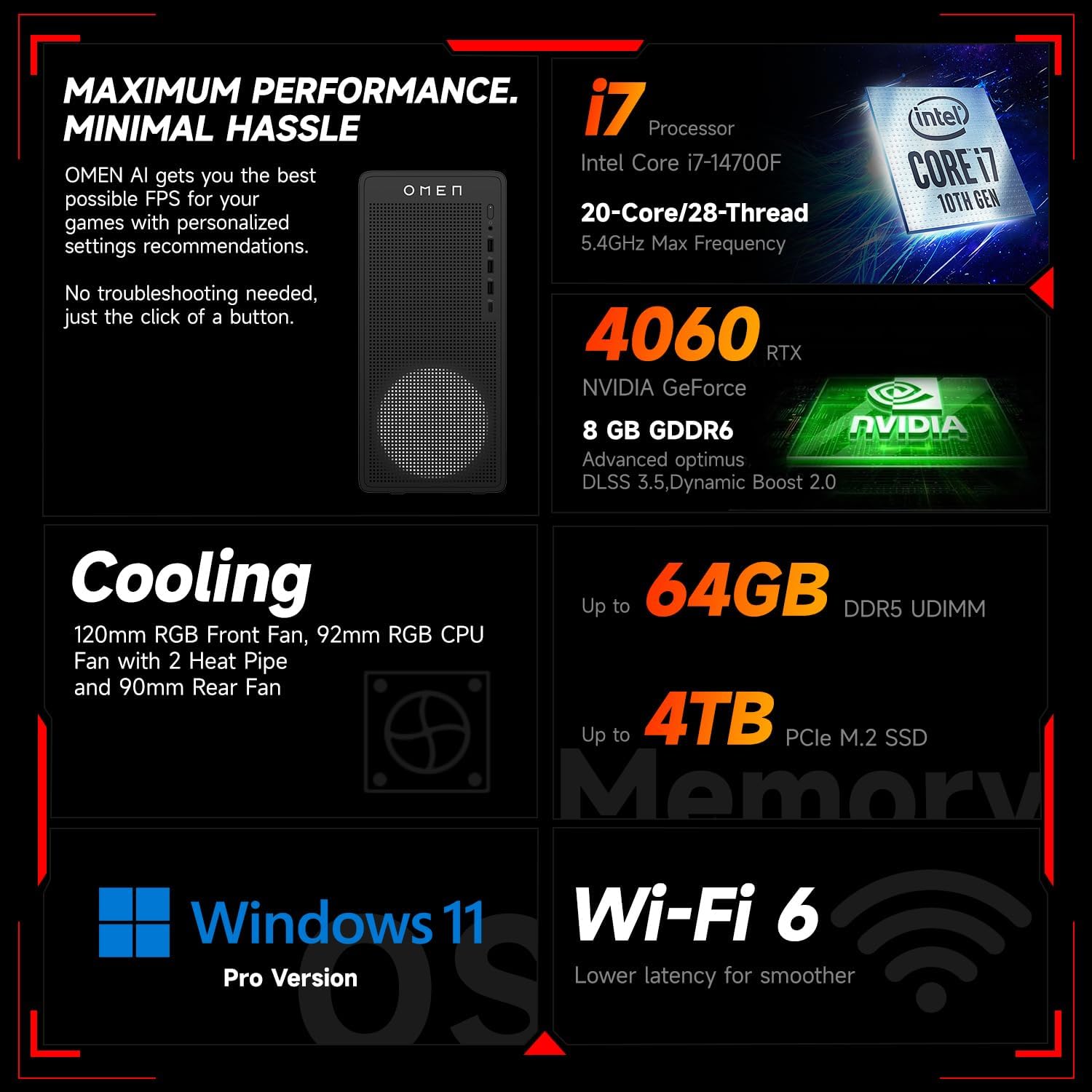
6.1. irudia: Amaituview of key performance and cooling specifications.
| Osagaia | Zehaztapena |
|---|---|
| Marka | HP |
| Modelo zenbakia | TG03 |
| Sistema eragilea | Windows 11 Pro |
| CPU eredua | Intel Core i7-14700F (20 Cores, 28 Threads, up to 5.4 GHz) |
| Koprozesadore grafikoa | NVIDIA GeForce RTX 4060 (8 GB GDDR6) |
| RAM memoria instalatuaren tamaina | 64 GB DDR5 RAM |
| Memoria Biltegiratzeko Ahalmena | 2 TB PCIe NVMe M.2 Solid State Drive |
| Haririk gabeko konexioa | Wi-Fi 6, Bluetootha |
| Aurrealdeko Portuak | 3x USB Type-A (5Gbps), 1x USB Type-C (10Gbps), Headphone/Mic Combo |
| Atzeko Portuak | 4x USB Type-A 2.0, 1x RJ-45, 1x HDMI, 3x DisplayPort, 2x Audio Port |
| Neurriak (L x W x H) | 13.26 x 6.1 x 12.12 hazbete |
| Elementuaren pisua | 13.14 kilo |
| Kolorea | Beltza |
| Osagarri multzokatua | Thunderobot KG3089R joko-teklatua |

Image 6.2: Details of the Intel Core i7-14700F processor.

Image 6.3: Information on the NVIDIA GeForce RTX 4060 graphics card.
7. Bermearen informazioa
Your HP OMEN 16L Gaming Desktop comes with a standard manufacturer's warranty. The specific terms and duration of the warranty are provided with your purchase documentation and are subject to HP's official warranty policy.
Ohar garrantzitsua: Modifications to the system, such as upgrading components (e.g., RAM) with non-HP certified parts or by unauthorized personnel, may void the manufacturer's warranty. Always consult HP's official support or authorized service providers before making any internal hardware changes.
The Thunderobot KG3089R Gaming Keyboard bundled with this desktop may have a separate warranty provided by its manufacturer. Please refer to the documentation included with the keyboard for its specific warranty terms.
8. Laguntza
For further assistance, technical support, or warranty claims, please contact HP Customer Support through the following channels:
- HP laguntza Webgunea: Bisitatu www.hp.com/support gidariak, eskuliburuak eta arazoak konpontzeko gidak lortzeko.
- HP laguntza laguntzailea: Use the pre-installed HP Support Assistant software on your desktop for diagnostics, updates, and direct access to support.
- Telefono-laguntza: Refer to your product documentation or the HP support webeskualdeko harremanetarako zenbakietarako gunea.