
1. Sarrera
This manual provides essential information for setting up, operating, and maintaining your NIMO N156 15.6" FHD Laptop. Please read this guide thoroughly before using your device to ensure proper function and longevity. Keep this manual for future reference.
2. Paketearen edukia
Egiaztatu elementu guztiak zure paketean daudela:
- 1 x NIMO N156 Laptop
- 1 x Type-C 100W PD Fast Charger
- 1 x Erabiltzailearen eskuliburua (dokumentu hau)
- Windows 11 Home Operating System (pre-installed)

Image: The NIMO N156 laptop, showcasing its 15.6-inch Full HD IPS display, Intel Core i5-12450H processor, 32GB RAM, 1TB SSD, fingerprint reader, Type-C PD charger, and backlit keyboard.
3. Produktua amaitu daview
3.1. Osagaiak eta Ezaugarriak
- Pantaila: 15.6" Full HD (1920x1080) IPS Anti-glare Panel with 178° wide viewangeluak.
- Prozesadorea: Intel Core i5-12450H (8 Cores, up to 4.4GHz).
- Memoria: 32GB DDR4 RAM (user-expandable).
- Biltegiratzea: 1TB PCIe NVMe SSD (user-expandable).
- Teklatua: Tamaina osoko atzeko argiztatutako teklatua, zenbakizko teklatuarekin.
- Segurtasuna: Integrated fingerprint reader, Webcam privacy shield.
- Kargatzen: 100W Type-C Power Delivery (PD) fast charging.
- Konektibitatea: Wi-Fi 6.

Image: A detailed diagram illustrating the various ports on the NIMO N156 laptop, including Micro SD, USB 2.0, USB 3.0, Headphone Jack, Kensington lock, Type-C (multifunction), Type-C (PD Charger Only), HDMI, and Charge LED.
3.2. Portuaren diseinua
Familiarize yourself with the port locations for connecting peripherals:
- Ezkerreko aldea: USB 3.0 Port, USB 2.0 Port, Micro SD Card Slot, Headphone Jack, Kensington Lock.
- Eskuineko aldea: HDMI Port, USB 3.0 Port, Type-C Port (multifunction), Type-C Port (for PD Charger only), Charge LED.
4. Konfigurazioa
4.1. Hasierako piztea
- Unpack the laptop and charger from the box.
- Connect the 100W Type-C PD Fast Charger to the designated Type-C charging port on the laptop and plug it into a power outlet.
- Open the laptop lid. The power button is typically located on the top right of the keyboard or on the side. Press and hold the power button for a few seconds until the screen illuminates.
- Allow the laptop to charge for at least 30 minutes before initial use, especially if the battery is completely depleted.

Image: The NIMO 100W Type-C PD Fast Charger, designed for rapid charging of the laptop and compatible devices.
4.2. Windows 11 konfigurazioa
Follow the on-screen instructions to complete the Windows 11 setup process. This typically includes:
- Zure eskualdea eta teklatuaren diseinua hautatzea.
- Wi-Fi sare batera konektatzen.
- Microsoft kontu batekin saioa hastea edo bat sortzea.
- PIN edo pasahitz bat konfiguratzea.
- Reviewpribatutasun ezarpenak konfiguratzen.
5. Funtzionamendu-argibideak
5.1. Energiaren kudeaketa
- Piztu: Sakatu pizteko botoia.
- Lo egiteko modua: Briefly press the power button or close the lid.
- Itzali: Egin klik Windows Hasi botoian, eta ondoren Pizteko > Itzali aukeran.
- Berrabiarazi: Click the Windows Start button, then Power > Restart.
5.2. Teklatuaren ezaugarriak

Irudia: Gertutik view of the NIMO N156 laptop's backlit keyboard, highlighting the numeric keypad and the integrated fingerprint sensor on the touchpad.
- Atzeko argiztatutako teklatua: Use the dedicated function key (often Fn + Fx, where Fx is an icon resembling a keyboard with light) to toggle the backlight on/off or adjust brightness levels.
- Zenbakizko teklatua: The full-size numeric keypad on the right provides convenient data entry.
5.3. Hatz-marken irakurgailua
The integrated fingerprint reader allows for secure and quick login. To set it up:
- Joan Windows Ezarpenak > Kontuak > Saioa hasteko aukerak atalera.
- Under 'Windows Hello Fingerprint', click 'Set up' and follow the on-screen prompts to register your fingerprints.
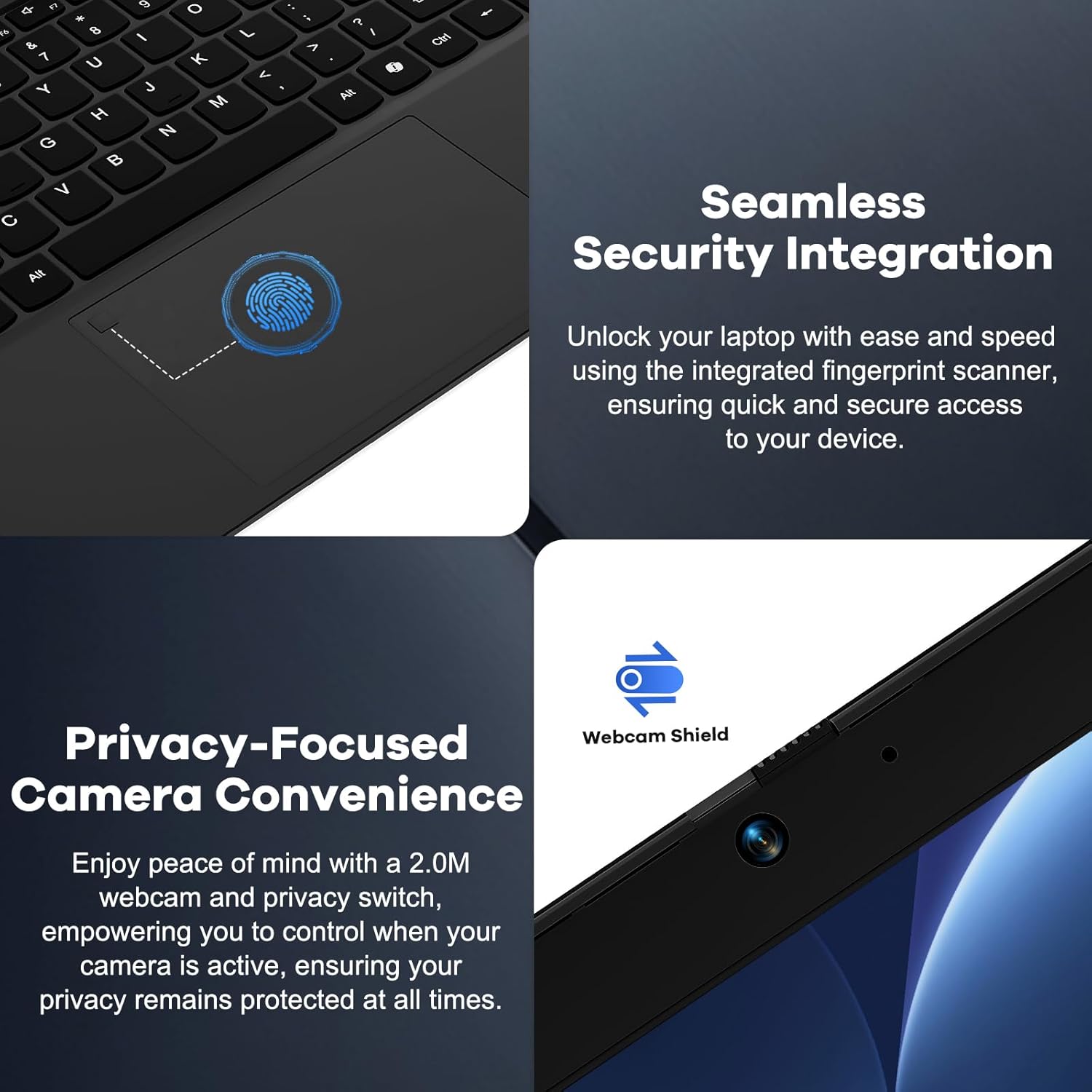
Image: A split image showing a close-up of the fingerprint reader on the touchpad for seamless security integration, and the physical webcam shield for privacy control.
5.4. Webcam Privacy Shield
The laptop features a physical privacy shield for the webcam. Slide the cover to the left to open the webcam for use, and slide it to the right to cover it when not in use, ensuring your privacy.
5.5. Periferikoak konektatzea
Erabili ataka desberdinak kanpoko gailuak konektatzeko:
- USB atakak: Connect USB drives, external keyboards, mice, or other USB accessories.
- HDMI ataka: Konektatu kanpoko monitore edo telebista batera pantaila zabalagoa lortzeko.
- Type-C Ports: One port supports multifunctionality (data transfer, display output via adapter), and the other is dedicated for the 100W PD charger.
- Aurikularrak Jack: Konektatu entzungailuak edo kanpoko bozgorailuak.
- Mikro SD txartelaren zirrikitua: Sartu Mikro SD txartel bat biltegiratze edo datu-transferentzia gehigarrirako.
6. Mantentzea
6.1. Garbiketa
- Always power off the laptop and disconnect the charger before cleaning.
- Erabili lipurrik gabeko zapi leun bat dampUrarekin edo pantaila-garbitzaile batekin garbitu pantailarako.
- Teklatuarentzat eta xasisarentzat, erabili zapi leun eta lehor bat. Aire konprimituzko lata batek zirrikituetako hautsa kendu dezake.
- Avoid harsh chemicals, abrasives, or excessive moisture.
6.2. Storage and RAM Upgrades
The NIMO N156 laptop features user-expandable DDR4 RAM and PCIe NVMe SSD storage. Refer to the official NIMO support resources or a qualified technician for detailed instructions on performing upgrades to avoid voiding your warranty or damaging the device.

Image: The NIMO N156 laptop displaying multiple open applications, emphasizing its high-speed 32GB RAM and 1TB PCIe SSD for faster performance and multitasking.
6.3. Bateria zaintzea
- Saihestu bateria maiz erabat deskargatzea.
- Store the laptop in a cool, dry place if not used for extended periods, with the battery charged to around 50-70%.
- Use only the provided NIMO 100W Type-C PD Fast Charger.
7. Arazoak
Arazoak badituzu, saiatu oinarrizko arazoak konpontzeko urrats hauekin:
- Ordenagailu eramangarria ez da pizten: Ensure the charger is properly connected and plugged into a working outlet. Try a different outlet. If the battery is completely drained, allow it to charge for a while before attempting to power on.
- Pantaila hutsik dago: Check if the laptop is powered on. Try connecting an external monitor via HDMI to see if there's a display output.
- Wi-Fi konexio arazoak: Ensure Wi-Fi is enabled in Windows settings. Restart your router and the laptop. Check for updated network drivers.
- Errendimendu motela: Close unnecessary applications. Check for sufficient free storage space. Ensure Windows and drivers are up to date.
- Gehiegizko berotzea: Ziurtatu aireztapen-hodiak ez daudela blokeatuta. Erabili ordenagailu eramangarria gainazal gogor eta lau batean.
For more complex issues, refer to the NIMO support webwebgunean edo jarri harremanetan bezeroarentzako zerbitzuarekin.
8. Zehaztapenak
| Ezaugarri | Zehaztapena |
|---|---|
| Eredua | Nimo N156 |
| Bistaratzea | 15.6" Full HD (1920x1080) IPS Anti-glare |
| Prozesadorea | Intel Core i5-12450H (8 nukleo, 4.4 GHz arte) |
| RAM | 32 GB DDR4 (3200 MHz) |
| Biltegiratzea | 1 TB PCIe NVMe SSD |
| Sistema eragilea | Windows 11 Home |
| Grafikoak | Intel Graphics integratua |
| Haririk gabeko konexioa | Wi-Fi 6 (802.11a/b/g/n/ac) |
| Portuak | 2x USB 3.0, 1x USB 2.0, 2x Type-C (1x PD Charging), 1x HDMI, 1x Headphone Jack, 1x Micro SD Card Slot, 1x Kensington Lock |
| Bateriaren iraupena | Approx. 5 hours (average usage), up to 9 hours (standby) |
| Kargagailua | 100W Type-C PD Fast Charger |
| Neurriak (LxWxH) | 14.07 x 8.98 x 0.76 hazbete |
| Pisua | 5 kilo |
| Ezaugarri bereziak | Atzeko argiztapeneko teklatua, hatz-marken irakurgailua, Webcam Shield, Numeric Keypad, 180° Lay-Flat Hinge |
9. Bermea eta Laguntza
Your NIMO N156 laptop is backed by a comprehensive 2-Year Manufacturer's Guarantee from Nimo Direct Inc. This warranty covers defects in materials and workmanship under normal use.
Additionally, NIMO offers a 90-Day Hassle-Free Returns policy. If you are not satisfied with your purchase, you may return it within 90 days according to the return policy terms.
For technical assistance, warranty claims, or support inquiries, please visit the official NIMO support website or contact their customer service department. Please have your model number (Nimo N156) and purchase information ready when contacting support.

Image: An illustration highlighting NIMO's after-sales services, including partially assembled domestically, 90-day returns, and 2 years of support.


