
Sarrera
This manual provides essential information for setting up, operating, maintaining, and troubleshooting your NIMO 15.6" FHD IPS Student-Laptop-Computer. Please read this guide thoroughly to ensure optimal performance and longevity of your device.

The NIMO 15.6" FHD IPS Student-Laptop-Computer, featuring a vibrant display and sleek design.
Zer sartzen da
Egiaztatu elementu guztiak ontzian daudela:
- 1 x Nimo N157 Laptop
- 1 x Type-C 65W GaN PD Fast Charger
- 1 x Erabiltzailearen eskuliburua
- Windows 11 Home (Pre-installed)
- 2 Years Warranty, 90 Days Return Information
Ezaugarri nagusiak
Your NIMO laptop is equipped with advanced features designed for productivity and convenience:
Vibrant FHD IPS Display
Experience stunning visuals on the 15.6" FHD IPS (1920x1080) Anti-Glare Display. With an 85% screen-to-body ratio and 16:9 aspect ratio, enjoy precise color accuracy and sharp detail for all your tasks.

The 15.6-inch FHD IPS display provides a bright and clear visual experience.
Errendimendu indartsua
Equipped with a 13th Gen Intel N150 processor (up to 3.6GHz), 16GB DDR4 RAM, and a 512GB PCIe SSD, this laptop delivers lightning-fast performance, rapid startup times, and accelerated data transfer for seamless multitasking and storage.
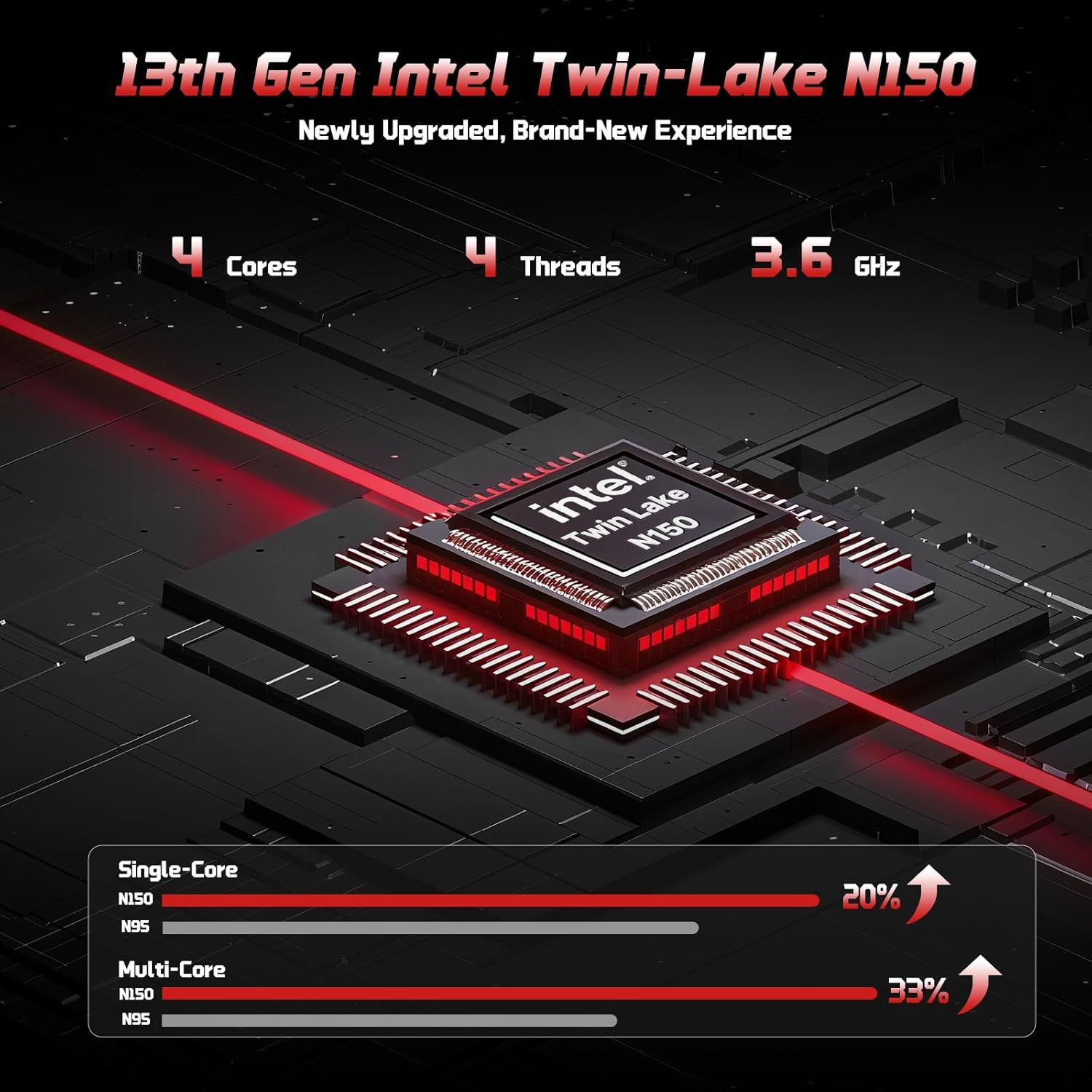
The 13th Gen Intel Twin-Lake N150 processor ensures efficient performance.

The laptop supports user-upgradable RAM and SSD for future expansion.
Fast Charging with GaN PD Charger
The included 65W GaN PD fast charger and 6.56ft USB-C to USB-C cable allow for quick power-ups. Charge for 15 minutes to get 2 hours of standby time. This versatile charger can also power your iPad, phone, and other compatible devices.

The 65W GaN PD charger provides fast and convenient charging for multiple devices.
Humanized Design & Security
Features a built-in fingerprint reader on the touchpad for secure, one-touch login. The backlit keyboard allows for easy typing in dim or dark environments, with adjustable brightness. The touchpad supports scroll and multi-touch gestures.

Secure fingerprint login and a comfortable backlit keyboard enhance usability.
Konektibitate integrala
The laptop includes a variety of ports for all your peripheral needs, including USB 3.0, USB 2.0, HDMI, and multiple Type-C ports (one for PD Charge Only, one for Multifunction). It also features Wi-Fi 6 and Bluetooth 5.2 for robust wireless connections.

Xehetasuna view of the laptop's ample ports for various connections.
Pribatutasuna Webkamara
A 720p HD camera with a physical privacy switch ensures your personal space is always secure. Easily slide the switch to cover the camera when not in use.

The physical privacy switch on the webcam provides enhanced security.
Konfigurazio Gida
1. Hasierako piztea
- Unpack your NIMO laptop and all accessories.
- Connect the Type-C 65W GaN PD Fast Charger to the laptop's Type-C PD Charge Only port and plug it into a power outlet.
- Open the laptop lid. The laptop may power on automatically, or you may need to press the power button (located on the top-right of the keyboard).
- Jarraitu pantailan agertzen diren argibideei Windows 11 Home konfigurazioa osatzeko, hizkuntza, eskualdea, sareko konexioa eta erabiltzaile-kontua sortzea barne.
2. Periferikoak konektatzea
Erabili eskuragarri dauden atakak kanpoko gailuak konektatzeko:
- USB gailuak: Connect USB drives, external keyboards, or mice to the USB 3.0 or USB 2.0 ports.
- Kanpoko pantaila: Use an HDMI cable to connect to an external monitor or projector via the HDMI port.
- Audio gailuak: Plug in headphones or external speakers into the 3.5mm headphone jack.
- MicroSD txartela: Insert a MicroSD card into the dedicated slot for expanded storage.
Funtzionamendu-argibideak
Teklatua eta Touchpad erabiliz
- Atzeko argiztatutako teklatua: Sakatu Fn + F10 (or the key with the keyboard backlight icon) to cycle through backlight brightness levels or turn it off.
- Zenbakizko teklatua: The integrated numeric keypad provides convenient data entry.
- Ukipen-panela: Supports standard Windows gestures, including two-finger scroll, pinch-to-zoom, and multi-finger taps for various functions.
Hatz-markaren saioa
To set up fingerprint login for enhanced security:
- Joan Windows Ezarpenak > Kontuak > Saioa hasteko aukerak atalera.
- Select "Fingerprint Recognition (Windows Hello)" and follow the on-screen prompts to register your fingerprint.
- Once registered, you can simply touch the fingerprint sensor on the touchpad to log in.
Bistaratzeko ezarpenak
Doitu pantailaren ezarpenak optimorako viewesan:
- Ebazpena: Right-click on the desktop, select "Display settings", and choose "1920 x 1080" for the best resolution.
- Distira: Doitu pantailaren distira funtzio-teklak erabiliz (Fn + F5/F6) or through Display settings.
Audioa eta Bideoa
- Bolumen kontrola: Use the function keys (Fn + F2/F3/F4) or the Windows volume mixer to adjust audio levels.
- Webcam Privacy: Slide the physical switch next to the webkamera kameraren lentea estaltzeko edo agerian uzteko, pribatutasuna bermatzeko.
Mantentzea
Zure ordenagailu eramangarria garbitzea
- Erabili lipurrik gabeko zapi leun bat dampPantaila garbitzeko, urarekin edo pantaila-garbitzaile batekin garbitu.
- Teklatuarentzat eta xasisarentzat, erabili oihal leun eta lehor bat. Saihestu produktu kimiko gogorrak edo material urratzaileak.
- Periodically use compressed air to clear dust from the vents to ensure proper heat dissipation.
Bateria zaintzea
To maximize your laptop's battery life and health:
- Saihestu bateria maiz erabat deskargatzea.
- Denbora luzez erabiltzen ez duzunean, gorde ordenagailu eramangarria leku fresko eta lehor batean.
- Use the provided NIMO 65W GaN PD Fast Charger for optimal charging performance.

The laptop features smart battery optimization for extended lifespan and safe charging.
RAM and SSD Upgrades
Your NIMO laptop supports detachable RAM and SSD, allowing for user upgrades. Consult a qualified technician or refer to detailed upgrade guides on the NIMO support website before attempting any internal component changes.
Ohiko arazoak konpontzea
If you encounter problems with your laptop, try the following solutions:
- Potentziarik gabe: Ensure the charger is securely connected to both the laptop and a working power outlet. Try a different outlet. If the battery is completely drained, allow it to charge for at least 30 minutes before attempting to power on.
- Bistaratzeko arazoak: Pantaila hutsik badago, saiatu sakatuz Fn + F7 (or the display toggle key) to switch display outputs. Check external monitor connections if applicable.
- Errendimendu motela: Close unnecessary applications. Check for Windows updates. Ensure sufficient free space on the SSD. Restarting the laptop can often resolve temporary slowdowns.
- Wi-Fi/Bluetooth konexioa: Ensure Wi-Fi and Bluetooth are enabled in Windows settings. Restart your router/modem. Update network drivers if necessary.
- Keyboard/Touchpad Unresponsive: Berrabiarazi ordenagailu eramangarria. Bilatu gidarien eguneraketak Gailu kudeatzailean.
If problems persist, please contact NIMO customer support for further assistance.
Zehaztapen Teknikoak
| Ezaugarri | Zehaztapena |
|---|---|
| Marka | NIMO |
| Ereduaren izena | Nimo N157 |
| Pantailaren tamaina | 15.6 hazbete |
| Pantailaren bereizmena | 1920 x 1080 pixel (FHD IPS) |
| Prozesadorea | 13th Gen Intel N150 (up to 3.6 GHz) |
| RAM | 16 GB DDR4 (3200 MHz) |
| Disko gogorra | 512 GB PCIe SSDa |
| Koprozesadore grafikoa | Grafiko integratuak (Intel) |
| Sistema eragilea | Windows 11 Home |
| Haririk gabeko mota | 802.11a/b/g/n/ac (Wi-Fi 6), Bluetooth 5.2 |
| USB atakak | 3 x USB 3.0, 1 x USB 2.0, 2 x Type-C (1 PD Charge Only, 1 Multifunction) |
| HDMI ataka | Bai |
| Bateriaren batez besteko iraupena | 5 ordu |
| Elementuaren pisua | 3.8 kilo |
| Produktuaren neurriak | 14.07 x 8.98 x 0.76 hazbete |
| Ezaugarri bereziak | Backlit Keyboard, Fingerprint Reader, HD Audio, Numeric Keypad, Privacy Webkamara |
Bermea eta Laguntza
NIMO is committed to providing excellent customer service and support for your product.
Fabrikatzailearen bermea
Your NIMO laptop is covered by a comprehensive 2 urteko fabrikatzailearen bermea. This warranty ensures that your device is free from defects in materials and workmanship under normal use.

NIMO products are covered by a 2-year support period.
90-Day Hassle-Free Returns
NIMO offers a 90-day hassle-free return and exchange service. If you have any concerns or are not satisfied with your product within 90 days of purchase, you may return it for any reason.

You may return any NIMO product for any reason within 90 days of purchase.
Laguntzarekin harremanetan jartzea
Our dedicated support team is ready to assist you. If any concerns arise or you have product-related questions, you can contact us through our official website, email, or telephone. We strive to swiftly resolve issues or facilitate replacements.

Contact our professional after-sales team via phone and live chat.
NIMO Direct Inc. is a family-owned small business founded in New Castle DE. We are committed to providing affordable, high-quality, and innovative products, while also supporting US manufacturing and local employment.