
1. Sarrera
The OBSBOT Vox Wireless Microphone system provides high-quality audio capture for various applications, including streaming, podcasting, vlogging, and presentations. This manual provides detailed instructions for setup, operation, and maintenance to ensure optimal performance and help you get the most out of your device.
2. Zer dago kutxan
The OBSBOT Vox package includes the following components:
- 2 x transmisore
- 1 x Hargailua
- 1 x Kargatzeko kasua
- 2 x Clip Magnets
- 2 x Lepoko magnetikoak
- 2 x Magnetic Back Clips
- 2 x Furry haizetakoak
- 1 x USB-C korronte kablea
- 1 x USB-C USB-A egokitzaileetara
- 1 x Berme Txartela
- 1 x Erabiltzailearen Gida

Image showing the complete contents of the OBSBOT Vox Wireless Microphone package, including two transmitters, one receiver, a charging case, various mounting accessories, cables, and documentation.
3. Ezaugarri nagusiak
- Haririk gabeko askatasuna: Stable signal transmission up to 300m (984ft) with advanced LDS Antenna.
- Estudioko Mailako Audio Kalitatea: 74dB SNR, 120dB SPL, 48kHz/24-bit resolution, omnidirectional pickup.
- Bi kanaleko grabaketa: Two transmitters to one receiver with separate audio channels.
- Plug & Play: Instant audio recording by plugging the USB-C receiver and taking transmitters from the charging case.
- Bateriaren iraupen hedatua: Up to 11 hours per transmitter, 44 hours total with charging case.
- Muntatzeko aukera anitzak: Magnetic, neck-mounted, handheld, clip-style.
- OBSBOT Ecosystem Compatibility: Syncs with OBSBOT webcams via OBSBOT Center and Obsbot Live apps.

A close-up image of the OBSBOT Vox microphone, emphasizing its studio-grade audio capabilities with a visual representation of sound waves.

Image showing two people seated at a table, each wearing an OBSBOT Vox transmitter, demonstrating the dual-channel recording feature for interviews or discussions.

A close-up image of the OBSBOT Vox receiver plugged into a mobile phone, indicating its simple plug-and-play setup for immediate use.
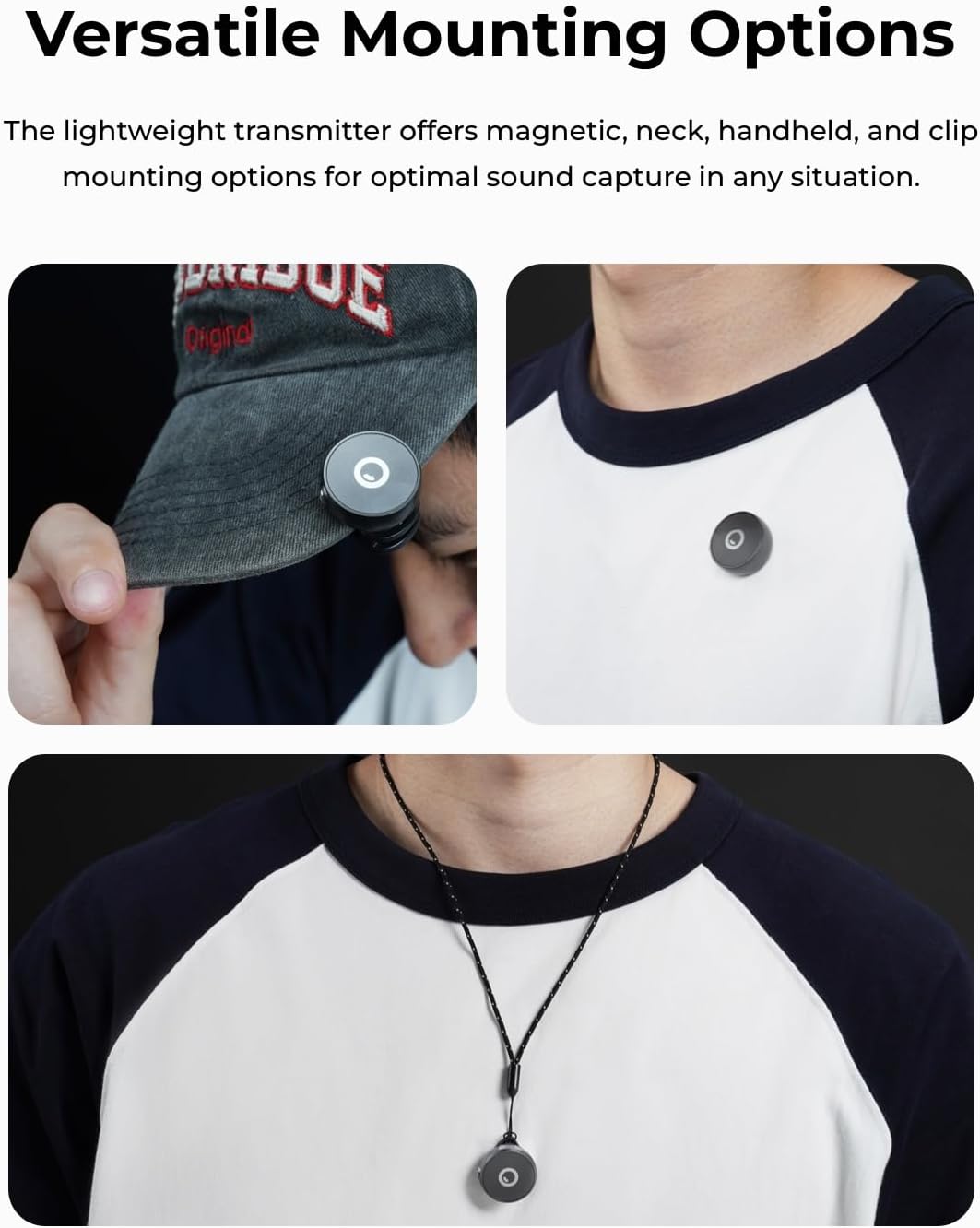
Image of the OBSBOT Vox charging case with transmitters inside, highlighting the 44-hour extended battery life.
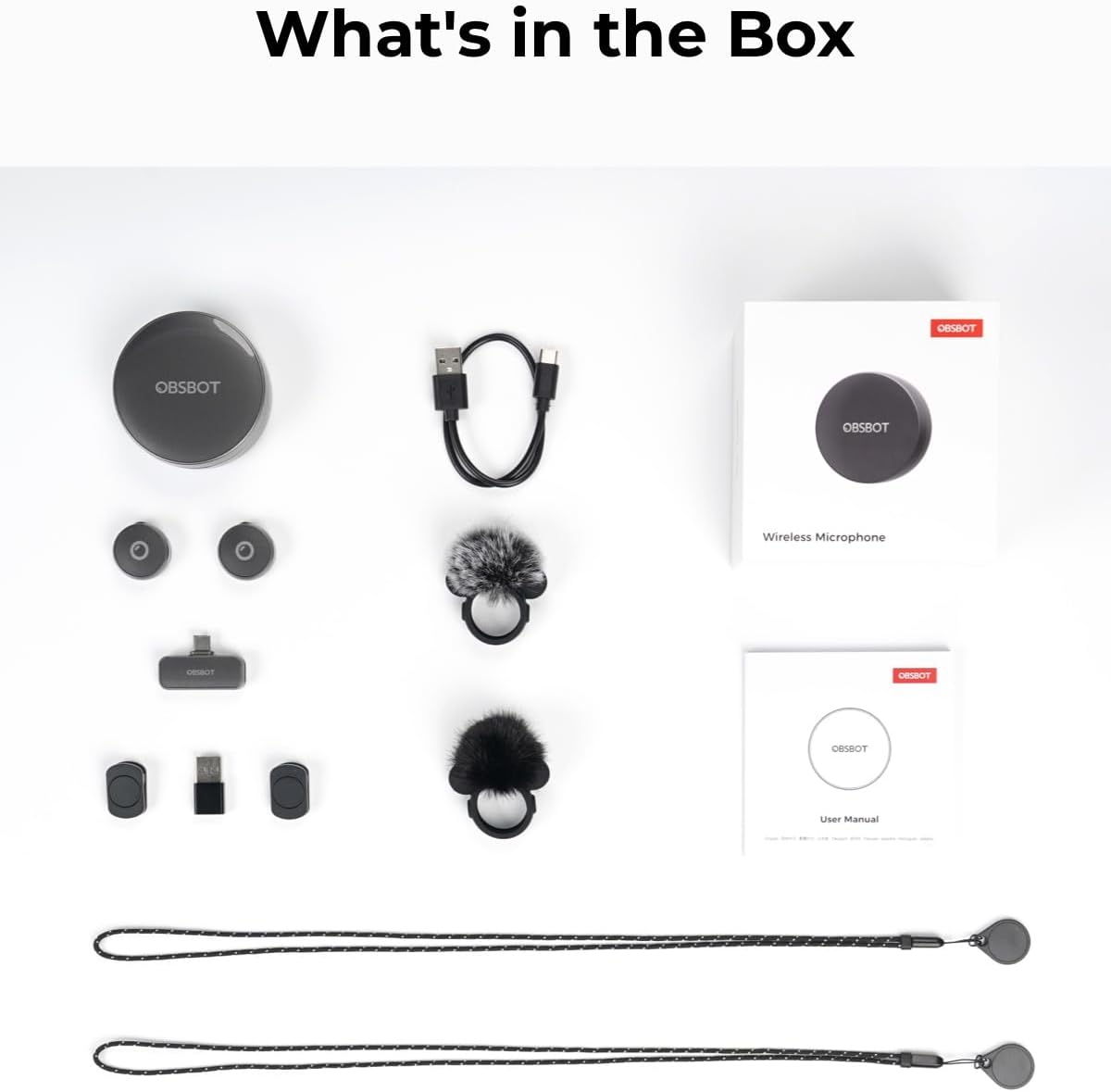
Image demonstrating different ways to wear the OBSBOT Vox transmitter, such as magnetically attached to a cap, clipped to a shirt, and worn around the neck with a magnetic necklace.
4. Konfigurazioa
- Kargatu transmisoreak: Place the transmitters into the charging case. Ensure the case is charged via the USB-C port.
- Konektatu hargailua: Plug the USB-C receiver into your recording device (phone, PC, laptop, tablet). Use the included USB-C to USB-A adapter if necessary.
- Pizteko transmisoreak: Atera igorleak kargatzeko zorrotik. Automatikoki piztuko dira eta hargailuarekin parekatzen saiatuko dira.
- Parekatzea (behar izanez gero): If pairing does not occur automatically, press and hold the button on the transmitter for 6 seconds until the indicator light flashes green rapidly. Follow on-screen prompts in the OBSBOT Center software if connecting to a PC.
This video provides a visual guide on how to set up and pair the OBSBOT Vox SE microphone, including connecting the receiver and adjusting settings within the OBSBOT Center software.
5. Funtzionamendu-argibideak
Igorlea jantzita
The lightweight transmitter offers multiple wearing options for optimal sound capture:
- Klip magnetikoa: Use the clip magnet or magnetic back clip to secure the transmitter to your collar, lapel, or cap.
- Lepoko magnetikoa: Wear the transmitter around your neck using the included magnetic necklace.
- Eskukoa: Hold the transmitter for direct voice capture.
Audio Input and Settings
When connected to a compatible device, the OBSBOT Vox will function as an audio input. For advanced settings and controls, use the OBSBOT Center or Obsbot Live apps.
- Audio Sarreraren Hautaketa: In your device's audio settings or OBSBOT software, select "OBSBOT Mic" as the audio input.
- Irabaziaren doikuntza: Adjust the audio input gain to prevent clipping or ensure sufficient volume.
- Audio modua: Choose between Mono or Stereo mode. Stereo mode is ideal for dual-transmitter setups like interviews.
- Zarata murriztea: Enable noise reduction (Weak, Medium, Strong) to minimize background noise.
- Mic Button Function: Configure the click button on the transmitter for functions like Human Tracking, Switch Tracking Mode, Zoom, or Recording (if supported by the connected OBSBOT camera).
- Vibration Alert & LED Light: Toggle vibration alerts and LED indicator lights on/off.
- Itzali automatikoa: Set the microphone to automatically power off after a period of inactivity.
6. Bateragarritasuna
The OBSBOT Vox Wireless Microphone is compatible with a wide range of devices:
- Computers (PC, Laptop)
- Smartphoneak
- Tabletak
Compatible devices must be equipped with USB-C or USB-A interfaces. The receiver's USB-C power input port supports simultaneous charging for connected mobile phones and tablets while in use (not supported for computers).
7. Bateriaren iraupena
Each OBSBOT Vox transmitter provides up to 11 hours of continuous runtime. The included 1000mAh charging case extends the total operating time to 44 hours, ensuring prolonged recording sessions without interruption.
8. Arazoak
Arazo arruntak eta irtenbideak
- Microphone not connecting:
- Ensure transmitters are powered on and out of the charging case.
- Verify the receiver is securely plugged into your device.
- Attempt manual pairing by holding the transmitter button for 6 seconds.
- Check device audio input settings to ensure "OBSBOT Mic" is selected.
- Poor audio quality / Background noise:
- Adjust gain settings in OBSBOT Center/Live apps.
- Enable or increase noise reduction levels (Weak, Medium, Strong).
- Ensure transmitters are positioned optimally (e.g., center of chest, away from obstructions).
- Check for strong magnetic interference if using magnetic mounts near sensitive electronics.
- Transmitter dislodges during activity:
- Use caution during vigorous exercise. Strong vibrations or sudden motions may cause transmitters to dislodge.
- Ensure mounting accessories (magnets, clips) are securely attached.
- Receiver not charging mobile devices:
- Confirm the connected device is a mobile phone or tablet. Computers are not supported for this function.
- Ensure the USB-C power input port on the receiver is connected to a power source.
9. Zehaztapenak
| Ezaugarri | Xehetasuna |
|---|---|
| Marka | OBSBOT |
| Ereduaren izena | OBSBOT Vox |
| Modelo zenbakia | PB2.00037 |
| Kolorea | Grisa |
| Konektibitate Teknologia | Haririk gabekoa |
| Haririk gabeko Teknologia | Bluetooth 5.0 |
| Transmisio-barrutia | Gehienez 300 m (984 oin) |
| SNR | 74 dB |
| SPL | 120 dB |
| Audio-ebazpena | 48kHz/24-Bit |
| Bilketa eredua | Norabide orotarikoa |
| Transmisorearen bateriaren iraupena | 11 ordu |
| Kargatzeko kasua bateriaren iraupena | 44 Hours (with 1000mAh case) |
| Elementuaren pisua | 0.3 kilogramo |
| Itxituraren Materiala | Plastikoa, Silikona |
| Gailu bateragarriak | Computer/Laptop/Smart Phone/Tablets |
| Uraren Erresistentzia Maila | Ez Urarekiko Erresistentea |
10. Bermea eta laguntza
Bermearen informazioa
The OBSBOT Vox Wireless Microphone comes with a 1-Year Warranty. Please refer to the included Warranty Card for full terms and conditions.
Bezeroarentzako Arreta
For further assistance, technical support, or product inquiries, please visit the official OBSBOT webgunea or contact their customer service team.