
1. Sarrera
This manual provides detailed instructions for the installation, operation, and maintenance of your ZOHGVSEXS Kamoer X1 PRO T2 Dosing Pump. This device is designed for precise liquid dosing in marine coral reef fish tanks and aquariums, ensuring stable water parameters. Please read this manual thoroughly before use to ensure proper function and longevity of the product.
2. Segurtasun-argibideak
- Deskonektatu beti energia-iturria mantentze-lan edo garbiketa egin aurretik.
- Ensure the pump is placed on a stable, level surface away from direct water splashes.
- Ez erabili ponpa kablea edo entxufea hondatuta badago.
- This product is designed for indoor use only and specifically for aquarium applications.
- Mantendu haurren eta maskoten eskura.
- Erabili jatorrizko edo onartutako ordezko piezak soilik.
3. Paketearen edukia
Mesedez, egiaztatu paketearen edukia jasotzean. Elementuren bat falta bada edo hondatuta badago, jarri harremanetan zure saltzailearekin.
- Kamoer X1 PRO T2 Dosing Pump
- Elikatze-moldagailua
- Dosifikatzeko hodiak
- Erabiltzailearen eskuliburua (dokumentu hau)
4. Produktua amaitu daview
The Kamoer X1 PRO T2 is a compact and precise peristaltic dosing pump featuring WiFi connectivity for app control. It is equipped with a KPAS100 peristaltic pump head, offering reliable and accurate dosing at up to 110ml/min.

4.1. irudia: Aurrealdeko angelua view of the Kamoer X1 PRO T2 Dosing Pump. This image shows the main unit with its display, control knob, and the visible blue peristaltic pump head.
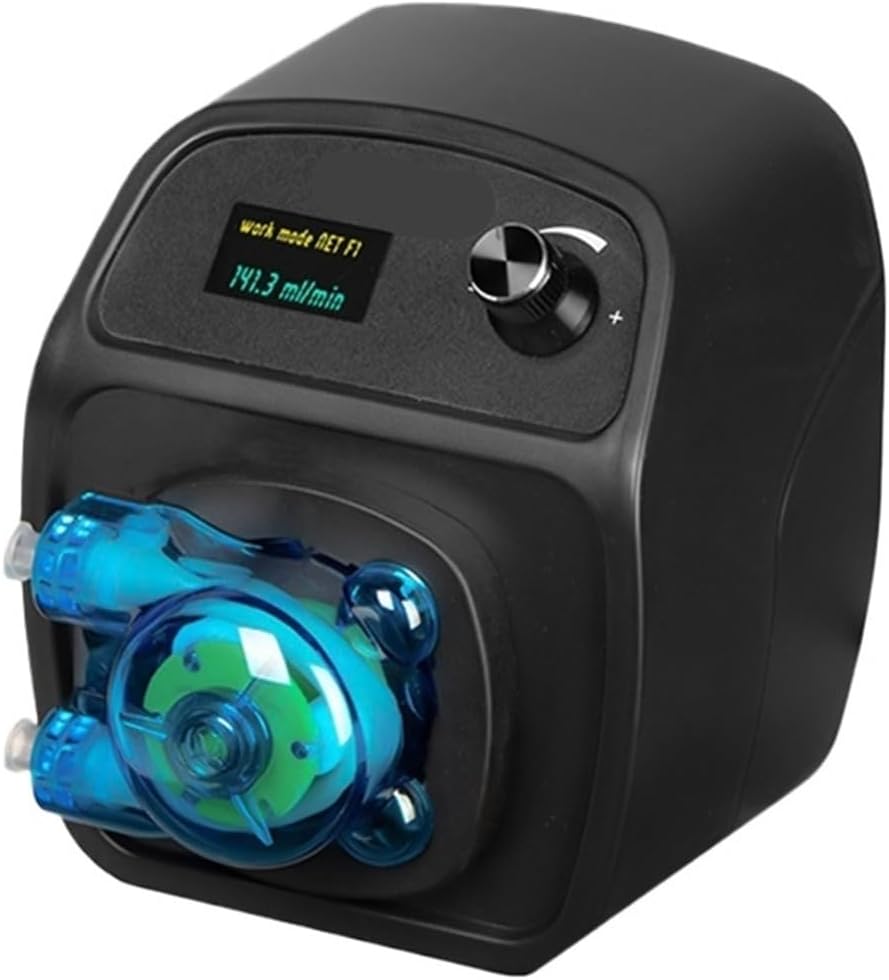
4.2. irudia: Goitik behera view of the Kamoer X1 PRO T2 Dosing Pump. This perspective highlights the display screen and the control knob on the top panel.

4.3. irudia: Aldea view of the Kamoer X1 PRO T2 Dosing Pump. This image provides a clear view of the peristaltic pump head and its tubing connections.

4.4. irudia: Kamoer X1 PRO T2 Dosing Pump held in a hand, illustrating its compact size and portability.
5. Konfigurazioa
5.1 Paketatzea
Carefully remove the dosing pump and all accessories from the packaging. Inspect for any visible damage.
5.2 Jartzea
Position the dosing pump on a dry, stable surface near your aquarium. Ensure it is above the water level of your dosing containers to prevent siphoning. Maintain adequate ventilation around the unit.
5.3 Tubing Connection
- Connect one end of the dosing tubing to the inlet port of the pump (typically marked 'IN' or indicated by an arrow).
- Place the other end of the inlet tubing into your desired liquid supplement container.
- Connect a separate piece of tubing to the outlet port of the pump (typically marked 'OUT' or indicated by an arrow).
- Secure the outlet tubing into your aquarium or sump, ensuring it is above the water line to prevent back-siphoning and securely fastened to prevent it from falling out.
5.4 Energia-konexioa
Connect the power adapter to the pump's power input port, then plug the adapter into a suitable electrical outlet. The pump display should illuminate.
5.5 WiFi App Connection
Download the official Kamoer app from your smartphone's app store. Follow the in-app instructions to connect your dosing pump to your home WiFi network. This typically involves putting the pump into pairing mode and entering your WiFi credentials.
6. Funtzionamendu-argibideak
6.1 Hasierako piztea
Once powered, the pump will display its current status. Use the control knob to navigate menus on the pump's display for basic settings or manual operations.
6.2 Eskuzko dosifikazioa
From the pump's menu or via the app, you can initiate a manual dose. Specify the volume and confirm. This is useful for priming the lines or testing.
6.3 Aplikazioen kontrola eta programazioa
The primary method of operation is through the Kamoer app. Within the app, you can:
- Set Dosing Schedules: Create daily, weekly, or custom schedules for each channel.
- Define Dosing Volumes: Specify the exact volume (e.g., ml) for each dose.
- Adjust Dosing Frequency: Set how many times per day or week the pump should dose.
- Monitorearen egoera: View current pump status, remaining liquid levels (if sensors are connected and configured), and dosing history.
- Kalibrazioa: Periodically calibrate the pump to ensure dosing accuracy. Refer to the app's calibration guide for detailed steps.
7. Mantentzea
7.1 Cleaning the Pump Head
Over time, residues may build up in the peristaltic pump head. Disconnect power, remove the tubing, and carefully open the pump head (refer to app or online resources for specific instructions if needed). Clean components with warm water and a soft brush. Ensure all parts are dry before reassembly.
7.2 Tubing Replacement
The peristaltic tubing (KPAS100) is a wear-and-tear item and should be replaced periodically (e.g., every 6-12 months, depending on usage) to maintain dosing accuracy and prevent leaks. Use only genuine Kamoer replacement tubing.
7.3 Arreta orokorra
Garbitu ponparen kanpoaldea iragarkiarekinamp cloth as needed. Avoid using harsh chemicals or abrasive cleaners. Ensure the pump remains dry and free from salt creep.
8. Arazoak
- Pump Not Dosing: Check power connection. Verify tubing is not kinked or blocked. Ensure the dosing schedule is active in the app. Check for error messages on the display or in the app.
- Inaccurate Dosing: Perform a calibration through the app. Check for air bubbles in the tubing. Ensure the tubing is not worn out and replace if necessary.
- Aplikazioaren konexio-arazoak: Ensure the pump is within WiFi range. Restart the pump and your router. Re-attempt the WiFi pairing process in the app.
- Isurketa: Check all tubing connections for tightness. Inspect the peristaltic tubing for cracks or damage and replace if found.
If problems persist, consult the Kamoer app's help section or contact customer support.
9. Zehaztapenak
| Ezaugarri | Zehaztapena |
|---|---|
| Marka | ZOHGVSEXS |
| Modelo zenbakia | X1 PRO T2 |
| Energia iturria | Bateriaz elikatzen da (Note: Typically refers to internal battery for settings retention, main operation is via AC adapter) |
| liburukiatage | 110-240V (via power adapter) |
| Dosing Rate | Up to 110ml/Min |
| Konektibitatea | WiFi App Control |
| Pump Head Type | KPAS100 Peristaltic |
| Unitate kopurua | 1.0 zenbaketa |
10. Bermea eta Laguntza
Bermeari buruzko informazioa eta laguntza teknikoa lortzeko, kontsultatu erosketarekin batera emandako dokumentazioa edo jarri harremanetan zuzenean saltzailearekin/fabrikatzailearekin. Gorde erosketaren frogagiria bermeari buruzko erreklamazioetarako.