
1. Bukatu daview
The Google Pixel 10 Pro is an advanced unlocked Android smartphone designed for seamless performance and intelligent features. It integrates the powerful Gemini AI, boasts an exceptional triple rear camera system, offers fast-charging capabilities with a 24+ hour battery life, and features a vibrant 6.3-inch Super Actua Display. This manual provides essential information for setting up, operating, and maintaining your device.

Image: The Google Pixel 10 Pro, showcasing its modern design and prominent camera bar.
2. Zer dago kutxan
Zure Google Pixel 10 Pro paketeak elementu hauek ditu:
- Google Pixel 10 Pro telefono mugikorra
- USB-C Cable (1 meter, USB-C to USB-C 2.0)
- Support, Safety & Warranty Booklet
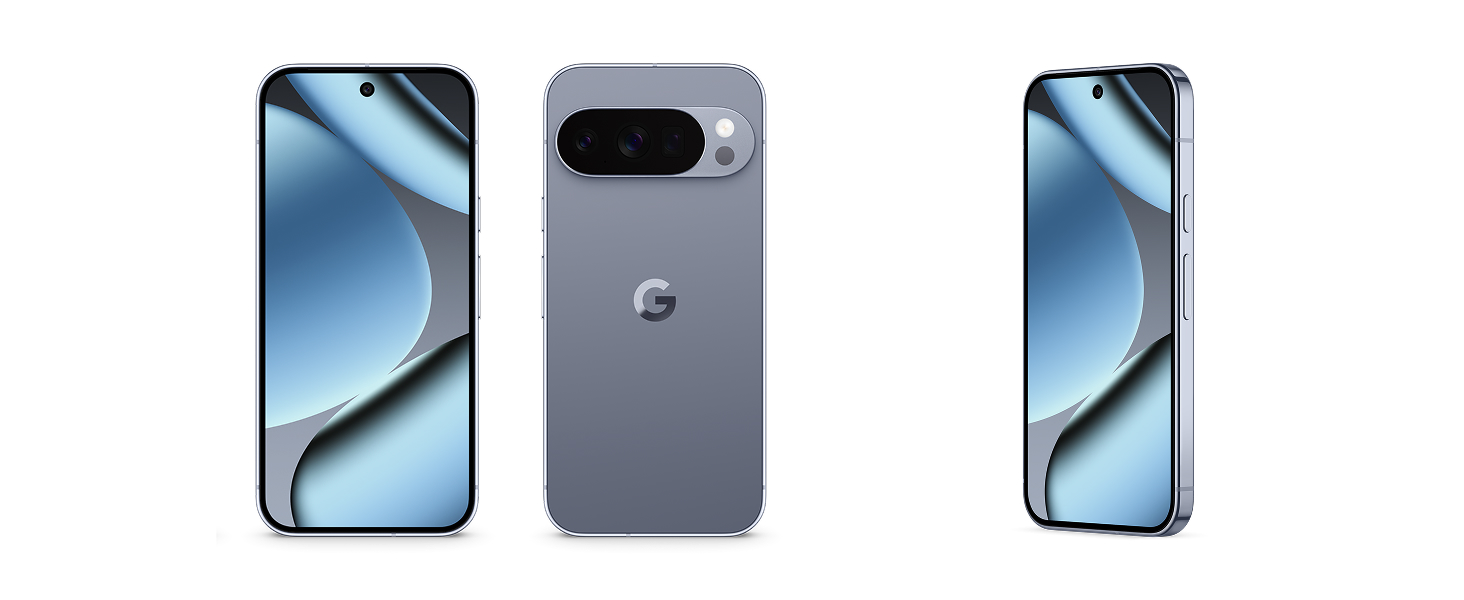
Image: The Google Pixel 10 Pro phone and its accompanying USB-C cable, as typically found in the product packaging.
3. Gainbehera fisikoaview
Familiarize yourself with the key physical components of your Pixel 10 Pro:
- Pantaila: 6.3-inch Super Actua Display with 120 Hz refresh rate and 1280 x 2856 pixel resolution.
- Camera Bar: Houses the triple rear camera system (50 MP main, 48 MP ultrawide, 48 MP telephoto) and flash.
- Aurrealdeko kamera: 42 MP front photo sensor.
- Botoiak: Pizteko botoia eta bolumen-kulunkaria alboan.
- Portuak: USB C motako ataka kargatzeko eta datuak transferitzeko.
- SIM zirrikitua: eSIM only, no physical SIM card slot.
- Iraunkortasuna: Built with durable aluminum and Corning Gorilla Glass Victus 2, offering scratch and drop resistance.

Irudia: Gertuko planoa view of the Google Pixel 10 Pro highlighting its durable construction and the integrated camera bar.
4. Konfigurazioa
Follow these steps to set up your new Google Pixel 10 Pro:
- Piztu: Sakatu eta eutsi pizteko botoiari Google logotipoa agertu arte.
- Hasierako konfigurazioa: Jarraitu pantailan agertzen diren argibideei hizkuntza hautatzeko, Wi-Fi sarera konektatzeko eta baldintzak eta zehaztapenak onartzeko.
- Aktibatu eSIM: The Pixel 10 Pro is eSIM-only. During setup, you will be guided to activate your eSIM digitally. This allows you to switch plans and store multiple numbers without a physical SIM card.
- Google kontua: Sign in with your Google Account or create a new one to access Google services and apps.
- Datuen transferentzia: You can transfer data from your old phone during the setup process. This typically takes about 20 minutes.
- Segurtasun konfigurazioa: Configure your preferred biometric security features, such as fingerprint recognition.

Image: A close-up of the Google Pixel 10 Pro's back, emphasizing its eSIM capability for digital plan switching.
5. Zure gailua funtzionatzea
The Pixel 10 Pro runs on Android 16, offering an intuitive and customizable user experience.
- Nabigazioa: Use gestures or on-screen buttons to navigate the interface.
- Deiak eta mezuak: Make calls and send messages using the default phone and messaging apps.
- Interneterako sarbidea: Connect to Wi-Fi or use 5G cellular technology for internet browsing.
- Aplikazioen kudeaketa: Download and manage apps from the Google Play Store.
- Pertsonalizazioa: Customize your home screen, widgets, and settings to suit your preferences.
Bideoa: Laburbilduzview of the Google Pixel 10 Pro's interface and general operation, demonstrating its responsiveness and ease of use.
6. Kamera sistema
The Pixel 10 Pro features a powerful triple rear camera system (50 MP Wide, 48 MP Ultrawide, 48 MP Telephoto) and a 42 MP front camera, enhanced by advanced Google AI models.
- 100x Pro Res Zoom: Capture incredible details from a distance with Pixel's best zoom quality ever.
- Super Steady Videos: The upgraded 50 MP camera can transform high-motion scenes into stable, cinematic 8K videos.
- Camera Coach: Utilize Gemini to receive helpful suggestions for framing and capturing your best photos.
- Argi gutxiko errendimendua: The camera system excels in low-light conditions, ensuring amazing results.

Image: A visual representation of the Google Pixel 10 Pro's 100x Pro Res Zoom, showing a distant object captured with high clarity.

Image: A dynamic shot illustrating the Google Pixel 10 Pro's ability to record super steady videos, even during high-motion activities.
7. Gemini AI Assistant
The Pixel 10 Pro integrates Gemini, Google's advanced AI, to enhance your daily interactions and productivity.
- Gemini Zuzenean: Engage in natural, free-flowing conversations with Gemini. Point your camera at objects to get information or chat with Gemini to brainstorm ideas and complete tasks across apps.
- Google Tensor G5 Chip: The next-gen Google Tensor G5 chip powers breakthrough AI performance, making your device faster and more responsive.

Image: A user interacting with Gemini Live on the Google Pixel 10 Pro, pointing the camera at a shark in an aquarium to receive real-time information.
Video: A short demonstration of the Google Pixel 10's "Pixelsnap" feature, showcasing its AI capabilities and seamless user experience.
8. Segurtasuna eta Pribatutasuna
The Pixel 10 Pro is designed with robust security features to protect your data and privacy:
- Spam, Scams, and Phishing Protection: Pixel helps protect you against unwanted and malicious communications.
- Segurtasun-eguneratzeak: Receive regular security and software updates for 7 years, ensuring your device remains protected against emerging threats.
- Lost or Stolen Device Protection: Your phone will automatically lock if it's lost or stolen, safeguarding your personal information.
- Larrialdi Ezaugarriak: Pixel has you covered in case of emergency, even when offline.

Image: Icons representing the security features of the Google Pixel 10, including protection against spam, regular updates, and lost device locking.
9. Baterien kudeaketa
The Google Pixel 10 Pro is equipped with a 4870 mAh battery, providing over 24 hours of usage on a single charge. With Extreme Battery Saver, it can last over 30 hours.
- Karga azkarra: Supports fast charging to quickly power up your device.
- PixelSnap Wireless Charging: Compatible with Qi2-certified PixelSnap wireless charging for convenient power-ups.
- Bateria optimizatzea: The device intelligently adapts to your usage patterns to optimize battery life.

Image: The Google Pixel 10 Pro being wirelessly charged, illustrating its long-lasting battery and efficient power management.
10. Konektibitatea
Your Pixel 10 Pro offers versatile connectivity options:
- Zelularra: Supports 5G cellular technology for fast mobile data. It is unlocked for all major carriers including Google Fi, Verizon, T-Mobile, and AT&T.
- Wi-Fi: Integrated Wi-Fi for high-speed internet access.
- Bluetootha: Connect to wireless accessories like headphones and smartwatches.
- NFC: Eremu Hurbileko Komunikazioa kontakturik gabeko ordainketak egiteko eta parekatze azkarra egiteko.
- USB C mota: Kargatzeko eta datuak kable bidez transferitzeko.
11. Mantentzea eta Zainketa
To ensure the longevity and optimal performance of your Pixel 10 Pro, follow these care guidelines:
- Garbiketa: Erabili zapi leun eta lihorik gabeko bat pantaila eta gorputza garbitzeko. Saihestu produktu kimiko gogorrak.
- Uraren erresistentzia: The device is water resistant, but not waterproof. Avoid prolonged exposure to water or submersion.
- Tenperatura: Kalteak saihesteko, erabili gailua gomendatutako tenperatura-tarteetan.
- Software eguneraketak: Regularly install software updates to benefit from performance improvements and security enhancements.
12. Arazoak
If you encounter issues with your Pixel 10 Pro, try these common troubleshooting steps:
- Berrabiarazi gailua: Berrabiarazte soil batek software akats txiki asko konpondu ditzake.
- Egiaztatu eguneratzeak: Ziurtatu zure gailuaren softwarea eguneratuta dagoela.
- Garbitu cachea: If an app is misbehaving, try clearing its cache.
- Fabrikaren berrezarpena: As a last resort, a factory reset can resolve persistent software issues (back up your data first).
- Jarri harremanetan laguntzarekin: For complex issues, refer to the Warranty & Support section.
13. Zehaztapenak
| Ezaugarri | Xehetasuna |
|---|---|
| Marka | |
| Ereduaren izena | Pixel 10 Pro |
| Sistema eragilea | Android 16 |
| CPU eredua | Google Tensor G5 |
| CPU Abiadura | 3.78 GHz |
| RAM Memoria | 16 GB |
| Biltegiratze Ahalmena | 256 GB (up to 1TB options available) |
| Pantailaren tamaina | 6.3 hazbete |
| Bistaratzeko mota | OLED Super Actua Display |
| Ebazpena | 1280 x 2856 pixels (3118 x 1440 max) |
| Freskatze tasa | 120 Hz |
| Atzeko kamera | 50 MP (Wide), 48 MP (Ultrawide), 48 MP (Telephoto) |
| Aurrealdeko kamera | 42 MP |
| Bideo Harrapaketa Ebazpena | 8K |
| Bateria Edukiera | 4870 mAh (24+ hour average life) |
| SIM txartelaren zirrikitua | eSIM |
| Konektibitatea | 5G, Bluetooth, NFC, Wi-Fi |
| Uraren Erresistentzia Maila | Urarekiko erresistentea (IP68) |
| Segurtasun biometrikoa | Hatz-markak hautematea |
| Eredu Urtea | 2025 |
14. Bermea eta Laguntza
Your Google Pixel 10 Pro comes with a 1-Year Manufacturer Warranty. For detailed warranty information, troubleshooting, and additional support, please refer to the included Warranty Booklet or visit the official Google Pixel support webgunea.
Lineako laguntza: g.co/pixel/support
Informazio juridikoa: g.co/pixel/legal